
jupyter notebook中No module named 'tensorflow'
当我们在jupyter notebook中运行时可能会遇见没有某个包的情况,如下:
---------------------------------------------------------------------------

ModuleNotFoundError                       Traceback (most recent call last)

<ipython-input-1-24005895b065> in <module>

      2 import h5py

      3 import matplotlib.pyplot as plt

----> 4 import tensorflow as tf

      5 from tensorflow.python.framework import ops

      6 import tf_utils

ModuleNotFoundError: No module named 'tensorflow'
首先我的jupyter notebook是在本地设置的python3的环境deeplearning下运行的:
userdeMacBook-Pro:~ user$ conda activate deeplearning

(deeplearning) userdeMacBook-Pro:~ user$ jupyter notebook
但是很奇怪的是我python3的环境下已经安装好了tensorflow,但是jupyter中还是显示没有
(deeplearning) userdeMBP:~ user$ python

Python 3.7.2 (default, Dec 29 2018, 00:00:04)

[Clang 4.0.1 (tags/RELEASE_401/final)] :: Anaconda, Inc. on darwin

Type "help", "copyright", "credits" or "license" for more information.

>>> import tensorflow

>>> tensorflow.__version__

'1.13.1'

>>>
可见安装了1.13.1版本的tensorflow
解决方法有:
打开你的anaconda navigator,按下图选择,之后apply安装就行:
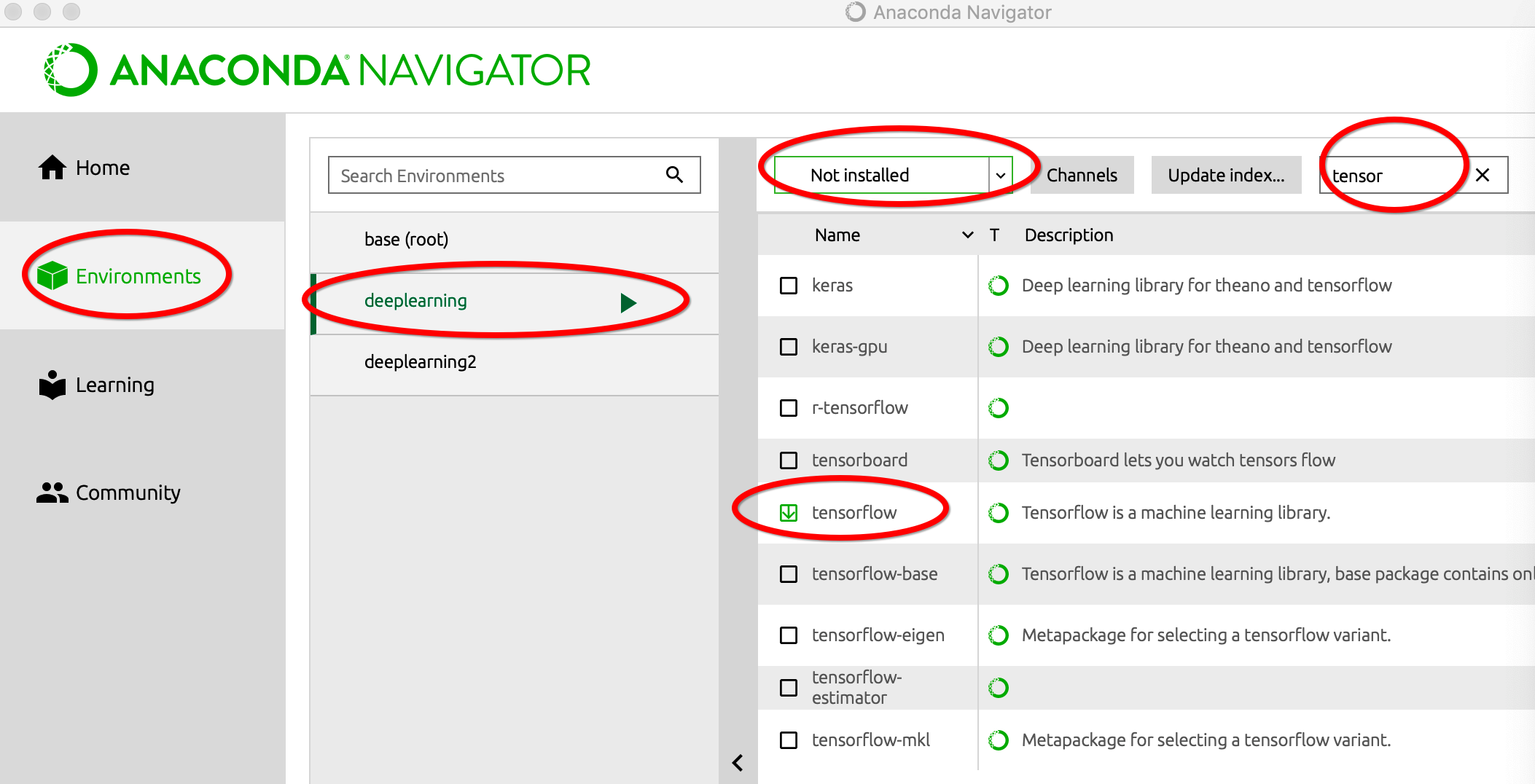
报了个错:
UnsatisfiableError: The following specifications were found to be in conflic

pytorch

tensorflow == 1.11.

use conda info <package> to check dependencies
使用conda info tensorflow查看依赖后,发现tensorflow <= 1.12.0版本不支持python3.7,而anaconda navigator中提供的tensorflow的最高版本是1.12.0,所以我就将其降到了3.6版本,即在指定的环境deeplearning下运行:
(deeplearning) userdeMBP:~ user$ conda install python=3.6
当然这样可能会导致一些之前安装的包的丢失,因为再import tensorflow时可见之前安装的tensorflow没了:
(deeplearning) userdeMBP:~ user$ python

Python 3.6. |Anaconda, Inc.| (default, Dec  , ::)

[GCC 4.2. Compatible Clang 4.0. (tags/RELEASE_401/final)] on darwin

Type "help", "copyright", "credits" or "license" for more information.

>>> import tensorflow

Traceback (most recent call last):

  File "<stdin>", line , in <module>

ModuleNotFoundError: No module named 'tensorflow'
然后再安装就可以看见安装成功:
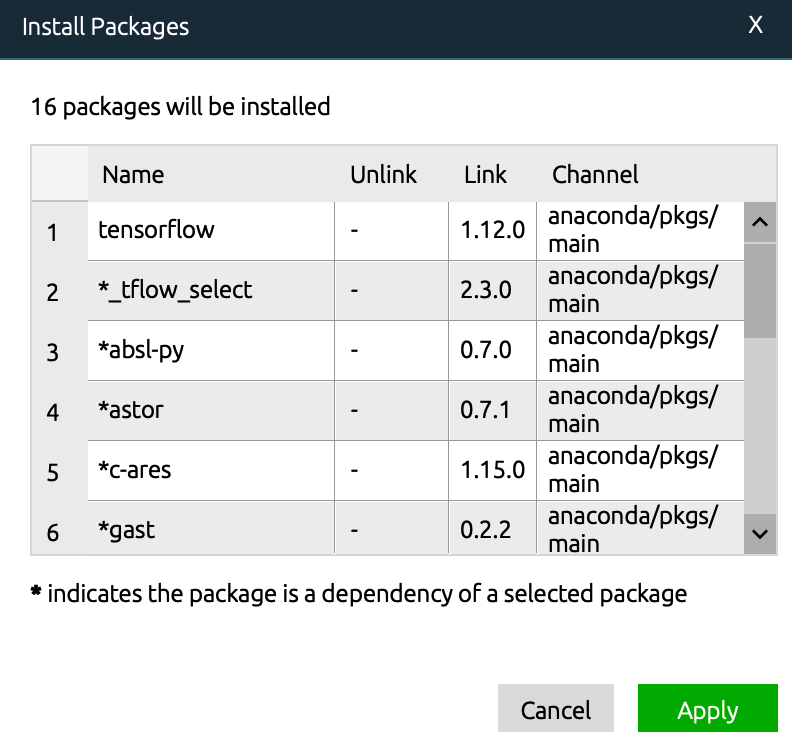
然后再查看:
(deeplearning) userdeMBP:~ user$ python

Python 3.6. |Anaconda, Inc.| (default, Dec  , ::)

[GCC 4.2. Compatible Clang 4.0. (tags/RELEASE_401/final)] on darwin

Type "help", "copyright", "credits" or "license" for more information.

>>> import tensorflow

>>> tensorflow.__version__

'1.12.0'

>>>
可见相应的环境deeplearning中成功安装了tensorflow == 1.12.0版本
⚠️
如果在过程中还是有UnsatisfiableError的错,除了依赖的问题,还可以试试:
userdeMBP:~ user$ conda update conda
更新conda
jupyter notebook中No module named 'tensorflow'的更多相关文章
- Python 在cmd中import模块成功,但是在jupyter notebook中No module xxx found
由于需要用到python中的某个库,因此打开命令行窗口cmd,然后使用pip安装.安装成功后,在cmd中输入python调出python环境,import该模块并使用,可以正常使用.但是打开juypt ...
- 在jupyter notebook导入tensorflow出错:No module named tensorflow 解决办法
1.背景 首先说一下我的环境: os : windows10 anaconda版本:2.7 官网提供了两种方法来安装TensorFlow:pip和anaconda.我使用的是anaconda方法.按照 ...
- 解决不能再jupyter notebook中使用tensorflow
在搭建cuda + Anaconda + tensorflow的开发环境时,在虚拟环境中的jupyter notebook启动后无法导入tensorflow.具体解决方案如下: 1.首先在虚拟环境中安 ...
- 关于win系统下Anaconda与TensorFlow的安装相关事宜以及错误:ImportError: No module named 'tensorflow'的解决
1.安装TensorFlow之前应该先安装Anaconda,不需要安装python,否则会出问题,我安装的版本是Anaconda3-4.2.0-Windows-x86_64,在这个链接上可以找到--h ...
- Anaconda3 tensorflow安装 及ModuleNotFoundError: No module named 'tensorflow' 解答
Anaconda3 的安装,参考:手把手教你如何安装Tensorflow(Windows和Linux两种版本) tensorflow的安装,参考:深度学习(TensorFlow)环境搭建:(三)Ubu ...
- jupyter notebook中出现ValueError: signal only works in main thread 报错 即 长时间in[*] 解决办法
我在jupyter notebook中新建了一个基于py3.6的kernel用来进行tensorflow学习 但是在jupyter notebook中建立该kernel时,右上角总是显示 服务正在启动 ...
- Jupyter notebook中的.ipynb文件转换成python的.py文件
转自:https://blog.csdn.net/wyr_rise/article/details/82656555 Jupyter notebook中.py与.ipynb文件的import问题 ...
- 在jupyter notebook中同时安装python2和python3
之前讨论过在anaconda下安装多个python版本,本期来讨论下,jupyter notebook中怎样同时安装python2.7 和python3.x. 由于我之前使用的jupyter note ...
- 解决在jupyter notebook中遇到的ImportError: matplotlib is required for plotting问题
昨天学习pandas和matplotlib的过程中, 在jupyter notebook遇到ImportError: matplotlib is required for plotting错误, 以下 ...
随机推荐
- JS apply的巧妙用法以及扩展到Object.defineProperty的使用
Math.max 实现得到数组中最大的一项 var array = [1,2,3,4,5]; var max = Math.max.apply(null, array); console.log(ma ...
- SAP MM 按采购订单查询付款信息的报表?
SAP MM 按采购订单查询付款信息的报表? 上午给P3项目采购部门用户做了一个采购相关的报表的培训.培训过程中,客户的采购部门经理提出了一个问题:有没有报表能查询到各个采购订单的付款情况,显示采购订 ...
- 函数纹理(国际象棋棋盘纹理&粗布纹理)MFC
函数纹理(国际象棋棋盘纹理&粗布纹理)MFC实现 源码百度云下载 国际象棋棋盘纹理(效果图见最后) //国际象棋纹理函数 //g(u, v) = a , 向下取整(8u)+向下取整(8v) ...
- (其他)Thinkpad笔记本装系统
电脑城装一次系统收你40元,不如自己装系统. 虽然百度上装系统的文章泛滥,但是还是自己尝试. 前3个小时thinkpad e570是不是坏掉了,怎么就进不去BIOS,这个时候直接搜索这个型号,问题输入 ...
- spring4笔记----spring4设值注入
2个接口 package com.ij34.servce; public interface people { public void cut(); } package com.ij34.servce ...
- scrapy实例:爬取中国天气网
1.创建项目 在你存放项目的目录下,按shift+鼠标右键打开命令行,输入命令创建项目: PS F:\ScrapyProject> scrapy startproject weather # w ...
- Greenplum hostname和address不一致导致配置文件无法加载
最近又遇到了几个坑,逐一记录分析下. 1.主机名hostname和address不一致 在又一次部署压测环境交由测试组进行压测时,同事修改了pg_hba.conf文件重新加载配置文件时报错.(找不到l ...
- sql 重复数据查询
具体代码: ); ORDER BY tcount DESC;
- MacOS远程Windows提示:远程桌面连接无法验证您希望连接的计算机的身份
解决方法: 1.在Windows端,运行输入 “gpedit.msc”,打开本地组策略编辑器 2.依次打开[计算机配置]→[管理模板]→[windows组件]→[远程桌面服务]→[远程桌面会话主机]→ ...
- ASP.NET -- WebForm -- ViewState
ASP.NET -- WebForm -- ViewState 1. ViewState的作用 当 ASP .NET 中的表单被提交时,表单会随所有表单值一同重新出现.这是由于 ASP .NET 维 ...