
解决在jupyter notebook中遇到的ImportError: matplotlib is required for plotting问题
昨天学习pandas和matplotlib的过程中, 在jupyter notebook遇到ImportError: matplotlib is required for plotting错误, 以下是解决该问题的具体描述, 在此记录, 给后面学习的朋友提供一个参考.
环境
win8.1, python3.7, jupyter notebook
问题描述
 import pandas as pd

 import matplotlib.pyplot as plt

 df = pd.read_csv(r"D:\Data\percent-bachelors-degrees-women-usa.csv")

 df.plot(x = "Year", y = "Agriculture")

 plt.xlabel("Year")

 plt.ylabel("Percentage")

 plt.show()
在jupyter notebook中执行上述代码, 抛出以下错误:
ImportError: matplotlib is required for plotting
解决思路
1. 不能导入matplotlib?在cmd命令窗口下确认:
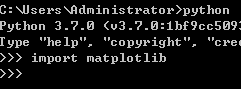
没有报错, 说明安装成功, 而且能够被成功导入.
2. 尝试其他方式: 之前用的是pandas中plot()方法绘图, 换成matplotlib.pyplot中的plot()方法
 import pandas as pd

 import matplotlib.pyplot as plt

 df = pd.read_csv(r"D:\Data\percent-bachelors-degrees-women-usa.csv")

 df_year, df_Agriculture = df["Year"], df["Agriculture"]

 plt.plot(df_year, df_Agriculture,"-", color = "r", linewidth = 5)

 plt.show()
在jupyter notebook中能够成功运行:
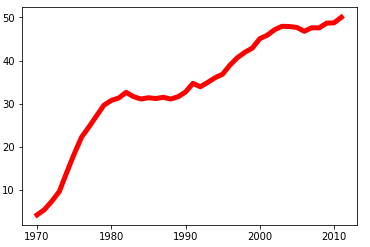
再次运行pandas的plot()方法, 仍然报错, 而且再次检查没有发现语句中存在错误.
那么问题来了, 为什么pandas中的plot()方法不能用?
3. 换IDE试试, 看看在pycharm中能不能运行:
 import pandas as pd

 import matplotlib.pyplot as plt

 df = pd.read_csv(r"D:\Data\percent-bachelors-degrees-women-usa.csv")

 df.plot(x = "Year", y = "Agriculture")

 plt.xlabel("Year")

 plt.ylabel("Percentage")

 plt.show()

在pycharm中能够成功运行, 而在jupyter notebook中不能运行, 看起是IDE的问题, 那么两者存在什么差异呢:
就我个人电脑而言, pycharm是我刚刚启动的(安装好matplotlib后), 而jupyter notebook已经好几天没有关闭过了(安装matplotlib前后都没有关闭过), 为了确保两者条件统一, 试着重启下jupyter notebook.
重启jupyter notebook成功之后再次运行代码:
 import pandas as pd

 import matplotlib.pyplot as plt

 df = pd.read_csv(r"D:\Data\percent-bachelors-degrees-women-usa.csv")

 df.plot(x = "Year", y = "Agriculture")

 plt.xlabel("Year")

 plt.ylabel("Percentage")

 plt.show()
能够成功显示:
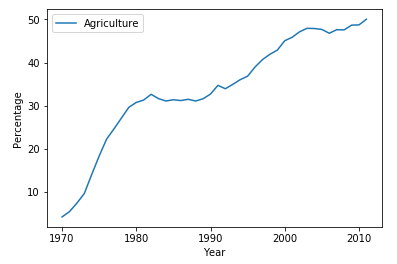
看起来问题出在: 安装matplotlib之后没有重启jupyter notebook.
总结
个人猜想: 在使用pandas中的plot()方法时, matplotlip里的pyplot绘图框架仅仅是用来展示图形的, 而要想让两者实现交互, 那应该确保在启动IDE之前两者都被成功安装.
如果在之后遇到类似问题, 在确保代码无误的情况下, 直接尝试重启下IDE有时能更快解决问题.
解决在jupyter notebook中遇到的ImportError: matplotlib is required for plotting问题的更多相关文章
- jupyter notebook中出现ValueError: signal only works in main thread 报错 即 长时间in[*] 解决办法
我在jupyter notebook中新建了一个基于py3.6的kernel用来进行tensorflow学习 但是在jupyter notebook中建立该kernel时,右上角总是显示 服务正在启动 ...
- jupyter notebook中No module named 'tensorflow'
当我们在jupyter notebook中运行时可能会遇见没有某个包的情况,如下: ---------------------------------------------------------- ...
- 非线性函数的最小二乘拟合及在Jupyter notebook中输入公式 [原创]
突然有个想法,能否通过学习一阶RC电路的阶跃响应得到RC电路的结构特征——时间常数τ(即R*C).回答无疑是肯定的,但问题是怎样通过最小二乘法.正规方程,以更多的采样点数来降低信号采集噪声对τ估计值的 ...
- Jupyter notebook中的.ipynb文件转换成python的.py文件
转自:https://blog.csdn.net/wyr_rise/article/details/82656555 Jupyter notebook中.py与.ipynb文件的import问题 ...
- 【动手学深度学习】Jupyter notebook中 import mxnet出错
问题描述 打开d2l-zh目录,使用jupyter notebook打开文件运行,import mxnet 出现无法导入mxnet模块的问题, 但是命令行运行是可以导入mxnet模块的. 原因: 激活 ...
- linux中jupyter notebook中切换虚拟环境
python -m ipykernel install --user --name 虚拟环境名称 --display-name "虚拟环境名称" 然后再打开jupyter note ...
- 在jupyter notebook中同时安装python2和python3
之前讨论过在anaconda下安装多个python版本,本期来讨论下,jupyter notebook中怎样同时安装python2.7 和python3.x. 由于我之前使用的jupyter note ...
- 在jupyter notebook中运行R语言
要想在jupyter notebook中运行R语言其实非常简单,按顺序安装下面扩展包即可: install.package('repr','IRdisplay','evaluate','crayon' ...
- 在jupyter notebook 中同时使用安装不同版本的python内核-从而可以进行切换
在安装anaconda的时候,默认安装的是python3.6 但是cs231n课程作业是在py2.7环境下运行的.所以需要在jupyter notebook中安装并启用python2.7版本 方法: ...
随机推荐
- nginx隐藏入口文件index.php
网站的访问url可能是这样http://www.xxx.com/index.php/home/index/index 这种有点不美观,我们想达到如下效果http://www.xxx.com/home/ ...
- Spring IOC(四)总结升华篇
本系列目录 Spring IOC(一)概览 Spring IOC(二)容器初始化 Spring IOC(三)依赖注入 Spring IOC(四)总结升华 =============正文分割线===== ...
- [转]Windows下使用VS2015编译openssl库
转自:http://blog.csdn.net/alger_magic/article/details/52584171 目标:编译vs环境下openssl库 工具: 1. 编译环境win10+vs2 ...
- Python 算术运算符
Python 算术运算符 运算结果为浮点数 除法:/ 整除: // 求余计算: % 求余运算可以用于固定时间的检测,比如说每10分钟进行一次什么样的操作,则:minute % 10 乘方运算:
- marathon 测试
marathon 初步使用 关闭selinux setenforce 0 Marathon之应用篇 先来了解一下 Marathon 是怎么布署decker的 json shell.json { } ...
- 理解OpenShift(3):网络之 SDN
理解OpenShift(1):网络之 Router 和 Route 理解OpenShift(2):网络之 DNS(域名服务) 理解OpenShift(3):网络之 SDN 理解OpenShift(4) ...
- kafka consumer防止数据丢失(转)
http://kane-xie.iteye.com/blog/2225085 kafka最初是被LinkedIn设计用来处理log的分布式消息系统,因此它的着眼点不在数据的安全性(log偶尔丢几条无所 ...
- 竖直的ViewPager,上下滑动的ViewPager,VerticalViewPager ;
直接看代码吧,重写Viewpager,改变了手势和切换效果:和正常的Viewpager使用一模一样: /** * ChenboCui 竖向的Viewpager */ public class Vert ...
- 学习笔记 requests + BeautifulSoup
第一步:requests get请求 # -*- coding:utf-8 -*- # 日期:2018/5/15 17:46 # Author:小鼠标 import requests url = &q ...
- 【Linux】【Chrome】安装Chrome浏览器的攻略
https://blog.csdn.net/chenlix/article/details/72526205 1.切换到root: su - 或者 sudo -i 2.下载新的软件源定义: cd /e ...