
Spring boot集成Websocket,前端监听心跳实现
第一:引入jar
由于项目是springboot的项目所以我这边简单的应用了springboot自带的socket jar
<dependency>

           <groupId>org.springframework.boot</groupId>

           <artifactId>spring-boot-starter-websocket</artifactId>

</dependency>
第二:Socket代码编写

import org.springframework.context.annotation.Bean;

import org.springframework.context.annotation.Configuration;

import org.springframework.web.socket.server.standard.ServerEndpointExporter;

/**

 * 开启WebSocket支持

 */

@Configuration

public class WebSocketConfig {

    /**

     *  注入对象ServerEndpointExporter,这个bean会自动注册使用了@ServerEndpoint注解声明的Websocket endpoint

     * @return

     */

    @Bean

    public ServerEndpointExporter serverEndpointExporter() {

        return new ServerEndpointExporter();

    }

}
import java.io.IOException;

import java.util.concurrent.CopyOnWriteArraySet;

import javax.websocket.OnClose;

import javax.websocket.OnError;

import javax.websocket.OnMessage;

import javax.websocket.OnOpen;

import javax.websocket.Session;

import javax.websocket.server.PathParam;

import javax.websocket.server.ServerEndpoint;

import org.springframework.stereotype.Component;

import lombok.extern.slf4j.Slf4j;

/**
 * 发送消息的类
 */

@Slf4j

@Component

@ServerEndpoint(value = "/websocket/{sid}")

public class WebSocketServer {

    //静态变量,用来记录当前在线连接数。应该把它设计成线程安全的。

    private static int onlineCount = 0;

    //concurrent包的线程安全Set,用来存放每个客户端对应的MyWebSocket对象。

    private static CopyOnWriteArraySet<WebSocketServer> webSocketSet = new CopyOnWriteArraySet<WebSocketServer>();

    //与某个客户端的连接会话,需要通过它来给客户端发送数据

    private Session session;

    //接收sid

    private String sid="";

    /**

     * 连接建立成功调用的方法*/

    @OnOpen

    public void onOpen(Session session,@PathParam("sid") String sid) {

        this.session = session;

        webSocketSet.add(this);     //加入set中

        addOnlineCount();           //在线数加1

        log.info("有新窗口开始监听:"+sid+",当前在线人数为" + getOnlineCount());

        this.sid=sid;

        try {

             sendMessage("连接成功");

        } catch (IOException e) {

            log.error("websocket IO异常");

        }

    }

    /**

     * 连接关闭调用的方法

     */

    @OnClose

    public void onClose() {

        webSocketSet.remove(this);  //从set中删除

        subOnlineCount();           //在线数减1

        log.info("有一连接关闭!当前在线人数为" + getOnlineCount());

    }

    /**

     * 收到客户端消息后调用的方法

     *

     * @param message 客户端发送过来的消息*/

    @OnMessage

    public void onMessage(String message, Session session) {

        log.info("收到来自窗口"+sid+"的信息:"+message);

        //群发消息

        for (WebSocketServer item : webSocketSet) {

            try {

                item.sendMessage(message);

            } catch (IOException e) {

                e.printStackTrace();

            }

        }

    }

    /**

     *

     * @param session

     * @param error

     */

    @OnError

    public void onError(Session session, Throwable error) {

        log.info("非正常关闭,发生错误!====>" + error.toString() + "当前在线人数为" + getOnlineCount());

    }

    /**

     * 实现服务器主动推送

     */

    public void sendMessage(String message) throws IOException {

        this.session.getBasicRemote().sendText(message);

    }

    /**

     * 群发自定义消息

     * */

    public static void sendInfo(String message,@PathParam("sid") String sid) throws IOException {

        log.info("推送消息到窗口"+sid+",推送内容:"+message);

        for (WebSocketServer item : webSocketSet) {

            try {

                //这里可以设定只推送给这个sid的,为null则全部推送

                if(sid==null) {

                    item.sendMessage(message);

                }else if(item.sid.equals(sid)){

                    item.sendMessage(message);

                }

            } catch (IOException e) {

                continue;

            }

        }

    }

    public static synchronized int getOnlineCount() {

        return onlineCount;

    }

    public static synchronized void addOnlineCount() {

        WebSocketServer.onlineCount++;

    }

    public static synchronized void subOnlineCount() {

        WebSocketServer.onlineCount--;

    }

}
发送消息调用

try {

    WebSocketServer.sendInfo("自定义需要推送的消息" ,"111");

} catch (IOException e) {

    e.printStackTrace();

}
上述代码在发送消息时,可以支持一条消息对应多个窗口
如果想要使用一个消息值推送到一个窗口,就使用一下springboot的管理
具体实现:
添加一个管理的类
import javax.websocket.server.ServerEndpointConfig;

import org.springframework.beans.BeansException;

import org.springframework.context.ApplicationContext;

import org.springframework.context.ApplicationContextAware;

public class MySpringConfigurator extends ServerEndpointConfig.Configurator implements ApplicationContextAware {

    private static volatile ApplicationContext context;

    @Override

    public void setApplicationContext(ApplicationContext applicationContext) throws BeansException {

        MySpringConfigurator.context=applicationContext;

    }

    @Override

    public <T> T getEndpointInstance(Class<T> clazz) throws InstantiationException {

        return context.getBean(clazz);

    }

}
import org.springframework.context.annotation.Bean;

import org.springframework.context.annotation.Configuration;

import org.springframework.web.socket.server.standard.ServerEndpointExporter;

/**

 * 开启WebSocket支持

 * @author zhengkai

 */

@Configuration

public class WebSocketConfig {

    /**

     *  注入对象ServerEndpointExporter,这个bean会自动注册使用了@ServerEndpoint注解声明的Websocket endpoint

     * @return

     */

    @Bean

    public ServerEndpointExporter serverEndpointExporter() {

        return new ServerEndpointExporter();

    }

    @Bean

    public MySpringConfigurator getSpringConfigurator(){

        return new MySpringConfigurator();

    }

}
加上这个对象多个窗口就只能一个窗口收到消息
第三步:前端配置
不带监听
var socket;

if(typeof(WebSocket) == "undefined") {

    console.log("您的浏览器不支持WebSocket");

}else{

    console.log("您的浏览器支持WebSocket");

    //实现化WebSocket对象,指定要连接的服务器地址与端口  建立连接

    //等同于socket = new WebSocket("ws://localhost:8083/checkcentersys/websocket/20");

    var wsUrl = $("#url").val();

    console.log("socket 链接地址:" + wsUrl);

    if (wsUrl.indexOf("https") >= 0 ) {//如果是https  webSocket 需要遵守wss协议所以这里判断如果是https socket

        wsUrl = wsUrl.replace("https","wss");

    }else{

        wsUrl = wsUrl.replace("http","ws");

    }

    console.log("socket 通讯地址:" + wsUrl);

  //创建链接

    function createWebSocket() {

        try {

            ws = new WebSocket(wsUrl);

            // 初始化链接

            init();

        } catch(e) {

            console.log('catch'+e);

            reconnect(wsUrl);

        }

    }

    /**

     * 初始化链接

     */

    function init() {

        ws.onclose = function () {

            console.log(getNowTime() +" Socket已关闭");

            reconnect(wsUrl);

        };

        ws.onerror = function() {

            console.log(getNowTime() +' 发生异常了');

            reconnect(wsUrl);

        };

        ws.onopen = function () {

            console.log(getNowTime() +" Socket 已打开");

            ws.send("连接成功");

            //心跳检测重置

            heartCheck.start();

        };

        ws.onmessage = function (event) {

            console.log(getNowTime() +' 接收到消息:'+event.data);

            heartCheck.start();

            //拿到任何消息都说明当前连接是正常的

            //实时添加消息

        }

    }
带心跳监听
var socket;

if(typeof(WebSocket) == "undefined") {

    console.log("您的浏览器不支持WebSocket");

}else{

    console.log("您的浏览器支持WebSocket");

    //实现化WebSocket对象,指定要连接的服务器地址与端口  建立连接

    //等同于socket = new WebSocket("ws://localhost:8083/checkcentersys/websocket/20");

    var wsUrl = $("#url").val();

    console.log("socket 链接地址:" + wsUrl);

    if (wsUrl.indexOf("https") >= 0 ) {//如果是https  webSocket 需要遵守wss协议所以这里判断如果是https socket

        wsUrl = wsUrl.replace("https","wss");

    }else{

        wsUrl = wsUrl.replace("http","ws");

    }

    console.log("socket 通讯地址:" + wsUrl);

    var lockReconnect = false;//避免重复连接

    var ws;

    var tt;

    //创建链接

    createWebSocket();

  //创建链接

    function createWebSocket() {

        try {

            ws = new WebSocket(wsUrl);

            // 初始化链接

            init();

        } catch(e) {

            console.log('catch'+e);

            reconnect(wsUrl);

        }

    }

    /**

     * 初始化链接

     */

    function init() {

        ws.onclose = function () {

            console.log(getNowTime() +" Socket已关闭");

            reconnect(wsUrl);

        };

        ws.onerror = function() {

            console.log(getNowTime() +' 发生异常了');

            reconnect(wsUrl);

        };

        ws.onopen = function () {

            console.log(getNowTime() +" Socket 已打开");

            ws.send("连接成功");

            //心跳检测重置

            heartCheck.start();

        };

        ws.onmessage = function (event) {

            console.log(getNowTime() +' 接收到消息:'+event.data);

            heartCheck.start();

            //拿到任何消息都说明当前连接是正常的

            //实时添加消息

        }

    }

    var lockReconnect = false;//避免重复连接

    //重试连接socket

    function reconnect(wsUrl) {

        if(lockReconnect) {

            return;

        };

        lockReconnect = true;

        //没连接上会一直重连,设置延迟避免请求过多

        tt && clearTimeout(tt);

        tt = setTimeout(function () {

            createWebSocket(wsUrl);

            lockReconnect = false;

        }, 180000);

    }

    //心跳检测

    var heartCheck = {

        timeout: 210000,

        timeoutObj: null,

        serverTimeoutObj: null,

        start: function(){

              console.log(getNowTime() +" Socket 心跳检测");

            var self = this;

            this.timeoutObj && clearTimeout(this.timeoutObj);

            this.serverTimeoutObj && clearTimeout(this.serverTimeoutObj);

            this.timeoutObj = setTimeout(function(){

                //这里发送一个心跳,后端收到后,返回一个心跳消息,

                //onmessage拿到返回的心跳就说明连接正常

                console.log(getNowTime() +' Socket 连接重试');

                ws.send("连接成功");

                self.serverTimeoutObj = setTimeout(function() {

                    console.log(ws);

                    ws.close();

                }, self.timeout);

            }, this.timeout)

        }

    }

}

/**

 * 获取系统当前时间

 * @returns

 */

function p(s) {

    return s < 10 ? '0' + s : s;

 }

function getNowTime() {

    var myDate = new Date();

    //获取当前年

    var year = myDate.getFullYear();

    //获取当前月

    var month = myDate.getMonth() + 1;

    //获取当前日

    var date = myDate.getDate();

    var h = myDate.getHours();       //获取当前小时数(0-23)

    var m = myDate.getMinutes();     //获取当前分钟数(0-59)

    var s = myDate.getSeconds();

    return year + '-' + p(month) + "-" + p(date) + " " + p(h) + ':' + p(m) + ":" + p(s);

}
第四:nginx配置
https的服务。socket通讯的时候一般情况我们部署的项目设置有超时时间,所以会导致socket连接会关闭,因此我这边使用前端做了心跳监控,定时发送消息给后端,避免我的socket连接断开,导致前端不能接收到手段推送的消息
具体配置如下:
    proxy_set_header Upgrade $http_upgrade;    #支持wss

        proxy_set_header Connection "upgrade";    #支持wss

    proxy_redirect off;

    proxy_connect_timeout      240;

    proxy_send_timeout         240;
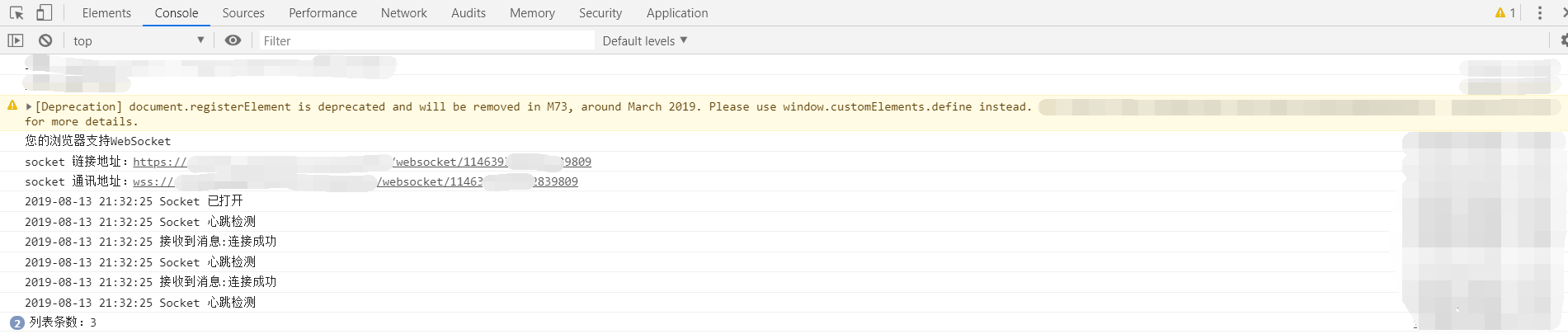
第五:运行效果
有心跳监听,无心跳监听结果大家就自己试哈


Spring boot集成Websocket,前端监听心跳实现的更多相关文章
- spring boot 集成 websocket 实现消息主动推送
spring boot 集成 websocket 实现消息主动 前言 http协议是无状态协议,每次请求都不知道前面发生了什么,而且只可以由浏览器端请求服务器端,而不能由服务器去主动通知浏览器端,是单 ...
- Spring Boot 集成 WebSocket 实现服务端推送消息到客户端
假设有这样一个场景:服务端的资源经常在更新,客户端需要尽量及时地了解到这些更新发生后展示给用户,如果是 HTTP 1.1,通常会开启 ajax 请求询问服务端是否有更新,通过定时器反复轮询服务端响应的 ...
- 【websocket】spring boot 集成 websocket 的四种方式
集成 websocket 的四种方案 1. 原生注解 pom.xml <dependency> <groupId>org.springframework.boot</gr ...
- spring boot集成Websocket
websocket实现后台像前端主动推送消息的模式,可以减去前端的请求获取数据的模式.而后台主动推送消息一般都是要求消息回馈比较及时,同时减少前端ajax轮询请求,减少资源开销. spring boo ...
- spring boot 集成 websocket 实现消息主动
来源:https://www.cnblogs.com/leigepython/p/11058902.html pom.xml 1 <?xml version="1.0" en ...
- spring boot集成websocket实现聊天功能和监控功能
本文参考了这位兄台的文章: https://blog.csdn.net/ffj0721/article/details/82630134 项目源码url: https://github.com/zhz ...
- Spring boot入门(二):Spring boot集成MySql,Mybatis和PageHelper插件
上一篇文章,写了如何搭建一个简单的Spring boot项目,本篇是接着上一篇文章写得:Spring boot入门:快速搭建Spring boot项目(一),主要是spring boot集成mybat ...
- Spring Boot系列教程十:Spring boot集成Sentinel Redis
前言 上一篇文章介绍了spring boot集成单点的redis,然而实际生产环境使用单点的redis风险很高,一旦宕机整个服务将无法使用,这篇文章介绍如何使用基于sentinel的redis高可用方 ...
- Spring boot集成RabbitMQ(山东数漫江湖)
RabbitMQ简介 RabbitMQ是一个在AMQP基础上完整的,可复用的企业消息系统 MQ全称为Message Queue, 消息队列(MQ)是一种应用程序对应用程序的通信方法.应用程序通过读写出 ...
随机推荐
- JS字符串数字前面加加号会变成数字类型
JS中一个字符串中只有数字,如果该字符串前面加了个加号,这个数值就变成了number类型.如本文测试中,用lodop打印二维码,最后一个参数是一个字符串,在前面加了加号和不在前面加加号,通过控制台输出 ...
- 用浏览器控制台抓取shodan、搜索引擎、zone-h的结果
0x00 前言 大部分内容来自参考连接的内容,只是一种爬取内容的思路. 在很久以前自己会有爬取zone-h做目标测试的需求,但是总是有各种反爬限制.而且个别网址还有前端自动生成内容的功能,使用Java ...
- PCL
PCL(PointCloudLibrary)——是一个的模块化的现代C++模板库. 其基于以下第三方库:Boost.Eigen.FLANN.VTK.CUDA.OpenNI.Qhull,实现点云相关的获 ...
- odoo 流水码 编码规则
<?xml version="1.0" encoding="utf-8"?> <odoo> <data noupdate=&quo ...
- SpringBoot+Mybatis+MySql 自动生成代码 自动分页
一.配置文件 <!-- 通用mapper --> <dependency> <groupId>tk.mybatis</groupId> <arti ...
- java jdk 8u191 官网下载地址
目前jdk最后免费版本 jdk-8u191 下载地址: https://www.oracle.com/technetwork/java/javase/downloads/java-archive-ja ...
- LeetCode 859. 亲密字符串(Buddy Strings) 23
859. 亲密字符串 859. Buddy Strings 题目描述 给定两个由小写字母构成的字符串 A 和 B,只要我们可以通过交换 A 中的两个字母得到与 B 相等的结果,就返回 true:否则返 ...
- 【LeetCode】寻找两个有序数组的中位数【性质分析+二分】
给定两个大小为 m 和 n 的有序数组 nums1 和 nums2. 请你找出这两个有序数组的中位数,并且要求算法的时间复杂度为 O(log(m + n)). 你可以假设 nums1 和 nums2 ...
- Java8 时间日期类操作
Java8 时间日期类操作 Java8的时间类有两个重要的特性 线程安全 不可变类,返回的都是新的对象 显然,该特性解决了原来java.util.Date类与SimpleDateFormat线程不安全 ...
- SpringBoot自动配置原理学习
介绍 构建Springboot项目时我们会创建一个启动类 @SpringBootApplication public class DemoApplication { public static voi ...