
使用代码浏览WPF控件模版
纯代码创建,不需要创建界面,创建WPF工程后,直接复制代码就可以使用。
当你手头没有Blend,又不记得以下这段代码,但是又想浏览控件模版的时候,就可以直接复制拿来用了。
   public partial class MainWindow : Window

     {

         ListBox lbox;

         TextBox tbox;

         Grid grid;

         public MainWindow()

         {

             InitializeComponent();

             InitializeControl();

             LoadControlTemplate();

         }

         /// <summary>

         /// 创建界面

         /// </summary>

         private void InitializeControl()

         {

             grid = new Grid();

             ColumnDefinition col1 = new ColumnDefinition();

             ColumnDefinition col2 = new ColumnDefinition();

             col1.Width = GridLength.Auto;

             grid.ColumnDefinitions.Add(col1);

             grid.ColumnDefinitions.Add(col2);

             //List

             lbox = new ListBox();

             lbox.SelectionChanged += (a, b) => { ShowControlTemplate(); };

             //TextBox

             tbox = new TextBox();

             tbox.VerticalScrollBarVisibility = ScrollBarVisibility.Auto;

             tbox.HorizontalScrollBarVisibility = ScrollBarVisibility.Auto;

             grid.Children.Add(lbox);

             grid.Children.Add(tbox);

             Grid.SetColumn(lbox, );

             Grid.SetColumn(tbox, );

             this.Content = grid;

         }

         private void LoadControlTemplate()

         {

             Type type = typeof(System.Windows.Controls.Control);

             List<Type> controlType = new List<Type>();

             System.Reflection.Assembly assembly = System.Reflection.Assembly.GetAssembly(typeof(System.Windows.Controls.Control));

             foreach (Type item in assembly.GetTypes())

             {

                 if (item.IsSubclassOf(type) && !item.IsAbstract && item.IsPublic)

                 {

                     controlType.Add(item);

                 }

             }

             lbox.ItemsSource = controlType;

         }

         private void ShowControlTemplate()

         {

             try

             {

                 Type type = (Type)lbox.SelectedItem;

                 System.Reflection.ConstructorInfo info = type.GetConstructor(Type.EmptyTypes);

                 Control control = (Control)info.Invoke(null);

                 control.Visibility = Visibility.Collapsed;

                 grid.Children.Add(control);

                 ControlTemplate template = control.Template;

                 System.Xml.XmlWriterSettings setting = new System.Xml.XmlWriterSettings();

                 setting.Indent = true;

                 StringBuilder sb = new StringBuilder();

                 System.Xml.XmlWriter writer = System.Xml.XmlWriter.Create(sb, setting);

                 System.Windows.Markup.XamlWriter.Save(template, writer);

                 tbox.Text = sb.ToString();

                 grid.Children.Remove(control);

             }

             catch (Exception ex)

             {

                 tbox.Text = ex.Message;

             }

         }

     }
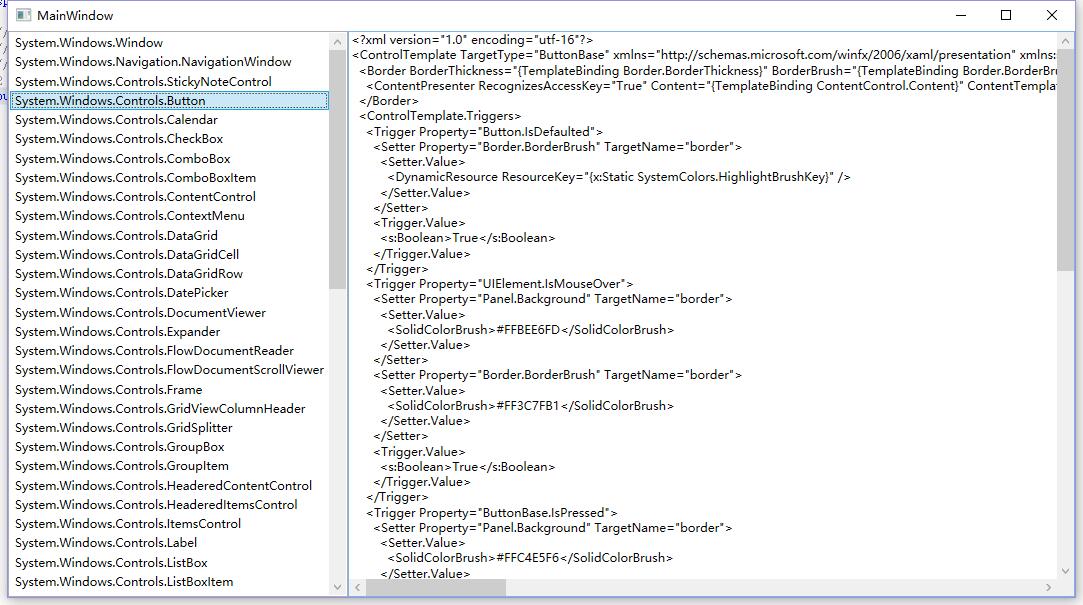
截图:
使用代码浏览WPF控件模版的更多相关文章
- 如何通过代码设置WPF控件的字体,颜色
this.lbTips.Foreground = new SolidColorBrush(Colors.Black); this.lbTips.FontFamily = new FontFamily( ...
- 解决 CefSharp WPF控件不能使用输入法输入中文的问题(代码已提交到 github)
首先,本文所有 代码已经提交到github,需要的可以直接从github获取:https://github.com/starts2000/CefSharp,希望可以帮助到有需要的朋友们. CEF 简介 ...
- c#字符串加载wpf控件模板代码 - 简书
原文:c#字符串加载wpf控件模板代码 - 简书 ResourceManager resManagerA = new ResourceManager("cn.qssq666.Properti ...
- 《Dotnet9》系列-开源C# WPF控件库3《HandyControl》强力推荐
大家好,我是Dotnet9小编,一个从事dotnet开发8年+的程序员.我最近开始写dotnet分享文章,希望能让更多人看到dotnet的发展,了解更多dotnet技术,帮助dotnet程序员应用do ...
- 如何封装属于自己的WPF控件库
在网上找了一下,发现这方面的资料并不多.做传统桌面的本来就不多了吧,更别说WPF了.我可能也要另寻出路了,不过我还是觉得做桌面挺有意思的. 言归正传 首先,新建一个WPF自定义控件库项目 这里我们封 ...
- 浅尝辄止——使用ActiveX装载WPF控件
1 引言 使用VC编写的容器类编辑器,很多都可以挂接ActiveX控件,因为基于COM的ActiveX控件不仅封装性不错,还可以显示一些不错的界面图元. 但是随着技术不断的进步,已被抛弃的Active ...
- 通过WinForm控件创建的WPF控件无法输入的问题
今天把写的一个WPF程序发布到别的机器上执行,发现一个比较奇怪的问题:在那个机器上用英文输入法无法输入数字,非要切换到中文输入法才行:但在我的机器上却是好好的. 最开始以为是输入法的问题,弄了好一阵子 ...
- WPF控件--利用Winform库中的NotifyIcon实现托盘小程序
WPF控件--NotifyIcon 运行界面如下所示: 图1 图2 代码很少,如下所示 ...
- WPF控件模板
引言:在进行WPF项目开发过程中,由于项目的需要,经常要对某个控件进行特殊的设定,其中就牵涉到模板的相关方面的内容.本文也是在自己进行项目开发过程中遇到控件模板设定时集中搜集资料后整理出来的,以供在以 ...
随机推荐
- 前端通用下载文件方法(兼容IE)
之前在网上看到一个博主写的前端通用的下载文件的方法,个人觉得很实用,所以mark一下,方便以后查阅 源文地址(源文还有上传/下载excel文件方法) 因为项目要求要兼容IE浏览器,所以完善了一下之前博 ...
- Kindle支持的文件格式
Kindle支持的文件格式 Kindle个人文档服务Kindle个人文档服务支持以下文件类型:Kindle格式(.MOBI..AZW)--Microsoft Word(.DOC..DOCX)HTML( ...
- viewSwitcher 切换视图
通过VIewSwitcher切换视图.这个用到了baseAdapter,还是不太懂,先记个笔记. <RelativeLayout xmlns:android="http://schem ...
- linux安装Erlang
Erlang一种通用的面向并发的编程语言. 1.安装Erlang编译依赖: yum -y install gcc glibc-devel make ncurses-devel openssl-deve ...
- Java8的时间日期API
原先的时间 api 大部分已经过时了 Date构造器 需要传入年月日 但是对时间的加减操作比较麻烦 Calenda 加减比较方便 使用 LocalDate. LocalTime. LocalDa ...
- ABAP语法篇2 内表操作语法
VALUE MOVE-CORRESPONDING CORRESPOING FOR REDUCE GROUP BY FILTER VALUE语法: 结构赋值 ... VALUE dtype | #( ...
- pix2pix&Cycle GAN&pix2pix HD
这里简短地谈一下如题的三篇论文: 参考:https://blog.csdn.net/gdymind/article/details/82696481 (1)pix2pix:从一张图片生成另一张图片 p ...
- 【Leetcode_easy】893. Groups of Special-Equivalent Strings
problem 893. Groups of Special-Equivalent Strings 题意: 感觉参考代码也是有点问题的... 参考 1. Leetcode_easy_893. Grou ...
- 【Leetcode_easy】840. Magic Squares In Grid
problem 840. Magic Squares In Grid solution: class Solution { public: int numMagicSquaresInside(vect ...
- angular2 ng-if
ng-if <td ><div class="td-li" > <a (click)="open(i)" class=" ...