
Android中百分比布局
百分比布局的出现主要是因为LinearLayout中可以通过android:layout_weight="1"这种方法来支持按比例指定控件大小
但是FrameLayout和RelativeLayout中并没有这种实现比例分配的功能,因此引入了PercentFrameLayout和PercentRelativeLayout这两个全新的布局
接下来是PercentFrameLayout的具体应用,需要导入support库
在app的build.gradle中添加如下的包
dependencies {

    compile fileTree(dir: 'libs', include: ['*.jar'])

    androidTestCompile('com.android.support.test.espresso:espresso-core:2.2.2', {

        exclude group: 'com.android.support', module: 'support-annotations'

    })

    compile 'com.android.support:appcompat-v7:25.3.1'

    compile 'com.android.support:percent:25.3.1'

    testCompile 'junit:junit:4.12'

}
接下来对布局的安排代码为:
<?xml version="1.0" encoding="utf-8"?>

<FrameLayout xmlns:android="http://schemas.android.com/apk/res/android"

    xmlns:app="http://schemas.android.com/apk/res-auto"

    xmlns:tools="http://schemas.android.com/tools"

    android:id="@+id/activity_main"

    android:orientation="horizontal"

    android:layout_width="match_parent"

    android:layout_height="match_parent"

    tools:context="com.itheima.album.uilayouttest.MainActivity">

    <android.support.percent.PercentFrameLayout

        xmlns:android="http://schemas.android.com/apk/res/android"

        xmlns:app="http://schemas.android.com/apk/res-auto"

        android:layout_width="match_parent"

        android:layout_height="match_parent"

        >

        <Button

            android:id="@+id/button1"

            android:text="Button 1"

            android:layout_gravity="left|top"

            app:layout_widthPercent="50%"

            app:layout_heightPercent="50%"

            />

        <Button

            android:id="@+id/button2"

            android:text="Button 2"

            android:layout_gravity="right|top"

            app:layout_widthPercent="50%"

            app:layout_heightPercent="50%"

            />

        <Button

            android:id="@+id/button3"

            android:text="Button 3"

            android:layout_gravity="left|bottom"

            app:layout_widthPercent="50%"

            app:layout_heightPercent="50%"

            />

        <Button

            android:id="@+id/button4"

            android:text="Button 4"

            android:layout_gravity="right|bottom"

            app:layout_widthPercent="50%"

            app:layout_heightPercent="50%"

            />

    </android.support.percent.PercentFrameLayout>

</FrameLayout>
程序运行截图如下:
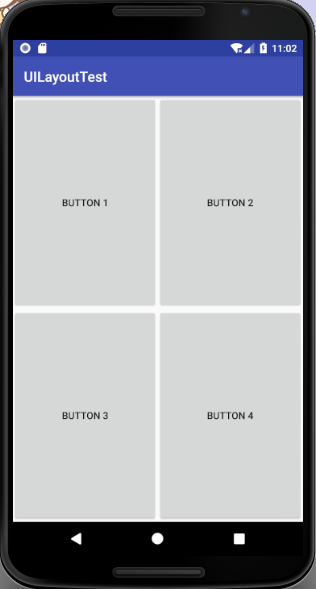
PercentRelativeLayout实现上图所示:
<?xml version="1.0" encoding="utf-8"?>

<RelativeLayout xmlns:android="http://schemas.android.com/apk/res/android"

    xmlns:app="http://schemas.android.com/apk/res-auto"

    xmlns:tools="http://schemas.android.com/tools"

    android:id="@+id/activity_main"

    android:orientation="horizontal"

    android:layout_width="match_parent"

    android:layout_height="match_parent"

    tools:context="com.itheima.album.uilayouttest.MainActivity">

    <android.support.percent.PercentRelativeLayout

        xmlns:android="http://schemas.android.com/apk/res/android"

        xmlns:app="http://schemas.android.com/apk/res-auto"

        android:layout_width="match_parent"

        android:layout_height="match_parent"

        >

        <Button

            android:id="@+id/button1"

            android:text="Button1"

            app:layout_widthPercent="50%"

            app:layout_heightPercent="50%"

            />

        <Button

            android:id="@+id/button2"

            android:text="Button2"

            android:layout_toRightOf="@id/button1"

            app:layout_widthPercent="50%"

            app:layout_heightPercent="50%"

            />

        <Button

            android:id="@+id/button3"

            android:text="Button3"

            android:layout_below="@id/button1"

            app:layout_widthPercent="50%"

            app:layout_heightPercent="50%"

            />

        <Button

            android:id="@+id/button4"

            android:text="Button4"

            android:layout_below="@id/button1"

            android:layout_toRightOf="@id/button3"

            app:layout_widthPercent="50%"

            app:layout_heightPercent="50%"

            />

    </android.support.percent.PercentRelativeLayout>

</RelativeLayout>
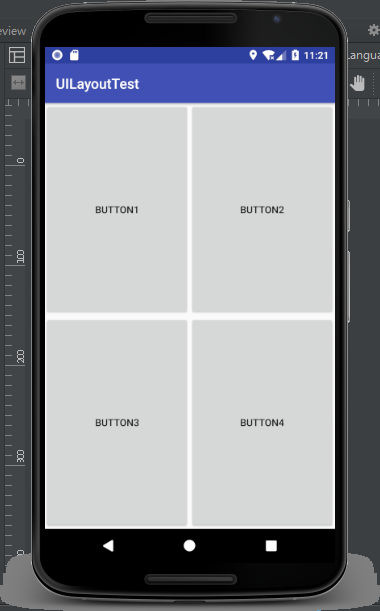
执行如下图所示:
Android中百分比布局的更多相关文章
- 无废话Android之常见adb指令、电话拨号器、点击事件的4种写法、短信发送器、Android 中各种布局(1)
1.Android是什么 手机设备的软件栈,包括一个完整的操作系统.中间件.关键的应用程序,底层是linux内核,安全管理.内存管理.进程管理.电源管理.硬件驱动 2.Dalvik VM 和 JVM ...
- Android中的布局优化方法
http://blog.csdn.net/rwecho/article/details/8951009 Android开发中的布局很重要吗?那是当然.一切的显示样式都是由这个布局决定的,你说能不重要吗 ...
- Android中得到布局文件对象有三种方式
Android中得到布局文件对象有三种方式 第一种,通过Activity对象 View view = Activity对象.getLayoutInflater().inflater(R.layout. ...
- Android笔记(七) Android中的布局——线性布局
我们的软件是由好多个界面组成的,而每个界面又由N多个控件组成,Android中借助布局来让各个空间有条不紊的摆放在界面上. 可以把布局看作是一个可以放置很多控件的容器,它可以按照一定的规律调整控件的位 ...
- Android添加百分比布局库时显示Failed to resolve: com.android.support.percent:问题
这是看第一行代码中遇到的问题,要添加百分比布局库的依赖时要在app下的bulid.gradle添加以下代码 implementation fileTree(dir:'libs',include:['* ...
- 什么是布局?Android中的布局是怎样的?
布局管理器(通常被称为是布局)是对ViewGroup类的扩展,是用来控制子控件在UI中的位置. Android SDK包含了许多布局类,在为视图.Fragment和Activity创建UI时,可以使用 ...
- Android中常用布局单位
Android在UI布局时经常用到一些单位,对单位混用直接会影响UI的显示,要想正确的在布局中使用每种单位就必须先真正的熟悉它. UI显示效果的影响因素:屏幕尺寸.屏幕密度.分辨率:而android手 ...
- Android中相对布局的两个控件
<Button android:id="@+id/button3" android:layout_width="wrap_content" android ...
- Android中的布局动画
简介 布局动画是给布局的动画,会影响到布局中子对象 使用方法 给布局添加动画效果: 先找到要设置的layout的id,然后创建布局动画,创建一个LayoutAnimationController,并把 ...
随机推荐
- rename file
https://askubuntu.com/questions/790633/the-o-parameter-in-aria2c-cant-rename-the-downloaded-file You ...
- Redis安装、主从配置及两种高可用集群搭建
Redis安装.主从配置及两种高可用集群搭建 一. 准备 Kali Linux虚拟机 三台:192.168.154.129.192.168.154.130.192.168.154 ...
- Shallow copy and Deep copy
Shallow copy and Deep copy 第一部分: 一.来自wikipidia的解释: Shallow copy One method of copying an object is t ...
- Android选项卡TabHost功能和用法
1.布局文件 <TabHost xmlns:android="http://schemas.android.com/apk/res/android" xmlns:tools= ...
- Android Scroller详解
在学习使用Scroller之前,需要明白scrollTo().scrollBy()方法. 一.View的scrollTo().scrollBy() scrollTo.scrollBy方法是View中的 ...
- maven下载jar demo
pom.xml <?xml version="1.0"?> <project xmlns="http://maven.apache.org/POM/4. ...
- php的微信公众平台开发接口类
<?php define("TOKEN", "weixin"); $wechatObj = new wechatCallbackapiTest(); if ...
- Chrome浏览器内部协议Chrome://收集
Chromium 采用 Chrome:// 协议开头的形式, 规定了一系列的内部协议, 有的用来显示数据, 有的用来实现一些功能, 但对普通用户进行了屏蔽.在Chrome浏览器地址栏直接访问就好了! ...
- NGINX并发量优化
NGINX并发量优化 一.压力测试 命令:ab -c 2000 -n 2000 web服务器的地址 ab:压力测试工具 -c:client缩写,客户端的数量 -n:总的访问量,所有客户端总共的访问量. ...
- 在Windows下/Linux下安装jdk版本
到官网https://www.oracle.com/technetwork/java/javase/downloads/index.html选择适合自己的版本, 目前我做测试和开发主要用的是jdk 8 ...