
git之fatal: Could not read from remote repository
问题背景:
在git bash中使用hexo g -d命令进行文章发布
详细错误信息:
fatal: Could not read from remote repository.

Please make sure you have the correct access rights

and the repository exists.

FATAL Something's wrong. Maybe you can find the solution here: http://hexo.io/docs/troubleshooting.html

Error: Connection reset by 13.250.177.223 port 22

fatal: Could not read from remote repository.

Please make sure you have the correct access rights

and the repository exists.

    at ChildProcess.<anonymous> (E:\Hexo\node_modules\hexo-util\lib\spawn.js:37:17)

    at emitTwo (events.js:126:13)

    at ChildProcess.emit (events.js:214:7)

    at ChildProcess.cp.emit (E:\Hexo\node_modules\cross-spawn\lib\enoent.js:40:29)

    at maybeClose (internal/child_process.js:915:16)

    at Socket.stream.socket.on (internal/child_process.js:336:11)

    at emitOne (events.js:116:13)

    at Socket.emit (events.js:211:7)

    at Pipe._handle.close [as _onclose] (net.js:561:12)
错误原因是因为ssh key有问题,连接不上服务器。
于是我参考如下链接,一步一步操作,最终解决了这个问题:
git遇到的问题之“Please make sure you have the correct access rights and the repository exists.”
虽然已经有了问题的解决答案,但是我觉得还是需要列举一下相关步骤,梳理一下:
1.重新在git设置一下身份的名字和邮箱
git config --global user.name "yourname"

git config --global user.email "your@email.com"
这里的yourname必须与github的用户名一致
这里your@email.com必须与github登录邮箱一致
2.删除.ssh文件夹下的known_hosts文件(该文件主要作用是域名解析)
3.ssh-keygen -t rsa -C “your@email.com(填写github对应的邮箱)”
一路回车即可,无需输入
4.进入github设置界面
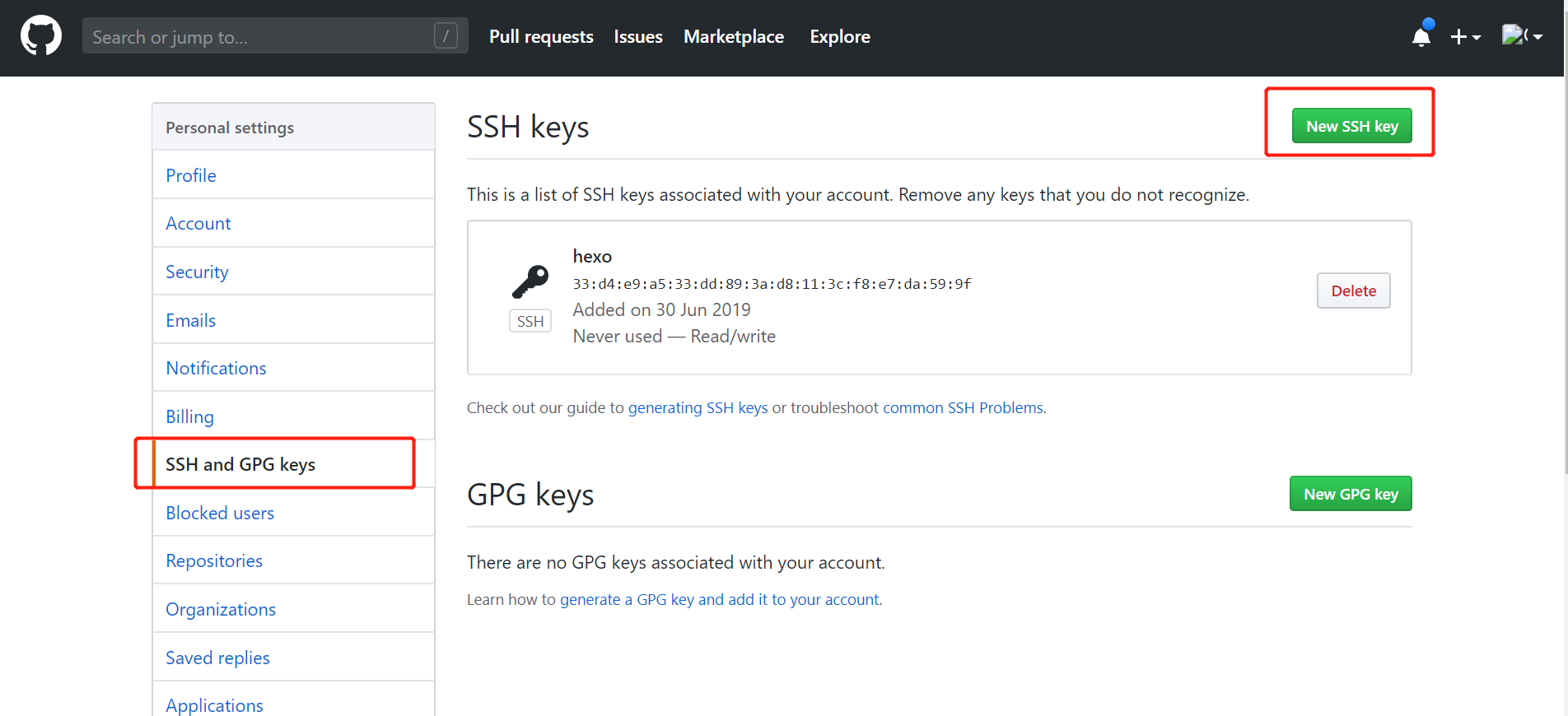
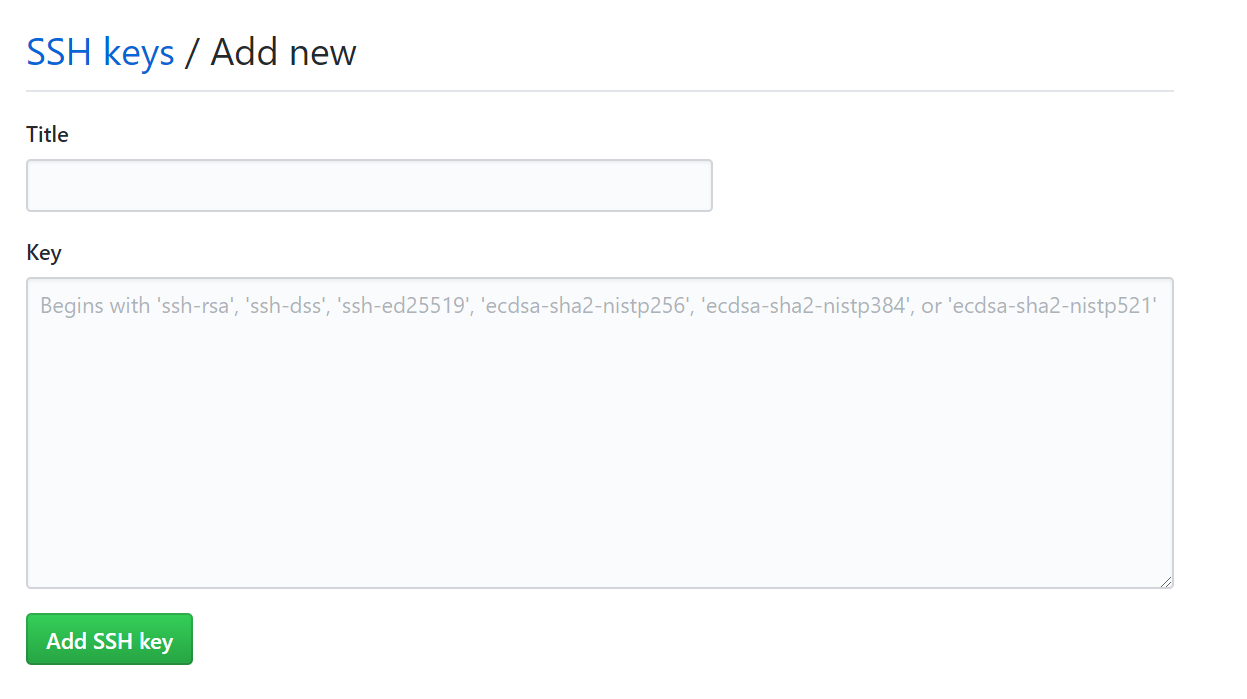
新增SSH key将id_rsa.pub内容添加到如图中的Key上(title可任意命名):
5.最后完美解决这个问题
git之fatal: Could not read from remote repository的更多相关文章
- git pull 出错 fatal: Could not read from remote repository.Please make sure you have the correct access rights.and the repository exists.
Warning: Permanently added the RSA host key for IP address '192.30.252.131' to the list of known hos ...
- git提示错误关于错误:ssh: Could not resolve hostname github.com: Name or service not known.fatal: Could not read from remote repository.
关于 Git 使用中出现的错误 饥人谷_楠柒 关注 2016.11.02 15:33* 字数 746 阅读 3607评论 5喜欢 10赞赏 1 关于错误:ssh: Could not resolve ...
- 用ssh进行git clone出现 fatal: Could not read from remote repository.
问题:在通过MobaXterm进行ssh连接的服务器上用ssh进行git clone出现 fatal: Could not read from remote repository. 解决方法:prox ...
- gitlab 安装遇到 fatal:does not appear to be a git repository fatal: Could not read from remote repository. 问题
Cloning into 'door_lock_bsp'... git@192.168.1.5's password: fatal: 'door_lock/door_lock_bsp.git' do ...
- fatal:'origin' does not appear to be a git repository fatal:Could not read from remote repository
天gitlab中遇到的问题: 当 git push origin branch_name时遇到报错如下: fatal:'origin' does not appear to be a git repo ...
- 【git基础】Permission denied (publickey). fatal: Could not read from remote repository
运行以下git命令的时候出现错误 git push -u origin master error The authenticity of host 'github.com (13.250.177.22 ...
- git clone ssh 时出现 fatal: Could not read from remote repository
一.问题及解决办法参考: 在 ubuntu 中,要把 GitHub 上的储存库克隆到计算机上时,执行如下命令: git clone git@github.com:USER-NAME/REPOSITOR ...
- github Permission denied (publickey). fatal: Could not read from remote repository.
github Permission denied (publickey).fatal: Could not read from remote repository. ----------------- ...
- Permission denied (publickey). fatal: Could not read from remote repository.
博主在github上下载tiny face的的源代码的时候,遇到git clone命令为:git clone --recursive git@github.com:peiyunh/tiny.git 而 ...
随机推荐
- Mac版StarUML破解方法
StarUML是用nodejs写的.确切的说是用Electron前端框架写的.新版本中所有的starUML源代码是通过asar工具打包而成.确切的代码位置在“%LOCALAPPDATA%\Progra ...
- springboot-实现log4j的AOP切面
参考链接: https://www.cnblogs.com/liaojie970/p/7883687.html https://blog.csdn.net/autfish/article/detail ...
- Upgrade Windows Server 2016 to Windows Server 2019
Pre-Upgrade Upgrade path: Windows Server 2016 can be upgraded to Windows 2019 in a single upgrade pr ...
- Linux之RHEL7root密码破解(一)
很多时候我们都会有这样的经历,各种密码,各种复杂,忘记了怎么办???Windows的有关密码忘记了是可以通过相关的邮箱啊手机号等等是可以 找回的,那么Linux的root密码忘记了,该怎么办呢?那么接 ...
- CSS选择器知识梳理
<一>CSS选择器结构逻辑图 温馨提示:各位小伙伴,可以把逻辑图下载下来放大,看的比较清除,也可以给我留言,我分享原百度脑图给各位小伙伴. <二>接下来按照结构逻辑图具体讲解各 ...
- AS项目报错 Error:java.util.concurrent.ExecutionException: com.android.tools.aapt2.Aapt2Exception: AAPT2 error: check logs for details
1 修改gradle的缓存目录 这个可以通过android studio的设置中找到gradle,配置另一个非中文目录来缓存. File -> Settings -> Build, Exe ...
- src挖掘过程之信息收集
信息收集 1.厂商域名 2.厂商ip段 3.厂商业务信息 域名收集 1.基于SSL证书查询 2.第三方网站接口查询 3.Github 4.DNS解析记录 5.子域名枚举等 基于 ...
- 【Herding HDU - 4709 】【数学(利用叉乘计算三角形面积)】
题意:给出n个点的坐标,问取出其中任意点围成的区域的最小值! 很明显,找到一个合适的三角形即可. #include<iostream> #include<cstdio> #in ...
- PHP-FPM的知识点
https://blog.csdn.net/resilient/article/details/82420863 这个URL,将php的各种模式与知识点说清楚了. 因为php-fpm默认编译进了php ...
- js插件---videojs中文文档详解
js插件---videojs中文文档详解 一.总结 一句话总结: js插件网上都有很多参考资料,使用起来也非常简单 二.lavarel中使用实例 <video id="example_ ...