
[Javascirpt] Developer-friendly Flow Charts with flowchart.js
Flowchart.js is a great tool for creating quick, simple flowcharts in a way that keeps you out of a WYSIWYG, and keeps your productive. No more drawing lines, no more determining how to draw a shape, no more deciding relative size and distance. Flowchart.js makes it easy to prototype new concepts and confirm product flows. Built in JavaScript, the library is complete with HTML rendering and a standard grammar and syntax for creating your flows.
<!DOCTYPE html>

<html lang="en">

<head>

  <meta charset="UTF-8">

  <title>Flowchart.js Example Project</title>

</head>

<body>

<div id="chart"></div>

<script type="text/javascript"

        src="//cdnjs.cloudflare.com/ajax/libs/raphael/2.2.7/raphael.min.js"></script>

<script type="text/javascript"

        src="//cdnjs.cloudflare.com/ajax/libs/flowchart/1.6.6/flowchart.min.js"></script>

<script type="text/javascript"

        src="//cdnjs.cloudflare.com/ajax/libs/axios/0.17.1/axios.min.js"></script>

<script type="text/javascript"

        src="script.js"></script>

</body>
axios.get('/data/additional-sample.txt').then(({data}) => {

    const fc = flowchart.parse(data);

    fc.drawSVG('chart');

  });
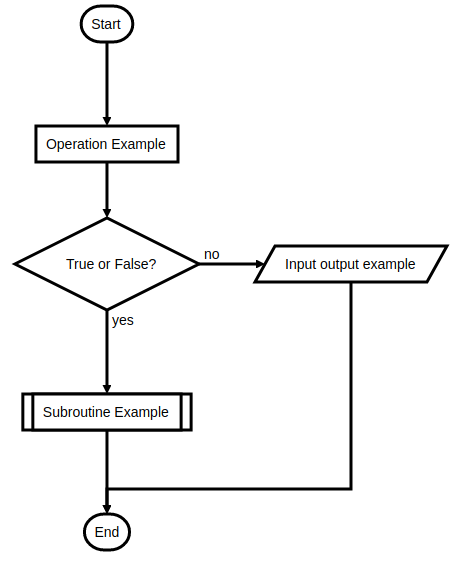
Flowchart 1:
start=>start

end=>end

operation=>operation: Operation Example

subroutine=>subroutine: Subroutine Example

condition=>condition: True or False?

inputoutput=>inputoutput: Input output example

start->operation->condition

condition(yes)->subroutine->end

condition(no)->inputoutput->end
Flowchart 2:
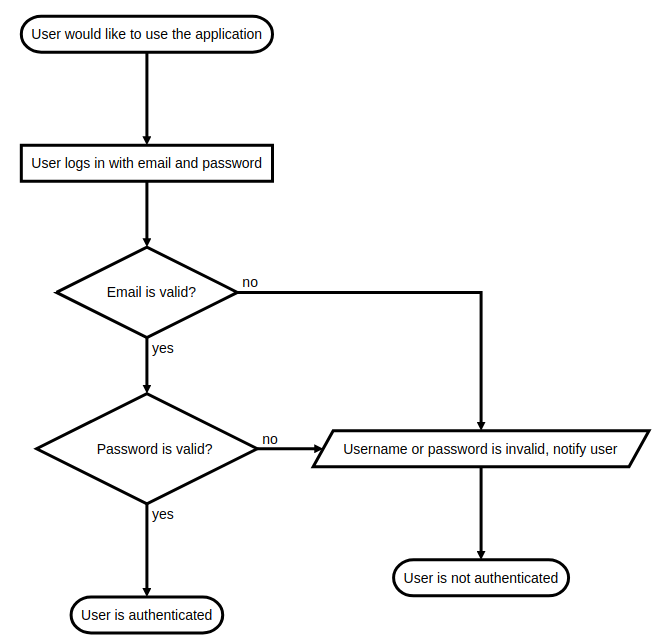
s=>start: User would like to use the application

e=>end: User is authenticated

e2=>end: User is not authenticated

o1=>operation: User logs in with email and password

c1=>condition: Email is valid?

c2=>condition: Password is valid?

io1=>inputoutput: Username or password is invalid, notify user

s->o1->c1

c1(yes)->c2

c1(no)->io1->e2

c2(yes)->e

c2(no)->io1->e2
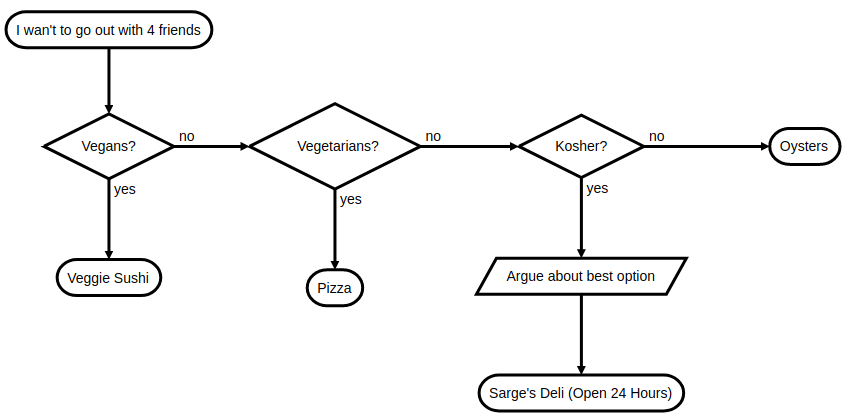
st=>start: I wan't to go out with 4 friends

cond1=>condition: Vegans?

cond2=>condition: Vegetarians?

cond3=>condition: Kosher?

e1=>end: Veggie Sushi

e2=>end: Pizza

e3=>end: Oysters

e4=>end: Sarge's Deli (Open 24 Hours)

io1=>inputoutput: Argue about best option

st->cond1

cond1(yes)->e1

cond1(no)->cond2

cond2(yes)->e2

cond2(no)->cond3

cond3(yes)->io1->e4

cond3(no)->e3
[Javascirpt] Developer-friendly Flow Charts with flowchart.js的更多相关文章
- Markdown Sublime flowchart.js 流程图
先亮出来一个 flowchart.js 的 Sample 给 Sublime 安装 MarkdownPreview,这个不必多说了 Sublime Text -> Preferences -&g ...
- Developer Friendly | 基础设施即代码的事实标准Terraform已支持京东云!
Developer Friendly | 基础设施即代码的事实标准Terraform已支持京东云! Chef.Puppet.Ansible.SaltStack 都可以称为配置管理工具,这些工具的主要目 ...
- 腾讯云部署golang flow流程,vue.js+nginx+mysql+node.js
这次总算把js-ojus/flow的ui部署到腾讯云上,比较吐槽的就是,为啥这么复杂,vue.js前后端分离,比golang编写的部署方面复杂几万倍.真是浪费人生啊. golang+sqlite写的东 ...
- flow 静态类型检查 js
1.flow介绍 https://ustbhuangyi.github.io/vue-analysis/prepare/flow.html#为什么用-flow 2.使用 (1)安装flow (2)项目 ...
- 初探flow.js
第一部分:前言 我们知道JS是弱类型语言,在声明变量时不论是什么类型的变量我们都用var即可,所以js是非常灵活的,但是同时问题就是弱类型语言有可能会出错,比如在调用函数时,且往往在运行起来时才可以检 ...
- js to svg flowchart
js to svg flowchart flowchart https://flowchart.js.org/ https://github.com/adrai/flowchart.js https: ...
- flow
Flow vs Stream https://wikidiff.com/flow/stream As nouns the difference between flow and stream is t ...
- 转:超级好用的流程图js框架
支叫图论(Graph Theroy).利用图我们可以做很多工具,比如思维导图,流程图,状态机,组织架构图,等等.今天我要做的是用开源的HTML5工具来快速构造一个做图的工具. 工具选择 预先善其事,必 ...
- markdown-it + highlight.js简易实现
markdown-it 官方demo markdown-it 文档 1.配置highlightjs,针对markdown中各种语言高亮,针对对应的标签 pre code 里面的样式 -- index. ...
随机推荐
- TT流程随笔
细节: 如果本地可以自动登录, 先实现本地登录,发送事件通知,再请求登录服务器 如果本地不可以登录(第一次或退出后),直接请求登录服务器 登录服务器返回消息服务器ip port / 文件服务器 链接消 ...
- CF 372B Counting Rectangles is Fun [dp+数据维护]
题意,给出一个n行m列的矩阵 里面元素是0或者1 给出q个询问 a,b,c,d 求(a,b)到(c,d)有多少个由0组成的矩形 我们定义 watermark/2/text/aHR0cDovL2Jsb2 ...
- NPAPI——实现非IE浏览器的类似ActiveX的本地程序(插件)调用
一.Netscape Plugin Interface(NPAPI) 大致的说明可以看下官方文档Plugin 本文主要针对于JavaScript与插件交互部分做一些交流,比如用于数字证书的操作(淘宝和 ...
- DB-MySQL:MySQL 复制表
ylbtech-DB-MySQL:MySQL 复制表 1.返回顶部 1. MySQL 复制表 如果我们需要完全的复制MySQL的数据表,包括表的结构,索引,默认值等. 如果仅仅使用CREATE TA ...
- Spark RDD概念学习系列之Pair RDD的action操作
不多说,直接上干货! Pair RDD的action操作 所有基础RDD 支持的行动操作也都在pair RDD 上可用
- Chrome 开发工具系列
- Sql Server远程还原
1.假设备份文件xxxx.bak大小约300G,还原后所占用的空间为900G 2.磁盘空间只有1T,若将备份文件拷贝过来,空间剩余700G,无法成功还原,因此通过远程方式还原. 例子如下: SQLSE ...
- 火狐浏览器下载文件中文乱码,文件名中的空格变加号("+")的问题
解决一下问题: 1.火狐浏览器下载文件,中文变乱码 2.IE浏览器下载文件,丢失文件扩展名或强制扩展名为".txt" 3.浏览器下载文件,文件名中的空格变成加号("+&q ...
- RabbitMQ学习笔记(2)----RabbitMQ简单队列(Hello World)的使用
1. 简单队列结构图 2. 引入依赖 pom.xml文件 <dependency> <groupId>com.rabbitmq</groupId> <arti ...
- Node Sass does not yet support your current environment: Windows 64-bit然如何解决,cnpm此问题解决方法
这里直接说了node sass不支持当前环境,所以可以直接删掉原来不支持本机的node sass,再重新安装就行了 删除: npm uninstall --save node-sass 安装: npm ...