
docker 搭建 nginx负载均衡
本文描述如何在一台机器上搭建nginx负载均衡,我将会启动3个nginx的docker,分别是1台前置nginx负责分发,后面2台负责处理请求。
首先我切换到/usr/local/docker/文件夹下,这个文件夹是专门用来做docker映射文件夹用的,docker里的重要的文件夹会映射到这里,在这里执行
mkdir nginx
mkdir nginx01
mkdir nginx02
nginx下存储的是前置nginx的文件
nginx01和nginx02负责存储后边两台nginx服务器的文件
《一、前置nginx配置以及启动》
切换到/usr/local/docker/nginx下
然后执行
mkdir -p conf html logs
切换到conf
vim nginx.conf
user nginx;

worker_processes auto;

error_log /var/log/nginx/error.log;

pid /run/nginx.pid;

# Load dynamic modules. See /usr/share/nginx/README.dynamic.

include /usr/share/nginx/modules/*.conf;

events {

    worker_connections 1024;

}

http {

    log_format  main  '$remote_addr - $remote_user [$time_local] "$request" '

                      '$status $body_bytes_sent "$http_referer" '

                      '"$http_user_agent" "$http_x_forwarded_for"';

    access_log  /var/log/nginx/access.log  main;

    sendfile            on;

    tcp_nopush          on;

    tcp_nodelay         on;

    keepalive_timeout   65;

    types_hash_max_size 2048;

    include             /etc/nginx/mime.types;

    default_type        application/octet-stream;

    # Load modular configuration files from the /etc/nginx/conf.d directory.

    # See http://nginx.org/en/docs/ngx_core_module.html#include

    # for more information.

    include /etc/nginx/conf.d/*.conf;

    server {

        listen       80 default_server;

        root         /usr/share/nginx/html;

        # Load configuration files for the default server block.

        include /etc/nginx/default.d/*.conf;

        location / {

        proxy_pass http://pic;

        }

        error_page 404 /404.html;

            location = /40x.html {

        }

        error_page 500 502 503 504 /50x.html;

            location = /50x.html {

        }

    }

    upstream pic{

                server 172.26.200.89:8088 weight=5;

                server 172.26.200.89:8089 weight=5;

    }

}
配置好以后,保存conf文件
然后启动这个前置nginx
docker run --name mynginx -d -p 82:80 -v /usr/local/docker/nginx/conf/nginx.conf:/etc/nginx/nginx.conf -v /usr/local/docker/nginx/logs:/var/log/nginx -d nginx
《二、nginx01配置以及启动》
切换到/usr/local/docker/nginx01/文件夹
执行
mkdir -p conf html logs
然后切换到conf文件夹
vim nginx.conf
user nginx;

worker_processes auto;

error_log /var/log/nginx/error.log;

pid /run/nginx.pid;

# Load dynamic modules. See /usr/share/nginx/README.dynamic.

include /usr/share/nginx/modules/*.conf;

events {

    worker_connections 1024;

}

http {

    log_format  main  '$remote_addr - $remote_user [$time_local] "$request" '

                      '$status $body_bytes_sent "$http_referer" '

                      '"$http_user_agent" "$http_x_forwarded_for"';

    access_log  /var/log/nginx/access.log  main;

    sendfile            on;

    tcp_nopush          on;

    tcp_nodelay         on;

    keepalive_timeout   65;

    types_hash_max_size 2048;

    include             /etc/nginx/mime.types;

    default_type        application/octet-stream;

    # Load modular configuration files from the /etc/nginx/conf.d directory.

    # See http://nginx.org/en/docs/ngx_core_module.html#include

    # for more information.

    include /etc/nginx/conf.d/*.conf;

    server {

    listen 8088;

    root /usr/share/nginx/html;

        index index.html index.htm;

    }

}
然后保存配置文件,退出
切换到/usr/local/docker/nginx01/html/文件夹下
vim index.html,简单写点东西,如下
8088 port nginx
然后启动docker
docker run --name mynginx01 -d -p 8088:8088 -v /usr/local/docker/nginx01/conf/nginx.conf:/etc/nginx/nginx.conf -v /usr/local/docker/nginx01/logs:/var/log/nginx -v /usr/local/docker/nginx01/html:/usr/share/nginx/html -d nginx
《三、nginx02配置以及启动》
切换到/usr/local/docker/nginx02/文件夹
执行
mkdir -p conf html logs
然后切换到conf文件夹
vim nginx.conf
user nginx;

worker_processes auto;

error_log /var/log/nginx/error.log;

pid /run/nginx.pid;

# Load dynamic modules. See /usr/share/nginx/README.dynamic.

include /usr/share/nginx/modules/*.conf;

events {

    worker_connections 1024;

}

http {

    log_format  main  '$remote_addr - $remote_user [$time_local] "$request" '

                      '$status $body_bytes_sent "$http_referer" '

                      '"$http_user_agent" "$http_x_forwarded_for"';

    access_log  /var/log/nginx/access.log  main;

    sendfile            on;

    tcp_nopush          on;

    tcp_nodelay         on;

    keepalive_timeout   65;

    types_hash_max_size 2048;

    include             /etc/nginx/mime.types;

    default_type        application/octet-stream;

    # Load modular configuration files from the /etc/nginx/conf.d directory.

    # See http://nginx.org/en/docs/ngx_core_module.html#include

    # for more information.

    include /etc/nginx/conf.d/*.conf;

    server {

    listen 8089;

    root /usr/share/nginx/html;

        index index.html index.htm;

    }

}
然后保存配置文件,退出
切换到/usr/local/docker/nginx02/html/文件夹下
vim index.html,简单写点东西,如下
8089 port nginx
然后启动docker
docker run --name mynginx02 -d -p 8089:8089 -v /usr/local/docker/nginx02/conf/nginx.conf:/etc/nginx/nginx.conf -v /usr/local/docker/nginx02/logs:/var/log/nginx -v /usr/local/docker/nginx02/html:/usr/share/nginx/html -d nginx
-------------------------------分割线-----------------------
至此,前置nginx和两台后置nginx都启动了,我们测试一下
在命令行执行
curl 127.0.0.1:82
如下图:
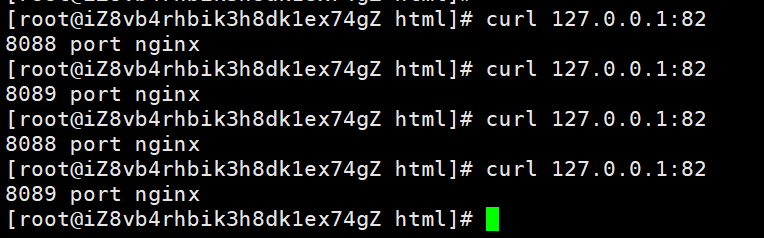
可以看到,由于我们前置nginx上的负载策略是各百分之50,所以出现了第一次请求发送到8088的nginx,第二次请求发送到8089的nginx,第三次又到8088,第四次8089。。。。。。
大家仅供参考,谢谢阅读全文。
docker 搭建 nginx负载均衡的更多相关文章
- Net分布式系统之二:CentOS系统搭建Nginx负载均衡
一.关于CentOS系统介绍 CentOS(Community Enterprise Operating System,中文意思是:社区企业操作系统)是Linux发行版之一,它是来自于Red Hat ...
- Nginx系列一:正向代理和反向代理、Nginx工作原理、Nginx常用命令和升级、搭建Nginx负载均衡
转自https://www.cnblogs.com/leeSmall/p/9351343.html 仅供个人学习 一.什么是正向代理.什么是反向代理 1. 正向代理,意思是一个位于客户端和原始服务器( ...
- Docker 安装 Nginx 负载均衡配置
Docker 安装 # 1)安装依赖包 yum install -y yum-utils device-mapper-persistent-data lvm2 # 2)添加Docker软件包源(否则d ...
- Nginx系列篇二:linux搭建Nginx负载均衡
建议先搭建好Nginx环境 可阅读--->Linux中搭建Nginx 1.准备好三台服务器[标配] 一.nginx负载均衡服务器:192.168.102.110,配置好Nginx 二.tomca ...
- Linux学习10-CentOS搭建nginx负载均衡环境
前言 当自己的web网站访问的人越来越多,一台服务器无法满足现有的业务时,此时会想到多加几台服务器来实现负载均衡. 网站的访问量越来越大,服务器的服务模式也得进行相应的升级,怎样将同一个域名的访问分散 ...
- Tomcat WEB搭建+Nginx负载均衡动静分离+DNS解析的实验
实验拓扑图: 实验环境: 在VMware workstation搭建虚拟环境,利用网络适配器的Nat和桥接模式模拟内网和外网环境. 实验过程中需要安装的工具包包括:vim unzip lrzsz ls ...
- Docker容器Nginx负载均衡配置、check及stub模块安装
Nginx是一款高性能的HTTP和反向代理.负载均衡web服务器.本次在Docker容器中部署三个tomcat,Nginx代理三个tomcat服务(以下称节点)来模拟实现负载均衡效果,配置check模 ...
- Net分布式系统之二:CentOS系统搭建Nginx负载均衡(下)
上一篇文章介绍了VMWare12虚拟机.Linux(CentOS7)系统安装.部署Nginx1.6.3代理服务做负载均衡.接下来介绍通过Nginx将请求分发到各web应用处理服务. 一.Web应用开发 ...
- Linux搭建nginx负载均衡(两台服务器之间)
负载均衡种类 第一种:通过硬件负载解决,常见的有NetScaler.F5.Radware和Array等商用的负载均衡器,价格比较昂贵 第二种:通过软件负载解决,常见的软件有LVS.Nginx.apac ...
随机推荐
- 关于.NET中的控制反转(二)- 依赖注入之 MEF
一.MEF是什么 Managed Extensibility Framework (MEF) 是用于创建可扩展的轻量级应用程序的库. 它让应用程序开发人员得以发现和使用扩展且无需配置. 它还让扩展开发 ...
- LAMP架构之PHP-FPM 服务器 转
安装PHP 解决依赖关系 # 请配置好yum源(系统安装源及epel源)后执行如下命令: yum -y groupinstall "Desktop Platform Development& ...
- linux的 复制 删除 解压 压缩 打包
liunx 删除 删除文件夹实例: rm -rf /var/log/httpd/access 将会删除/var/log/httpd/access目录以及其下所有文件.文件夹 2 删除文件使用实例: r ...
- springboot源码解析-管中窥豹系列之Runner(三)
一.前言 Springboot源码解析是一件大工程,逐行逐句的去研究代码,会很枯燥,也不容易坚持下去. 我们不追求大而全,而是试着每次去研究一个小知识点,最终聚沙成塔,这就是我们的springboot ...
- idea生成UML
原文链接http://zhhll.icu/2020/12/18/idea/%E7%94%9F%E6%88%90UML/ 使用idea直接生成UML类图 然后点击所要生成的类即可生成 由于本身的博客百度 ...
- Centos7安装RabbitMQ详细教程
MQ引言 什么是MQ MQ:message Queue翻译为消息队列,通过典型的生产者和消费者模型不断向消息队列中生产消息,消费者不断从队列中获取消息.因为消息的生产和消费都是一部的,而且只关心消息的 ...
- 【Linux】saltstack 安装及简单使用
准备三台server,一台为master(10.96.20.113),另两台为minion(10.96.20.117,10.96.20.118) 主机名(master.minion1.minion2) ...
- 【Jboss】一台服务器上如何部署多个jboss
一台服务器上如何部署多个jboss呢?直接把整个部署环境copy一份到相应的目录下? 这样只是前提,但是启动复制后的jboss就会发现,有很多端口被占用 3873,8080,8009,8443,808 ...
- 浏览器performance工具介绍及内存问题表现与监控内存的几种方式
一.GC的目的 为了实现内存空间的良性循环,performance提供多种监控方式监控内存 分析内存相关信息 当代码出现问题的时候及时定位到出现问题的代码块, 提高执行效率. preforcemanc ...
- Vulnhub靶场——DC-1
记一次Vulnhub靶场练习记录 靶机DC-1下载地址: 官方地址 https://download.vulnhub.com/dc/DC-1.zip 该靶场共有5个flag,下面我们一个一个寻找 打开 ...