
iframe和DataForm
一、iframe使用
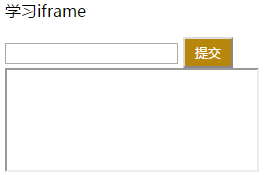
iframe在一个页面中,相当于整个window窗口的子窗口,可通过页面的元素结构查看。
<div>

    <p>学习iframe</p>

    <form id='form' action="ajax1" method="post" target="ifra">

        <input type="text">

        <input type="button" value="提交" class="btn" onclick="ajaxSubmit5()">

    </form>

    <iframe id="iframe" name="ifra" style="height: 100px;width: 250px;" ></iframe>

</div>

……

function ajaxSubmit5() {

    document.getElementById('iframe').onload = reloadIframe;

    $('#form').submit();

}

function reloadIframe() {

    //ret = this.contentWindow.document.body.innerText

    ret = $(this).contents().find('body').text()

    data = JSON.parse(ret)

    if (data.status == 'success')

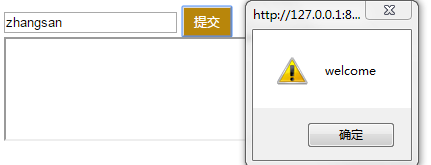
        alert('welcome')

}
创建iframe和Form表单
def ajax1(request):

    print(request.GET)

    print(request.POST)

    print(request.body)

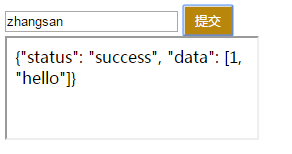
    ret = {'status':'success','data':[1,'hello']}

    return HttpResponse(json.dumps(ret))
后台处理函数
执行过程:
①在输入框输入内容并点击提交,执行ajaxSubmit5(),并通过submit()向后台提交数据;
②由于在form表单中设置了target="ifra",即target为iframe的name值,因此后台HttpResponse的返回值传递给iframe
③后台向iframe传递返回值时,即onload触发reloadIframe()
④在reloadIframe()中,通过this.contentWindow.document.body.innerText获取iframe的显示内容,即HttpResponse的返回值,再进行判断。
二、利用iframe+form上传文件
<form id='form1' action="ajax1" method="post" target="ifra1" enctype="multipart/form-data">

    <input type="text" name="k1">

    <input type="text" name="k2">

    <input type="file" name="k3">

    <input type="button" value="提交" class="btn" onclick="ajaxSubmit8()">

</form>

<iframe id="iframe1" name="ifra1" style="display: none;"></iframe>
模板
function ajaxSubmit8() {

    $('#form1').submit();

    document.getElementById('iframe1').onload = reloadIframe1;

}

function reloadIframe1() {

    ret = this.contentWindow.document.body.innerHTML

    data = JSON.parse(ret)

    if (data.status == 'success')

        alert('welcome')

}
iframe+form
def ajax1(request):

    print(request.POST)

    print(request.FILES)

    obj = request.FILES.get('k3')

    file_path = os.path.join('static', obj.name)

    with open(file_path, 'wb') as f:

        for line in obj.chunks():

            f.write(line)

    ret = {'status':'success','data':[1,'hello']}

    return HttpResponse(json.dumps(ret))
后台处理函数

三、利用ajax+FormData上传文件
<input type="file" id="img">

<input type="button" class="btn" value="提交" onclick="ajaxSubmit6()">

<input type="button" class="btn" value="提交" onclick="ajaxSubmit7()">

……
模板
function ajaxSubmit6() {

    var data = new FormData()  //使用FormData时,需要在ajax中添加processData和contentType两个参数

    data.append('k1','v1')

    data.append('k2','v2')

    f = $('#img')[0].files[0]

    data.append('k3',f)

    $.ajax({

        url:'ajax1',

        type:'POST',

        data:data,

        processData:false,

        contentType:false,

        success:function (arg) {

            console.log(arg)

        }

    })

}

function ajaxSubmit7() {

    var data = new FormData()

    //使用FormData来传递数据时,无论是使用jQuery还是原生的XMLHttpRequest,都不能在后台使用request.body,数据在request.POST和request.FILES中

    data.append('k1','v1')

    data.append('k2','v2')

    f = $('#img')[0].files[0]

    data.append('k3',f)

    var xhr = new XMLHttpRequest();

    xhr.onreadystatechange = function(){

        if(xhr.readyState == 4)

            console.log(xhr.responseText);

    }

    xhr.open('POST','ajax1');

    xhr.send(data);

}
ajax+FormData
def ajax1(request):

    print(request.POST)

    print(request.FILES)

    obj = request.FILES.get('k3')

    file_path = os.path.join('static', obj.name)

    with open(file_path, 'wb') as f:

        for line in obj.chunks():

            f.write(line)

    ret = {'status':'success','data':[1,'hello']}

    return HttpResponse(json.dumps(ret))
后台处理函数
四、利用iframe+form上传并生成图片预览
<form id='form1' action="upload_file" method="post" target="ifra1" enctype="multipart/form-data">

    <input type="file" name="k3" onchange="uploadFile()">

</form>

<iframe id="iframe1" name="ifra1" style="display: none;"></iframe>

<div>预览</div>

<div id="preview"></div>
模型
def upload_file(req):

    if req.method == 'GET':

        return render(req,'upload.html')

    else:

        ret = {'status': True, 'data': None, 'message': None}

        obj = req.FILES.get('k3')

        nid = str(uuid.uuid4())

        file_path = os.path.join('static', nid + obj.name)

        with open(file_path, 'wb') as f:

            for line in obj.chunks():

                f.write(line)

        ret['data'] = file_path

        return HttpResponse(json.dumps(ret))
后台处理函数
<script src="/static/jquery-3.3.1.min.js"></script>

<script>

    function uploadFile() {

        document.getElementById('iframe1').onload = reloadIframe1;

            $('#form1').submit();

    }

function reloadIframe1() {

    ret = this.contentWindow.document.body.innerHTML

    obj = JSON.parse(ret)

    console.log(obj)

    var tag = document.createElement('img')  //创建img标签

    tag.src = obj.data   //设置img标签的src为本地已上传图片的路径

    $('#preview').empty().append(tag)  //清空预览图片并上传新的图片

}

</script>
iframe+form
iframe和DataForm的更多相关文章
- 完美判断iframe是否加载完成
var iframe = document.createElement("iframe"); iframe.style.width = "265px"; ifr ...
- js学习笔记:操作iframe
iframe可以说是比较老得话题了,而且网上也基本上在说少用iframe,其原因大致为:堵塞页面加载.安全问题.兼容性问题.搜索引擎抓取不到等等,不过相对于这些缺点,iframe的优点更牛,跨域请求. ...
- 页面嵌入dom与被嵌入iframe的攻防
1.情景一:自己的页面被引入(嵌入)至别人的页面iframe中 if(window.self != window.top){ //url是自己页面的url window.top.location.hr ...
- iframe用法
<iframe src="http://caiyanli.top/" height="500" width="500" frameb ...
- 如何获取url中的参数并传递给iframe中的报表
在使用报表软件时,用户系统左边一般有目录树,点击报表节点就会在右侧网页的iframe中显示出报表,同时点击的时候也会传递一些参数给网页,比如时间和用户信息等.如何使网页中的报表能够获取到传递过来的参数 ...
- JavaScript权威设计--Window对象之Iframe(简要学习笔记十四)
1.Window对象属性的文档元素(id) 如果在HTML文档中用id属性来为元素命名,并且如果Window对象没有此名字的属性,Window对象会赋予一个属性,它的名字是id属性的值,而他们的值指向 ...
- ASP.NET 页面禁止被 iframe 框架引用
两个站点: a.sample.com b.sample.com a.sample.com 站点中的一段示例 JS 代码: var iframe = document.createElement(&qu ...
- 父页面操作iframe子页面的安全漏洞及跨域限制问题
一.父子交互的跨域限制 同域情况下,父页面和子页面可以通过iframe.contentDocument或者parent.document来交互(彼此做DOM操作等,如父页面往子页面注入css). 跨域 ...
- 解决iframe作为子窗口,刷新后iframe页面跳转到其它页面的问题
转载请在页首注明作者与出处 http://www.cnblogs.com/zhuxiaojie/p/5990262.html 前言: 在开发网站时,尤其是管理后台,我们经常会使用iframe作为内容窗 ...
随机推荐
- Python实用笔记 (13)函数式编程——返回函数
函数作为返回值 我们来实现一个可变参数的求和.通常情况下,求和的函数是这样定义的: def calc_sum(*args): ax = 0 for n in args: ax = ax + n ret ...
- 深入理解JVM(③)虚拟机的类加载器(双亲委派模型)
前言 先解释一下什么是类加载器,通过一个类的全限定名来获取描述该类的二进制字节流,在虚拟机中实现这个动作的代码被称为"类加载器(Class Loader)". 类与类加载器 类加载 ...
- 数据库周刊28│开发者最喜爱的数据库是什么?阿里云脱口秀聊程序员转型;MySQL update误操作;PG流复制踩坑;PG异机归档;MySQL架构选型;Oracle技能表;Oracle文件损坏处理……
热门资讯 1.Stackoverflow 2020年度报告出炉!开发者最喜爱的数据库是什么?[摘要]2020年2月,近6.5万名开发者参与了 Stackoverflow 的 2020 年度调查,这份报 ...
- 高速缓存一致性协议MESI与内存屏障
一.CPU高速缓存简单介绍 CPU高速缓存机制的引入,主要是为了解决CPU越来越快的运行速度与相对较慢的主存访问速度的矛盾.CPU中的寄存器数量有限,在执行内存寻址指令时,经常需要从内存中读取指令所需 ...
- 栈的顺序存储和链式存储c语言实现
一. 栈 栈的定义:栈是只允许在一端进行插入或删除操作的线性表. 1.栈的顺序存储 栈顶指针:S.top,初始设为-1 栈顶元素:S.data[S.top] 进栈操作:栈不满时,栈顶指针先加1,再到栈 ...
- Jenkins 主题:jenkins-theme-v2
说明 本次样式是基于 Jenkins ver. 2.235.1 写的,所有对于之前的版本可能样式不兼容,好像变化挺大的.个人测试了在用的 Jenkins ver. 2.190.1,完全不行,所有建议想 ...
- 同一WpfApplication下简单的页面转换
别人写的很不错的Dome...分享学习下 源文件地址 : http://pan.baidu.com/share/link?shareid=1698564707&uk=3912660076
- css transparent属性_css 透明颜色transparent的使用
在css中 transparent到底是什么意思呢? transparent 它代表着全透明黑色,即一个类似rgba(0,0,0,0)这样的值. 例如在css属性中定义:background:tran ...
- linux中编写同步文件的脚本
搭集群最麻烦的就是修改配置文件,如果只用修改一个机器上的配置文件,然后用一个脚本就可以把配置文件同步到其他机器上,岂不快哉! 编写一个名为xsync的脚本文件: 作用: 将当前机器的文件,同步到集群所 ...
- 如何快速部署一条Simplechain子链
我们都知道Simplechain是一种主子链架构,主链Simplechain是POW共识算法的公链.那如何快速创建一条属于自己的子链呢?下面我们就是快速部署一条子链流程.首先clone 源码, 然后按 ...