
Salesforce LWC学习(二十四) Array.sort 浅谈
本篇参考:https://developer.mozilla.org/zh-CN/docs/Web/JavaScript/Reference/Global_Objects/Array/sort
salesforce开发过程中,数组在前端的使用中基本是不可避免,下面的demo大家猜一下输出结果。
arraySortSample.html
<template>

    <lightning-card title="integer item sort">

        <ul>

            <template for:each={sortedIntegerArray} for:item="integerItem">

                <li key={integerItem}>

                    {integerItem}

                </li>

            </template>

        </ul>

    </lightning-card>

    <lightning-card title="string item sort">

        <ul>

            <template for:each={sortedStringArray} for:item="stringItem">

                <li key={stringItem}>

                    {stringItem}

                </li>

            </template>

        </ul>

    </lightning-card>

</template>
arraySortSample.js
import { LightningElement } from 'lwc';

export default class ArraySortSample extends LightningElement {

    integerArray = [2,5,23,4,16];

    stringArray = ['a','A','b','B'];

    get sortedIntegerArray() {

        return this.integerArray.sort();

    }

    get sortedStringArray() {

        return this.stringArray.sort();

    }

}
结果展示
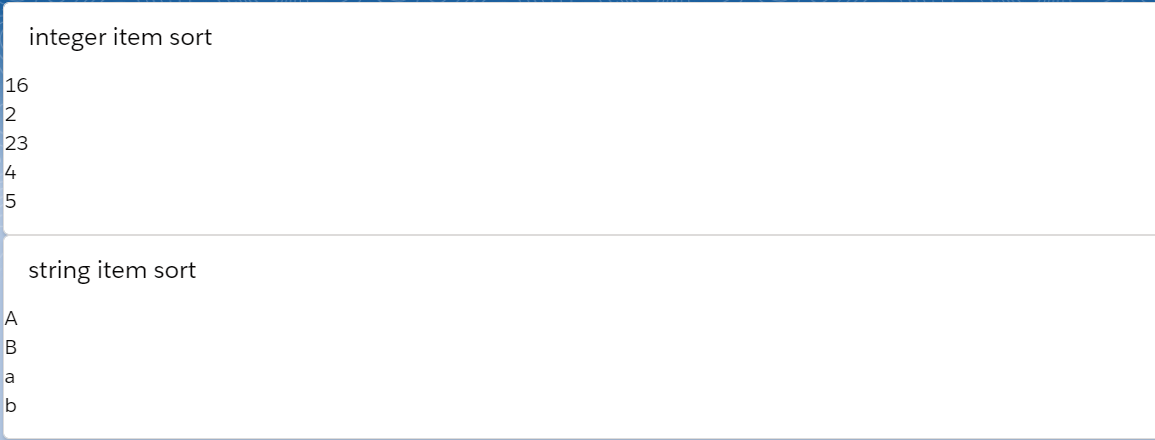
如果对前端不熟悉的人可能有点疑问。
1. 数字比较没有按照常规的大小顺序?
2. 字符排序没有按照 abcd等顺序?
当我们查看官方的API以后,可以发现:
1. sort比较第一件事先将每一个item转换成字符,也就是说即使整型他也会先转成字符;
2. 按照unicode位点进行排序。我们查看ASC码可以看出来A对应65,B对应66,a对应97,b对应98。 所以排序为 ABab。
显然这种排序不符合我们的要求,如何进行自定义的排序?
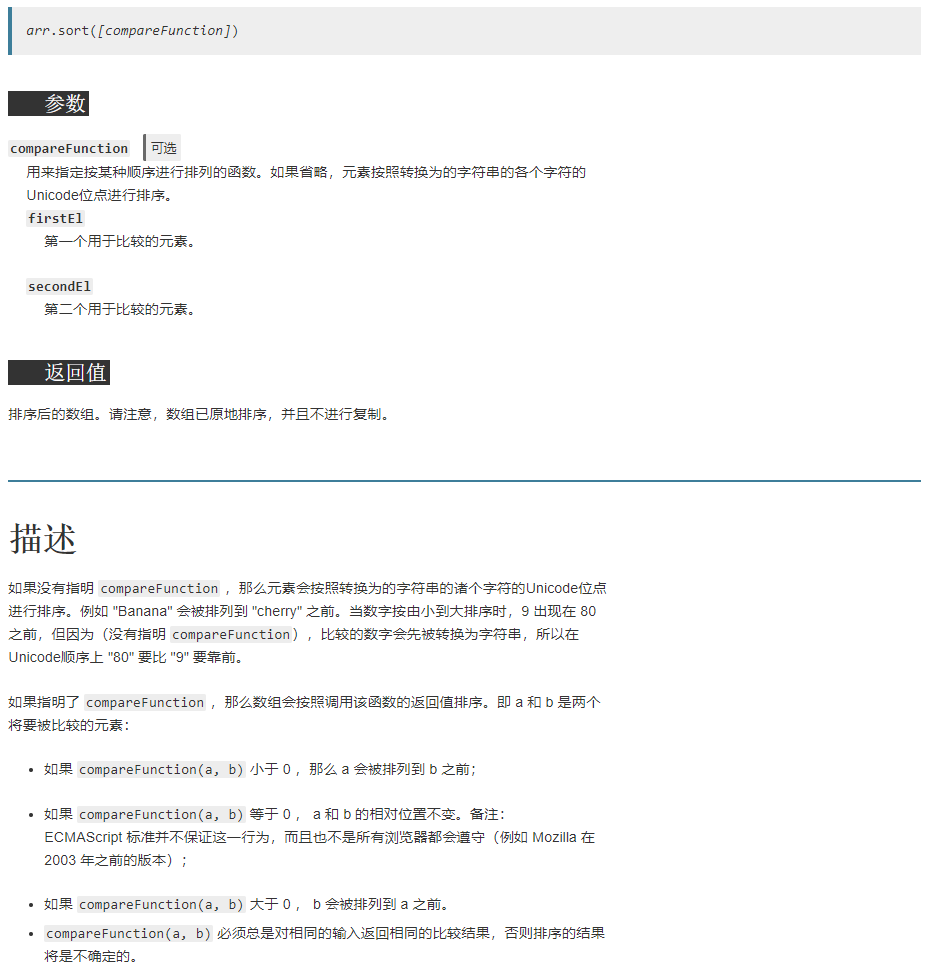
sort基于原地算法,方法提供了一个可选择的比较函数,可以提供两个参数,这两个参数相邻的并对这两个参数进行比较。我们只需要进行自定义的sort方法设置,通过比较a,b两个参数是否大于0即可知道a/b两个谁大然后array便会对两个参数进行自定义排序。
在lwc中,可以使用 array.sort((a,b) => {logic})方式去操作,a代表第一个item,b代表第二个item。logic返回大于0或者小于等于0即可。
我们对代码进行简单的变换。
import { LightningElement } from 'lwc';

export default class ArraySortSample extends LightningElement {

    integerArray = [2,5,23,4,16];

    stringArray = ['a','A','b','B'];

    items = [

        { name: 'Edward', value: 21 },

        { name: 'Sharpe', value: 37 },

        { name: 'And', value: 45 },

        { name: 'The', value: -12 },

        { name: 'Magnetic' },

        { name: 'Zeros', value: 37 }

    ];

    get sortedItemArray() {

        return this.items.sort((a,b) => {

            return (a.value - b.value);

        });

    }

    get sortedIntegerArray() {

        return this.integerArray.sort((a,b) => a - b);

    }

    get sortedStringArray() {

        //return this.stringArray.sort();

        return this.stringArray.sort((a,b) => {

            a = a.toLocaleLowerCase();

            b = b.toLocaleLowerCase();

            if(a <= b) {

                return -1;

            } else {

                return 1;

            }

        });

    }

}
对应的arraySortSample.html如下:
<template>

    <lightning-card title="integer item sort">

        <ul>

            <template for:each={sortedIntegerArray} for:item="integerItem">

                <li key={integerItem}>

                    {integerItem}

                </li>

            </template>

        </ul>

    </lightning-card>

    <lightning-card title="string item sort">

        <ul>

            <template for:each={sortedStringArray} for:item="stringItem">

                <li key={stringItem}>

                    {stringItem}

                </li>

            </template>

        </ul>

    </lightning-card>

    <lightning-card title="object item sort">

        <ul>

            <template for:each={sortedItemArray} for:item="objectItem">

                <li key={objectItem.value}>

                    {objectItem.name}

                </li>

            </template>

        </ul>

    </lightning-card>

</template>
结果展示
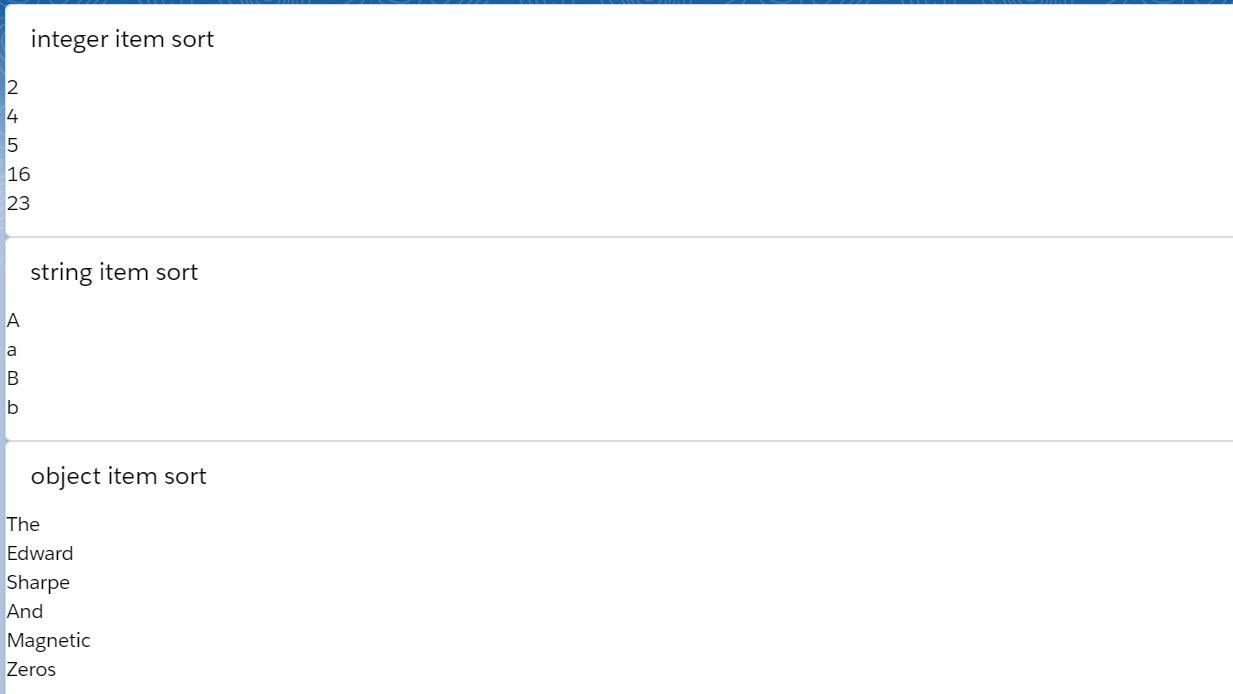
总结:篇中主要简单介绍了一下如何进行自定义sort以及标准sort的排序标准。篇中错误地方欢迎指出,有不懂欢迎留言。
Salesforce LWC学习(二十四) Array.sort 浅谈的更多相关文章
- Salesforce LWC学习(二十三) Lightning Message Service 浅谈
本篇参考: https://trailhead.salesforce.com/content/learn/superbadges/superbadge_lwc_specialist https://d ...
- Salesforce LWC学习(二十六) 简单知识总结篇三
首先本篇感谢长源edward老哥的大力帮助. 背景:我们在前端开发的时候,经常会用到输入框,并且对这个输入框设置 required或者其他的验证,当不满足条件时使用自定义的UI或者使用标准的 inpu ...
- Salesforce LWC学习(二十二) 简单知识总结篇二
本篇参看: https://developer.salesforce.com/docs/component-library/documentation/en/lwc/lwc.reactivity_fi ...
- Salesforce LWC学习(二十五) Jest Test
本篇参看: https://trailhead.salesforce.com/content/learn/modules/test-lightning-web-components https://j ...
- Salesforce LWC学习(三十四) 如何更改标准组件的相关属性信息
本篇参考: https://www.cnblogs.com/zero-zyq/p/14548676.html https://www.lightningdesignsystem.com/platfor ...
- Salesforce LWC学习(二十八) 复制内容到系统剪贴板(clipboard)
本篇参考: https://developer.mozilla.org/zh-CN/docs/Mozilla/Add-ons/WebExtensions/Interact_with_the_clipb ...
- Salesforce LWC学习(二十九) getRecordNotifyChange(LDS拓展增强篇)
本篇参考: https://developer.salesforce.com/docs/component-library/documentation/en/lwc/data_ui_api https ...
- Salesforce LWC学习(三十) lwc superbadge项目实现
本篇参考:https://trailhead.salesforce.com/content/learn/superbadges/superbadge_lwc_specialist 我们做lwc的学习时 ...
- Salesforce LWC学习(三十九) lwc下quick action的recordId的问题和解决方案
本篇参考: https://developer.salesforce.com/docs/component-library/bundle/force:hasRecordId/documentation ...
随机推荐
- Vue 引用图片的三种方式
首先给图片地址绑定变量 <template> <img :src="imgUrl"> </template> 在script中设置变量 < ...
- mysql基础测试题
mysql基础测试题:https://www.cnblogs.com/wupeiqi/articles/5729934.html 如何创建表? 就这样类推?如何提取我们想要的元素呢? 综合提取呢?
- ElasticSearch在CentOS的安装
ElasticSearch在CentOS的安装 一.tar包安装 单机安装 创建elastic用户,ElasticSearch不支持root用户运行 useradd elastic 上传文件到 /so ...
- JMX基本概念
Object name的语法 形似 com.sun.someapp:type=Whatsit,name=25 com.sun.someapp 是domain,冒号后面的是key-property-li ...
- 【NOI2005】瑰丽华尔兹 - DP
题目描述 你跳过华尔兹吗?当音乐响起,当你随着旋律滑动舞步,是不是有一种漫步仙境的惬意? 众所周知,跳华尔兹时,最重要的是有好的音乐.但是很少有几个人知道,世界上最伟大的钢琴家一生都漂泊在大海上,他的 ...
- 求正整数2和n之间的完全数
[题目描述] 求正整数22和nn之间的完全数(一行一个数). 完全数:因子之和等于它本身的自然数,如6=1+2+36=1+2+3 [输入] 输入n(n≤5000)n(n≤5000). [输出] 一行一 ...
- 详解Python Graphql
前言 很高兴现在接手的项目让我接触到了Python Graphql,百度上对其介绍相对较少也不够全面,几乎没有完整的中文文档,所以这边也借此机会学习一下Graphql. 什么是Graphql呢? Gr ...
- python爬虫抖音 个人资料 仅供学习参考 切勿用于商业
本文仅供学习参考 切勿用于商业 本次爬取使用fiddler+模拟器(下载抖音APP)+pycharm 1. 下载最新版本的fiddler(自行百度下载),以及相关配置 1.1.依次点击,菜单栏-Too ...
- 微信DLL劫持反弹shell复现
(该文参考网络他人资料,仅为学习,不许用于非法用途) 一.操作环境 Windows7 : 微信 , Process Explorer(任务管理工具,本实验中用于查找微信程序调用的DLL文件) Ka ...
- java基础-03:注释
1.注释的意义: (1) 为了更好的阅读自己编写的代码,方便日后代码维护,建议添加注释. (2) 有利于团队协作. (3) 代码即文档.程序源代码是程序文档的重要组成部分. 2.注释分类 (1) 单行 ...