
Salesforce LWC学习(三十九) lwc下quick action的recordId的问题和解决方案
本篇参考:
https://developer.salesforce.com/docs/component-library/bundle/force:hasRecordId/documentation
https://developer.salesforce.com/docs/component-library/documentation/en/lwc/use_record_context
Salesforce LWC学习(三十六) Quick Action 支持选择 LWC了
我们在使用lwc的时候,recordId的嵌入以及wire adapter的功能,极大的减轻了我们的开发压力,让我们很爽的使用着。后来随着release的不断增强,lwc也支持quick action。这个我们在之前的篇章也讲过。曾经对recordId的使用不是很深入,随着quick action的一个功能的使用,发现了recordId在lwc下的一个隐藏描述(或者直接说是bug也好)。我们先来一个大家常用并且看上去没有问题的代码
testLwcQuickAction.html
<template>

    <lightning-quick-action-panel header="Test LWC Quick Action">

        {name}

    </lightning-quick-action-panel>

</template>
testLwcQuickAction.js
import { LightningElement, track, wire,api } from 'lwc';

import { CloseActionScreenEvent } from 'lightning/actions';

import { getRecord, getFieldValue } from 'lightning/uiRecordApi';

import NAME_FIELD from '@salesforce/schema/Account.Name';

export default class testLwcQuickAction extends LightningElement {

    @api recordId;

    @wire(getRecord, { recordId: '$recordId', fields: [NAME_FIELD]})

    account;

    get name() {

        return getFieldValue(this.account.data, NAME_FIELD);

    }

}
将这个lwc配置成一个quick action,类型选择lightning web component,找到一条account,我们看一下效果。
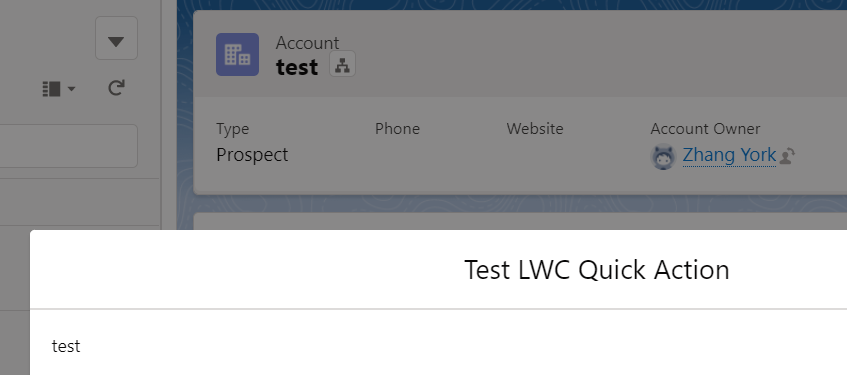
展示正常,没啥问题。那我们有时候会使用quick action做callout或者后台交互,当然可以使用headless的quick action,但是为了UI美观,我们可以使用screen的quick action,运行时展示 spinner,运行结束消失,让用户不会以为页面假死。我们进行下个代码展示。
TestLwcQuickActionController.cls
public with sharing class TestLwcQuickActionController {

     @AuraEnabled(cacheable=false)

     public static Boolean updateAccount(String accountId) {

         Account accountItem = new Account();

         accountItem.Id = accountId;

         accountItem.Name = 'updated account : ' + String.valueOf(System.now());

         update accountItem;

         return true;

     }

}
testLwcQuickAction2.html
<template>

<lightning-quick-action-panel header="Test LWC Quick Action">

</lightning-quick-action-panel>

</template>
testLwcQuickAction2.js
import { LightningElement, track, wire,api } from 'lwc';

import { CloseActionScreenEvent } from 'lightning/actions';

import { ShowToastEvent } from 'lightning/platformShowToastEvent';

import updateAccount from '@salesforce/apex/TestLwcQuickActionController.updateAccount';

export default class testLwcQuickAction2 extends LightningElement {

    @api recordId;

    renderedCallback() {

        updateAccount({accountId : this.recordId})

        .then(result => {

            console.log(result);

            let event = new ShowToastEvent({

                    title: 'update success',

                    variant: 'success'

                });

                this.dispatchEvent(event);

                this.dispatchEvent(new CloseActionScreenEvent());

        })

        .catch(error => {

            console.log(JSON.stringify(error));

            let event = new ShowToastEvent({

                    title: 'error occurs',

                    variant: "error"

                });

            this.dispatchEvent(event);

            this.dispatchEvent(new CloseActionScreenEvent());

        });

    }

}
乍一眼看上去是不是一点问题都没有,让我们实际运行一下
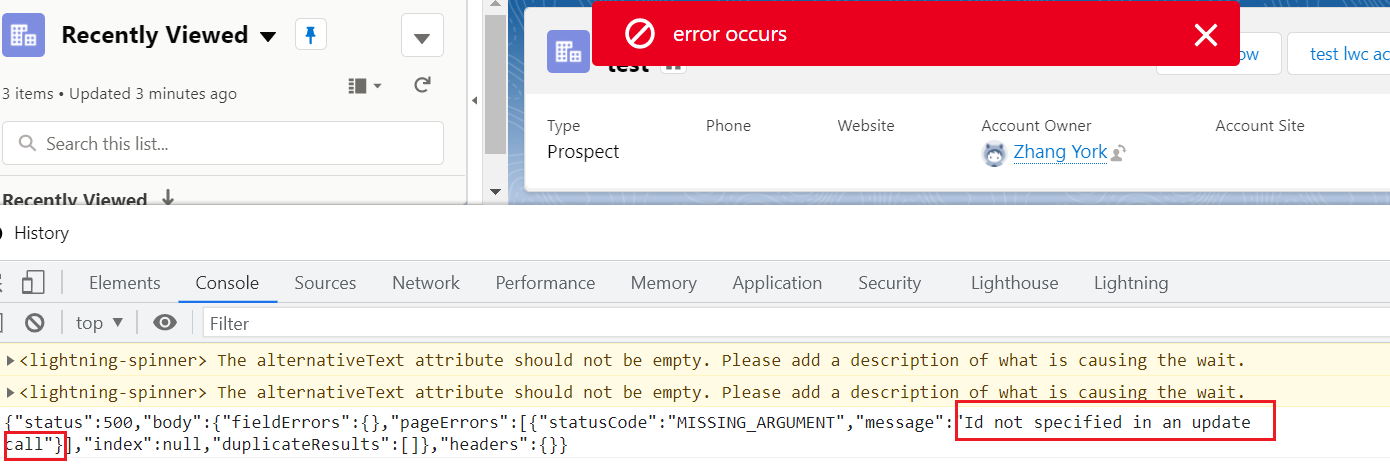
竟然报错了,提示没有recordId,我们将这个不作为 lwc 的quick action,复制这个代码,放在 lightning record page发现代码正常运行,只有作为quick action情况下,recordId为null??? 当然,不止renderedCallback, connectedCallback下,recordId同样为空。我们找到文档,提示只有显示UI的上下文才可以正常的使用 recordId,其他的情况下则不支持。当然,报错原因是 recordId我们没有判断非空,这个主要是为了暴露问题,如果使用非空验证,仍然不会执行后台。

那么问题来了,什么是 explicit record context?我们哪里可以查到呢? 至少lwc的文档中没有查看到,所以我们需要先找到 aura的文档,因为aura是lightning experience的第一版,我们只需要看一下 force:hasRecordId的文档去碰一下运气看看有没有即可。很幸运地是,我们找到了文档,并且了解了什么算是显示记录的上下文。
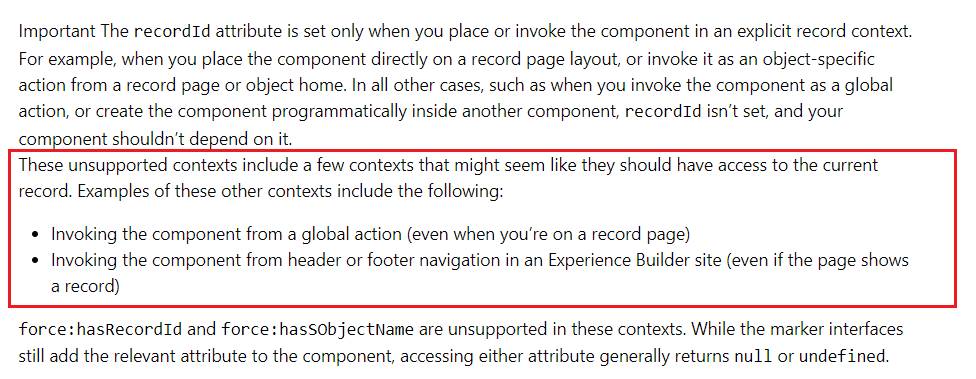
通过描述愈发的感觉这是因为 lwc quick action的兼容性导致的问题,或者说是一个bug,因为这个并不符合说的显示记录的上下文的描述,而且同样代码作为组件放在record page即可以生效。当然问题既然发现,找到workaround方案就可以了。解决这个问题,目前想到3种 workaround方案,每个方案都亲测可以解决问题。
1. 前端展示 recordId,放在 div 设置 style="display:none"即可,这样就满足了显示记录上下文的要求,将js内容前端展示,则会强制嵌入。
testLwcQuickAction2.html
<template>

<lightning-quick-action-panel header="Test LWC Quick Action">

    <div style="display: none;">

        {recordId}

    </div>

</lightning-quick-action-panel>

</template>
testLwcQuickAction2.js:renderedCallback先判断recordId非空
import { LightningElement, track, wire,api } from 'lwc';

import { CloseActionScreenEvent } from 'lightning/actions';

import { ShowToastEvent } from 'lightning/platformShowToastEvent';

import updateAccount from '@salesforce/apex/TestLwcQuickActionController.updateAccount';

export default class testLwcQuickAction2 extends LightningElement {

    @api recordId;

    renderedCallback() {

        if(this.recordId) {

            updateAccount({accountId : this.recordId})

            .then(result => {

                console.log(result);

                let event = new ShowToastEvent({

                        title: 'update success',

                        variant: 'success'

                    });

                    this.dispatchEvent(event);

                    this.dispatchEvent(new CloseActionScreenEvent());

            })

            .catch(error => {

                console.log(JSON.stringify(error));

                let event = new ShowToastEvent({

                        title: 'error occurs',

                        variant: "error"

                    });

                this.dispatchEvent(event);

                this.dispatchEvent(new CloseActionScreenEvent());

            });

        }

    }

}
2. aura类型quick action,aura搭配lwc的组合YYDS
testQuickActionForAura.cmp: aura下嵌入 recordId正常
<aura:component implements="force:hasRecordId,force:lightningQuickActionWithoutHeader">

    <aura:attribute name="recordId" type="String"></aura:attribute>

    <c:testSonLwcQuickAction recordId="{!v.recordId}" onclosemodal="{!c.handleCloseAction}"></c:testSonLwcQuickAction>

</aura:component>
testQuickActionForAuraController.js
({

    handleCloseAction : function(component, event, helper) {

        $A.get('e.force:refreshView').fire();

        $A.get("e.force:closeQuickAction").fire();

    }

})
testSonLwcQuickAction.js
import { LightningElement, track, wire,api } from 'lwc';

import { ShowToastEvent } from 'lightning/platformShowToastEvent';

import updateAccount from '@salesforce/apex/TestLwcQuickActionController.updateAccount';

export default class testSonLwcQuickAction extends LightningElement {

    @api recordId;

    renderedCallback() {

        updateAccount({accountId : this.recordId})

        .then(result => {

            console.log(result);

            let event = new ShowToastEvent({

                    title: 'update success',

                    variant: 'success'

                });

                this.dispatchEvent(event);

                this.dispatchEvent(new CustomEvent('closemodal'));

        })

        .catch(error => {

            console.log(JSON.stringify(error));

            let event = new ShowToastEvent({

                    title: 'error occurs',

                    variant: "error"

                });

            this.dispatchEvent(event);

            this.dispatchEvent(new CustomEvent('closemodal'));

        });

    }

}
lwc的js调用后台,运行以后,event dispatch,aura关闭quick action modal,此种方式亲测有效。
3. 使用CurrentPageReference获取recordId,获取以后,再去执行后台方法
testLwcQuickAction.html
<template>

<lightning-quick-action-panel header="Test LWC Quick Action">

</lightning-quick-action-panel>

</template>
testLwcQuickAction.js
import { LightningElement, track, wire,api } from 'lwc';

import { CloseActionScreenEvent } from 'lightning/actions';

import { ShowToastEvent } from 'lightning/platformShowToastEvent';

import { CurrentPageReference } from 'lightning/navigation';

import updateAccount from '@salesforce/apex/TestLwcQuickActionController.updateAccount';

export default class testLwcQuickAction3 extends LightningElement {

    @track recordId;

    @wire(CurrentPageReference)

    pageRef;

    renderedCallback() {

        if(this.pageRef && this.pageRef.state) {

            this.recordId = this.pageRef.state.recordId;

            updateAccount({accountId : this.recordId})

            .then(result => {

                console.log('*** result : ' + result);

                let event = new ShowToastEvent({

                        title: 'update success',

                        variant: 'success'

                    });

                    this.dispatchEvent(event);

                    this.dispatchEvent(new CloseActionScreenEvent());

            })

            .catch(error => {

                console.log(JSON.stringify(error));

                let event = new ShowToastEvent({

                        title: 'error occurs',

                        variant: "error"

                    });

                this.dispatchEvent(event);

                this.dispatchEvent(new CloseActionScreenEvent());

            });

        }

    }

}
简单演示:点击按钮以后,可以正常的获取 recordId并且可以正常的运行

总结: 篇中只是暴露出recordId在lwc quick action下的问题,其他的情况暂时使用正常,以及3种workaround方案。篇中demo中没有考虑缓存,也没有优化代码,感兴趣的小伙伴自行优化。有更好的方法欢迎交流沟通。篇中错误地方欢迎指出,有不懂欢迎留言。
Salesforce LWC学习(三十九) lwc下quick action的recordId的问题和解决方案的更多相关文章
- Salesforce LWC学习(三十八) lwc下如何更新超过1万的数据
背景: 今天项目组小伙伴问了一个问题,如果更新数据超过1万条的情况下,有什么好的方式来实现呢?我们都知道一个transaction只能做10000条DML数据操作,那客户的操作的数据就是超过10000 ...
- Salesforce LWC学习(三十) lwc superbadge项目实现
本篇参考:https://trailhead.salesforce.com/content/learn/superbadges/superbadge_lwc_specialist 我们做lwc的学习时 ...
- Salesforce LWC学习(二十九) getRecordNotifyChange(LDS拓展增强篇)
本篇参考: https://developer.salesforce.com/docs/component-library/documentation/en/lwc/data_ui_api https ...
- Salesforce LWC学习(三十六) Quick Action 支持选择 LWC了
本篇参考: https://developer.salesforce.com/docs/component-library/documentation/en/lwc/lwc.use_quick_act ...
- Salesforce LWC学习(三十四) 如何更改标准组件的相关属性信息
本篇参考: https://www.cnblogs.com/zero-zyq/p/14548676.html https://www.lightningdesignsystem.com/platfor ...
- Salesforce LWC学习(三十五) 使用 REST API实现不写Apex的批量创建/更新数据
本篇参考: https://developer.salesforce.com/docs/atlas.en-us.224.0.api_rest.meta/api_rest/resources_compo ...
- Salesforce LWC学习(三十二)实现上传 Excel解析其内容
本篇参考:salesforce lightning零基础学习(十七) 实现上传 Excel解析其内容 上一篇我们写了aura方式上传excel解析其内容.lwc作为salesforce的新宠儿,逐渐的 ...
- 前端学习(三十九)移动端app(笔记)
移动端App 开发App的三种方式 Native App 原生 底层语言 java Android oc ...
- Java开发学习(三十九)----SpringBoot整合mybatis
一.回顾Spring整合Mybatis Spring 整合 Mybatis 需要定义很多配置类 SpringConfig 配置类 导入 JdbcConfig 配置类 导入 MybatisConfig ...
随机推荐
- Android获取通知栏的高度
1 public static int getStatusBarHeight(Context context){ 2 Class<?> c = null; 3 ...
- spring 事务处理中,同一个类中:A方法(无事务)调B方法(有事务),事务不生效问题
public class MyEntry implements IBaseService{ public String A(String jsonStr) throws Exception{ User ...
- springboot整合jetty
1.jetty介绍 通常我们进行Java Web项目开发,必须要选择一种服务器来部署并运行Java应用程序,Tomcat和Jetty作为目前全球范围内最著名的两款开源servlet容器,该怎么选呢. ...
- 【Java基础】方法调用机制——MethodHandle
MethodHandle是Java7引入的一种机制,主要是为了JVM支持动态语言. 一个MethodHandle调用示例 共有方法调用 首先,演示一下最基本的MethodHandle使用. 第一步:创 ...
- 对于HTML和XML的理解
1.什么是HTML??? HTML就是 超文本标记语言(超文本含义:超过文本 --图片 .视频.音频. 超链接) 2.HTML作用 把网页的信息格式化的展现,对网页信息进行规范化展示 连接(https ...
- Java线程安全性-原子性工具对比
synchronized 不可中断锁,适合竞争不激烈的场景,可读性好,竞争激烈时性能下降很快 Lock 可中断锁,多样化同步,竞争激烈时能维持常态 Atomic 竞争激烈时能维持常态,比Lock性能还 ...
- Git初始化及仓库创建和操作
一.基本信息配置 1.全局配置用户名 git config --global user.name "YeHuan-byte" 2.全局配置邮箱 git config --globa ...
- 优化器统计跟踪(SYS.EXP_HEAD$ SYS.EXP_OBJ$ SYS.EXP_STAT$不)导致表空间 SYSAUX不断增长
资料来自support文档 ID 2354960.1 环境: aws rds 19c(亚马逊云oracle 数据库) 背景: 在一次查看数据库表段的占用空间大小的时候,无意间发现其中EXP_开头的表占 ...
- Samba 源码解析之SMBclient命令流
smbclient提供了类似FTP式的共享文件操作功能, 本篇从源码角度讲解smbclient的实现,smbclient命令的具体使用可通过help命令和互联网查到大量资料. 以下从源码角度分析一个s ...
- Python测试框架pytest入门基础
Pytest简介 Pytest is a mature full-featured Python testing tool that helps you write better programs.T ...