
Android 控件属性
TextView 文字属性
//文字左右居中
android:layout_centerHorizontal="true"
//文字垂直居中
android:layout_centerVertical="true"
//文字大小
android:textSize="80px"
//背景颜色
android:background="#00FF00"
//获取页面对象的值用findViewById 来获取
例子:获取TextView的值
TextView textView = (TextView)findViewById(R.id.空间ID);
----------------------------------------------------
2、View是所以控件的父类。
文本、按钮、多选、单选、布局、等等都集成View。
----------------------------------------------------
3、监听器的使用基本流程。
①获取代表控件的对象
②定义一个类,实现监听器接口
③生成监听器对象
④为控件绑定监听器对象
 protected void onCreate(Bundle savedInstanceState) {

        super.onCreate(savedInstanceState);

        setContentView(R.layout.layout);

           textview = (TextView)findViewById(R.id.txtView);

           textview.setText("第一个TextView");

           textview.setBackgroundColor(Color.GREEN);

           //拿到Button控件

           btn = (Button)findViewById(R.id.btn);

           ButtonListener btns = new ButtonListener();

           btn.setOnClickListener(btns);

    }

    //监听器类

    class ButtonListener implements OnClickListener

    {

        @Override

        public void onClick(View view) {

            count_S++;

            textview.setText(count_S+"");

        }

    }
-----------------------------------------------------
4、布局方法分类(-)
1、linerLayout 线性布局
2、RelativeLayout 相对布局 用的比较多
3、ListView布局
4、GridView布局

-------------------------------------------
5、距离单位
1、距离单位px
2、距离单位dp
3、距离单位sp
4、控件的外边距和内边距
(1)什么是dpi (dots per inch)dpi是屏幕的细腻程度。
计算公式:
dpi = (height² + width²)开根号 ,除以 size
dp = dip(Device Independent pixels)
换算公式 px = dp *(dpi /160)
在dpi为160的屏幕上:1dp =1px

(2)sp 通常用于指定字体大小
① sp: scaled pixels
② sp单位通常用于指定字体大小
③ 当用户修改手机字体是,sp会随之改变
(3) 字体用sp,控件大小用dp。
-----------------------------------------------------------------------------
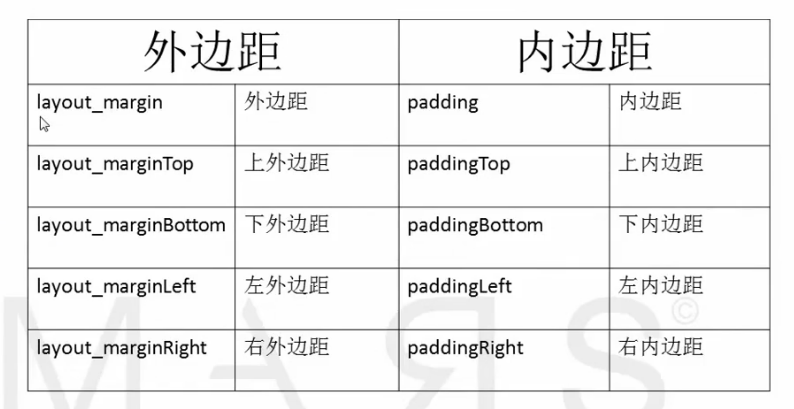
6、内边距和外边距

(1)设置内边距和外边距
7、CheckBox 全选和全不选
private CheckBox eatBox;

    private CheckBox sleepBox;

    private CheckBox dotaBox;

    private CheckBox AllCheck;

    private CheckBox CkLOL;

    private TextView textview;

    private Button btn;

    int count_S = ;

    @Override

    protected void onCreate(Bundle savedInstanceState) {

        super.onCreate(savedInstanceState);

        setContentView(R.layout.checkbox);

        eatBox = (CheckBox) findViewById(R.id.eatId);

        sleepBox = (CheckBox) findViewById(R.id.sleepId);

        dotaBox = (CheckBox) findViewById(R.id.dotaId);

        AllCheck = (CheckBox)findViewById(R.id.AllCheckId);

        CkLOL = (CheckBox)findViewById(R.id.LOL);

        AllCheckListener al = new AllCheckListener();

        AllCheck.setOnCheckedChangeListener(al);

    }

    class AllCheckListener implements CompoundButton.OnCheckedChangeListener

    {

        @Override

        public void onCheckedChanged(CompoundButton compoundButton, boolean isChecked) {
      //方法一:

            if (isChecked)

            {

                eatBox.setChecked(true);

                sleepBox.setChecked(true);

                dotaBox.setChecked(true);

                CkLOL.setChecked(true);

                System.out.println("All Check");

            }else{

                eatBox.setChecked(false);

                sleepBox.setChecked(false);

                dotaBox.setChecked(false);

                CkLOL.setChecked(false);

                System.out.println("unCheck");

            }

      ----------
      方法二:
        eatBox.setChecked(isChecked);
        sleepBox.setChecked(isChecked);
        dotaBox.setChecked(isChecked);
        CkLOL.setChecked(isChecked);
}
8、单选按钮Radio
  private RadioGroup radioGroup;

    private RadioButton nan;

    private RadioButton nv;

    @Override

    protected void onCreate(Bundle savedInstanceState) {

        super.onCreate(savedInstanceState);

        setContentView(R.layout.radiobox);

        radioGroup = (RadioGroup) findViewById(R.id.radioGroupId);

        nan = (RadioButton)findViewById(R.id.nanID);

        nan.setChecked(true);   //默认是第一个被选中

        nv = (RadioButton)findViewById(R.id.nvId);

        RadioGroupListener listener = new RadioGroupListener();

        radioGroup.setOnCheckedChangeListener(listener);

    }

    class RadioGroupListener implements RadioGroup.OnCheckedChangeListener

    {

        //id被选中单选单选按钮ID

        @Override

        public void onCheckedChanged(RadioGroup radioGroup, int id)

        {

            //radioGroup 有多个组情况要先判断是哪个Group

            if (radioGroup.getId() == R.id.radioGroupId)

            {

                if (id == nan.getId())

                {

                    System.out.println("选中男");

                }else if (id==nv.getId())

                {

                    System.out.println("选中nv");

                }

            }else{

                System.out.println("没有选中按钮");

            }

        }

    }
9、图片控件 ImageView
    <ImageView

        android:layout_width="match_parent"

        android:layout_height="206dp"

        android:id="@+id/imageView"

        android:layout_gravity="center_vertical"

        android:src="@mipmap/a12" />   // 图片路径
ScaleType 拉伸类型
10、android:layout_weight="1"
是平分剩余的空间,而不是把父容器平分
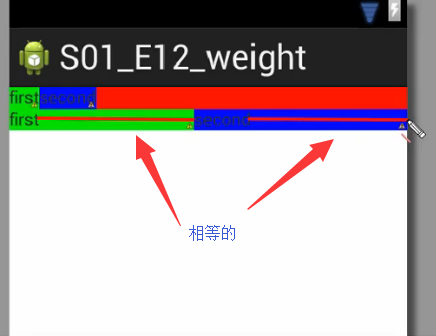
如果想让第一个控件占屏幕的1/3,第二个控件占2/3
  <TextView

        android:id="@+id/firstID"

        android:layout_width="0dp"

        android:layout_height="wrap_content"

        android:background="#00FF00"

        android:layout_weight=""

        android:text="first101010"/>

    <TextView

        android:id="@+id/secondID"

        android:layout_width="0dp"

        android:layout_height="wrap_content"

        android:layout_weight=""

        android:background="#002200"

        android:text="second"/>

height 也是可以这样用。
11、相对布局

<TextView
    android:id="@+id/firstView"       //@+id 是创建ID
    android:layout_width="wrap_content"
    android:layout_height="wrap_content"
    android:background="#FF0000"
    android:text="Hello World!"
    />
<TextView

    android:layout_width="wrap_content"
    android:layout_height="wrap_content"
    android:layout_toRightOf="@id/firstView"   //@id 是引用ID 是存在的ID
    android:background="#00FF00"
    android:text="World Hello!"/>
Android 控件属性的更多相关文章
- Android控件属性大全(转)
http://blog.csdn.net/pku_android/article/details/7365685 LinearLayout 线性布局 子元素任意: Tab ...
- Android控件属性大全[整理转载]
控件属性: android属性 Android功能强大,界面华丽,但是众多的布局属性就害苦了开发者,下面这篇文章结合了网上不少资料, 第一类:属性值为true或falseandroid:layout_ ...
- 【转载】Android控件属性大全
控件属性: android属性 Android功能强大,界面华丽,但是众多的布局属性就害苦了开发者,下面这篇文章结合了网上不少资料, 第一类:属性值为true或falseandroid:layout_ ...
- 转:Android控件属性
Android功能强大,界面华丽,但是众多的布局属性就害苦了开发者,下面这篇文章结合了网上不少资料,花费本人一个下午搞出来的,希望对其他人有用. 第一类:属性值为true或false android: ...
- Android控件属性android:visibility的invisible与gone的区别
"invisible" : 不可见 "gone" : 隐 藏 主要区别在于控件设置了invisible后控件不可见,但是保留了控件在界面上的空间, ...
- Android - 控件android:ems属性
Android - 控件android:ems属性http://blog.csdn.net/caroline_wendy/article/details/41684255?utm_source=tui ...
- android控件的属性
android控件的属性 本节描述android空间的位置,内容等相关属性及属性的含义 第一类:属性值为true或false android:layout_centerHrizontal 水平居中 ( ...
- 关于Android控件EditText的属性InputType的一些经验,java组合多个参数
关于Android控件EditText的属性InputType的一些经验 2013-11-14 15:08:02| 分类: 默认分类|举报|字号 订阅 1.InputType属性在代码中 ...
- Android控件常见属性
1.宽/高android:layout_width android:layout_height// 取值match_parent //匹配父控件wrap_content //自适应,根据内容 如果指定 ...
随机推荐
- JAVA JNI学习
JAVA JNI JNI是Java Native Interface的缩写,中文为JAVA本地调用.从Java1.1开始,Java Native Interface(JNI)标准成为java平台的 ...
- SQL Server 索引重建的 4 种方法
解决方法 方法 1. 重建指定索引,这种方法没有性能可谈.重建时表还不可访问. 方法 2. 在线重建索引,只有SQL Server 企业版才支持. 方法 3. 使用填充因子重建,这样做不一定可以减小查 ...
- angularJS常用命令
首先使用命令行进入你要编辑的web项目目录下: (一)编译浏览项目 1:grunt build 对web项目编译: 2:grunt server 装载(在浏览器上查看页面): 3:ctrl ...
- SQL Server索引 - 索引(物化)视图 <第九篇>
一.索引视图基本概念 索引视图实际上是一种将一组唯一值“物化”为群集索引形式的视图,所为物化就是几乎和表一样,其数据也是会存储一份的(会占用硬盘空间,但是查询速度快,例如可以将count(),sum( ...
- Linux系统编程(20)——信号基本概念
信号及信号来源 信号是在软件层次上对中断机制的一种模拟,在原理上,一个进程收到一个信号与处理器收到一个中断请求可以说是一样的.信号是异步的,一个进程不必通过任何操作来等待信号的到达,事实上,进程也不知 ...
- Linux系统编程(8)—— 进程之进程控制函数fork
fork()函数通过系统调用创建一个与原来进程几乎完全相同的进程,也就是两个进程可以做完全相同的事,但如果初始参数或者传入的变量不同,两个进程也可以做不同的事. 一个进程调用fork()函数后,系统先 ...
- 【转】Android虚拟平台的编译和整合
原文网址:http://blog.csdn.net/rickleaf/article/details/6369065 概要 Android从2008年开始到本文写的2011年,短短三年的时间里成为手机 ...
- Asp.NET MVC 技术参考:http://kb.cnblogs.com/zt/mvc/
Asp.NET MVC 技术参考:http://kb.cnblogs.com/zt/mvc/
- 学生管理系统(list)
学生管理系统:学习了一点文件指针的操作和链表操作,以前总想搞下子,刚好碰到同学要做这个,自己瞎搞了一通. 实现功能:数据添加,查找,删除,插入,修改只是在查找加几句就没写. #include < ...
- hdu 4502 吉哥系列故事——临时工计划_简单dp
题意: 俗话说一分钱难倒英雄汉,高中几年下来,吉哥已经深深明白了这个道理,因此,新年开始存储一年的个人资金已经成了习惯,不过自从大学之后他不好意思再向大人要压岁钱了,只能把唯一的希望放到 ...