
Maven+Eclipse+Spring MVC简单实例
1. ToolsVersion and Preparations:
Eclipse: 3.5 (eclipse-jee-galileo-win32)
Maven: 2.0.11
Spring MVC : 3.0.5 Release
JDK:1.6
Eclipse Maven的插件
2.Stepby step:
2.1 在Eclipse 里建立Maven项目
选择File-> New -> Other,在New窗口中选择 Maven -> Maven Project
Click ‘Next’ button:
Click ‘Next’ button:
在‘Filter’后面的文本框输入:maven-archetype-webapp
Click and select "org.apache.maven.archetypes" row, then click ‘Next’ button:
Click ‘Finish’ button , thenthe new Maven project will be successfully created.
建立好后的文件结构如下图:
2.2 创建Source目录结构,达到标准Maven项目的结构
分别添加如下三个Source Folder:
src/main/java , src/test/java , src/test/resources
2.3向Maven项目里添加所依赖的Jar包
Copy below pom.xml contents to your project pom.xml.
<projectxmlns="http://maven.apache.org/POM/4.0.0"xmlns:xsi="http://www.w3.org/2001/XMLSchema-instance"
xsi:schemaLocation="http://maven.apache.org/POM/4.0.0http://maven.apache.org/maven-v4_0_0.xsd">
<modelVersion>4.0.0</modelVersion>
<groupId>springmvc.maven.example</groupId>
<artifactId>springmvc</artifactId>
<packaging>war</packaging>
<version>0.0.1-SNAPSHOT</version>
<name>springmvc MavenWebapp</name>
<url>http://maven.apache.org</url>
<properties>
<context.path>springmvc</context.path>
<compiler.version>1.5</compiler.version>
<tomcat.port>8083</tomcat.port>
</properties>
<dependencies>
<dependency>
<groupId>junit</groupId>
<artifactId>junit</artifactId>
<version>4.8.1</version>
<scope>test</scope>
</dependency>
<dependency>
<groupId>org.springframework</groupId>
<artifactId>spring-aop</artifactId>
<version>3.0.5.RELEASE</version>
<type>jar</type>
<scope>compile</scope>
</dependency>
<dependency>
<groupId>org.springframework</groupId>
<artifactId>spring-asm</artifactId>
<version>3.0.5.RELEASE</version>
<type>jar</type>
<scope>compile</scope>
</dependency>
<dependency>
<groupId>org.springframework</groupId>
<artifactId>spring-aspects</artifactId>
<version>3.0.5.RELEASE</version>
<type>jar</type>
<scope>compile</scope>
</dependency>
<dependency>
<groupId>org.springframework</groupId>
<artifactId>spring-beans</artifactId>
<version>3.0.5.RELEASE</version>
<type>jar</type>
<scope>compile</scope>
</dependency>
<dependency>
<groupId>org.springframework</groupId>
<artifactId>spring-context</artifactId>
<version>3.0.5.RELEASE</version>
<type>jar</type>
<scope>compile</scope>
</dependency>
<dependency>
<groupId>org.springframework</groupId>
<artifactId>spring-context-support</artifactId>
<version>3.0.5.RELEASE</version>
<type>jar</type>
<scope>compile</scope>
</dependency>
<dependency>
<groupId>org.springframework</groupId>
<artifactId>spring-core</artifactId>
<version>3.0.5.RELEASE</version>
<type>jar</type>
<scope>compile</scope>
</dependency>
<dependency>
<groupId>org.springframework</groupId>
<artifactId>spring-expression</artifactId>
<version>3.0.5.RELEASE</version>
<type>jar</type>
<scope>compile</scope>
</dependency>
<dependency>
<groupId>org.springframework</groupId>
<artifactId>spring-jdbc</artifactId>
<version>3.0.5.RELEASE</version>
<type>jar</type>
<scope>compile</scope>
</dependency>
<dependency>
<groupId>org.springframework</groupId>
<artifactId>spring-jms</artifactId>
<version>3.0.5.RELEASE</version>
<type>jar</type>
<scope>compile</scope>
</dependency>
<dependency>
<groupId>org.springframework</groupId>
<artifactId>spring-orm</artifactId>
<version>3.0.5.RELEASE</version>
<type>jar</type>
<scope>compile</scope>
</dependency>
<dependency>
<groupId>org.springframework</groupId>
<artifactId>spring-oxm</artifactId>
<version>3.0.5.RELEASE</version>
<type>jar</type>
<scope>compile</scope>
</dependency>
<dependency>
<groupId>org.springframework</groupId>
<artifactId>spring-tx</artifactId>
<version>3.0.5.RELEASE</version>
<type>jar</type>
<scope>compile</scope>
</dependency>
<dependency>
<groupId>org.springframework</groupId>
<artifactId>spring-web</artifactId>
<version>3.0.5.RELEASE</version>
<type>jar</type>
<scope>compile</scope>
</dependency>
<dependency>
<groupId>org.springframework</groupId>
<artifactId>spring-webmvc</artifactId>
<version>3.0.5.RELEASE</version>
<type>jar</type>
<scope>compile</scope>
</dependency>
<dependency>
<groupId>org.springframework</groupId>
<artifactId>spring-test</artifactId>
<version>3.0.5.RELEASE</version>
<type>jar</type>
<scope>compile</scope>
</dependency>
<dependency>
<groupId>javax.servlet</groupId>
<artifactId>jstl</artifactId>
<version>1.2</version>
<type>jar</type>
<scope>compile</scope>
</dependency>
</dependencies>
<build>
<defaultGoal>tomcat:run</defaultGoal>
<resources>
<resource>
<directory>${basedir}/src/main/java</directory>
<includes>
<include>**/*.xml</include>
</includes>
</resource>
<resource>
<directory>${basedir}/src/main/resources</directory>
<includes>
<include>**/*.xml</include>
<include>**/*.properties</include>
</includes>
</resource>
</resources>
<plugins>
<plugin>
<groupId>org.apache.maven.plugins</groupId>
<artifactId>maven-compiler-plugin</artifactId>
<configuration>
<source>${compiler.version}</source>
<target>${compiler.version}</target>
</configuration>
</plugin>
<plugin>
<groupId>org.codehaus.mojo</groupId>
<artifactId>tomcat-maven-plugin</artifactId>
<configuration>
<port>${tomcat.port}</port>
</configuration>
</plugin>
</plugins>
<finalName>${context.path}</finalName>
</build>
</project>
2.4构建SpringMVC框架
2.4.1 编辑web.xml文件
webx.xml代码如下:
<?xmlversion="1.0" encoding="UTF-8"?>
<web-appxmlns="http://java.sun.com/xml/ns/javaee"
xmlns:xsi="http://www.w3.org/2001/XMLSchema-instance"
xsi:schemaLocation="http://java.sun.com/xml/ns/javaee
http://java.sun.com/xml/ns/javaee/web-app_2_5.xsd"
version="2.5" >
<!-- 区分项目名称,防止默认重名-->
<context-param>
<param-name>webAppRootKey</param-name>
<param-value>maven.example.root</param-value>
</context-param>
<!-- Spring的log4j监听器-->
<listener>
<listener-class>org.springframework.web.util.Log4jConfigListener</listener-class>
</listener>
<!-- 字符集 过滤器 -->
<filter>
<filter-name>CharacterEncodingFilter</filter-name>
<filter-class>org.springframework.web.filter.CharacterEncodingFilter</filter-class>
<init-param>
<param-name>encoding</param-name>
<param-value>UTF-8</param-value>
</init-param>
<init-param>
<param-name>forceEncoding</param-name>
<param-value>true</param-value>
</init-param>
</filter>
<filter-mapping>
<filter-name>CharacterEncodingFilter</filter-name>
<url-pattern>/*</url-pattern>
</filter-mapping>
<!-- Spring view分发器 -->
<servlet>
<servlet-name>dispatcher</servlet-name>
<servlet-class>org.springframework.web.servlet.DispatcherServlet</servlet-class>
<init-param>
<param-name>contextConfigLocation</param-name>
<param-value>classpath*:dispatcher-servlet.xml</param-value>
</init-param>
<load-on-startup>1</load-on-startup>
</servlet>
<servlet-mapping>
<servlet-name>dispatcher</servlet-name>
<url-pattern>*.do</url-pattern>
</servlet-mapping>
</web-app
2.4.2编写Spring配置文件dispatcher-servlet.xml
(src/main/resources/dispatcher-servlet.xml)
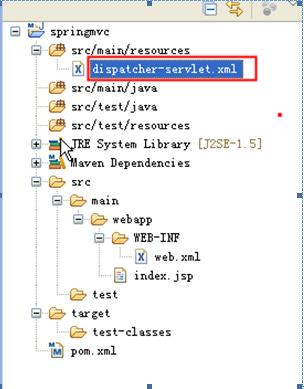
如要添加MVC驱动、注解检测、视图解析等。dispatcher-servlet.xml代码如下:
<?xml version="1.0"encoding="UTF-8"?>
<beansxmlns="http://www.springframework.org/schema/beans"
xmlns:aop="http://www.springframework.org/schema/aop"
xmlns:context="http://www.springframework.org/schema/context"
xmlns:mvc="http://www.springframework.org/schema/mvc"
xmlns:tx="http://www.springframework.org/schema/tx"
xmlns:xsi="http://www.w3.org/2001/XMLSchema-instance"
xsi:schemaLocation="http://www.springframework.org/schema/aop
http://www.springframework.org/schema/aop/spring-aop-3.0.xsd
http://www.springframework.org/schema/beans
http://www.springframework.org/schema/beans/spring-beans-3.0.xsd
http://www.springframework.org/schema/context
http://www.springframework.org/schema/context/spring-context-3.0.xsd
http://www.springframework.org/schema/mvc
http://www.springframework.org/schema/mvc/spring-mvc-3.0.xsd
http://www.springframework.org/schema/tx
http://www.springframework.org/schema/tx/spring-tx-3.0.xsd">
<mvc:annotation-driven/>
<context:component-scanbase-package="springmvc.maven.example" />
<beanclass="org.springframework.web.servlet.view.InternalResourceViewResolver">
<propertyname="prefix" value="/WEB-INF/jsp/" />
<propertyname="suffix" value=".jsp" />
</bean>
</beans>
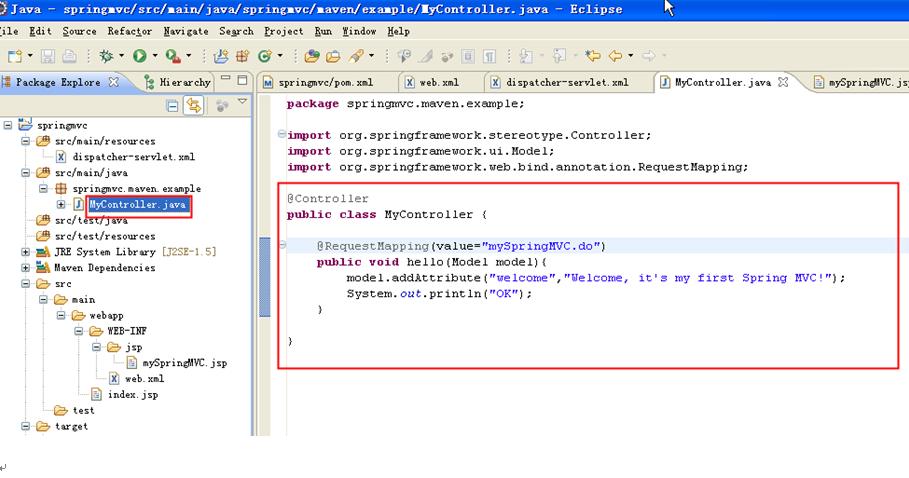
2.4.3编写一个Controller层测试类
2.4.4编写JSP文件
根据dispatcher-servlet.xml和Controller层的代码,我们需要在WEB-INF下建立一个jsp文件夹,在其下建立一个mySpringMVC.jsp文件,内容如下:

3. Compile, Deploy and Run (All only need one maven command):
Command: mvn clean install –DskipTests=truewar:exploded tomcat:run


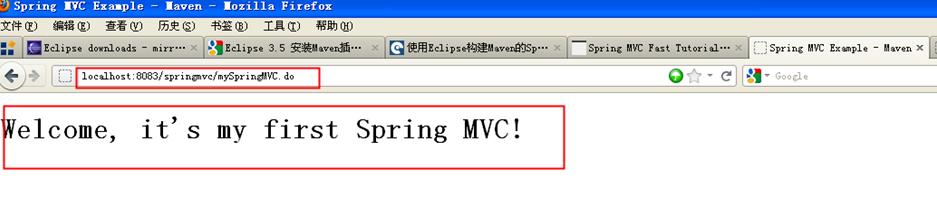
Open your browser,then type http://localhost:8083/springmvc/mySpringMVC.do in url, then pressEnter key:
自csdn
Maven+Eclipse+Spring MVC简单实例的更多相关文章
- 使用maven+eclipse搭建最简单的struts2的helloworld
使用maven+eclipse搭建最简单的struts2的helloworld 一.web分层结构简介 1.web[细]粒度分层结构: 按细粒度分层可以分为以下6种: 1).表现层:html/css/ ...
- Spring mvc系列一之 Spring mvc简单配置
Spring mvc系列一之 Spring mvc简单配置-引用 Spring MVC做为SpringFrameWork的后续产品,Spring 框架提供了构建 Web 应用程序的全功能 MVC 模块 ...
- Spring.Net 简单实例-02(属性注入)
说明:接续Spring.Net 简单实例-01(IOC) 话不多说看操作 1:为UserInfo添加属性 2: 修改App.config中代码 <?xml version="1.0&q ...
- Spring MVC框架实例
Spring MVC 背景介绍 Spring 框架提供了构建 Web 应用程序的全功能 MVC 模块.使用 Spring 可插入的 MVC 架构,能够选择是使用内置的 Spring Web 框架还是 ...
- 用maven创建Spring MVC项目
用maven创建Spring MVC项目 mvn archetype:generate -DgroupId=fry-arthur -DartifactId=spring-mvc-study -Darc ...
- eclipse luna maven搭建spring mvc
1. 环境配置 a) Java 1.7 b) Eclipse luna c) Maven3.2.5 d) Spring 4.1.4 2. ...
- Eclipse Maven构建Spring MVC项目
工作中项目开发使用Maven管理项目的构建.打包.编译,框架採用的是Spring MVC框架,而且实现了多模块.多项目的管理.自己也简单的參与了架构的设计.对于刚開始学习的人来说,使用Maven构建项 ...
- 基于XML配置的Spring MVC 简单的HelloWorld实例应用
1.1 问题 使用Spring Web MVC构建helloworld Web应用案例. 1.2 方案 解决本案例的方案如下: 1. 创建Web工程,导入Spring Web MVC相关开发包. Sp ...
- Spring MVC接口实例
概述 前文记录了MVC模式和Spring MVC的初步认识,现在记录创建一个项目,配置Spring MVC,编写接口程序. 创建项目 打开IntelliJ IDEA,点击"File-> ...
随机推荐
- <jsp:include page="">和<%@include page=""%> 标签学习
<jsp:include page=""><jsp:param value=""name=""/><DEL&g ...
- CoreAnimation (CALayer 动画)
CoreAnimation基本介绍: CoreAnimation动画位于iOS框架的Media层 CoreAnimation动画实现需要添加QuartzCore.Framework CoreAnima ...
- Girls' research(manacher)
Girls' research Time Limit: 3000/1000 MS (Java/Others) Memory Limit: 65535/32768 K (Java/Others) ...
- Aqua Data Studio 查询结果中文乱码
菜单条里[文件]-[选项]会弹出个选项对话框 然后选[一般] 在右边的[外观]以下找到[网格结果字体] 将字体类型改成宋体即可了 watermark/2/text/aHR0cDovL2Jsb2cuY ...
- 【web开发学习笔记】Structs2 Result学习笔记(三)带參数的结果集
Result学习笔记(三)带參数的结果集 第一部分:代码 //前端 <head> <meta http-equiv="Content-Type" content= ...
- 什么是CALayer
一.什么是CALayer * 在iOS系统中,你能看得见摸得着的东西基本上都是UIView,比如一个按钮.一个文本标签.一个文本输入框.一个图标等等,这些都是UIView. * 其实UIView之所以 ...
- C# 方法的调用
using System; using System.Collections.Generic; using System.Linq; using System.Text; using System.T ...
- Hibernate MySQL 数据库 使用别名 报 Column * Not Found
使用Hibernate 查询MySQL数据表的时候报 Column Not Found ,原因是MySQL的驱动不支持别名, 解决方案如下,在连接参数中加上 useOldAliasMetadataBe ...
- 【转】LINUX下一款不错的网站压力测试工具webbench
原文链接:http://blog.csdn.net/xinqingch/article/details/8618704 安装: wget http://blog.s135.com/soft/linux ...
- Java NIO--初步认识
: 一.java NIO 和阻塞I/O的区别 1. 阻塞I/O通信模型 2. java NIO原理及通信模型 二.java NIO服务端和客户端代码实现 一.java NIO 和阻 ...