
ASP.NET MVC 4.0 学习4-Code First
之前我們需要用到的數據,通過添加Entity實體數據模型把數據庫中需要的Database拉到項目中如下圖,
而就是Code First就是相對於這種處理數據的方法而言的
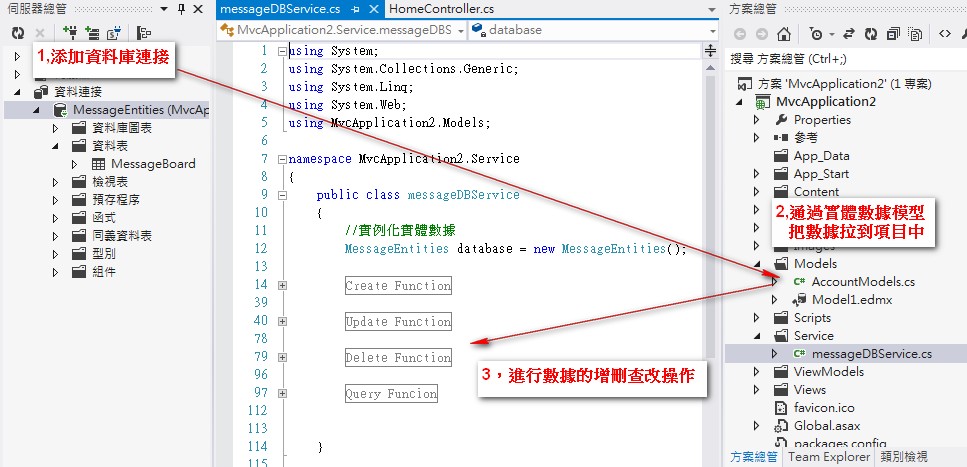
Code First更加準確的解讀是開發人員只需要編寫程式(Code Only),系統會自動建立模型和數據庫
我們來新建一個專案看一下Code First的具體實現
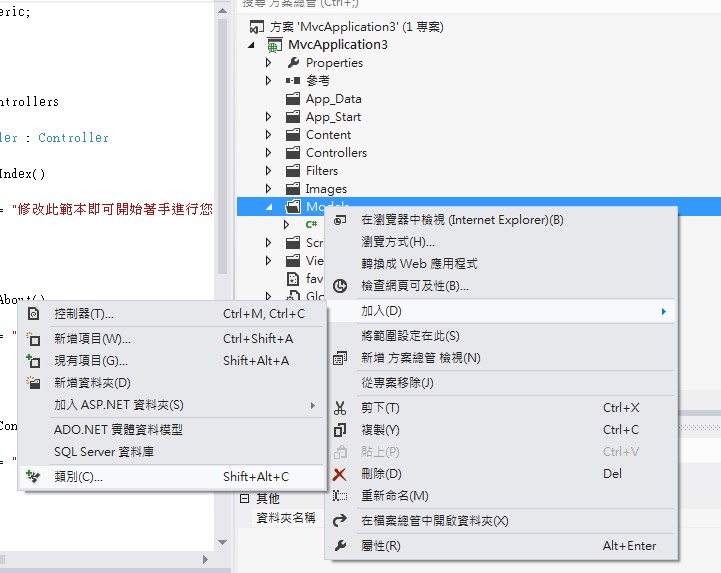
1,新專案的Model中加入類別MessageBoard存儲留言信息
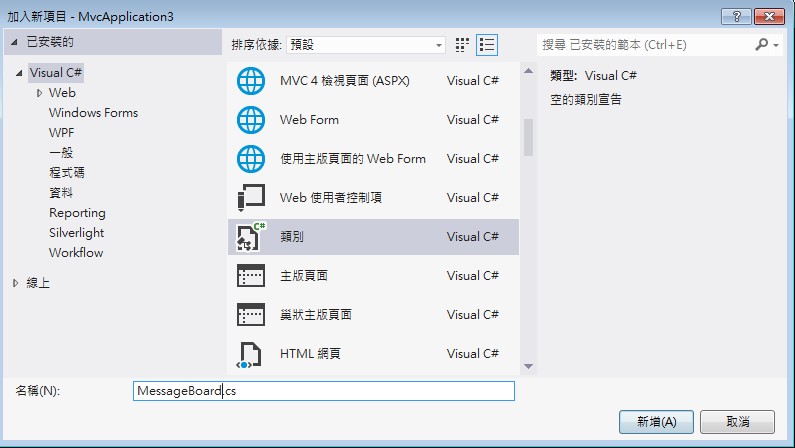
MessageBoard.cs中添加字段屬性:
using System;

using System.Collections.Generic;

using System.Linq;

using System.Web;

using System.ComponentModel.DataAnnotations;

using System.ComponentModel;

namespace MvcApplication3.Models

{

    public class MessageBoard

    {

        [Key]

        public int MsgID { get; set; }

        [Required]

        [DisplayName("姓名:")]

        public string Title { get; set; }

        [Required]

        [DisplayName("內容")]

        public string Content { get; set; }

    }

}
2,Ctrl+Shift+B重建方案後,添加MessageController

範本選擇讀寫功能,模型類別選擇剛建立的Model中的MessageBoard

確認以後,我們看到Models和Views中自動生成了對應的文件,MessageController.cs和View中自動添加了相應增刪改:
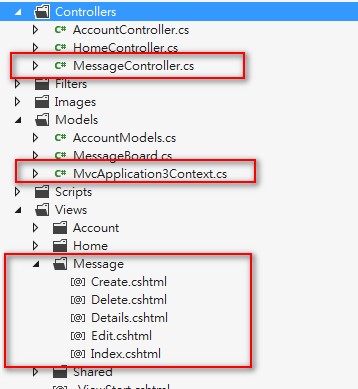
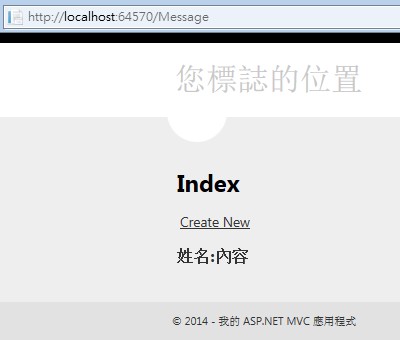
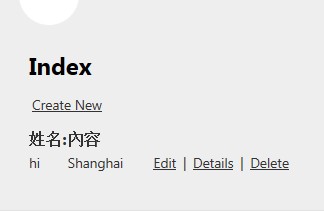
Ctrl+F5運行程式,輸入Message如:http://localhost:64570/Message 我們看到了Message的首頁,並且可以添加留言
增刪查改的功能是我們剛才在添加控制器的時候選擇了“具有讀取/寫入...”功能系統自動實現的:
 →
→ →
→ 
我們剛才並沒有建立數據庫,新增的留言存放在哪裡了?
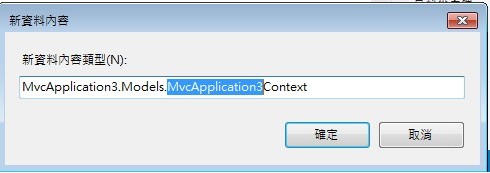
項目中點擊查看所有文件,我們發現App_Data下面產生了.mdf文件,.mdf文件以及Models下的MvcApplication3Context.cs也是在我們添加MessageController這一步選擇“資料內容類別”的時候產生的:
 →→→→
→→→→ 
雙擊.mdf我們看到了生成的Table和Models下MessageBoard.cs中的屬性是一致的:
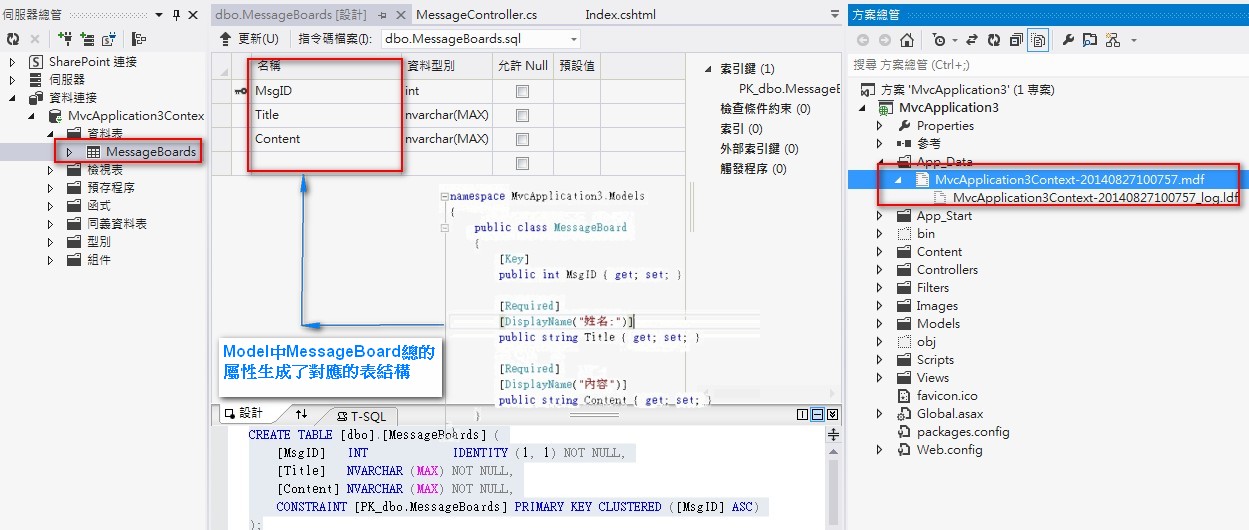
這就是Code First ,我們只需要去編寫Models中的模型,添加Controller時候系統自動幫我們生成了和模型一致的數據庫文件
接下來我們再看一下Models中的模型:
Code First,Model資料模型中的class對應生成了數據庫中的Table: MessageBoard.cs 對應 MessageBoards表
Model中的Class除了對屬性進行定義外,還能定義Table的名稱,Table中的主鍵以及Table間的一對多 多對多關係:
Model中添加兩個模型類,BookModel.cs和AuthorModel.cs,類中借住System.Collenctons命名空間下的Icollection實現了表與表之
間的對應關係:
1,更新MessageBoard.cs類,添加Book和Author的模型定義:
using System;

using System.Collections.Generic;

using System.Linq;

using System.Web;

using System.ComponentModel.DataAnnotations;

using System.ComponentModel;

using System.ComponentModel.DataAnnotations.Schema;

namespace MvcApplication3.Models

{

    public class MessageBoard

    {

        [Key]

        public int MsgID { get; set; }

        [Required]

        [DisplayName("姓名:")]

        public string Title { get; set; }

        [Required]

        [DisplayName("內容")]

        public string Content { get; set; }

    }

    //定義表名稱

    [Table("MyTable")]

    public class BookModels

    {

        //定義主鍵Key

        [Key]

        [DatabaseGeneratedAttribute(DatabaseGeneratedOption.Identity)]

        public int BookID { get; set; }

        [Required]

        public string BookName { get; set; }

        [Required]

        public DateTime PublishTime { get; set; }

        //Book和作者的對應關係: N*1

        public AuthorModels AuthorModels { get; set; }

    }

    //定義表名稱

    [Table("Author")]

    public class AuthorModels

    {

        [Key]

        [DatabaseGeneratedAttribute(DatabaseGeneratedOption.Identity)]

        public int AuthorID { get; set; }

        [Required]

        public string Name { get; set; }

        //作者和數的對應關係:一個作者對應多本數 1*多

        [Required]

        public ICollection<BookModels> BookModels { get; set; }

    }

}
2,更新MvcApplication3Context.cs文件:
using System.Data.Entity;

namespace MvcApplication3.Models

{

    public class MvcApplication3Context : DbContext

    {

        // 您可以將自訂程式碼新增到這個檔案。變更不會遭到覆寫。

        //

        // 如果您要 Entity Framework 每次在您變更模型結構描述時

        // 自動卸除再重新產生資料庫,請將下列

        // 程式碼新增到 Global.asax 檔案的 Application_Start 方法中。

        // 注意: 這將隨著每次模型變更而損毀並重新建立您的資料庫。

        //

        // System.Data.Entity.Database.SetInitializer(new System.Data.Entity.DropCreateDatabaseIfModelChanges<MvcApplication3.Models.MvcApplication3Context>());

        public MvcApplication3Context() : base("name=MvcApplication3Context")

        {

        }

        public DbSet<MessageBoard> MessageBoards { get; set; }

        public DbSet<BookModels> BookModels { get; set; }

        public DbSet<AuthorModels> AuthorModels { get; set; }

    }

}
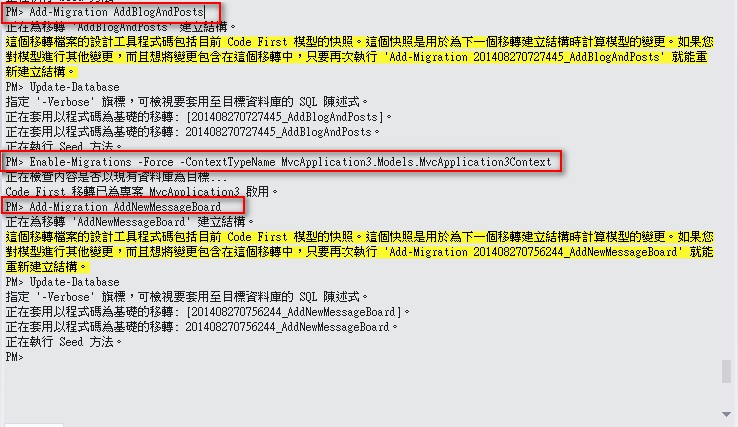
3,打開套件管理器控制臺,逐步執行以下命令:
以下是Code First Migration功能可以參考:http://msdn.microsoft.com/en-us/data/jj193542
- PM> Enable-Migrations -Force -ContextTypeName MvcApplication3.Models.MvcApplication3Context
- PM> Add-Migration AddNewMessageBoard
- PM> Update-Database

執行成功:
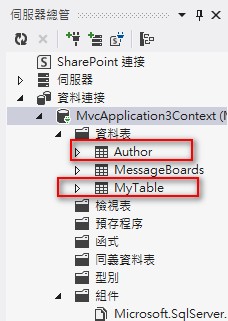
數據庫中我們看到新增加的Table:
ASP.NET MVC 4.0 学习4-Code First的更多相关文章
- ASP.NET MVC 4.0 学习5-ActionResult
一,Controller簡介 Controller擔任了資料傳遞的角色,負責流程控制,決定存取哪個Model以及決定顯示哪個View頁面,即ASP.NET MVC中有關於『傳遞』的任務皆由Contro ...
- ASP.NET MVC 4.0 学习6-Model Binding
一,ViewData,ViewBag與TempData ASP.NET MVC架構中,通過繼承在Controller中的ViewData,ViewBag和TempData和View頁面進行資料的存取, ...
- ASP.NET MVC 4.0 学习2-留言板實現
新增專案實現留言板功能,瞭解MVC的運行機制 1,新增專案 2,添加數據庫文件message.mdf Ctrl+W,L 打開資料庫連接,添加存放留言的Atricle表 添加字段,後點擊&quo ...
- ASP.NET MVC 4.0 学习1-C#基础语法
1,方法多載,相同的方法名稱,不同的參數類型.數量 class Program { static void Main(string[] args) { Program newObject = new ...
- ASP.NET MVC 4.0 学习3-Model
Model負責獲取數據庫中的資料,並對數據庫中的數據進行處理. MVC中有關 數據庫 的任務都由Model來完成,Model中對數據資料進行定義,Controller和View中都會參考到Model, ...
- 从零开始学习ASP.NET MVC 1.0
转自:http://www.cnblogs.com/zhangziqiu/archive/2009/02/27/ASPNET-MVC-1.html <从零开始学习ASP.NET MVC 1.0& ...
- 安装了VS2010 sp1 后再安装ASP.NET MVC 3.0的问题(Final Result: Installation failed with error code: (0x80070643), "安装时发生严重错误 " (Ela)
原文:安装了VS2010 sp1 后再安装ASP.NET MVC 3.0的问题(Final Result: Installation failed with error code: (0x800706 ...
- 系列文章--从零开始学习ASP.NET MVC 1.0
从零开始学习ASP.NET MVC 1.0 (一) 开天辟地入门篇 从零开始学习 ASP.NET MVC 1.0 (二) 识别URL的Routing组件 从零开始学习 ASP.NET MVC 1.0 ...
- 安装了VS2010 sp1 后再安装ASP.NET MVC 3.0的问题
安装了VS2010 sp1 后再安装ASP.NET MVC 3.0的问题(Final Result: Installation failed with error code: (0x80070643) ...
随机推荐
- DataTables在回调方法中使用api
$(document).ready(function() { $('#example').dataTable( { "initComplete": function () { va ...
- JavaIO学习总结一
Java IO 输入输出 一.概念 Java中输入输出操作是以流的方式进行的,流是Java内存中的一组有序数据序列.Java将数据从源(文件.内存.控制台.网络)读入到内存中,形成了流,然后将这些流还 ...
- Effective Java2读书笔记-类和接口(三)
第17条:要么为继承而设计,并提供文档说明,要么就禁止继承 第18条:接口优于抽象类 这两条中,提到了一个很重要的概念骨架实现.也就是说,抽象类实现接口的形式.这样的好处是,接口本来不能提供默认的实现 ...
- 本地windows主机无法访问虚拟机里主机解决办法
一:设置虚拟机里IP,使其与本地计算机IP在同一网段 本地计算机网络IP设置如下: 虚拟机里ip为192.168.1.9 设置IP步骤请参考:Linux里如何设置IP(RED HAT) 二:将虚拟机网 ...
- LeetCode_Unique Binary Search Trees II
Given n, generate all structurally unique BST's (binary search trees) that store values 1...n. For e ...
- Berserk Rook
Berserk Rook As you may know, chess is an ancient game for which almost everyone has at least a basi ...
- c++ 12
一.模板与继承 1.从模板类派生模板子类 2.为模板子类提供基类 二.容器和迭代器 以链表为例. 三.STL概览 1.十大容器 1)向量(vector):连续内存,后端压弹,插删低效 2)列表(lis ...
- Android应用开发学习之启动另外一个Activity
作者:刘昊昱 博客:http://blog.csdn.net/liuhaoyutz 一个Activity可以启动另外一个Activity,以实现比较复杂的功能,我们来看一个例子,其运行效果如下图所示: ...
- Linux 程序设计的一些优化措施
Linux 程序设计的一些优化措施 这些知识是在平常的阅读中,零散的获得的,自己总结了一下,分享在这里 全局变量VS函数参数 全局变量在Linux下的驱动编程里边,用的是非常多,例如中断服务函数ISR ...
- Animation Override Controller动画重载器
假设游戏有很多个小人, 每一个人有2种动画站立,跑. 在通常情况下每一个人物都需要一个动画控制器. 有没有想过定义一个动画控制器 无须在定义全新的动画充值器实现每一个小人都播放自己的动画呢?没错An ...