
ASP.NET MVC 4.0 学习4-Code First
之前我們需要用到的數據,通過添加Entity實體數據模型把數據庫中需要的Database拉到項目中如下圖,
而就是Code First就是相對於這種處理數據的方法而言的
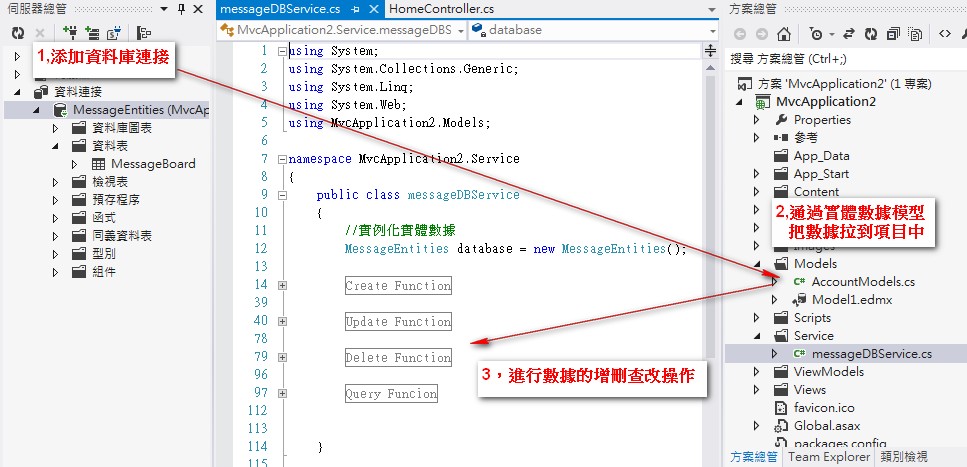
Code First更加準確的解讀是開發人員只需要編寫程式(Code Only),系統會自動建立模型和數據庫
我們來新建一個專案看一下Code First的具體實現
1,新專案的Model中加入類別MessageBoard存儲留言信息
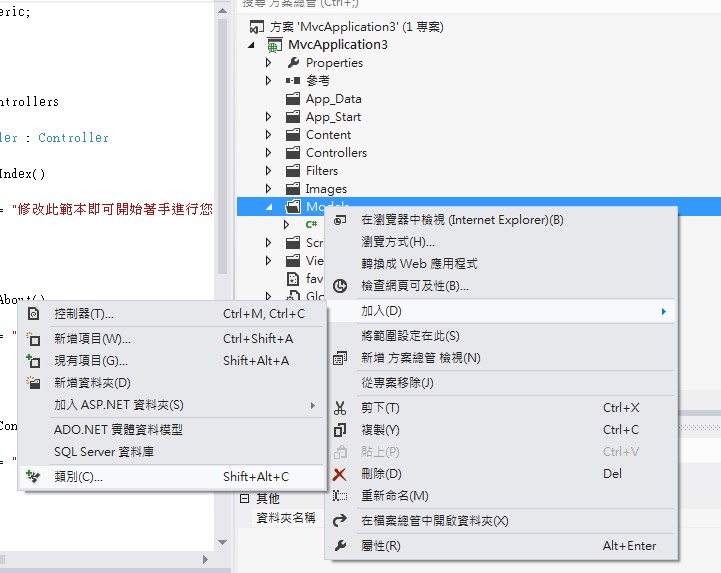
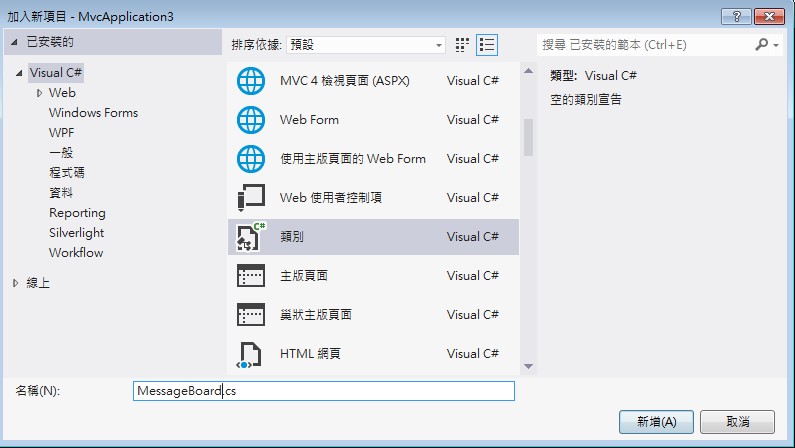
MessageBoard.cs中添加字段屬性:
using System;

using System.Collections.Generic;

using System.Linq;

using System.Web;

using System.ComponentModel.DataAnnotations;

using System.ComponentModel;

namespace MvcApplication3.Models

{

    public class MessageBoard

    {

        [Key]

        public int MsgID { get; set; }

        [Required]

        [DisplayName("姓名:")]

        public string Title { get; set; }

        [Required]

        [DisplayName("內容")]

        public string Content { get; set; }

    }

}
2,Ctrl+Shift+B重建方案後,添加MessageController

範本選擇讀寫功能,模型類別選擇剛建立的Model中的MessageBoard

確認以後,我們看到Models和Views中自動生成了對應的文件,MessageController.cs和View中自動添加了相應增刪改:
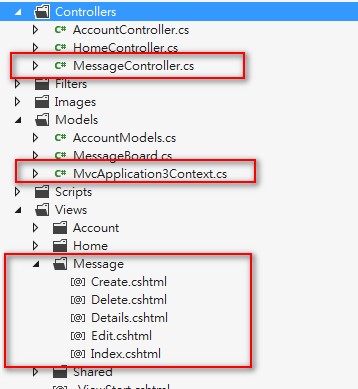
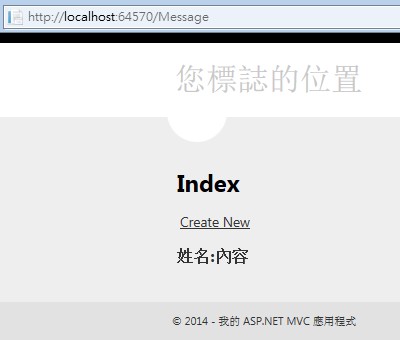
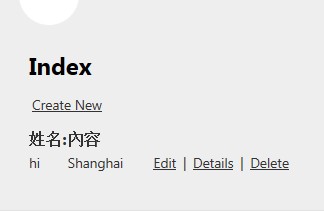
Ctrl+F5運行程式,輸入Message如:http://localhost:64570/Message 我們看到了Message的首頁,並且可以添加留言
增刪查改的功能是我們剛才在添加控制器的時候選擇了“具有讀取/寫入...”功能系統自動實現的:
 →
→ →
→ 
我們剛才並沒有建立數據庫,新增的留言存放在哪裡了?
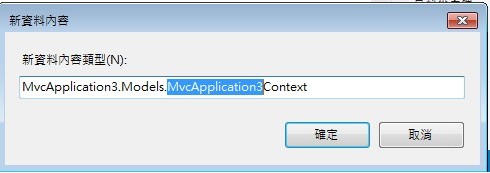
項目中點擊查看所有文件,我們發現App_Data下面產生了.mdf文件,.mdf文件以及Models下的MvcApplication3Context.cs也是在我們添加MessageController這一步選擇“資料內容類別”的時候產生的:
 →→→→
→→→→ 
雙擊.mdf我們看到了生成的Table和Models下MessageBoard.cs中的屬性是一致的:
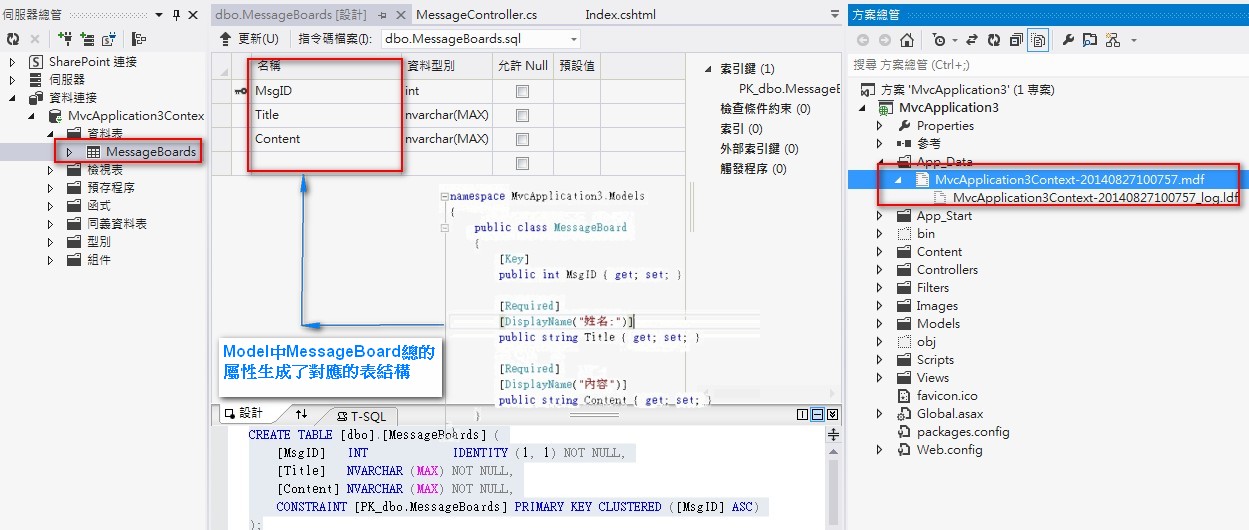
這就是Code First ,我們只需要去編寫Models中的模型,添加Controller時候系統自動幫我們生成了和模型一致的數據庫文件
接下來我們再看一下Models中的模型:
Code First,Model資料模型中的class對應生成了數據庫中的Table: MessageBoard.cs 對應 MessageBoards表
Model中的Class除了對屬性進行定義外,還能定義Table的名稱,Table中的主鍵以及Table間的一對多 多對多關係:
Model中添加兩個模型類,BookModel.cs和AuthorModel.cs,類中借住System.Collenctons命名空間下的Icollection實現了表與表之
間的對應關係:
1,更新MessageBoard.cs類,添加Book和Author的模型定義:
using System;

using System.Collections.Generic;

using System.Linq;

using System.Web;

using System.ComponentModel.DataAnnotations;

using System.ComponentModel;

using System.ComponentModel.DataAnnotations.Schema;

namespace MvcApplication3.Models

{

    public class MessageBoard

    {

        [Key]

        public int MsgID { get; set; }

        [Required]

        [DisplayName("姓名:")]

        public string Title { get; set; }

        [Required]

        [DisplayName("內容")]

        public string Content { get; set; }

    }

    //定義表名稱

    [Table("MyTable")]

    public class BookModels

    {

        //定義主鍵Key

        [Key]

        [DatabaseGeneratedAttribute(DatabaseGeneratedOption.Identity)]

        public int BookID { get; set; }

        [Required]

        public string BookName { get; set; }

        [Required]

        public DateTime PublishTime { get; set; }

        //Book和作者的對應關係: N*1

        public AuthorModels AuthorModels { get; set; }

    }

    //定義表名稱

    [Table("Author")]

    public class AuthorModels

    {

        [Key]

        [DatabaseGeneratedAttribute(DatabaseGeneratedOption.Identity)]

        public int AuthorID { get; set; }

        [Required]

        public string Name { get; set; }

        //作者和數的對應關係:一個作者對應多本數 1*多

        [Required]

        public ICollection<BookModels> BookModels { get; set; }

    }

}
2,更新MvcApplication3Context.cs文件:
using System.Data.Entity;

namespace MvcApplication3.Models

{

    public class MvcApplication3Context : DbContext

    {

        // 您可以將自訂程式碼新增到這個檔案。變更不會遭到覆寫。

        //

        // 如果您要 Entity Framework 每次在您變更模型結構描述時

        // 自動卸除再重新產生資料庫,請將下列

        // 程式碼新增到 Global.asax 檔案的 Application_Start 方法中。

        // 注意: 這將隨著每次模型變更而損毀並重新建立您的資料庫。

        //

        // System.Data.Entity.Database.SetInitializer(new System.Data.Entity.DropCreateDatabaseIfModelChanges<MvcApplication3.Models.MvcApplication3Context>());

        public MvcApplication3Context() : base("name=MvcApplication3Context")

        {

        }

        public DbSet<MessageBoard> MessageBoards { get; set; }

        public DbSet<BookModels> BookModels { get; set; }

        public DbSet<AuthorModels> AuthorModels { get; set; }

    }

}
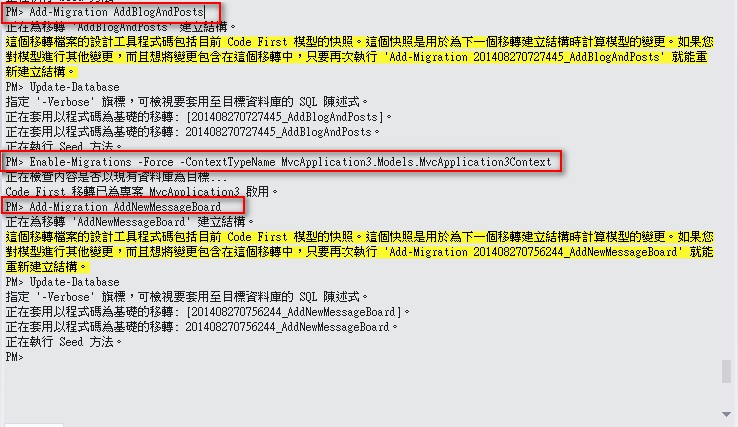
3,打開套件管理器控制臺,逐步執行以下命令:
以下是Code First Migration功能可以參考:http://msdn.microsoft.com/en-us/data/jj193542
- PM> Enable-Migrations -Force -ContextTypeName MvcApplication3.Models.MvcApplication3Context
- PM> Add-Migration AddNewMessageBoard
- PM> Update-Database

執行成功:
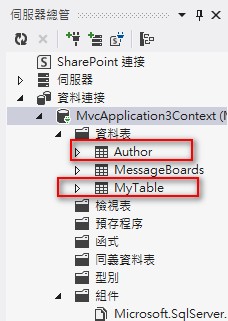
數據庫中我們看到新增加的Table:
ASP.NET MVC 4.0 学习4-Code First的更多相关文章
- ASP.NET MVC 4.0 学习5-ActionResult
一,Controller簡介 Controller擔任了資料傳遞的角色,負責流程控制,決定存取哪個Model以及決定顯示哪個View頁面,即ASP.NET MVC中有關於『傳遞』的任務皆由Contro ...
- ASP.NET MVC 4.0 学习6-Model Binding
一,ViewData,ViewBag與TempData ASP.NET MVC架構中,通過繼承在Controller中的ViewData,ViewBag和TempData和View頁面進行資料的存取, ...
- ASP.NET MVC 4.0 学习2-留言板實現
新增專案實現留言板功能,瞭解MVC的運行機制 1,新增專案 2,添加數據庫文件message.mdf Ctrl+W,L 打開資料庫連接,添加存放留言的Atricle表 添加字段,後點擊&quo ...
- ASP.NET MVC 4.0 学习1-C#基础语法
1,方法多載,相同的方法名稱,不同的參數類型.數量 class Program { static void Main(string[] args) { Program newObject = new ...
- ASP.NET MVC 4.0 学习3-Model
Model負責獲取數據庫中的資料,並對數據庫中的數據進行處理. MVC中有關 數據庫 的任務都由Model來完成,Model中對數據資料進行定義,Controller和View中都會參考到Model, ...
- 从零开始学习ASP.NET MVC 1.0
转自:http://www.cnblogs.com/zhangziqiu/archive/2009/02/27/ASPNET-MVC-1.html <从零开始学习ASP.NET MVC 1.0& ...
- 安装了VS2010 sp1 后再安装ASP.NET MVC 3.0的问题(Final Result: Installation failed with error code: (0x80070643), "安装时发生严重错误 " (Ela)
原文:安装了VS2010 sp1 后再安装ASP.NET MVC 3.0的问题(Final Result: Installation failed with error code: (0x800706 ...
- 系列文章--从零开始学习ASP.NET MVC 1.0
从零开始学习ASP.NET MVC 1.0 (一) 开天辟地入门篇 从零开始学习 ASP.NET MVC 1.0 (二) 识别URL的Routing组件 从零开始学习 ASP.NET MVC 1.0 ...
- 安装了VS2010 sp1 后再安装ASP.NET MVC 3.0的问题
安装了VS2010 sp1 后再安装ASP.NET MVC 3.0的问题(Final Result: Installation failed with error code: (0x80070643) ...
随机推荐
- 微信小程序开发工具 常用快捷键
格式调整 Ctrl+S:保存文件 Ctrl+[, Ctrl+]:代码行缩进 Ctrl+Shift+[, Ctrl+Shift+]:折叠打开代码块 Ctrl+C Ctrl+V:复制粘贴,如果没有选中任何 ...
- 《Programming WPF》翻译 第6章 4.应用程序全球化
原文:<Programming WPF>翻译 第6章 4.应用程序全球化 如果你打算发布你的应用程序到全球各地,你可能需要为不同地区的用户界面准备不同的版本.至少,这需要解决将文本翻译成适 ...
- 【温故而知新:文件操作】C#的文件读写相关
StreamReader类以及其方法ReadLine,Read,ReadToEnd的分析 首先StreamReader类的构造参数非常丰富在这里,我觉得最常用的就是StreamReader(Strea ...
- Non-unique Elements
Non-unique Elements You are given a non-empty list of integers (X). For this task, you should return ...
- SoftLayerDebug
- FlexComboBoxTree
在我的CSDN资源中有项目工程文件.下载导入工程即可看到效果,下面是地址. http://download.csdn.net/detail/cym_lmy/6326053 MyCombBoxTree1 ...
- shell数组(产生不同的随机数)
#!/bin/bash # declare -a ARRAY read -p "Please input num[1-39]:" EMENUM #对比新生成的随机数是否重复 fun ...
- 第06讲- DDMS中logcat的使用
1.DDMS使用 )Device选项卡 Device中罗列了Emulator中所有的进程,选项卡右上角那一排按钮分别为:调试进程.更新进程.更新进程堆栈信息.停止某个进程. )Threads选项卡 ...
- Linux正則表達式-反复出现的字符
星号(*)元字符表示它前面的正則表達式能够出现零次或多次.也就是说,假设它改动了单个字符.那么该字符能够在那里也能够不在那里,而且假设它在那里,那可能会不止出现一个.能够使用星号元字符匹配出如今引號中 ...
- 批量创建prefab
using UnityEngine; using System.Collections; using UnityEngine.UI; using System.IO; using UnityEdito ...