
IOS --支付宝SDK 分解讲解
开发在手机端的时候(客户端),我们主要负责客户端(手机端)的开发,所以那些繁琐的到支付宝官网填写商户信息可以留给后台去弄,后台只要把:
1回调地址,
2app的ID,
3商户的私钥(privateKey),
4商户ID(partner),
5支付宝账号(seller),提供给你就好了。
如果想学习怎么在支付宝填写商户信息的话可以官网按着步骤来:
 https://b.alipay.com/signing/productDetail.htm?productId=I1011000290000001002 https://doc.open.alipay.com/doc2/detail.htm?spm=a219a.7629140.0.0.kDer5c&treeId=58&articleId=103578&docType=1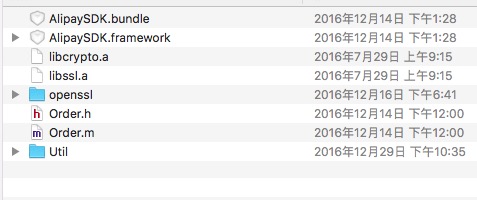
2.在项目里配置好支付宝SDK所需的框架
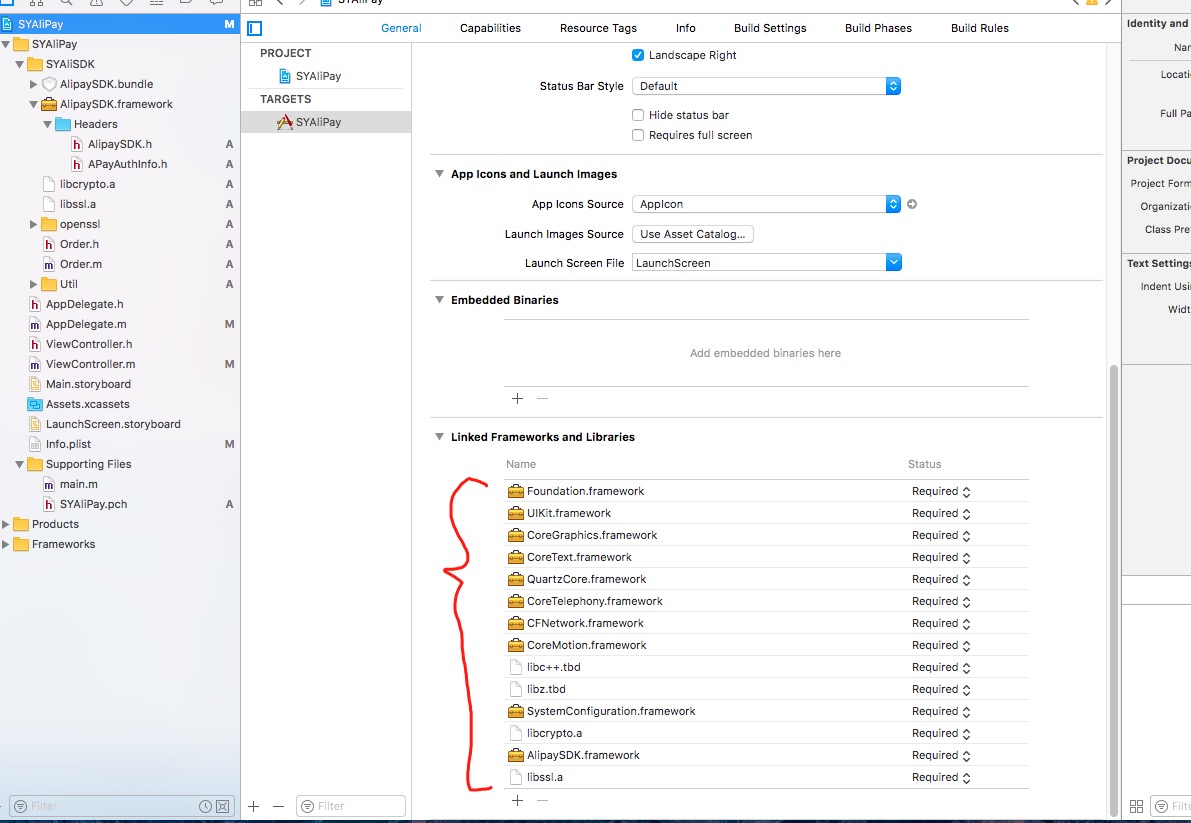
3.导入后,运行运行项目,会发现报错,这样你要按照支付宝提供的方法添加路径(因为项目中不能识别某个文件):#include<openssl/asn1.h>
点击项目名称,点击“Build Settings”选项卡,在搜索框中,以关键字“search”搜索,对“Header Search Paths”增加头文件路径:$(SRCROOT)/项目名称。如果头文件信息已增加,可不必再增加。

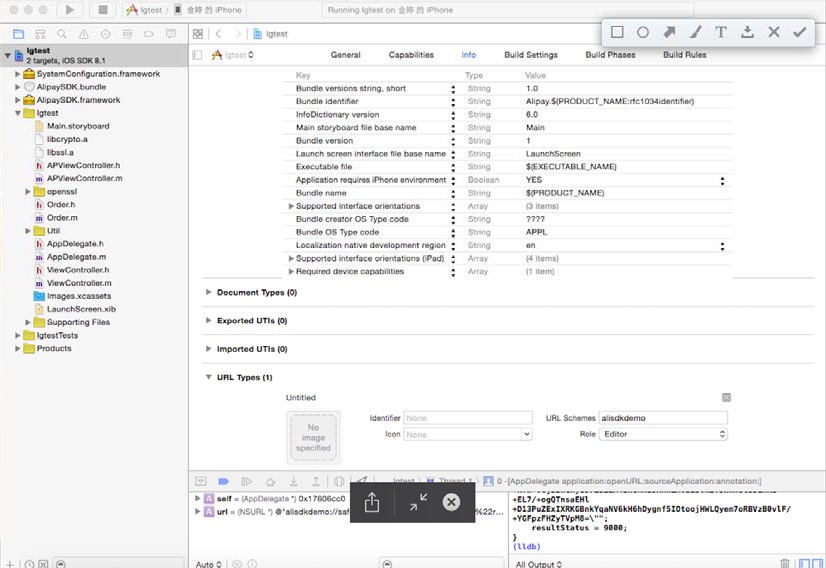
4,之后就要配置跳转的URL Types :
点击项目名称,点击“Info”选项卡,在“URL Types”选项中,点击“+”,在“URL Schemes”中输入“alisdkdemo”。“alisdkdemo”来自于文件“APViewController.m”的NSString *appScheme = @“alisdkdemo”;。
注意:这里的URL Schemes中输入的alisdkdemo,为测试demo,实际商户的app中要填写独立的scheme,建议跟商户的app有一定的标示度,要做到和其他的商户app不重复,否则可能会导致支付宝返回的结果无法正确跳回商户app。
5.最后要记得配置 支付宝白名单 ,在info.plist设置

这样配置就完成了,最后是代码的调用了。
6.1在appdelegate
- #import "AppDelegate.h"
- #import <AlipaySDK/AlipaySDK.h>
- #import "Product.h"
- #import "Order.h"
- #import "DataSigner.h"
- @interface AppDelegate ()
- @end
- @implementation AppDelegate
- - (BOOL)application:(UIApplication *)application didFinishLaunchingWithOptions:(NSDictionary *)launchOptions {
- // Override point for customization after application launch.
- return YES;
- }
- -(BOOL)application:(UIApplication *)app openURL:(NSURL *)url options:(NSDictionary<NSString *,id> *)options{
- [self alipayUrlAction:url];
- return YES;
- }
- -(BOOL)application:(UIApplication *)application openURL:(NSURL *)url sourceApplication:(NSString *)sourceApplication annotation:(id)annotation{
- //有多中支付方式,要用scheme 来进行判断,看是那种途径的url.
- [self alipayUrlAction:url];
- return YES;
- }
- -(BOOL)application:(UIApplication *)application handleOpenURL:(NSURL *)url{
- [self alipayUrlAction:url];
- return YES;
- }
- -(void)alipayUrlAction:(NSURL *)url{
- [[AlipaySDK defaultService] processOrderWithPaymentResult:url standbyCallback:^(NSDictionary *resultDic) {
- if ([[resultDic valueForKey:@"resultStatus"] intValue] == 9000) {
- if ([_aliDelegate respondsToSelector:@selector(alipydidSuccess)]) {
- [_aliDelegate alipydidSuccess];
- }
- }else{
- if ([_aliDelegate respondsToSelector:@selector(alipydidFaile)]) {
- [_aliDelegate alipydidFaile];
- }
- }
- }];
- }
- -(void)payByAlipay:(Product *)product{
- /*
- *商户的唯一的parnter和seller。
- *签约后,支付宝会为每个商户分配一个唯一的 parnter 和 seller。
- */
- /*============================================================================*/
- /*=======================需要填写商户app申请的===================================*/
- /*============================================================================*/
- NSString *partner = @""; //商户id
- NSString *seller = @""; //账户id 签约账号。
- NSString *privateKey = @""; // md5
- //partner和seller获取失败,提示
- if ([partner length] == 0 ||
- [seller length] == 0 ||
- [privateKey length] == 0)
- {
- UIAlertView *alert = [[UIAlertView alloc] initWithTitle:@"提示"
- message:@"缺少partner或者seller或者私钥。"
- delegate:self
- cancelButtonTitle:@"确定"
- otherButtonTitles:nil];
- [alert show];
- return;
- }
- /*
- *生成订单信息及签名
- */
- //将商品信息赋予AlixPayOrder的成员变量
- Order *order = [[Order alloc] init];
- order.partner = partner;
- order.sellerID = seller;
- order.outTradeNO = @"xxxxxx"; //订单ID(由商家自行制定)
- order.subject = product.productName; //商品标题
- order.body = product.productName; //商品描述
- order.totalFee = [NSString stringWithFormat:@"%.2f",product.price]; //商品价格
- order.notifyURL = @"http://www.xxx.com"; //回调URL
- order.service = @"mobile.securitypay.pay";
- order.paymentType = @"1";
- order.inputCharset = @"utf-8";
- order.itBPay = @"30m";
- order.showURL = @"m.alipay.com";
- //应用注册scheme,在AlixPayDemo-Info.plist定义URL types
- NSString *appScheme = @"alisdkdemo";
- //将商品信息拼接成字符串
- NSString *orderSpec = [order description];
- NSLog(@"orderSpec = %@",orderSpec);
- //获取私钥并将商户信息签名,外部商户可以根据情况存放私钥和签名,只需要遵循RSA签名规范,并将签名字符串base64编码和UrlEncode
- id<DataSigner> signer = CreateRSADataSigner(privateKey);
- NSString *signedString = [signer signString:orderSpec];
- //将签名成功字符串格式化为订单字符串,请严格按照该格式
- NSString *orderString = nil;
- if (signedString != nil) {
- orderString = [NSString stringWithFormat:@"%@&sign=\"%@\"&sign_type=\"%@\"",
- orderSpec, signedString, @"RSA"];
- [[AlipaySDK defaultService] payOrder:orderString fromScheme:appScheme callback:^(NSDictionary *resultDic) {
- NSLog(@"reslut = %@",resultDic);
- if ([[resultDic valueForKey:@"resultStatus"] intValue] == 9000) { //成功
- if ([_aliDelegate respondsToSelector:@selector(alipydidSuccess)]) {
- [_aliDelegate alipydidSuccess];
- }
- }else{ //失败
- if ([_aliDelegate respondsToSelector:@selector(alipydidFaile)]) {
- [_aliDelegate alipydidFaile];
- }
- }
- }];
- }
- }
- @end
6.1ViewController
- #import "ViewController.h"
- #import "Product.h"
- #import "Order.h"
- #import <AlipaySDK/AlipaySDK.h>
- #import "AppDelegate.h"
- @interface ViewController ()<UITableViewDelegate,UITableViewDataSource>
- @property (weak, nonatomic) IBOutlet UITableView *myTableView;
- @property(nonatomic, strong)NSMutableArray *productList;
- @end
- @implementation ViewController
- - (void)viewDidLoad {
- [super viewDidLoad];
- [self generateData];
- }
- #pragma mark -
- #pragma mark ==============产生随机订单号==============
- - (NSString *)generateTradeNO
- {
- static int kNumber = 15;
- NSString *sourceStr = @"0123456789ABCDEFGHIJKLMNOPQRSTUVWXYZ";
- NSMutableString *resultStr = [[NSMutableString alloc] init];
- srand((unsigned)time(0));
- for (int i = 0; i < kNumber; i++)
- {
- unsigned index = rand() % [sourceStr length];
- NSString *oneStr = [sourceStr substringWithRange:NSMakeRange(index, 1)];
- [resultStr appendString:oneStr];
- }
- return resultStr;
- }
- #pragma mark -
- #pragma mark ==============产生订单信息==============
- - (void)generateData{
- // NSArray *subjects = @[@"1",
- // @"2",@"3",@"4",
- // @"5",@"6",@"7",
- // @"8",@"9",@"10"];
- NSArray *body = @[@"我是测试数据",
- @"我是测试数据",
- @"我是测试数据",
- @"我是测试数据",
- @"我是测试数据",
- @"我是测试数据",
- @"我是测试数据",
- @"我是测试数据",
- @"我是测试数据",
- @"我是测试数据"];
- self.productList = [[NSMutableArray alloc] init];
- for (int i = 0; i < [body count]; ++i) {
- Product *product = [[Product alloc] init];
- product.productName = [body objectAtIndex:i];
- product.price = 0.01f+pow(10,i-2);
- [self.productList addObject:product];
- }
- }
- #pragma mark -
- #pragma mark UITableViewDelegate
- - (CGFloat)tableView:(UITableView *)tableView heightForRowAtIndexPath:(NSIndexPath *)indexPath
- {
- return 55.0f;
- }
- #pragma mark -
- #pragma mark UITableViewDataSource
- - (NSInteger)tableView:(UITableView *)tableView numberOfRowsInSection:(NSInteger)section
- {
- return [self.productList count];
- }
- //
- //用TableView呈现测试数据,外部商户不需要考虑
- //
- - (UITableViewCell *)tableView:(UITableView *)tableView cellForRowAtIndexPath:(NSIndexPath *)indexPath
- {
- UITableViewCell *cell = [[UITableViewCell alloc] initWithStyle:UITableViewCellStyleSubtitle
- reuseIdentifier:@"Cell"];
- Product *product = [self.productList objectAtIndex:indexPath.row];
- cell.textLabel.text = product.productName;
- cell.detailTextLabel.text = [NSString stringWithFormat:@"一口价:%.2f",product.price];
- return cell;
- }
- #pragma mark -
- #pragma mark ==============点击订单模拟支付行为==============
- //
- //选中商品调用支付宝极简支付
- //
- - (void)tableView:(UITableView *)tableView didSelectRowAtIndexPath:(NSIndexPath *)indexPath
- {
- /*
- *点击获取prodcut实例并初始化订单信息
- */
- Product *product = [self.productList objectAtIndex:indexPath.row];
- AppDelegate *appdele = (AppDelegate *)[UIApplication sharedApplication].delegate;
- [appdele payByAlipay:product];
- [tableView deselectRowAtIndexPath:indexPath animated:YES];
- }
- - (void)didReceiveMemoryWarning {
- [super didReceiveMemoryWarning];
- // Dispose of any resources that can be recreated.
- }
- @end
- #import <Foundation/Foundation.h>
- @interface Product : NSObject
- @property (nonatomic, copy) NSString* productName;
- @property (nonatomic, assign) float price;
- @end
IOS --支付宝SDK 分解讲解的更多相关文章
- iOS支付宝SDK回调那坑
支付宝钱包支付接口开发包2.0标准版(iOS 2.2.1) ,回调不出来,demo给出的方法是: - (BOOL)application:(UIApplication *)application op ...
- IOS 支付宝 SDK 申请
https://b.alipay.com/order/productDetail.htm?productId=2013080604609654&tabId=4#ps-tabinfo-hash
- 基于IOS下的支付宝SDK的学习与使用——实现产品支付(二)
首先本篇为作者原创,仅供学习使用,以后会不断完善,精炼.阅读之前请参考 上一篇 上一篇 中详细说明了结合官方支付宝SDK,对工程环境进行的一些配置,实现了支付,本篇重点说明一下,注意事项和原理,主要 ...
- iOS开发——高级篇——如何集成支付宝SDK
一.什么是支付宝 第三方支付平台 和内购非常相似内购是用户将钱付款给苹果,之后苹果分成给商户支付宝是用户将钱付款给支付宝,之后支付宝将钱转入我们的账户 使用支付宝前提购买的物品必须是和应用程序无关的. ...
- cocos2d-x + Lua接入iOS原生SDK的实现方案[转]
相信很多朋友在使用cocos2d-x+lua开发游戏时都遇到过接入iOS原生SDK的问题,比如常见的接应用内支付SDK,广告SDK或是一些社交平台SDK等等,我也没少接过这类SDK.这篇文章主要是对我 ...
- iOS支付宝集成详细流程
实现支付宝支付的准备工作: 1.向支付宝签约,成为支付宝的商户 签约完成后,支付宝会提供一些必要的数据给我们 商户ID:partner 账号ID:seller 即支付宝账号 签约需要营业执照 2.获取 ...
- [原创]cocos2d-x + Lua接入iOS原生SDK的实现方案
相信很多朋友在使用cocos2d-x+lua开发游戏时都遇到过接入iOS原生SDK的问题,比如常见的接应用内支付SDK,广告SDK或是一些社交平台SDK等等,我也没少接过这类SDK.这篇文章主要是对我 ...
- iOS支付宝支付集成
概述 iOS支付宝支付集成 详细 代码下载:http://www.demodashi.com/demo/10729.html 支付宝和微信都是业界的老大哥,相信大家都有所觉得文档.SDK都是各种坑吧( ...
- iOS - 集成SDK问题
1.大部分社交平台接口不支持https协议. 问题描述:在iOS9下,系统默认会拦截对http协议接口的访问,因此无法获取http协议接口的数据.对ShareSDK来说,具体表现可能是,无法授权.分享 ...
随机推荐
- [SaltStack] 基础介绍
今天有时间把以前研究过的saltstack梳理总结下 -:) salt是干什么的我就不多说了, 大家Google下资料很多的, 简单来说就是func+puppet: 配置文件管理 远程命令调用 Cro ...
- 三个div向左浮动不在同一行,向右浮动在同一行的解决办法
前几天在写代码的时候发现了一个问题,问题的大致描述如下: 在一个大的div中,同一行有三个小的div,当三个小的div均向左浮动时,会出现换行问题,均向右浮动时却在同一行. 解决这个问题的方法是在:在 ...
- springBoot yml 和 properties
加载顺序不一致,application.yml 在前,application.properties 在后. yml 文件内容 server: port: 8081 spring: redis: dat ...
- POJ3086 Treats for the Cows(区间DP)
题目链接 Treats for the Cows 直接区间DP就好了,用记忆化搜索是很方便的. #include <cstdio> #include <cstring> #i ...
- Ansible文本操作实例
以下三个demo是最常见的anbible编辑文件的场景. demo1: 在文本文件某个标记前添加一段内容,如果已经添加,第二次执行不会重复添加. - name: demo1 change the xm ...
- Maximum Product Subarray - LeetCode
Find the contiguous subarray within an array (containing at least one number) which has the largest ...
- Factory Method 和AbstractFactory
对应慕课视频的连接:https://www.imooc.com/video/5316 1,工厂模式的应用场景 有一组类似的对象需要被创建 在编码时不能预见需要被创建哪种类的实例 在系统需要考虑扩展性的 ...
- ylb:SQL 存储过程(Procedure)
ylbtech-SQL Server: SQL Server-SQL 存储过程(Procedure) 1,存储过程(Procedure)-基本创建与操作 2,存储过程(Procedure)-入参 3, ...
- 社区管理有捷径!Wish3D Earth社区网格化管理案例重磅上线
社区网格化是精细化.全覆盖.高效率的社区管理模式,便捷有效的社区网格化管理平台是社区网格化管理的关键. Wish3D Earth全新上线三维社区网格化管理平台,使用实景三维模型作为地图,地形地貌真实展 ...
- 【FUN】——英文版面青年教育网站策划&GUI设计
写在前面:这个教育网页一共分为四个页面,首页.课程.活动.空间.是我在学习网页设计与策划的时候作为知识应用练习做的,主要使用Photoshop软件设计构图,其中图片素材与部分灵感来源于网络. 一.网站 ...