
ActionResult
ActionResult
public abstract class ActionResult
{
public abstract void ExecuteResult(ControllerContext context);
}
- EmptyResult
无论一个Action返回值是Void还是其他数据类型,都会创建相应的ActionResult.
如果一个Action方法的返回值时Void或者Null,会生成一个EmptyResult对象.
EmptyResult主要起到了适配器的作用,让所有的用法保持一致.
ActionInvoker中,执行Action方法后,根据返回值判断
protected virtual ActionResult CreateActionResult(ControllerContext controllerContext, ActionDescriptor actionDescriptor, object actionReturnValue)

    {

        if (actionReturnValue == null)//Action的返回值为Void或者Null

{

            return new EmptyResult();

        }

        ActionResult actionResult = (actionReturnValue as ActionResult) ??

        new ContentResult { Content = Convert.ToString(actionReturnValue, CultureInfo.InvariantCulture) };//如果返回值不是ActionResult,就创建ContentResult

        return actionResult;

    }
EmptyResult
public class EmptyResult : ActionResult

    {

        private static readonly EmptyResult _singleton = new EmptyResult();

        internal static EmptyResult Instance

        {

            get { return _singleton; }

        }

        public override void ExecuteResult(ControllerContext context)

        {

        }

    }
ContentResult
如果Action的返回值不是ActionResult,就创建ContentResult
ContentResult
public class ContentResult : ActionResult

    {

        public string Content { get; set; }

        public Encoding ContentEncoding { get; set; }

        public string ContentType { get; set; }

        public override void ExecuteResult(ControllerContext context)

        {

            if (context == null) {

                throw new ArgumentNullException("context");

            }

            HttpResponseBase response = context.HttpContext.Response;

            if (!String.IsNullOrEmpty(ContentType)) {

                response.ContentType = ContentType;

            }

            if (ContentEncoding != null) {

                response.ContentEncoding = ContentEncoding;

            }

            if (Content != null) {

                response.Write(Content);

            }

        }

    }
Controller中定义了几个创建ContentResult的封装方法
protected internal ContentResult Content(string content)

    {

        return Content(content, null /* contentType */);

    }

    protected internal ContentResult Content(string content, string contentType)

    {

        return Content(content, contentType, null /* contentEncoding */);

    }

    protected internal virtual ContentResult Content(string content, string contentType, Encoding contentEncoding)

    {

        return new ContentResult {

            Content = content,

            ContentType = contentType,

            ContentEncoding = contentEncoding

        };

    }
FileResult
可以将某个物理文件的内容给客户端.如果指定了文件名,就采用附件的方式下载文件.
FileResult
public abstract class FileResult : ActionResult

{

    private string _fileDownloadName;

    protected FileResult(string contentType)

    {

        if (String.IsNullOrEmpty(contentType)) {

            throw new ArgumentException(MvcResources.Common_NullOrEmpty, "contentType");

        }

        ContentType = contentType;

    }

    public string ContentType { get; private set; }

    public string FileDownloadName

    {

        get { return _fileDownloadName ?? String.Empty; }

        set { _fileDownloadName = value; }

    }

    public override void ExecuteResult(ControllerContext context)

    {

        if (context == null) {

            throw new ArgumentNullException("context");

        }

        HttpResponseBase response = context.HttpContext.Response;

        response.ContentType = ContentType;

        if (!String.IsNullOrEmpty(FileDownloadName)) {

            string headerValue = ContentDispositionUtil.GetHeaderValue(FileDownloadName);

            context.HttpContext.Response.AddHeader("Content-Disposition", headerValue);

        }

        WriteFile(response);

    }

}
文件下载方式有两种
针对文件的响应具有两种形式,即内联(Inline) 和附件(Attachment) 。一般来说,前者会利用浏览器直接打开响应的文件,而后者会以独立的文件下载到客户端。对于后者,我们一般会为下载的文件指定一个文件名,这个文件名可以通过FileResult 的FileDownloadName 属性来指定。文件响应在默认情况下采用内联的方式,如果需要采用附件的形式,需要为响应创建一个名称为"Content-Disposition" 的报头,该报头值的格式为
"attachment; filename={FileDownloadName} "。
有三种FileResult
- FileContentResult
针对文件内容创建的FileResult.直接将文件内容写入到Response的OutputStream中
FileContentResult
public class FileContentResult : FileResult

{

    public FileContentResult(byte[] fileContents, string contentType)

        : base(contentType)

    {

        if (fileContents == null) {

            throw new ArgumentNullException("fileContents");

        }

        FileContents = fileContents;

    }

    public byte[] FileContents { get; private set; }

    protected override void WriteFile(HttpResponseBase response)

    {

        response.OutputStream.Write(FileContents, 0, FileContents.Length);

    }

}
- FilePathResult
根据物理文件路径创建FileResult.调用 response.TransmitFile(FileName)输出文件
FilePathResult
public class FilePathResult : FileResult

{

    public FilePathResult(string fileName, string contentType)

        : base(contentType)

    {

        if (String.IsNullOrEmpty(fileName)) {

            throw new ArgumentException(MvcResources.Common_NullOrEmpty, "fileName");

        }

        FileName = fileName;

    }

    public string FileName { get; private set; }

    protected override void WriteFile(HttpResponseBase response)

    {

        response.TransmitFile(FileName);

    }

}
- FileStreamResult
FileStreamResult
public class FileStreamResult : FileResult

{

    private const int BufferSize = 0x1000;

    public FileStreamResult(Stream fileStream, string contentType)

        : base(contentType)

    {

        if (fileStream == null) {

            throw new ArgumentNullException("fileStream");

        }

        FileStream = fileStream;

    }

    public Stream FileStream { get; private set; }

    protected override void WriteFile(HttpResponseBase response)

    {

        Stream outputStream = response.OutputStream;

        using (FileStream) {

            byte[] buffer = new byte[BufferSize];

            while (true) {

                int bytesRead = FileStream.Read(buffer, 0, BufferSize);

                if (bytesRead == 0) {

                    // no more data

                    break;

                }

                outputStream.Write(buffer, 0, bytesRead);

            }

        }

    }

}
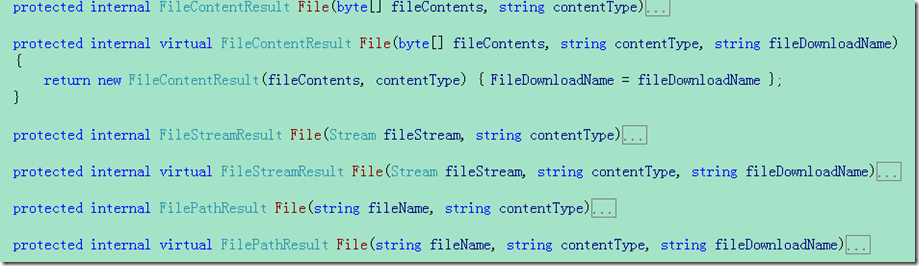
- Controller中定义的封装方法
- JavaScriptResult
貌似和浏览器有关系,谷歌不执行,直接返回字符串了
在服务端生成一段JS,作为响应返回给客户端,并且在客户端执行.
JavaScriptResult就是将ContentType设置为javascript,然后直接写入JS内容,因此,完全可以用ContentResult实现这个效果,只需要设置ContentType的类型为Scrippt就可以了
JavaScriptResult
public class JavaScriptResult : ActionResult

{

    public string Script { get; set; }

    public override void ExecuteResult(ControllerContext context)

    {

        if (context == null) {

            throw new ArgumentNullException("context");

        }

        HttpResponseBase response = context.HttpContext.Response;

        response.ContentType = "application/x-javascript";

        if (Script != null) {

            response.Write(Script);

        }

    }

}
- JsonResult
默认情况下,不允许Get请求Json数据
JsonResult
public class JsonResult : ActionResult

{

    public JsonResult()

    {

        JsonRequestBehavior = JsonRequestBehavior.DenyGet;

    }

    public Encoding ContentEncoding { get; set; }

    public string ContentType { get; set; }

    public object Data { get; set; }

    public JsonRequestBehavior JsonRequestBehavior { get; set; }

    public int? MaxJsonLength { get; set; }

    public int? RecursionLimit { get; set; }

    public override void ExecuteResult(ControllerContext context)

    {

        if (context == null) {

            throw new ArgumentNullException("context");

        }

        if (JsonRequestBehavior == JsonRequestBehavior.DenyGet &&

        String.Equals(context.HttpContext.Request.HttpMethod, "GET", StringComparison.OrdinalIgnoreCase)) {

            throw new InvalidOperationException(MvcResources.JsonRequest_GetNotAllowed);

        }

        HttpResponseBase response = context.HttpContext.Response;

        if (!String.IsNullOrEmpty(ContentType)) {

            response.ContentType = ContentType;

        } else {

            response.ContentType = "application/json";

        }

        if (ContentEncoding != null) {

            response.ContentEncoding = ContentEncoding;

        }

        if (Data != null) {

            JavaScriptSerializer serializer = new JavaScriptSerializer();

            if (MaxJsonLength.HasValue) {

                serializer.MaxJsonLength = MaxJsonLength.Value;

            }

            if (RecursionLimit.HasValue) {

                serializer.RecursionLimit = RecursionLimit.Value;

            }

            response.Write(serializer.Serialize(Data));

        }

    }

}
JsonRequestBehavior
public enum JsonRequestBehavior
{
AllowGet,
DenyGet,
}
- HttpStatusCodeResult
设置Response的StatusCode
HttpStatusCodeResult
public HttpStatusCodeResult(int statusCode, string statusDescription)
{
StatusCode = statusCode;
StatusDescription = statusDescription;
}
public int StatusCode { get; private set; }
public string StatusDescription { get; private set; }
public override void ExecuteResult(ControllerContext context)
{
if (context == null)
{
throw new ArgumentNullException("context");
}
context.HttpContext.Response.StatusCode = StatusCode;
if (StatusDescription != null)
{
context.HttpContext.Response.StatusDescription = StatusDescription;
}
}
- RedirectResult/RedirectToRouteResult
客户端的浏览器地址会变化
其作用与调用HttpResponse 的Redirect/RedirectPermanent 方法完全一致
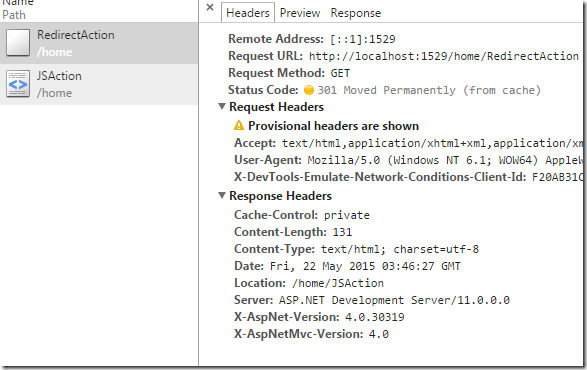
暂时重定向和永久重定向有时又被称为"302 重定向"和"301 重定向", 302 和301 表示响应的状态码。当我们调用HttpResponse 的RedirectIRedirectPermanent 方法时,除了会设置相应的响应状态码之外,还会将重定向的目标地址写入响应报头(Location) ,浏览器在接收到响应之后自动发起针对重定向目标地址的访问。
RedirectResult
public bool Permanent { get; private set; }
public string Url { get; private set; }
public override void ExecuteResult(ControllerContext context)
{
if (context == null)
{
throw new ArgumentNullException("context");
}
if (context.IsChildAction)
{
throw new InvalidOperationException(MvcResources.RedirectAction_CannotRedirectInChildAction);
}
string destinationUrl = UrlHelper.GenerateContentUrl(Url, context.HttpContext);
context.Controller.TempData.Keep();
if (Permanent)
{
context.HttpContext.Response.RedirectPermanent(destinationUrl, endResponse: false);
}
else
{
context.HttpContext.Response.Redirect(destinationUrl, endResponse: false);
}
}
RedirectToRouteResult
根据路由生成URL,
再进行重定向
public class RedirectToRouteResult : ActionResult

{

    private RouteCollection _routes;

    public RedirectToRouteResult(RouteValueDictionary routeValues)

        :

        this(null, routeValues)

    {

    }

    public RedirectToRouteResult(string routeName, RouteValueDictionary routeValues)

        : this(routeName, routeValues, permanent: false)

    {

    }

    public RedirectToRouteResult(string routeName, RouteValueDictionary routeValues, bool permanent)

    {

        Permanent = permanent;

        RouteName = routeName ?? String.Empty;

        RouteValues = routeValues ?? new RouteValueDictionary();

    }

    public bool Permanent { get; private set; }

    public string RouteName { get; private set; }

    public RouteValueDictionary RouteValues { get; private set; }

    internal RouteCollection Routes

    {

        get

        {

            if (_routes == null) {

                _routes = RouteTable.Routes;

            }

            return _routes;

        }

        set { _routes = value; }

    }

    public override void ExecuteResult(ControllerContext context)

    {

        if (context == null) {

            throw new ArgumentNullException("context");

        }

        if (context.IsChildAction) {

            throw new InvalidOperationException(MvcResources.RedirectAction_CannotRedirectInChildAction);

        }

        string destinationUrl = UrlHelper.GenerateUrl(RouteName, null /* actionName */, null /* controllerName */, RouteValues, Routes, context.RequestContext, false /* includeImplicitMvcValues */);

        if (String.IsNullOrEmpty(destinationUrl)) {

            throw new InvalidOperationException(MvcResources.Common_NoRouteMatched);

        }

        context.Controller.TempData.Keep();

        if (Permanent) {

            context.HttpContext.Response.RedirectPermanent(destinationUrl, endResponse: false);

        } else {

            context.HttpContext.Response.Redirect(destinationUrl, endResponse: false);

        }

    }

}
ViewResult和ViewEngine
- View引擎中的View
IView
public interface IView
{
void Render(ViewContext viewContext, TextWriter writer);
}
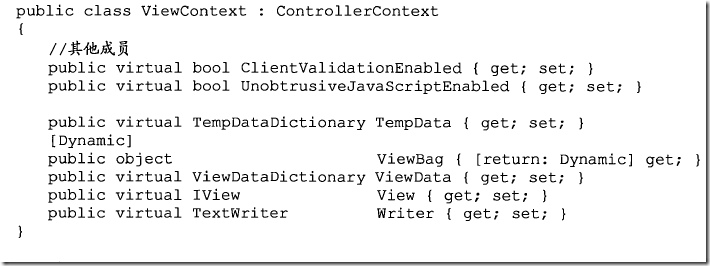
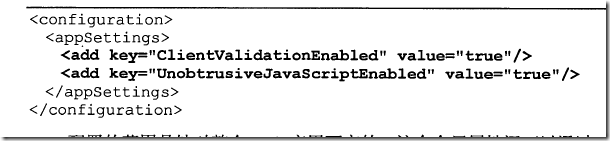
ViewContext
- ViewEngine
IViewEngine
public interface IViewEngine
{
ViewEngineResult FindPartialView(ControllerContext controllerContext, string partialViewName, bool useCache);
ViewEngineResult FindView(ControllerContext controllerContext, string viewName, string masterName, bool useCache);
void ReleaseView(ControllerContext controllerContext, IView view);
}
ViewEngineResult
public class ViewEngineResult

{

    public ViewEngineResult(IEnumerable<string> searchedLocations)

    {

        if (searchedLocations == null) {

            throw new ArgumentNullException("searchedLocations");

        }

        SearchedLocations = searchedLocations;

    }

    public ViewEngineResult(IView view, IViewEngine viewEngine)

    {

        if (view == null) {

            throw new ArgumentNullException("view");

        }

        if (viewEngine == null) {

            throw new ArgumentNullException("viewEngine");

        }

        View = view;

        ViewEngine = viewEngine;

    }

    public IEnumerable<string> SearchedLocations { get; private set; }

    public IView View { get; private set; }

    public IViewEngine ViewEngine { get; private set; }

}
ViewEngines
public static class ViewEngines

{

    private static readonly ViewEngineCollection _engines = new ViewEngineCollection

{

new WebFormViewEngine(),

new RazorViewEngine(),

};

    public static ViewEngineCollection Engines

    {

        get { return _engines; }

    }

}
ViewEngineCollection
ViewEngineCollection 同样定义了FindViewlF indPartialView 方法用于获取指定名称的View 和分部View
public class ViewEngineCollection : Collection<IViewEngine>

{

    private IResolver<IEnumerable<IViewEngine>> _serviceResolver;

    public ViewEngineCollection()

    {

        _serviceResolver = new MultiServiceResolver<IViewEngine>(() => Items);

    }

    public ViewEngineCollection(IList<IViewEngine> list)

        : base(list)

    {

        _serviceResolver = new MultiServiceResolver<IViewEngine>(() => Items);

    }

    public virtual ViewEngineResult FindPartialView(ControllerContext controllerContext, string partialViewName)

    {

        if (controllerContext == null) {

            throw new ArgumentNullException("controllerContext");

        }

        if (String.IsNullOrEmpty(partialViewName)) {

            throw new ArgumentException(MvcResources.Common_NullOrEmpty, "partialViewName");

        }

        return Find(e => e.FindPartialView(controllerContext, partialViewName, true),

        e => e.FindPartialView(controllerContext, partialViewName, false));

    }

    public virtual ViewEngineResult FindView(ControllerContext controllerContext, string viewName, string masterName)

    {

        if (controllerContext == null) {

            throw new ArgumentNullException("controllerContext");

        }

        if (String.IsNullOrEmpty(viewName)) {

            throw new ArgumentException(MvcResources.Common_NullOrEmpty, "viewName");

        }

        return Find(e => e.FindView(controllerContext, viewName, masterName, true),

        e => e.FindView(controllerContext, viewName, masterName, false));

    }

}
- ViewResult的执行
如果Action的返回值不是ActionResult,就创建ContentResult
ActionResult的更多相关文章
- 【转】ASP.NET MVC学习笔记-Controller的ActionResult
1. 返回ViewResult public ActionResult Index() { ViewData["Message"] = "Welcome ...
- Razor语法&ActionResult&MVC
Razor代码复用 mvc 4 razor语法讲解和使用 了解ASP.NET MVC几种ActionResult的本质:EmptyResult & ContentResult 了解ASP.NE ...
- ASP.NET MVC自定义ActionResult实现文件压缩
有时候需要将单个或多个文件进行压缩打包后在进行下载,这里我自定义了一个ActionResult,方便进行文件下载 using System; using System.Collections; usi ...
- C# MVC 自定义ActionResult实现EXCEL下载
前言 在WEB中,经常要使用到将数据转换成EXCEL,并进行下载.这里整理资料并封装了一个自定义ActionResult类,便于使用.如果文章对你有帮助,请点个赞. 话不多少,这里转换EXCEL使用的 ...
- ASP.NET MVC中多种ActionResult用法总结
最近一段时间做了个ASP.NET MVC4.0的项目,项目马上就要结束了,今天忙里偷闲简单总结一下心得: 1. 如果Action需要有返回值的话,必须是ActionResult的话,可以返回一个Emp ...
- 一个ActionResult中定位到两个视图—<团委项目>
在使用MVC做项目的时候一般的情况就是一个ActionResult一个视图,这样对应的Return View();就可以找到下面对应的视图,这是根据一个原则,"约定大于配置&quo ...
- MVC - Action和ActionResult
Action 定义在Controller中的Action方法返回ActionResult对象,ActionResult是对Action执行结果的封装,用于最终对请求进行响应.HTTP是一个单纯的采用请 ...
- MVC中几种常用ActionResult
一.定义 MVC中ActionResult是Action的返回结果.ActionResult 有多个派生类,每个子类功能均不同,并不是所有的子类都需要返回视图View,有些直接返回流,有些返回字符串等 ...
- ASP.NET MVC 拓展ActionResult实现Html To Pdf 导出
之前实现了html直接转换为word文档的功能,那么是否也同样可以直接转换为pdf文档呢,网上搜了下html to pdf 的开源插件有很多 如:wkhtmltopdf,pdfsharp,itexts ...
- 了解ASP.NET MVC几种ActionResult的本质:JavaScriptResult & JsonResult
在之前的两篇文章(<EmptyResult & ContentResult>和<FileResult>)我们剖析了EmptyResult.ContentResult和F ...
随机推荐
- Android -- 经验分享
目录 代码中安装 ...
- struts2标签详解
struts2标签讲解 要使用Struts2的标签,只需要在JSP页面添加如下一行定义即可:<%@ taglib prefix="s" uri="/struts-t ...
- Mac下的常用Shell命令
今天介绍一下在Mac的终端中一些常用的Shell命令: 1.查看当前工作目录的完整路径 pwd (pwd的原意是:print work directiory,而不是密码password的意思,呵呵) ...
- mysql存储过程和游标以及if-else,while典型实例
-- -------------------------------------------------------------------------------- -- Routine DDL - ...
- android开发 根据Uri获取真实路径
Uri uri = data.getData(); String[] proj = { MediaStore.Images.Media.DATA }; Cursor actualimagecursor ...
- 浏览器不支持HTML5
有些浏览器并不支持HTML5中的新增元素,如IE8或更早版本.想要应用样式,可以头部标记<head>中加入下面JavaScript代码 <html> <head> ...
- github/gitlab 管理多个ssh key
github/gitlab 管理多个ssh key 以前只使用一个 ssh key 在github上提交代码,由于工作原因,需要再添加一个ssh key在公司的 gitlab上提交代码,下面记录下配置 ...
- 802.11 wireless 五
802.11 wireless 5CSMA/CA,采用倒计时的方法,退避的时间(当年时间+duration 为发送时间,每一个帧会有一个duration,这个位叫做duration[n.持续]) PS ...
- hdu 1533 Going Home 最小费用最大流
题目链接:http://acm.hdu.edu.cn/showproblem.php?pid=1533 On a grid map there are n little men and n house ...
- BZOJ3130 [Sdoi2013]费用流
AC通道:http://www.lydsy.com/JudgeOnline/problem.php?id=3130 这题codevs上也有,不过数据挂了[要A得看discuss]. 题目大意: Ali ...