
wpMVVM模式绑定集合的应用
一、新建一个项目,命名为wpMVVMone,添加一个有关食品信息的类Food.CS,代码如下:
public class Food

    {

        public string Name { get; set; }

        public string Description { get; set; }

        public string iconUri { get; set; }

        public string Type { get; set; }

    }
二、添加一个存放图片的文件夹images,然后往里添加若干张图片。
三、新建一个类:FoodViewModel,并加入命名空间
using System.Collections.ObjectModel;
using System.ComponentModel;
完整代码如下:
using System;

using System.Net;

using System.Windows;

using System.Windows.Controls;

using System.Windows.Documents;

using System.Windows.Ink;

using System.Windows.Input;

using System.Windows.Media;

using System.Windows.Media.Animation;

using System.Windows.Shapes;

using System.Collections.ObjectModel;

using System.ComponentModel;

namespace wpMVVMone

{

    public class FoodViewModel:INotifyPropertyChanged

    {

        private ObservableCollection<Food> _allfood;

        public ObservableCollection<Food> Allfood

        {

            get

            {

                if (_allfood == null)

                    _allfood = new ObservableCollection<Food>();

                return _allfood;

            }

            set

            {

                if (_allfood != value)

                {

                    _allfood = value;

                    NotifyChanged("Allfood");

                }

            }

        }

        public FoodViewModel()

        {

            try

            {

                Food item0 = new Food()

                {

                    Name = "西红柿",

                    iconUri = "images/f01.jpg",

                    Type = "Healthy",

                    Description = "西红丝的味道很不错"

                };

                Food item1 = new Food()

                {

                    Name = "黄瓜",

                    iconUri = "images/f02.jpg",

                    Type = "Healthy",

                    Description = "黄瓜的味道很不错"

                };

                Food item2 = new Food()

                {

                    Name = "西柿",

                    iconUri = "images/f03.jpg",

                    Type = "Healthy",

                    Description = "西丝的味道很不错"

                };

                Food item3 = new Food()

                {

                    Name = "西红柿1",

                    iconUri = "images/f04.jpg",

                    Type = "Healthy",

                    Description = "西红丝1的味道很不错"

                };

                Food item4 = new Food()

                {

                    Name = "西红柿2",

                    iconUri = "images/f05.jpg",

                    Type = "Healthy",

                    Description = "西红丝2的味道很不错"

                };

                Food item5 = new Food()

                {

                    Name = "西红柿3",

                    iconUri = "images/f06.jpg",

                    Type = "Healthy",

                    Description = "西红丝3的味道很不错"

                };

                Food item6 = new Food()

                {

                    Name = "西红柿4",

                    iconUri = "images/f07.jpg",

                    Type = "Healthy",

                    Description = "西红丝4的味道很不错"

                };

                Allfood.Add(item0);

                Allfood.Add(item1);

                Allfood.Add(item2);

                Allfood.Add(item3);

                Allfood.Add(item4);

                Allfood.Add(item5);

                Allfood.Add(item6);

            }

            catch (Exception ex)

            {

                MessageBox.Show(ex.Message);

            }

        }

        public event PropertyChangedEventHandler PropertyChanged;

        public void NotifyChanged(string propertyname)

        {

            if (PropertyChanged != null)

            {

                PropertyChanged(this, new PropertyChangedEventArgs(propertyname));

            }

        }

    }

}
四、切换到MainPage页面的XAML代码界面,添加引用:xmlns:my="clr-namespace:wpMVVMone"
在外层Grid上边添加
<phone:PhoneApplicationPage.Resources>
<my:FoodViewModel x:Key="food"/>
</phone:PhoneApplicationPage.Resources>
放置内容的Grid中的XAML代码为
<Grid x:Name="ContentPanel" Grid.Row="1" Margin="12,0,12,0" DataContext="{StaticResource food}">

            <ListBox x:Name="listbox1" HorizontalContentAlignment="Stretch" ItemsSource="{Binding Allfood}">

                <ListBox.ItemTemplate>

                    <DataTemplate>

                        <StackPanel Orientation="Horizontal" Background="Gray" Width="450" Margin="10">

                            <Image Source="{Binding iconUri}" Stretch="None"/>

                            <TextBlock Text="{Binding Name}" FontSize="40" Width="150"/>

                        </StackPanel>

                    </DataTemplate>

                </ListBox.ItemTemplate>

            </ListBox>

        </Grid>
运行结果如图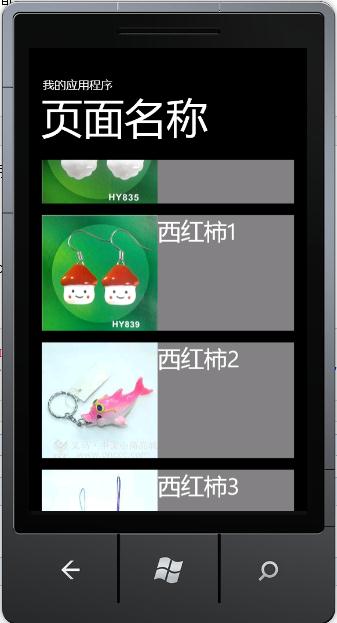
wpMVVM模式绑定集合的应用的更多相关文章
- 为 ItemsControl 类型的控件提供行号,mvvm模式 绑定集合
从网络上看到的两种方式,一种是,在 codebehind 里为 控件写事件,下面是将集合绑定到 DataGrid 控件: private void DataGridSoftware_LoadingRo ...
- 背水一战 Windows 10 (22) - 绑定: 通过 Binding 绑定对象, 通过 x:Bind 绑定对象, 通过 Binding 绑定集合, 通过 x:Bind 绑定集合
[源码下载] 背水一战 Windows 10 (22) - 绑定: 通过 Binding 绑定对象, 通过 x:Bind 绑定对象, 通过 Binding 绑定集合, 通过 x:Bind 绑定集合 作 ...
- 绑定: 通过 Binding 绑定对象, 通过 x:Bind 绑定对象, 通过 Binding 绑定集合, 通过 x:Bind 绑定集合
背水一战 Windows 10 之 绑定 通过 Binding 绑定对象 通过 x:Bind 绑定对象 通过 Binding 绑定集合 通过 x:Bind 绑定集合 示例1.演示如何通过 Bindin ...
- WPF 绑定集合 根据集合个数改变样式 INotifyCollectionChanged
问题:当前ListBox Items 绑定 集合数据源ListA时候:ListA集合数据源中存在另外一个集合ListB,当更改或往ListB集合中添加数据的时候,通知改变? 实体类继承 INotify ...
- springmvc:请求参数绑定集合类型
一.请求参数绑定实体类 domain: private String username; private String password; private Double money; private ...
- 在ASP.NET MVC中使用Knockout实践08,使用foreach绑定集合
本篇体验使用 foreach 绑定一个Product集合. 首先使用构造创建一个View Model. var Product = function(data) { this.name = ko.ob ...
- Linux的bond模式绑定及模式区别
[Linux的bond模式配置] 原理: 多块网卡虚拟成一张,实现冗余:多张网卡对外显示一张,具有同一个IP: 工作在网卡是混杂模式的情况下: 对于多物理网卡的 Bond 网卡而言,其中一块物理网卡会 ...
- javascript设计模式(张容铭)学习笔记 - 外观模式绑定事件
有一个需求要为document对象绑定click事件来是想隐藏提示框的交互功能,于是小白写了如下代码: document.onclick = function(e) { e.preventDefaul ...
- WPF—TreeView无限极绑定集合形成树结构
1.如图所示:绑定树效果图 2.前台Xaml代码: <Window x:Class="WpfTest.MainWindow" xmlns="http://schem ...
随机推荐
- [Java] Collections的简单运用
package test.collections; import java.util.ArrayList; import java.util.Collection; import java.util. ...
- ASP.NET MVC4 WebAPI若干要点
本文仅仅是将一些可以运行无误的WebAPI示例的要点,记录下来,供自己查阅,也供刚刚学习WebAPI的读者参考之. 1.默认的API是不会过滤到action这个级别的,如果要过滤到这个级别,必须在路由 ...
- UTF-8 GB2321
已知:汉字“你”UTF8编码是 0xe4bda0,GBK编码是 0xc4e3,求证. 0xe4bda0 → 2进制11100100 10111101 10100000 → UTF8 3字节111001 ...
- sql server远程访问Oracle数据库
在sql server上新建了连接服务器后 在指定的链接服务器上执行指定的传递查询. 该服务器是 OLE DB 数据源. OPENQUERY 可以在查询的 FROM 子句中引用,就好象它是一个表名. ...
- arm交叉编译器gnueabi、none-eabi、arm-eabi、gnueabihf、gnueabi区别
命名规则 交叉编译工具链的命名规则为:arch [-vendor] [-os] [-(gnu)eabi] arch – 体系架构,如ARM,MIPSvendor – 工具链提供商os – 目标操作系统 ...
- Windows Service的安装卸载 和 Service控制(转)
Windows Service的安装卸载 和 Service控制 原文地址:http://www.cnblogs.com/Peter-Zhang/archive/2011/10/15/2212663. ...
- 通过WebHandler给图片添加水印
图片生成webhandler水印,主要把水印的信息和位置post到webhandler去处理,返回后再div上显示 前台传递水印的信息和位置: /***********提取DIV属性********* ...
- Grunt 之 watch 和 livereload
现在 watch 中已经集成了 livereload ,所以把它们放在一起说明. watch 可以监控特定的文件,在添加文件.修改文件.或者删除文件的时候自动执行自定义的任务,比如 livereloa ...
- 开发者眼中最好的 22 款 GUI 测试工具
1.Abbot - Java GUI 测试框架 Abbot是一个基于GUI的简单的Java测试框架,它能够帮助开发者测试Java用户界面. 它提供事件自动生成和验证Java GUI组件,使您能够轻松地 ...
- 关于conversation generation的论文笔记
对话模型此前的研究大致有三个方向:基于规则.基于信息检索.基于机器翻译.基于规则的对话系统,顾名思义,依赖于人们周密设计的规则,对话内容限制在特定领域下,实际应用如智能客服,智能场馆预定系统.基于信息 ...