
WPF—TreeView无限极绑定集合形成树结构
1.如图所示:绑定树效果图
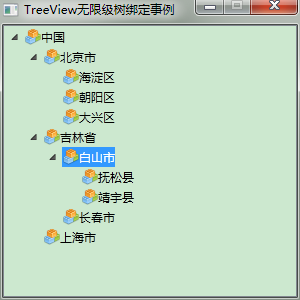
2.前台Xaml代码:
<Window x:Class="WpfTest.MainWindow"

        xmlns="http://schemas.microsoft.com/winfx/2006/xaml/presentation"

        xmlns:x="http://schemas.microsoft.com/winfx/2006/xaml"

        xmlns:mode="clr-namespace:WpfTest"

        Title="TreeView无限级树绑定事例" Height="" Width="" WindowStartupLocation="CenterScreen" ResizeMode="CanMinimize">

    <Grid>

        <Grid.Resources>

            <HierarchicalDataTemplate DataType="{x:Type mode:Node}" ItemsSource="{Binding Nodes}">

                <StackPanel Orientation="Horizontal" Margin="0,2,0,2">

                    <!--<Image Source="pack://application:,,,/WpfTest;Component/Resources/KnowDot.png" Width="" Height="" />-->

                    <!--<Image Source="Resources/KnowDot.png" Width="" Height="" />-->

                    <Image Source="/WpfTest;Component/Resources/KnowDot.png" Width="" Height="" />

                    <TextBlock Text="{Binding Name}" ToolTip="{Binding Name}" Tag="{Binding}"/>

                </StackPanel>

            </HierarchicalDataTemplate>

        </Grid.Resources>

        <TreeView Name="TreeView"/>

    </Grid>

</Window>
2.后台cs代码:采用递归无限极向下查询
using System;

using System.Collections.Generic;

using System.Linq;

using System.Text;

using System.Windows;

using System.Windows.Controls;

using System.Windows.Data;

using System.Windows.Documents;

using System.Windows.Input;

using System.Windows.Media;

using System.Windows.Media.Imaging;

using System.Windows.Navigation;

using System.Windows.Shapes;

using System.Threading;

using System.Diagnostics;

using System.Windows.Markup;

namespace WpfTest

{

    /// <summary>

    /// MainWindow.xaml 的交互逻辑

    /// </summary>

    public partial class MainWindow : Window

    {

        public MainWindow()

        {

            InitializeComponent();

            List<Node> nodes = new List<Node>()

            {

                new Node { ID = , Name = "中国" },

                new Node { ID = , Name = "北京市", ParentID =  },

                new Node { ID = , Name = "吉林省", ParentID =  },

                new Node { ID = , Name = "上海市", ParentID =  },

                new Node { ID = , Name = "海淀区", ParentID =  },

                new Node { ID = , Name = "朝阳区", ParentID =  },

                new Node { ID = , Name = "大兴区", ParentID =  },

                new Node { ID = , Name = "白山市", ParentID =  },

                new Node { ID = , Name = "长春市", ParentID =  },

                new Node { ID = , Name = "抚松县", ParentID =  },

                new Node { ID = , Name = "靖宇县", ParentID =  }

            };

            // 绑定树

            List<Node> outputList = Bind(nodes);

            //(TreeView.SelectedItem as Node).ID

            this.TreeView.ItemsSource = outputList;

            //TreeViewItem item = new TreeViewItem();

            //item.Header = "";

        }

        /// <summary>

        /// 绑定树

        /// </summary>

        List<Node> Bind(List<Node> nodes)

        {

            List<Node> outputList = new List<Node>();

            for (int i = ; i < nodes.Count; i++)

            {

                if (nodes[i].ParentID == -)

                {

                    outputList.Add(nodes[i]);

                }

                else

                {

                    FindDownward(nodes, nodes[i].ParentID).Nodes.Add(nodes[i]);

                }

            }

            return outputList;

        }

        /// <summary>

        /// 递归向下查找

        /// </summary>

        Node FindDownward(List<Node> nodes, int id)

        {

            if (nodes == null) return null;

            for (int i = ; i < nodes.Count; i++)

            {

                if (nodes[i].ID == id)

                {

                    return nodes[i];

                }

                Node node = FindDownward(nodes[i].Nodes, id);

                if (node != null)

                {

                    return node;

                }

            }

            return null;

        }

    }

    public class Node

    {

        public Node()

        {

            this.Nodes = new List<Node>();

            this.ParentID = -;

        }

        public int ID { get; set; }

        public string Name { get; set; }

        public int ParentID { get; set; }

        public List<Node> Nodes { get; set; }

    }

}
WPF—TreeView无限极绑定集合形成树结构的更多相关文章
- [No0000D1]WPF—TreeView无限极绑定集合形成树结构
1.如图所示:绑定树效果图 2.前台Xaml代码: <Window x:Class="WpfTest.MainWindow" xmlns="http://schem ...
- wpf treeview 数据绑定 递归绑定节点
1.先上效果 将所有节点加入ComboBox数据源,在ComboBox中选择时下方Treeview显示该节点下的子节点. 1.xaml文件,将以下代码加入界面合适位置 <StackPanel&g ...
- 转:打造DropDownList,TreeView,ListBox无限极分类目录树
[csharp] view plaincopyprint? #region DropDownList无限递归显示层次关系 /// <summary> /// 创建无限分级下拉列表框 /// ...
- WPF 绑定集合 根据集合个数改变样式 INotifyCollectionChanged
问题:当前ListBox Items 绑定 集合数据源ListA时候:ListA集合数据源中存在另外一个集合ListB,当更改或往ListB集合中添加数据的时候,通知改变? 实体类继承 INotify ...
- WPF Binding学习(四) 绑定各种数据源
转自:http://blog.csdn.net/lisenyang/article/details/18312199 1.集合作为数据源 首先我们先创建一个模型类 public class Stude ...
- WPF TreeView HierarchicalDataTemplate
原文 WPF TreeView HierarchicalDataTemplate HierarchicalDataTemplate 的DataType是本层的绑定,而ItemsSource是绑定下层的 ...
- C#无限极分类树-创建-排序-读取 用Asp.Net Core+EF实现
今天做一个管理后台菜单,想着要用无限极分类,记得园子里还是什么地方见过这种写法,可今天找了半天也没找到,没办法静下心来自己写了: 首先创建节点类(我给它取名:AdminUserTree): /// & ...
- [WPF 基础知识系列] —— 绑定中的数据校验Vaildation
前言: 只要是有表单存在,那么就有可能有对数据的校验需求.如:判断是否为整数.判断电子邮件格式等等. WPF采用一种全新的方式 - Binding,来实现前台显示与后台数据进行交互,当然数据校验方式也 ...
- 【laravel5.4】Baum无限极分类和collect助手函数、transform()中间件(转换数据)方法使用
1.目的,无限极分类 /* * getdepartment:获取[当前登录用户对应公司的所有有效部门] * DB::table ==>返回查询构造器结果,不会返回一个collect实例 * 而 ...
随机推荐
- Microsoft visual studio中文字样输出
解决办法: 可以尝试下通过: 1.file->高级保存选项-> 2.工具->选项->文本编辑器->自动检测不带签名的UTF-8编码
- [ActionScript 3.0] AS3 ConvolutionFilter卷积滤镜的应用
ConvolutionFilter 类应用矩阵盘绕滤镜效果.卷积将输入图像的像素与相邻的像素合并以生成图像.通过卷积,可以实现大量的图像效果,包括模糊.边缘检测.锐化.浮雕和斜角.您可以将滤镜应用于任 ...
- freemarker中使用shiro标签
地址:https://github.com/jagregory/shiro-freemarker-tags下载该jar包 或者源代码文件复制到自己工程的lib下或者package中 如果使用spri ...
- XBox360-双光盘游戏自制GOD
一直在找极限竞速4(Forza4),虽然这个版本比较老,但因为带体感.终于下到了,可惜是2个ISO.试着自己做GOD.用到两个软件:Iso2God和Xbox Backup Creator(俗称XBC) ...
- H264句法和语法总结(二)NAL层语法
1.NAL全称Network Abstract Layer, 即网络抽象层. 在H.264/AVC视频编码标准中,整个系统框架被分为了两个层面:视频编码层面(VCL)和网络抽象层面(N ...
- How I came to find Linux
http://ianmurdock.com/post/how-i-came-to-find-linux/ lan murdock August 17, 2015 I saw my first Sun ...
- 在 ASP.NET MVC 应用中使用 NInject 注入 ASMX 类型的 Web Service
这几天,有同学问到为什么在 ASP.NET MVC 应用中,无法在 .ASMX 中使用 NInject 进行注入. 现象 比如,我们定义了一个接口,然后定义了一个实现. public interfac ...
- HDU1213
http://acm.split.hdu.edu.cn/showproblem.php?pid=1213 #include<stdio.h> #include<algorithm&g ...
- JAVA的JDBC连接与sql操作
一.前言 本文主要介绍怎样连接数据库.即JDBC的操作.以MySQL为例子. 前提是首先要将驱动jar包放入对应路径中. 二.过程说明 1.加载jdbc驱动程序 <span style=&quo ...
- telnet登录路由器启动服务的shell脚本
因为在测试中经常要telnet登录到路由器中去配置环境启动路由器,每次都输入一遍命令太麻烦了,想着写一个shell脚本实现自动登录.配置环境.启动服务的过程. 脚本实现是使用expect来实现的,所以 ...