
wpMVVM模式绑定集合的应用
一、新建一个项目,命名为wpMVVMone,添加一个有关食品信息的类Food.CS,代码如下:
public class Food

    {

        public string Name { get; set; }

        public string Description { get; set; }

        public string iconUri { get; set; }

        public string Type { get; set; }

    }
二、添加一个存放图片的文件夹images,然后往里添加若干张图片。
三、新建一个类:FoodViewModel,并加入命名空间
using System.Collections.ObjectModel;
using System.ComponentModel;
完整代码如下:
using System;

using System.Net;

using System.Windows;

using System.Windows.Controls;

using System.Windows.Documents;

using System.Windows.Ink;

using System.Windows.Input;

using System.Windows.Media;

using System.Windows.Media.Animation;

using System.Windows.Shapes;

using System.Collections.ObjectModel;

using System.ComponentModel;

namespace wpMVVMone

{

    public class FoodViewModel:INotifyPropertyChanged

    {

        private ObservableCollection<Food> _allfood;

        public ObservableCollection<Food> Allfood

        {

            get

            {

                if (_allfood == null)

                    _allfood = new ObservableCollection<Food>();

                return _allfood;

            }

            set

            {

                if (_allfood != value)

                {

                    _allfood = value;

                    NotifyChanged("Allfood");

                }

            }

        }

        public FoodViewModel()

        {

            try

            {

                Food item0 = new Food()

                {

                    Name = "西红柿",

                    iconUri = "images/f01.jpg",

                    Type = "Healthy",

                    Description = "西红丝的味道很不错"

                };

                Food item1 = new Food()

                {

                    Name = "黄瓜",

                    iconUri = "images/f02.jpg",

                    Type = "Healthy",

                    Description = "黄瓜的味道很不错"

                };

                Food item2 = new Food()

                {

                    Name = "西柿",

                    iconUri = "images/f03.jpg",

                    Type = "Healthy",

                    Description = "西丝的味道很不错"

                };

                Food item3 = new Food()

                {

                    Name = "西红柿1",

                    iconUri = "images/f04.jpg",

                    Type = "Healthy",

                    Description = "西红丝1的味道很不错"

                };

                Food item4 = new Food()

                {

                    Name = "西红柿2",

                    iconUri = "images/f05.jpg",

                    Type = "Healthy",

                    Description = "西红丝2的味道很不错"

                };

                Food item5 = new Food()

                {

                    Name = "西红柿3",

                    iconUri = "images/f06.jpg",

                    Type = "Healthy",

                    Description = "西红丝3的味道很不错"

                };

                Food item6 = new Food()

                {

                    Name = "西红柿4",

                    iconUri = "images/f07.jpg",

                    Type = "Healthy",

                    Description = "西红丝4的味道很不错"

                };

                Allfood.Add(item0);

                Allfood.Add(item1);

                Allfood.Add(item2);

                Allfood.Add(item3);

                Allfood.Add(item4);

                Allfood.Add(item5);

                Allfood.Add(item6);

            }

            catch (Exception ex)

            {

                MessageBox.Show(ex.Message);

            }

        }

        public event PropertyChangedEventHandler PropertyChanged;

        public void NotifyChanged(string propertyname)

        {

            if (PropertyChanged != null)

            {

                PropertyChanged(this, new PropertyChangedEventArgs(propertyname));

            }

        }

    }

}
四、切换到MainPage页面的XAML代码界面,添加引用:xmlns:my="clr-namespace:wpMVVMone"
在外层Grid上边添加
<phone:PhoneApplicationPage.Resources>
<my:FoodViewModel x:Key="food"/>
</phone:PhoneApplicationPage.Resources>
放置内容的Grid中的XAML代码为
<Grid x:Name="ContentPanel" Grid.Row="1" Margin="12,0,12,0" DataContext="{StaticResource food}">

            <ListBox x:Name="listbox1" HorizontalContentAlignment="Stretch" ItemsSource="{Binding Allfood}">

                <ListBox.ItemTemplate>

                    <DataTemplate>

                        <StackPanel Orientation="Horizontal" Background="Gray" Width="450" Margin="10">

                            <Image Source="{Binding iconUri}" Stretch="None"/>

                            <TextBlock Text="{Binding Name}" FontSize="40" Width="150"/>

                        </StackPanel>

                    </DataTemplate>

                </ListBox.ItemTemplate>

            </ListBox>

        </Grid>
运行结果如图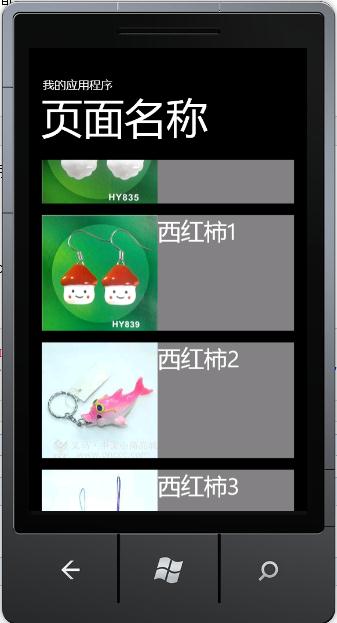
wpMVVM模式绑定集合的应用的更多相关文章
- 为 ItemsControl 类型的控件提供行号,mvvm模式 绑定集合
从网络上看到的两种方式,一种是,在 codebehind 里为 控件写事件,下面是将集合绑定到 DataGrid 控件: private void DataGridSoftware_LoadingRo ...
- 背水一战 Windows 10 (22) - 绑定: 通过 Binding 绑定对象, 通过 x:Bind 绑定对象, 通过 Binding 绑定集合, 通过 x:Bind 绑定集合
[源码下载] 背水一战 Windows 10 (22) - 绑定: 通过 Binding 绑定对象, 通过 x:Bind 绑定对象, 通过 Binding 绑定集合, 通过 x:Bind 绑定集合 作 ...
- 绑定: 通过 Binding 绑定对象, 通过 x:Bind 绑定对象, 通过 Binding 绑定集合, 通过 x:Bind 绑定集合
背水一战 Windows 10 之 绑定 通过 Binding 绑定对象 通过 x:Bind 绑定对象 通过 Binding 绑定集合 通过 x:Bind 绑定集合 示例1.演示如何通过 Bindin ...
- WPF 绑定集合 根据集合个数改变样式 INotifyCollectionChanged
问题:当前ListBox Items 绑定 集合数据源ListA时候:ListA集合数据源中存在另外一个集合ListB,当更改或往ListB集合中添加数据的时候,通知改变? 实体类继承 INotify ...
- springmvc:请求参数绑定集合类型
一.请求参数绑定实体类 domain: private String username; private String password; private Double money; private ...
- 在ASP.NET MVC中使用Knockout实践08,使用foreach绑定集合
本篇体验使用 foreach 绑定一个Product集合. 首先使用构造创建一个View Model. var Product = function(data) { this.name = ko.ob ...
- Linux的bond模式绑定及模式区别
[Linux的bond模式配置] 原理: 多块网卡虚拟成一张,实现冗余:多张网卡对外显示一张,具有同一个IP: 工作在网卡是混杂模式的情况下: 对于多物理网卡的 Bond 网卡而言,其中一块物理网卡会 ...
- javascript设计模式(张容铭)学习笔记 - 外观模式绑定事件
有一个需求要为document对象绑定click事件来是想隐藏提示框的交互功能,于是小白写了如下代码: document.onclick = function(e) { e.preventDefaul ...
- WPF—TreeView无限极绑定集合形成树结构
1.如图所示:绑定树效果图 2.前台Xaml代码: <Window x:Class="WpfTest.MainWindow" xmlns="http://schem ...
随机推荐
- Codeforces 716C[数论][构造]
/* CF傻逼构造题 某人要经过n回合游戏,初始分值是2,等级为1. 每次有两种操作 1.无条件,分值加上自己的等级数. 2.当目前的数字是完全平方数并且该数字开方以后是等级数加1的整数倍,那么可以将 ...
- NYOJ 51-管闲事的小明
点击打开链接 管闲事的小明 时间限制:4000 ms | 内存限制:65535 KB 难度:2 描述 某校大门外长度为L的马路上有一排树,每两棵相邻的树之间的间隔都是1米.我们可以把马路看成一个数 ...
- (easy)LeetCode 203.Remove Linked List Elements
Remove all elements from a linked list of integers that have value val. ExampleGiven: 1 --> 2 --& ...
- IOS插件管理器: alcatraz
官网 http://alcatraz.io/ 推荐几个应用,均可以由alcatraz来进行安装: 1. 格式化 clangformat. 插入自定义的格式化文件:https://raw.githubu ...
- NSUrl 的常见用法
NSURL *url = [NSURL URLWithString:@"http://www.baidu.com/s?tn=baiduhome_pg&bs=NSRUL&f=8 ...
- FileSystem实例化过程
HDFS案例代码 Configuration configuration = new Configuration(); FileSystem fileSystem = FileSystem.get(n ...
- Html类ImageGetter接口
public class ImgLabelActivity extends Activity { private static final String TAG = "ImgLabelAct ...
- Android的消息处理机制,handler,message,looper(一)
当应用程序启动时,Android首先会开启一个主线程(也就是UI线程),主线程为管理界面中的UI控件.在程序开发时,对于比较耗时的操作,通常会为其开辟一个单独的线程来执行,以尽可能减少用户的等待时间. ...
- 0901~0907面试总结(腾讯CDC、金蝶)
纯脑记,但应该不会差太多 20150901腾讯CDC面试(初级外包岗) 0826的上午先用QQ进行了初步沟通,要求做一个不考虑AI的井字棋游戏,0830上午E-mail上交了做好的DEMO,然后等了几 ...
- Flash图表控件FusionCharts如何自定义图表上的垂直线
什么是垂直分割线 垂直(或条形图中的水平)分隔线是用来帮助用户分隔数据块的.可以被放置在任何两个数据点,即使是不规则的间隔也可以. <chart caption='Monthly Revenue ...