
Red Hat Enterprise Linux AS4, C++ OCCI connect Oracle 9i
前提是已经安装好Oracle 9i。
1. 下载对应的ORACLE client安装。
http://www.oracle.com/technetwork/database/features/instant-client/index-097480.html
因为没有9i的client提供下载了,我选择最接近的版本下载:
Version 10.1.0.5
Instant Client Package - Basic: All files required to run OCI, OCCI, and JDBC-OCI applications
Download instantclient-basic-linux32-10.1.0.5-20060511.zip (31,413,713 bytes) (cksum - 384697539)
下载之后解压。
2. 先把示例代码给出来:
//oci.cpp
#include <iostream>

#include <string>

#include <occi.h>

using namespace std;

using namespace oracle::occi;

int main()

{

    Connection *conn;

    Environment *env;

    Statement *stmt;

    //build a connection

    string struser("scott");

    string strpwd("tiger");

    string strconn_string("");

    cout << "" << endl;

    env = Environment::createEnvironment(Environment::OBJECT);

    cout << "" << endl;

    conn = env->createConnection(struser, strpwd, strconn_string);

    cout << "" << endl;

    if( NULL != conn)

        cout << "conn success" << endl;

    else

        cout << "conn failed" << endl;

    //execute sql statement

    string strsql("select to_char(sysdate,'yyyy-mm-dd hh24:mi:ss') from dual");

    stmt = conn->createStatement(strsql);

    ResultSet *rset = stmt->executeQuery();

    while(rset->next())

    {

        string time = rset->getString();

        cout << "now time:" << time << endl;

    }

    //close resourses

    stmt->closeResultSet(rset);

    conn->terminateStatement(stmt);

    env->terminateConnection(conn);

    Environment::terminateEnvironment(env);

    return ;

}
3. 编译
这里对g++的版本有要求,如果是g++ 3.x.x的,可能会爆出如下错误:
undefined reference to `oracle::occi::Environment::createEnvironment(orac le::occi::Environment::Mode, void*, void* (*)(void*, unsigned int), void* (*)(void*, void*, unsigned int), void (*)(void*, void*))'
网上很多讨论这个错误的,解决办法是安装低版本的g++。
资料(可以不看):解决方案的出处:http://www.dbforums.com/showthread.php?1619980-Makefile-problem-for-OCCI-on-Oracle-9i
If you're getting the following error messages:
undefined reference to `oracle:occi::Environment::createEnvironment(oracle:occi::Environment::Mode, void*, void* (*)(void*, unsigned), void* (*)(void*, void*, unsigned), void (*)(void*, void*))'
and
undefined reference to `oracle:occi::Environment::terminateEnvironment(oracle:occi::Environment*)'
then you're probably running oracle9i on redhat 8.0. to solve this, download and install the following rpm's from this redhat link:
* compat-gcc-7.3-2.96.118.i386.rpm
* compat-gcc-c++-7.3-2.96.118.i386.rpm
* compat-libstdc++-7.3-2.96.118.i386.rpm
* compat-libstdc++-devel-7.3-2.96.118.i386.rpm
and compile with g++296 instead of g++. sure you'll be stuck with g++-2.96, but at least it will compile and run.
在谷歌搜索如下4个rpm包安装:
* compat-gcc-7.3-2.96.118.i386.rpm
* compat-libstdc++-7.3-2.96.118.i386.rpm
* compat-libstdc++-devel-7.3-2.96.118.i386.rpm
* compat-gcc-c++-7.3-2.96.118.i386.rpm
请按照安装上述顺序安装rpm包,因为最后一个依赖于第一二三个。
如果安装的时候报错说“正在安装的g++与系统上存在的g++有冲突”,在rpm后加上-aid --force参数,如下:
sudo rpm -ivh xxx.rpm -aid --force
详情可见这篇文:http://www.cnblogs.com/duanguyuan/p/4118210.html
安装好此版本的g++后,就可以用以下命令编译了:
g++ -o oci -I /opt/oracle/product/rdbms/public/ -I /opt/oracle/product/rdbms/demo/ -I /home/oracle/instantclient10_1/ -L /opt/oracle/product/lib/ -L /opt/oracle/product/rdbms/lib/ oci.cpp -lclntsh -locci /usr/lib/libstdc++.so. -Wall -O -g
注意仔细看上边所包含的编译目录,先看看自己的$ORACLE_HOME在哪里,看看上述的目录都在不在。其中instantclient10_1目录便是第一步下载的Oracle client。
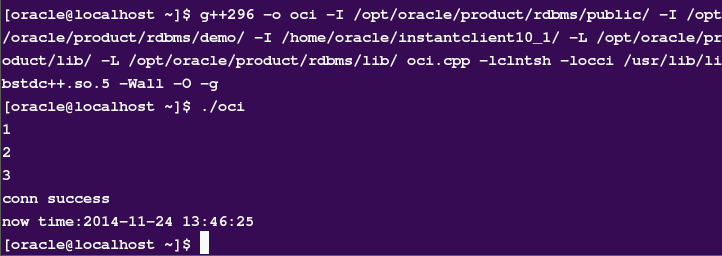
4. 运行
结果如下图
其他参考:
http://blog.csdn.net/gyanp/article/details/6107044
http://oradim.blogspot.com/2009/08/getting-started-with-occi-linux-version.html
Red Hat Enterprise Linux AS4, C++ OCCI connect Oracle 9i的更多相关文章
- Red Hat Enterprise Linux 7.4上安装Oracle 11.2.0.4
1. 配置Yum源及关闭SeLinux [root@localhost ~]# mkdir /media/rhel [root@localhost ~]# mount /dev/cdrom /medi ...
- Deploy Oracle 10.2.0.5 DataGuard on Red Hat Enterprise Linux 6.4
系统:Red Hat Enterprise Linux 6.4 数据库:Oracle 10.2.0.5.0 Patch Set 4 主机:10dg1 192.168.1.91 10dg2192.168 ...
- setting up a IPSEC/L2TP vpn on CentOS 6 or Red Hat Enterprise Linux 6 or Scientific Linux
This is a guide on setting up a IPSEC/L2TP vpn on CentOS 6 or Red Hat Enterprise Linux 6 or Scientif ...
- SQL Server on Red Hat Enterprise Linux——RHEL上的SQL Server(全截图)
本文从零开始一步一步介绍如何在Red Hat Enterprise Linux上搭建SQL Server 2017,包括安装系统.安装SQL等相关步骤和方法(仅供测试学习之用,基础篇). 一. 创 ...
- Configure Always On Availability Group for SQL Server on RHEL——Red Hat Enterprise Linux上配置SQL Server Always On Availability Group
下面简单介绍一下如何在Red Hat Enterprise Linux上一步一步创建一个SQL Server AG(Always On Availability Group),以及配置过程中遇到的坑的 ...
- SQL Server on Red Hat Enterprise Linux
本文从零开始一步一步介绍如何在Red Hat Enterprise Linux上搭建SQL Server 2017,包括安装系统.安装SQL等相关步骤和方法(仅供测试学习之用,基础篇). 一. 创 ...
- Red Hat Enterprise Linux 6.6安装体验
Red Hat Enterprise Linux 6.6的安装首界面有五个选项,这跟以前的Red Hat Enterprise Linux 5.x的安装界面是有一些区别的. 安装或者升级现有系统( ...
- Red Hat Enterprise Linux 各个版本以及发布日期
Red Hat Enterprise Linux 7 Release/Update General Availability Date redhat-release Errata Date* Kern ...
- 如何安装win10+Red Hat Enterprise Linux双系统?
1,如何安装win10+Red Hat Enterprise Linux双系统???? 有很多人(没做过调查,可能就我自己想装吧)想要安装Red Hat Enterprise Linux系统,但是又不 ...
随机推荐
- Promise原理讲解 && 实现一个Promise对象 (遵循Promise/A+规范)
1.什么是Promise? Promise是JS异步编程中的重要概念,异步抽象处理对象,是目前比较流行Javascript异步编程解决方案之一 2.对于几种常见异步编程方案 回调函数 事件监听 发布/ ...
- console对象探究
作为一个前端,console.log()可能是你最常用的方法,打印打印再打印,但是其实console对象上有用的方法有很多,来,各位看官上眼 分类输出 厌倦了 console.log 单调的输出?欢迎 ...
- NET Core应用中使用缓存
NET Core应用中使用缓存 .NET Core针对缓存提供了很好的支持 ,我们不仅可以选择将数据缓存在应用进程自身的内存中,还可以采用分布式的形式将缓存数据存储在一个“中心数据库”中.对于分布式缓 ...
- EFCore使用JSON_VALUE查询json对象的值
EFCore使用JSON_VALUE查询json对象的值 Intro SqlServer 从2016开始支持 JSON 操作,可以使用 JSON_VALUE 查询 JSON 对象的某个属性值,更多介绍 ...
- Python第五天 文件访问 for循环访问文件 while循环访问文件 字符串的startswith函数和split函数 linecache模块
Python第五天 文件访问 for循环访问文件 while循环访问文件 字符串的startswith函数和split函数 linecache模块 目录 Pycharm使用技巧( ...
- 基本的CRUD操作
导入包---实体类------数据库连接----数据库操作----service层数据操作----网页对service层可视化实现 model package com.ij34.model; publ ...
- Kafka相关内容总结(概念和原理)
说明 主要内容是在网上的一些文章中整理出来: 加粗的字体是比较重要的内容,部分是自己的经验和理解: 整理的目的主要是为了方便查阅: 为什么需要消息系统 解耦: 在项目启动之初来预测将来项目会碰到什么需 ...
- SQL 使用临时表和临时变量完成update表字段---实际案例
-- 使用临时表 -- 创建临时表 --ALTER TABLE TS_ExpenseApplication_Reim_Detail ADD BgCode NVARCHAR() NULL, BgItem ...
- SQL SELECT DISTINCT 语句
SQL SELECT DISTINCT 语句 在表中,可能会包含重复值.这并不成问题,不过,有时您也许希望仅仅列出不同(distinct)的值. 关键词 DISTINCT 用于返回唯一不同的值. 语法 ...
- 【任务】Python语言程序设计.MOOC学习
[博客导航] [Python导航] 任务 18年11月29日开始,通过9周时间跨度,投入约50小时时间,在19年1月25日之前,完成中国大学MOOC平台上的<Python语言程序设计>课程 ...