
Red Hat Enterprise Linux 7.4上安装Oracle 11.2.0.4
1. 配置Yum源及关闭SeLinux
[root@localhost ~]# mkdir /media/rhel

[root@localhost ~]# mount /dev/cdrom /media/rhel

mount: /dev/sr0 is write-protected, mounting read-only

[root@localhost ~]# vi /etc/yum.repos.d/iso.repo

[iso]

name=iso

baseurl=file:///media/rhel

enabled=

gpgcheck=
[root@localhost ~]# vi /etc/selinux/config

# modify

SELINUX=disabled
2. 安装桌面环境(如果未安装)
[root@localhost ~]# yum -y group install "Server with GUI"
3. 安装软件包
[root@localhost ~]# yum -y install binutils binutils-devel compat-libcap1 compat-libstdc++- compat-libstdc++-.i686 ksh elfutils-libelf elfutils-libelf-devel glibc glibc-common glibc-devel glibc-headers gcc gcc-c++ libaio libaio.i686 libaio-devel libaio-devel.i686 libgcc libstdc++ libstdc++.i686 libstdc++-devel libstdc++-devel.i686 make sysstat unixODBC unixODBC-devel libXp libXp-devel libXpm-devel telnet
4. 建立用户
[root@localhost ~]# groupadd oinstall

[root@localhost ~]# groupadd dba

[root@localhost ~]# useradd -g oinstall -G dba oracle

[root@localhost ~]# passwd oracle
[root@localhost ~]# vi /etc/profile

#在末尾加入

if [ \$USER = "oracle" ];then

        if [ \$SHELL = "/bin/ksh" ];then

                ulimit -p

                ulimit -n

        else

                ulimit -u  -n

        fi

        umask

fi
5. 建立文件夹
[root@localhost ~]# mkdir -p /u01/oracle

[root@localhost ~]# mkdir -p /u01/oracle/11.2./db_1

[root@localhost ~]# chown -R oracle:oinstall /u01/oracle/

[root@localhost ~]# chown -R oracle:oinstall /u01/oracle/11.2./db_1/

[root@localhost ~]# chmod -R  /u01/oracle/

[root@localhost ~]# chmod -R  /u01/oracle/11.2./db_1/
6. 配置系统核心参数,Oracle用户资源限制,Oracle用户环境变量
[root@localhost ~]# MEMTOTAL=$(free -b | sed -n '2p' | awk '{print $2}')

[root@localhost ~]# SHMMAX=$(expr $MEMTOTAL / )

[root@localhost ~]# SHMMNI=

[root@localhost ~]# PAGESIZE=$(getconf PAGE_SIZE)

[root@localhost ~]# cat >> /etc/sysctl.conf << EOF

fs.aio-max-nr =

fs.file-max =

kernel.shmmax = $SHMMAX

kernel.shmall = $(expr \( $SHMMAX / $PAGESIZE \) \* \( $SHMMNI /  \))

kernel.shmmni = $SHMMNI

kernel.sem =

net.ipv4.ip_local_port_range =

net.core.rmem_default =

net.core.rmem_max =

net.core.wmem_default =

net.core.wmem_max =

EOF

[root@localhost ~]# sysctl -p
[root@localhost ~]# vi /etc/security/limits.conf

# add to the end

oracle  soft  nproc

oracle  hard  nproc

oracle  soft  nofile

oracle  hard  nofile

oracle  soft  stack

oracle  hard  stack
[root@localhost ~]# vi /home/oracle/.bash_profile

# add to the end

export ORACLE_SID=sdzy;

export ORACLE_BASE=/u01/oracle;

export ORACLE_HOME=/u01/oracle/11.2./db_1;

export PATH=$ORACLE_HOME/bin:$PATH:$HOME/bin

export LD_LIBRARY_PATH=$ORACLE_HOME/lib
[root@localhost ~]# reboot
7. 编辑主机名
[root@localhost ~]# vi /etc/hosts

# add

192.168.10.11 oracle

[root@localhost ~]# vi /etc/hostname

# modify

oracle
[root@localhost ~]# vi /etc/sysconfig/network
8. 解压安装文件
[root@localhost ~]# cd /opt

[root@localhost opt]# unzip p13390677_112040_Linux-x86-64_1of7.zip ;unzip p13390677_112040_Linux-x86-64_2of7.zip
9. 开始安装
[oracle@localhost ~]$ cd $ORACLE_HOME/sysman/lib
[oracle@localhost lib]$ cp ins_emagent.mk ins_emagent.mk.bak
[oracle@localhost lib]$ vi ins_emagent.mk
查找$(MK_EMAGENT_NMECTL)
更改为$(MK_EMAGENT_NMECTL) -lnnz11
[root@localhost rhel]# xhost +

access control disabled, clients can connect from any host

[root@localhost rhel]# su - oracle

[oracle@localhost ~]$ export DISPLAY=10.1.105.52:0.0  #此处IP请改为客户端的IP

[oracle@localhost ~]$ cd /opt/database/

[oracle@localhost database]$ ./runInstaller
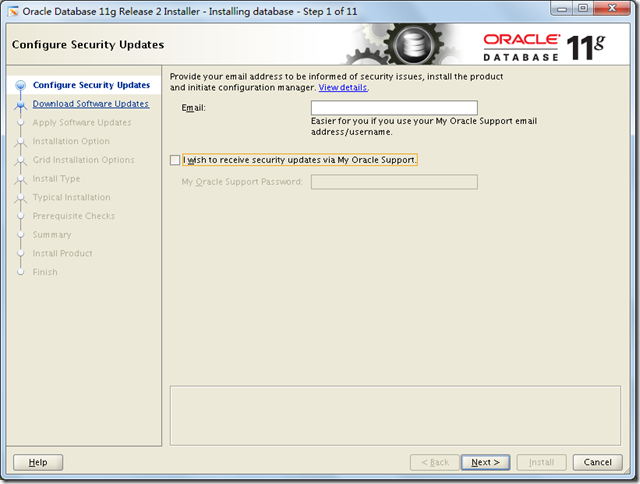
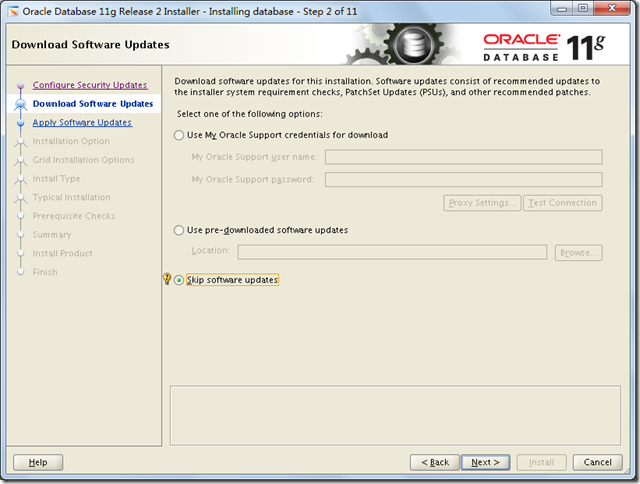
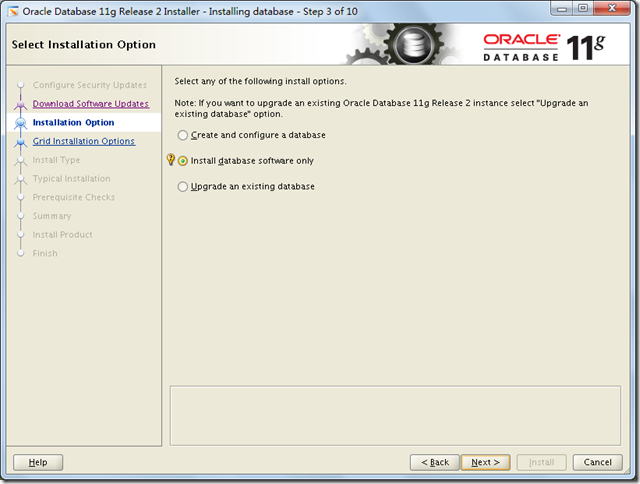
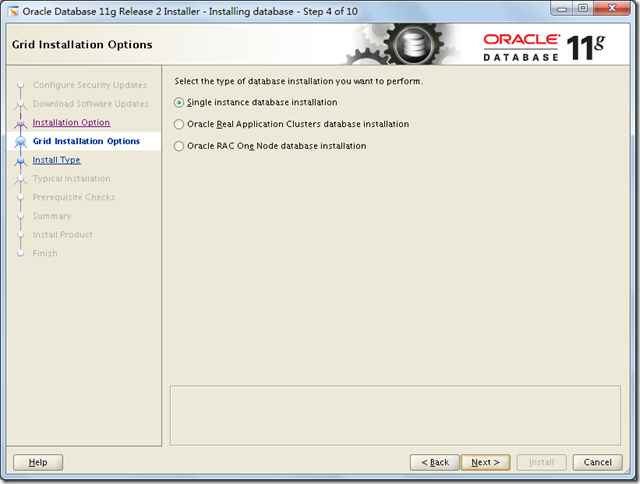
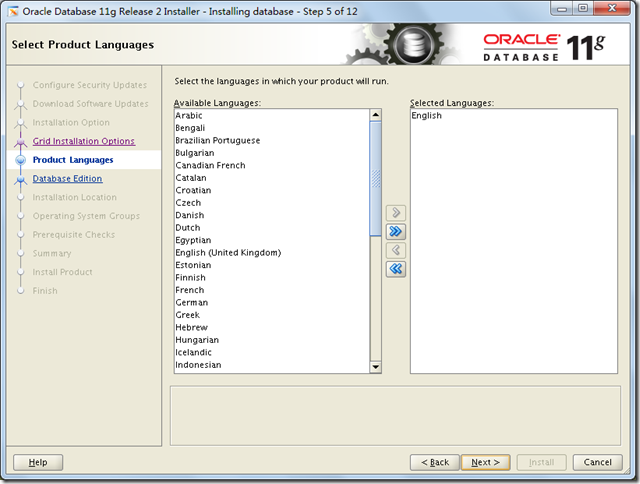
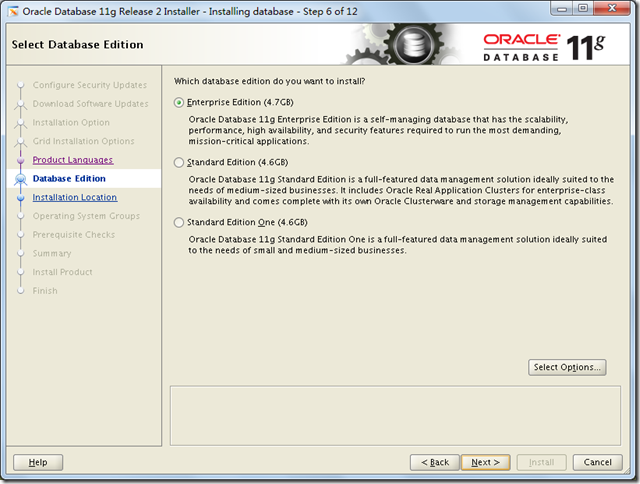
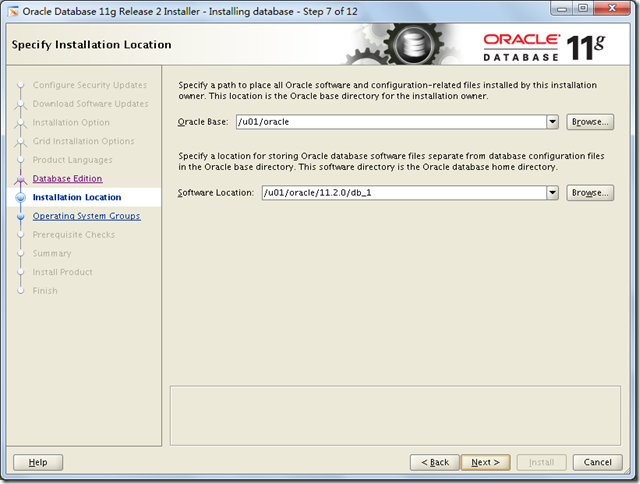
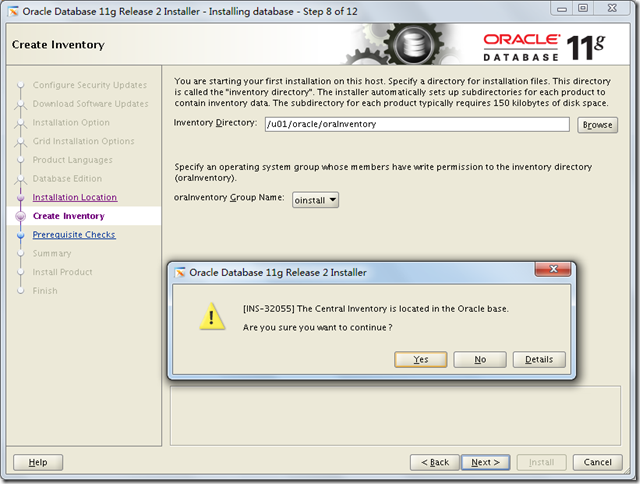
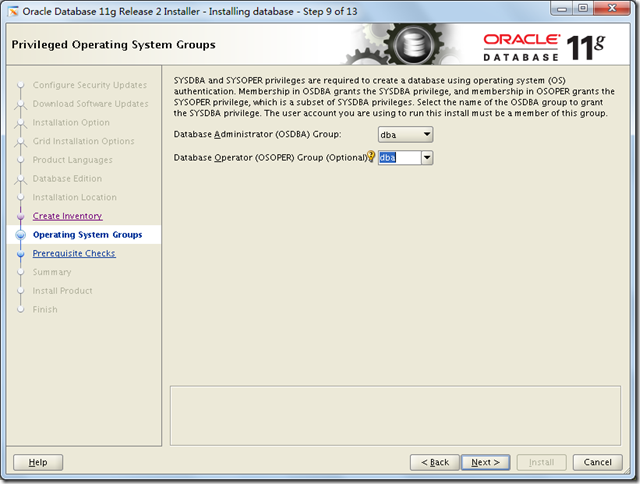
检查发现少了一个软件包,且在光盘中搜不到,需要网上下载后手动安装。
[root@localhost opt]# rpm -ivh compat-libstdc++--3.2.-.el7.x86_64.rpm
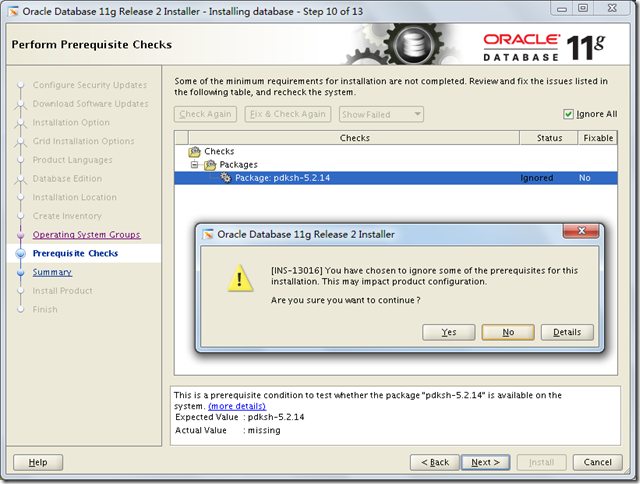
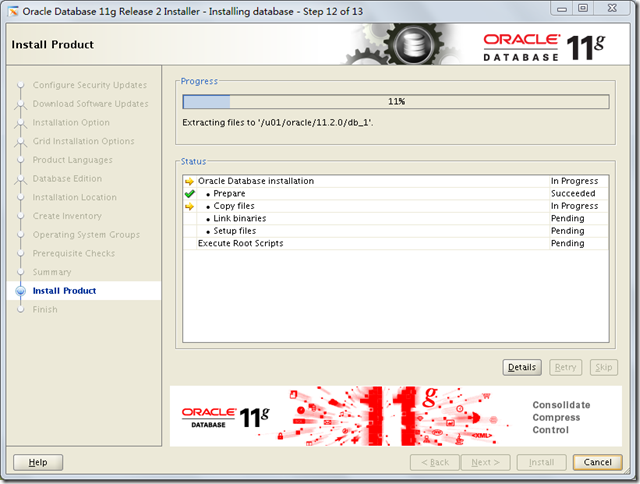
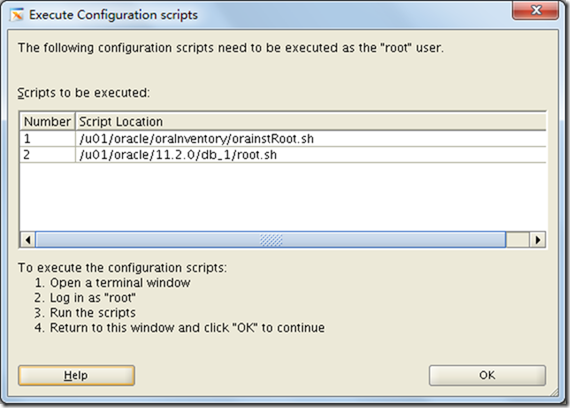
[root@localhost opt]# /u01/oracle/oraInventory/orainstRoot.sh

[root@localhost opt]# /u01/oracle/11.2./db_1/root.sh
至此安装完成!
Red Hat Enterprise Linux 7.4上安装Oracle 11.2.0.4的更多相关文章
- 在Red Hat Enterprise Linux 7.3上安装SQL Server 2017
必要条件: 1.在此快速安装过程中,您需要安装SQL Server 2017或SQL Server 2019上Red Hat Enterprise Linux (RHEL) 7.3 +.然后使用sql ...
- Red Hat Enterprise Linux Server(RHEL) yum安装软件时This system is not registered with RHN. RHN support will be disabled. 的解决方法(转)
新安装了redhat6.5.安装后,登录系统,使用yum update 更新系统.提示: This system is not registered to Red Hat Subscription M ...
- Red Hat Enterprise Linux Server 6.5安装GCC 4.9.2
现在很多程序员都应用GCC,怎样才能更好的应用GCC.目前,GCC可以用来编译C/C++.FORTRAN.JAVA.OBJC.ADA等语言的程序,可根据需要选择安装支持的语言.本文以在RedHat L ...
- Red Hat Enterprise Linux / CentOS 7 yum安装zabbix4.0
添加Zabbix存储库安装存储库配置包. 该软件包包含yum(软件包管理器)配置文件. rpm -ivh https://repo.zabbix.com/zabbix/4.0/rhel/7/x86_6 ...
- Red Hat Enterprise Linux AS4, C++ OCCI connect Oracle 9i
前提是已经安装好Oracle 9i. 1. 下载对应的ORACLE client安装. http://www.oracle.com/technetwork/database/features/inst ...
- Deploy Oracle 10.2.0.5 DataGuard on Red Hat Enterprise Linux 6.4
系统:Red Hat Enterprise Linux 6.4 数据库:Oracle 10.2.0.5.0 Patch Set 4 主机:10dg1 192.168.1.91 10dg2192.168 ...
- Red Hat Enterprise Linux 6.6安装体验
Red Hat Enterprise Linux 6.6的安装首界面有五个选项,这跟以前的Red Hat Enterprise Linux 5.x的安装界面是有一些区别的. 安装或者升级现有系统( ...
- Red Hat Enterprise Linux 6 “桌面”、“工作站”、“服务器” 版本差异比较
Red Hat Enterprise Linux 6,共有三个版本.通过安装发现,所谓的"桌面"."工作站"."服务器"这三个版本的区别就在 ...
- Red Hat Enterprise Linux 5 64-bit chinese language support config steps
Red Hat Enterprise Linux 5 64-bit 系统下安装中文语言支持方法 测试环境:Windows2012+Vmvare9.0+Red Hat Enterprise Linux ...
随机推荐
- 云计算IaaS浅谈
(本篇文章仅仅是整理文档资料时,发现的一篇课程报告,感觉还挺有参考意义的) 最近几年云计算一直是IT业的热点,一股炽热的云计算浪潮席卷了世界,全世界都在讲云计算,都在搞云计算.虽然最初是由谷歌公司提出 ...
- vue.js学习 自定义过滤器使用(1)
在这个教程中,我们将会通过几个例子,了解和学习VueJs的过滤器.我们参考了一些比较完善的过滤器,比如orderBy 和 filterBy.而且我们可以链式调用过滤器,一个接一个过滤.因此,我们可以定 ...
- Struts DynaActionForm example
The Struts DynaActionForm class is an interesting feature to let you create a form bean dynamically ...
- bms_output.put_line使用方法
https://blog.csdn.net/sxww321/article/details/4020300
- markdown转换为html
想要自己实现markdown编辑器,欲使用markdown-it作为编辑器,有着比较多的插件,可以实现代码高亮以及对数学公式转换等功能. // Activate/deactivate rules, w ...
- 【LOJ】#2672. 「NOI2012」魔幻棋盘
题解 代码7.1KB,人傻代码长 恶心死我了这代码真的把我写恶心了= = 想一想就知道这个东西--维护到中心的差分,然后用二维线段树维护一下矩形的gcd 嗯,我说完了,你写吧. 首先这个二维线段树的单 ...
- 【Codeforces】113 D. Museum
题解 我们设\(f(i,j)\)是\((i,j)\)这个点期望被经过多少次 我们可以列出方程组来消元,由于终点只会被经过0次或者1次,期望就是概率 对于起点的话我们期望经过次数多加一个1 复杂度\(O ...
- 让ORM支持多结果集
在现有的ORM框架中,都支持查询单个结果集.比如查询用户表,传入语句,返回一个用户对象的集合.虽然一次性查询多个结果集的情况不多,而且也可以通过多次查询得到,但是从写框架的角度来说,我们并不清楚客户( ...
- Java—String,StringBuffer,StringBuilde区别和操作
Java语言有关字符串的类有三种 java.lang.String:一般作为简单字符串类型 java.lang.StringBuffer:字符串缓冲区 java.lang.StringBuider:字 ...
- sort change from to range
SORT FIELDS=COPY OUTREC FINDREP=(IN=X'05',OUT=X'40', STARTPOS=107,ENDPOS=204)