
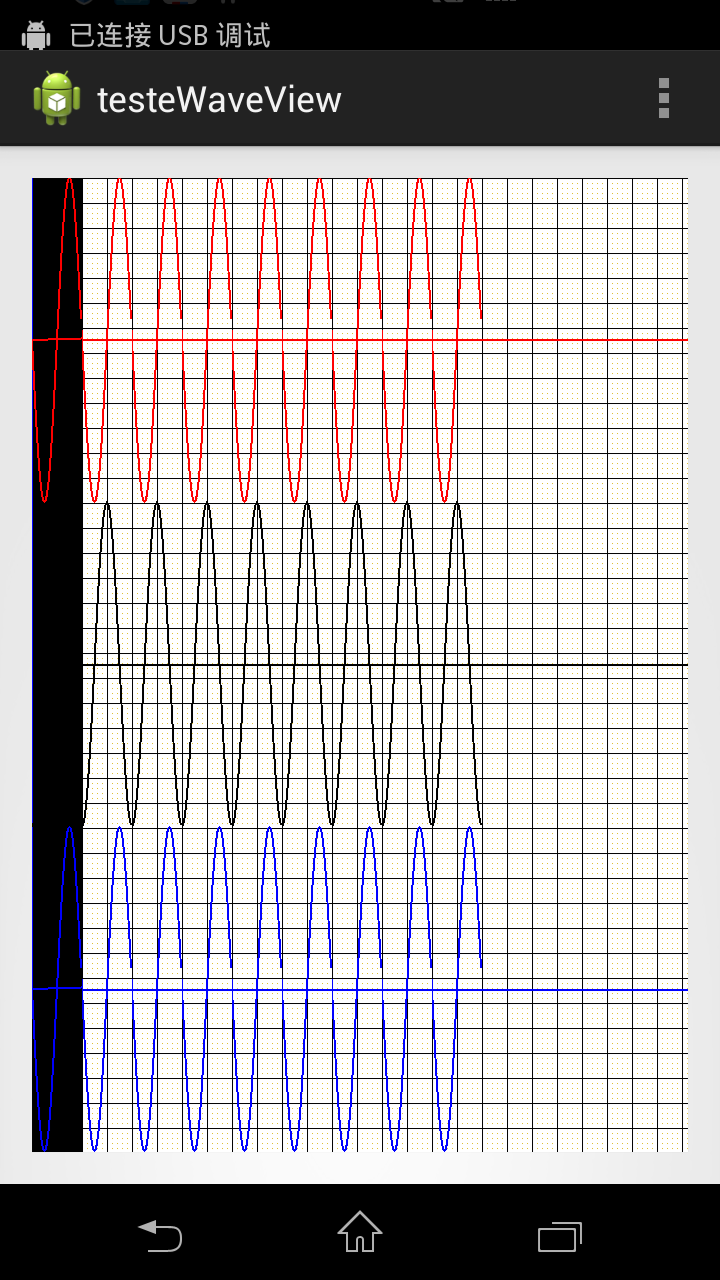
SurfaceView绘图时刷新问题,尝试各种办法无法解决,请教高手
/**
*
*/
源码:http://pan.baidu.com/s/1i3FtdZZ
画图时最左面,第一帧总是出现一个黑条,其它的帧没有问题
package com.macrosoft.testewaveview;
import android.content.Context;
import android.graphics.Bitmap;
import android.graphics.Canvas;
import android.graphics.Color;
import android.graphics.Paint;
import android.graphics.PorterDuff;
import android.graphics.Rect;
import android.graphics.Bitmap.Config;
import android.util.AttributeSet;
import android.view.SurfaceHolder;
import android.view.SurfaceHolder.Callback;
import android.view.SurfaceView;
/**
* @author a1
*
*/
public class WaveView extends SurfaceView implements Callback,Runnable{
private Context mContext;
private SurfaceHolder surfaceHolder;
private boolean flag = false;//线程标识
private Bitmap bitmapBackground;
private float mSurfaceWidth,mSurfaceHeight;//屏幕宽高
private int mBitmapPos;
private Canvas mCanvas;
private Thread thread;
Paint[] paints = new Paint[3];
//背景移动状态
private enum State{
LEFT,RIGHT;
}
private State state = State.LEFT;
private final int BITMAP_STEP = 1;//背景画布移动步伐
public WaveView(Context context,AttributeSet attrs) {
super(context,attrs);
//setBackgroundColor(Color.GREEN);
paints[0] = new Paint();
paints[1] = new Paint();
paints[2] = new Paint();
paints[0].setColor(Color.RED);
paints[0].setStrokeWidth(2);
paints[1].setStrokeWidth(2);
paints[2].setStrokeWidth(2);
paints[1].setColor(Color.BLACK);
paints[2].setColor(Color.BLUE);
mBitmapPos = 0;
flag = true;
this.mContext = context;
setFocusable(true);
setFocusableInTouchMode(true);
surfaceHolder = getHolder();
surfaceHolder.addCallback(this);
}
public Bitmap GenerateBackBitmap(int width, int height) {
Bitmap bitmap = Bitmap.createBitmap(width, height, Config.ARGB_8888);
Canvas canvas = new Canvas(bitmap);
// 准备画笔
Paint paint = new Paint();
paint.setColor(Color.WHITE);
paint.setStrokeWidth(3);
Paint paintPoint = new Paint();
paintPoint.setColor(Color.rgb(220, 190, 50));
Paint paintLine = new Paint();
paintLine.setColor(Color.rgb(0, 0, 0));
// Paint paintBack = new Paint();
// paintBack.setColor(Color.rgb(255, 255, 255));
int cx = canvas.getWidth();// - canvas.getWidth()%25;
int cy = canvas.getHeight();// - (canvas.getHeight() - 21) % 25 - 21;
Rect r = new Rect(0, 0, cx - 1, cy - 1);
canvas.drawRect(r, paint);
// ////////////画点///////////////
for (int x = 0; x < width; x += 5) {
for (int y = 0; y < height; y += 5) {
canvas.drawPoint(x, y, paintPoint);
}
}
// 画纵轴
for (int x = 0; x < width; x += 25) {
canvas.drawLine(x, 0, x, height, paintLine);
}
// 画横轴
for (int y = 0; y < height; y += 25) {
canvas.drawLine(0, y, width, y, paintLine);
}
// 绘制坐标轴
canvas.drawLine(0, mSurfaceHeight / 6, mSurfaceWidth,
mSurfaceHeight / 6, paints[0]);
canvas.drawLine(0, 3*mSurfaceHeight / 6, mSurfaceWidth,
3*mSurfaceHeight / 6, paints[1]);
canvas.drawLine(0, 5*mSurfaceHeight / 6, mSurfaceWidth,
5*mSurfaceHeight / 6, paints[2]);
return bitmap;
}
protected void OnDraw(){
drawBG();
//updateBG();
}
private void drawBG() {
mCanvas.drawColor(Color.WHITE,PorterDuff.Mode.ADD);
//mCanvas.drawColor(Color.BLACK);
mCanvas.drawBitmap(bitmapBackground, mBitmapPos, 0,null);
}
/**
* 更新背景
*
*/
private void updateBG() {
/**图片滚动效果**/
switch(state){
case LEFT:
mBitmapPos -= BITMAP_STEP;
break;
case RIGHT:
mBitmapPos += BITMAP_STEP;
break;
default:
break;
}
if(mBitmapPos <= -mSurfaceWidth/2){
state = State.RIGHT;
}
if(mBitmapPos >= 0){
state = State.LEFT;
}
}
int xpos = 0;
int oldX = 0,x;
int oldY1,oldY2,oldY3,y1,y2,y3;
@Override
public void run() {
//OnDraw();
while(flag){
synchronized(surfaceHolder){
if(xpos > mSurfaceWidth){
xpos = 0;
}
if(xpos == 00){
mCanvas = surfaceHolder.lockCanvas();
OnDraw();
surfaceHolder.unlockCanvasAndPost(mCanvas);
}
Canvas canvas = surfaceHolder.lockCanvas(new Rect(xpos, 0,
xpos + 50, (int) mSurfaceHeight));
for (int i = 0; i < 50; i++) {
x = xpos + i;
y1 = (int) ((int) (mSurfaceHeight/6*Math.sin(2*Math.PI*x/50) + mSurfaceHeight/6) + 0);
y2 = (int) ((int) (mSurfaceHeight/6*Math.cos(2*Math.PI*x/50) + mSurfaceHeight/6) + 2*mSurfaceHeight/6);
y3 = (int) ((int) (mSurfaceHeight/6*Math.sin(2*Math.PI*x/50) + mSurfaceHeight/6) + 4*mSurfaceHeight/6);
canvas.drawLine(oldX, oldY1, x, y1, paints[0]);
canvas.drawLine(oldX, oldY2, x, y2, paints[1]);
canvas.drawLine(oldX, oldY3, x, y3, paints[2]);
oldX = x;
oldY1 = y1;
oldY2 = y2;
oldY3 = y3;
}
surfaceHolder.unlockCanvasAndPost(canvas);
xpos+=50;
try{
Thread.sleep(100);
}catch(InterruptedException e){
e.printStackTrace();
}
}
}
}
public void ClearDraw(){
Canvas canvas = null;
try{
canvas = surfaceHolder.lockCanvas(null);
canvas.drawColor(Color.WHITE);
canvas.drawColor(Color.TRANSPARENT,PorterDuff.Mode.SRC);
}catch(Exception e){
}finally{
if(canvas != null){
surfaceHolder.unlockCanvasAndPost(canvas);
}
}
}
@Override
public void surfaceChanged(SurfaceHolder arg0, int arg1, int arg2, int arg3) {
}
@Override
public void surfaceCreated(SurfaceHolder arg0) {
mSurfaceWidth = getWidth();
mSurfaceHeight = getHeight();
int mWidth = (int)(mSurfaceWidth*3/2);
/**将图片缩放到屏幕的3/2倍**/
bitmapBackground = GenerateBackBitmap((int)mSurfaceWidth,(int)mSurfaceHeight);
//bitmapBackground = GenerateBackBitmap((int)mWidth,(int)mSurfaceHeight);
//ClearDraw();
mCanvas = surfaceHolder.lockCanvas();
OnDraw();
surfaceHolder.unlockCanvasAndPost(mCanvas);
thread = new Thread(this);
thread.start();
}
@Override
public void surfaceDestroyed(SurfaceHolder arg0) {
flag = false;
}
}
SurfaceView绘图时刷新问题,尝试各种办法无法解决,请教高手的更多相关文章
- Android SurfaceView 绘图覆盖刷新及脏矩形刷新方法
http://www.cnblogs.com/SkyD/archive/2010/11/08/1871423.html Android SurfaceView 绘图覆盖刷新及脏矩形刷新方法 Surfa ...
- 【转】Android Fragment中使用SurfaceView切换时闪一下黑屏的解决办法
重构了下之前自己的一个新闻客户端,全部使用了Fragment来进行页面切换,只有一个入口Activity作为程序的启动Activity,其中有一个界面需要调用摄像头识别二维码, 于是就会用到Surfa ...
- VC++大数据量绘图时无闪烁刷屏技术实现(我的理解是,在内存上作画,然后手动显示,而不再直接需要经过WM_PAINT来处理了)
http://hantayi.blog.51cto.com/1100843/383578 引言 当我们需要在用户区显示一些图形时,先把图形在客户区画上,虽然已经画好但此时我们还无法看到,还要通过 程序 ...
- view, surfaceView, invalidate, postInvalidate, 刷新屏幕
http://blog.csdn.net/linghu_java/article/details/9985489 1.view view在api中的结构 Java.lang.Object Androi ...
- R语言绘图时的边界碰撞问题
当我们在绘图时,经常会遇到这样的问题,添加的文字标记超出了坐标系的问题,导致文字显示不全 比如下面这个例子: plot(c(1,5),c(1,5)) text(5,5.1,"ABCDEF&q ...
- VMware下ubuntu与win8共享文件时/mnt/hgfs目录为空的解决办法
VMware下ubuntu(guest)与win8共享文件时/mnt/hgfs目录为空的解决办法 环境:VMware-player-5.0.2-1031769 + ubuntu13.04 1.安装vm ...
- vs调试windows mobile程序时布署时间太长的解决办法
vs调试windows mobile程序时布署时间太长的解决办法 1.VS平台上,选工具-选项-项目和解决方案-MS BUILD项目生成输出详细信息中选择“诊断”,目的是在调试窗口中看出哪个过程编译的 ...
- 向SDE图层中添加大量数据时,出现ORA-00604以及ORA-01000的解决办法
转自原文 向SDE图层中添加大量数据时,出现ORA-00604以及ORA-01000的解决办法 写了一个小程序,从一个列表中读取坐标串,每个坐标串生成一个IPolygon,然后将这些Polygon添加 ...
- SurfaceView绘图机制
一.为什么需要用SurfaceView绘图,不直接继承View绘图 它的特性是:可以在主线程之外的线程中向屏幕绘图上.这样可以避免画图任务繁重的时候造成主线程阻塞,从而提高了程序的反应速度.在游戏开发 ...
随机推荐
- thinkphp5.0如何隐藏index.php入口文件
隐藏入口文件 public/index.php 同级的.htaccess文件 [ Apache ] 方法1: <IfModule mod_rewrite.c> Options +Follo ...
- java将字符串存入oracle的Blob中
Blob内存放的是字节数组,需使用String的getBytes获得该字符串的字节数组(注意字符集编码),然后存入Blob. Oracle的Blob字段比较特殊,他比long字段的性能要好很多,可以用 ...
- scroll-view
scroll-view 中分别有上下竖向滑动和左右横向滑动之分,在这次项目中刚好需要用到横向滑动,但在测试过程中发现横向滑动没有了效果(静止在那里没移动过),经调试发现: 1.scroll-view ...
- flask 数据库迁移的简单操作
1.目的:修改现有数据库的表结构,不改变数据库中现有的数据. 2.导包:from flask_migrate import Migrate, MigrateCommandfrom flask_scri ...
- anaconda 的安装
进官网下载anaconda, 根据需要下载对应python版本Anaconda软件. https://www.anaconda.com/download/#windows 下载完双击 Anaconda ...
- python自动化框架(一)
一.jsonpath难点分析 dic = { "error_code": 0, "stu_info": [ { "id": 2057, &q ...
- CentOS 7 下安装 Nginx
安装所需环境 Nginx 是 C语言 开发,建议在 Linux 上运行,当然,也可以安装 Windows 版本,本篇则使用 CentOS 7 作为安装环境. 一. gcc 安装安装 nginx 需要先 ...
- ZJOI2018 D1T2 历史(毕竟我菜,所以题解十分易懂。。)
我定睛一看,上一篇博客居然是去年省选写的...emmm我果然很懒.. 又是一年省选季,临死前订正一下去年的题吧.. 作为第一天30pts的滚粗选手,我去年并没有怎么思考这题.. 题意概括好麻烦,来来来 ...
- H3C_IRF_BFD配置
IRF典型配置举例(BFD MAD检测方式)1. 组网需求 由于网络规模迅速扩大,当前中心交换机(Device A)转发能力已经不能满足需求,现需要在保护现有投资的基础上将网络转发能力提高一倍,并要求 ...
- 那些年,很多人没看懂的Python内置函数
Python之所以特别的简单就是因为有很多的内置函数是在你的程序"运行之前"就已经帮你运行好了,所以,可以用这个的特性简化很多的步骤.这也是让Python语言变得特别的简单的原因之 ...