
SurfaceView绘图时刷新问题,尝试各种办法无法解决,请教高手
/**
*
*/
源码:http://pan.baidu.com/s/1i3FtdZZ
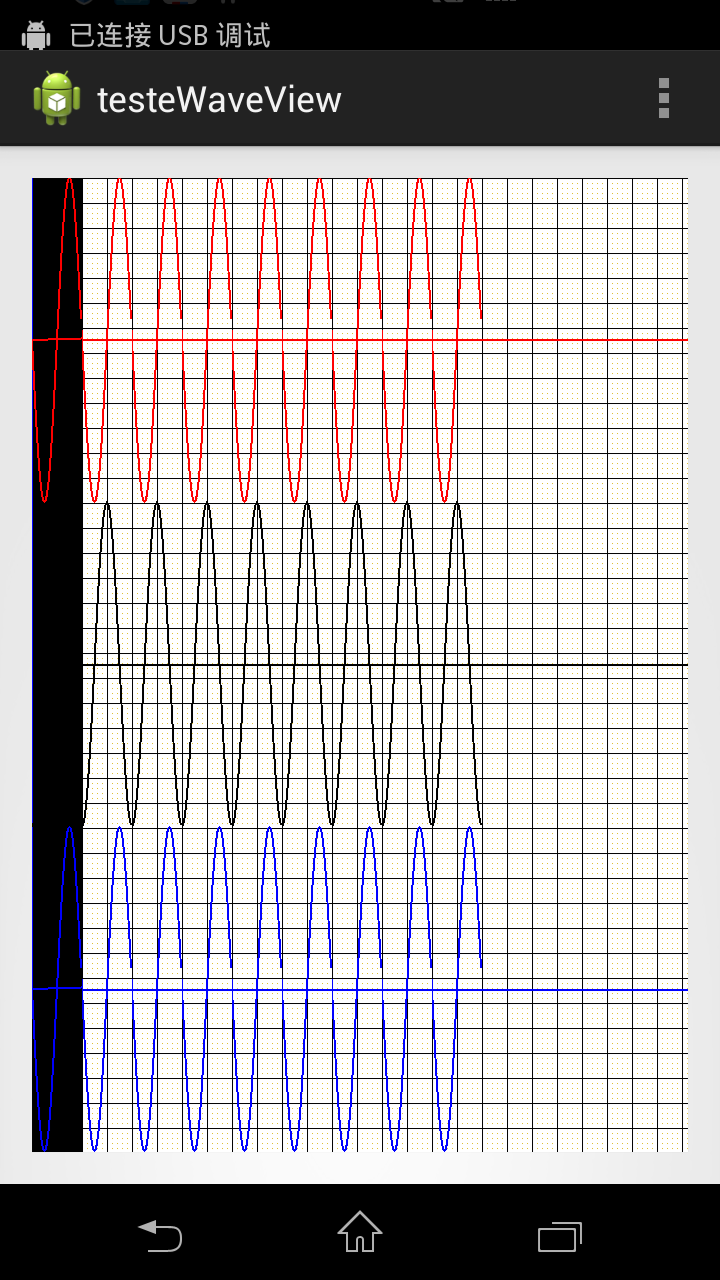
画图时最左面,第一帧总是出现一个黑条,其它的帧没有问题
package com.macrosoft.testewaveview;
import android.content.Context;
import android.graphics.Bitmap;
import android.graphics.Canvas;
import android.graphics.Color;
import android.graphics.Paint;
import android.graphics.PorterDuff;
import android.graphics.Rect;
import android.graphics.Bitmap.Config;
import android.util.AttributeSet;
import android.view.SurfaceHolder;
import android.view.SurfaceHolder.Callback;
import android.view.SurfaceView;
/**
* @author a1
*
*/
public class WaveView extends SurfaceView implements Callback,Runnable{
private Context mContext;
private SurfaceHolder surfaceHolder;
private boolean flag = false;//线程标识
private Bitmap bitmapBackground;
private float mSurfaceWidth,mSurfaceHeight;//屏幕宽高
private int mBitmapPos;
private Canvas mCanvas;
private Thread thread;
Paint[] paints = new Paint[3];
//背景移动状态
private enum State{
LEFT,RIGHT;
}
private State state = State.LEFT;
private final int BITMAP_STEP = 1;//背景画布移动步伐
public WaveView(Context context,AttributeSet attrs) {
super(context,attrs);
//setBackgroundColor(Color.GREEN);
paints[0] = new Paint();
paints[1] = new Paint();
paints[2] = new Paint();
paints[0].setColor(Color.RED);
paints[0].setStrokeWidth(2);
paints[1].setStrokeWidth(2);
paints[2].setStrokeWidth(2);
paints[1].setColor(Color.BLACK);
paints[2].setColor(Color.BLUE);
mBitmapPos = 0;
flag = true;
this.mContext = context;
setFocusable(true);
setFocusableInTouchMode(true);
surfaceHolder = getHolder();
surfaceHolder.addCallback(this);
}
public Bitmap GenerateBackBitmap(int width, int height) {
Bitmap bitmap = Bitmap.createBitmap(width, height, Config.ARGB_8888);
Canvas canvas = new Canvas(bitmap);
// 准备画笔
Paint paint = new Paint();
paint.setColor(Color.WHITE);
paint.setStrokeWidth(3);
Paint paintPoint = new Paint();
paintPoint.setColor(Color.rgb(220, 190, 50));
Paint paintLine = new Paint();
paintLine.setColor(Color.rgb(0, 0, 0));
// Paint paintBack = new Paint();
// paintBack.setColor(Color.rgb(255, 255, 255));
int cx = canvas.getWidth();// - canvas.getWidth()%25;
int cy = canvas.getHeight();// - (canvas.getHeight() - 21) % 25 - 21;
Rect r = new Rect(0, 0, cx - 1, cy - 1);
canvas.drawRect(r, paint);
// ////////////画点///////////////
for (int x = 0; x < width; x += 5) {
for (int y = 0; y < height; y += 5) {
canvas.drawPoint(x, y, paintPoint);
}
}
// 画纵轴
for (int x = 0; x < width; x += 25) {
canvas.drawLine(x, 0, x, height, paintLine);
}
// 画横轴
for (int y = 0; y < height; y += 25) {
canvas.drawLine(0, y, width, y, paintLine);
}
// 绘制坐标轴
canvas.drawLine(0, mSurfaceHeight / 6, mSurfaceWidth,
mSurfaceHeight / 6, paints[0]);
canvas.drawLine(0, 3*mSurfaceHeight / 6, mSurfaceWidth,
3*mSurfaceHeight / 6, paints[1]);
canvas.drawLine(0, 5*mSurfaceHeight / 6, mSurfaceWidth,
5*mSurfaceHeight / 6, paints[2]);
return bitmap;
}
protected void OnDraw(){
drawBG();
//updateBG();
}
private void drawBG() {
mCanvas.drawColor(Color.WHITE,PorterDuff.Mode.ADD);
//mCanvas.drawColor(Color.BLACK);
mCanvas.drawBitmap(bitmapBackground, mBitmapPos, 0,null);
}
/**
* 更新背景
*
*/
private void updateBG() {
/**图片滚动效果**/
switch(state){
case LEFT:
mBitmapPos -= BITMAP_STEP;
break;
case RIGHT:
mBitmapPos += BITMAP_STEP;
break;
default:
break;
}
if(mBitmapPos <= -mSurfaceWidth/2){
state = State.RIGHT;
}
if(mBitmapPos >= 0){
state = State.LEFT;
}
}
int xpos = 0;
int oldX = 0,x;
int oldY1,oldY2,oldY3,y1,y2,y3;
@Override
public void run() {
//OnDraw();
while(flag){
synchronized(surfaceHolder){
if(xpos > mSurfaceWidth){
xpos = 0;
}
if(xpos == 00){
mCanvas = surfaceHolder.lockCanvas();
OnDraw();
surfaceHolder.unlockCanvasAndPost(mCanvas);
}
Canvas canvas = surfaceHolder.lockCanvas(new Rect(xpos, 0,
xpos + 50, (int) mSurfaceHeight));
for (int i = 0; i < 50; i++) {
x = xpos + i;
y1 = (int) ((int) (mSurfaceHeight/6*Math.sin(2*Math.PI*x/50) + mSurfaceHeight/6) + 0);
y2 = (int) ((int) (mSurfaceHeight/6*Math.cos(2*Math.PI*x/50) + mSurfaceHeight/6) + 2*mSurfaceHeight/6);
y3 = (int) ((int) (mSurfaceHeight/6*Math.sin(2*Math.PI*x/50) + mSurfaceHeight/6) + 4*mSurfaceHeight/6);
canvas.drawLine(oldX, oldY1, x, y1, paints[0]);
canvas.drawLine(oldX, oldY2, x, y2, paints[1]);
canvas.drawLine(oldX, oldY3, x, y3, paints[2]);
oldX = x;
oldY1 = y1;
oldY2 = y2;
oldY3 = y3;
}
surfaceHolder.unlockCanvasAndPost(canvas);
xpos+=50;
try{
Thread.sleep(100);
}catch(InterruptedException e){
e.printStackTrace();
}
}
}
}
public void ClearDraw(){
Canvas canvas = null;
try{
canvas = surfaceHolder.lockCanvas(null);
canvas.drawColor(Color.WHITE);
canvas.drawColor(Color.TRANSPARENT,PorterDuff.Mode.SRC);
}catch(Exception e){
}finally{
if(canvas != null){
surfaceHolder.unlockCanvasAndPost(canvas);
}
}
}
@Override
public void surfaceChanged(SurfaceHolder arg0, int arg1, int arg2, int arg3) {
}
@Override
public void surfaceCreated(SurfaceHolder arg0) {
mSurfaceWidth = getWidth();
mSurfaceHeight = getHeight();
int mWidth = (int)(mSurfaceWidth*3/2);
/**将图片缩放到屏幕的3/2倍**/
bitmapBackground = GenerateBackBitmap((int)mSurfaceWidth,(int)mSurfaceHeight);
//bitmapBackground = GenerateBackBitmap((int)mWidth,(int)mSurfaceHeight);
//ClearDraw();
mCanvas = surfaceHolder.lockCanvas();
OnDraw();
surfaceHolder.unlockCanvasAndPost(mCanvas);
thread = new Thread(this);
thread.start();
}
@Override
public void surfaceDestroyed(SurfaceHolder arg0) {
flag = false;
}
}
SurfaceView绘图时刷新问题,尝试各种办法无法解决,请教高手的更多相关文章
- Android SurfaceView 绘图覆盖刷新及脏矩形刷新方法
http://www.cnblogs.com/SkyD/archive/2010/11/08/1871423.html Android SurfaceView 绘图覆盖刷新及脏矩形刷新方法 Surfa ...
- 【转】Android Fragment中使用SurfaceView切换时闪一下黑屏的解决办法
重构了下之前自己的一个新闻客户端,全部使用了Fragment来进行页面切换,只有一个入口Activity作为程序的启动Activity,其中有一个界面需要调用摄像头识别二维码, 于是就会用到Surfa ...
- VC++大数据量绘图时无闪烁刷屏技术实现(我的理解是,在内存上作画,然后手动显示,而不再直接需要经过WM_PAINT来处理了)
http://hantayi.blog.51cto.com/1100843/383578 引言 当我们需要在用户区显示一些图形时,先把图形在客户区画上,虽然已经画好但此时我们还无法看到,还要通过 程序 ...
- view, surfaceView, invalidate, postInvalidate, 刷新屏幕
http://blog.csdn.net/linghu_java/article/details/9985489 1.view view在api中的结构 Java.lang.Object Androi ...
- R语言绘图时的边界碰撞问题
当我们在绘图时,经常会遇到这样的问题,添加的文字标记超出了坐标系的问题,导致文字显示不全 比如下面这个例子: plot(c(1,5),c(1,5)) text(5,5.1,"ABCDEF&q ...
- VMware下ubuntu与win8共享文件时/mnt/hgfs目录为空的解决办法
VMware下ubuntu(guest)与win8共享文件时/mnt/hgfs目录为空的解决办法 环境:VMware-player-5.0.2-1031769 + ubuntu13.04 1.安装vm ...
- vs调试windows mobile程序时布署时间太长的解决办法
vs调试windows mobile程序时布署时间太长的解决办法 1.VS平台上,选工具-选项-项目和解决方案-MS BUILD项目生成输出详细信息中选择“诊断”,目的是在调试窗口中看出哪个过程编译的 ...
- 向SDE图层中添加大量数据时,出现ORA-00604以及ORA-01000的解决办法
转自原文 向SDE图层中添加大量数据时,出现ORA-00604以及ORA-01000的解决办法 写了一个小程序,从一个列表中读取坐标串,每个坐标串生成一个IPolygon,然后将这些Polygon添加 ...
- SurfaceView绘图机制
一.为什么需要用SurfaceView绘图,不直接继承View绘图 它的特性是:可以在主线程之外的线程中向屏幕绘图上.这样可以避免画图任务繁重的时候造成主线程阻塞,从而提高了程序的反应速度.在游戏开发 ...
随机推荐
- jsonModel使用
流弊的JSON数据模型框架 https://github.com/jsonmodel/jsonmodel 版本 1.3.0 如果你喜欢JSONModel,并且使用了它,请你: star一下 给我一些反 ...
- hdu-3689 Infinite monkey theorem 概率dp+kmp
有一只猴子随机敲键盘,给出它可能敲的键以及敲各个键的概率. 输入:n,表示有多少个键,m,表示猴子会敲m次键 n个二元组(字母,数字) 表示键代表的字母及其被敲的概率. 最后一个目标字符串. 问这只猴 ...
- jupyter notebook添加虚拟环境
原本以为,当进入虚拟环境之后,再运行jupyter notebook应该是这个环境下的jupyter,比如我默认创建一个文件,这个文件调用的编译器应该是这个虚拟环境中的编译器,实际上并不是 当你进入j ...
- mac系统访问windows共享文件夹
1. 打开finder 2. 找到前往 - 连接服务器 3. 打开后,输入smb://ip地址 点击连接 4. 选择共享文件夹 5. 点击好,之后就可以了,如下图
- 前端跨域(一):CORS
上周做了一个移动端表单提交的页面,其中涉及到了跨域问题,想来也是惭愧,因为之前一直都没有遇到过这个问题,因此都没有深入探索过,只是知道有哪几种方式,这次终于借这个机会可以把遗留的知识点补一补了. 1. ...
- 20155208徐子涵 《网络对抗技术》Web基础
20155208徐子涵 <网络对抗技术>Web基础 实验要求 Web前端HTML Web前端javascipt Web后端:MySQL基础:正常安装.启动MySQL,建库.创建用户.修改密 ...
- CCS的文本及字体
1.文本 CSS 文本属性可定义文本的外观 通过文本属性,您可以改变文本的颜色.字符间距,对齐文本,装饰文本,对文本进行缩进,等等. 缩进文本 把 Web 页面上的段落的第一行缩进,这是一种最常用的文 ...
- centos7使用cronolog分割tomcat8.5的catalina.out日志
1.安装cronolog wget https://files.cnblogs.com/files/crazyzero/cronolog-1.6.2.tar.gz tar -zxvf cronolog ...
- display inline or block
一.首先要了解什么是块级元素与行级元素 块级元素 会占领页面的一行,其后多个block元素自动换行. 可以设置width,height,设置了width后同样也占领一行.同样也可以设置 margi ...
- 引擎设计跟踪 地形LOD的改进
虽然地形已经有LOD和形变(geomorphing, 这里简称morphing)来进行LOD的渐变,从而避免bump, 但是如果LOD级别过多,远处的高山就会严重丢失细节,比如变成尖尖的凸起,非常丑陋 ...