
Creating a ROS msg and srv
- msg: msg files are simple text files that describe the fields of a ROS message. They are used to generate source code for messages in different languages.
- srv: an srv file describes a service. It is composed of two parts: a request and a response.
msg文件类似于googleprotobuf中的proto文件,用以描述msg类型,以便后续生成相应的msg代码.
srv文件用以描述一个service.由request/response两部分组成.
创建一个msg文件并生成相应源码
- 定义.msg文件
- 修改package.xml
- 修改CMakeLists.txt
1.定义msg文件
msg文件类似于googleprotobuf中的proto文件,用以描述msg类型,以便后续生成相应的msg代码.
roscd beginner_tutorials

mkdir msg

echo "int64 num" > msg/Num.msg
2.修改package.xml
这两句要加到package.xml文件中.才能将.msg文件转换为相应的c++/python等语言的源码.

 <build_depend>message_generation</build_depend>

 <exec_depend>message_runtime</exec_depend>
3.修改CMakelists.txt
1.添加find_package依赖
把message_generation加入find_package

find_package(catkin REQUIRED COMPONENTS

   roscpp

   rospy

   std_msgs

   message_generation

)
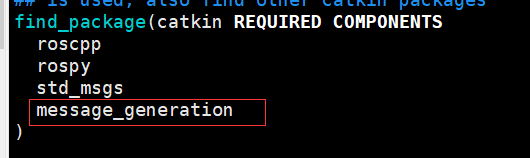
2.添加runtime依赖
catkin_package(

  ...

  CATKIN_DEPENDS message_runtime ...

  ...)
3.定义msg文件
add_message_files(

  FILES

  Num.msg

)

generate_messages(

  DEPENDENCIES

  std_msgs

)
之后我们可以用rosmsg检查我们创建的msg
rosmsg show [message type]

rosmsg show beginner_tutorials/Num

rosmsg show Num
创建一个srv文件并生成相应源码
srv文件
int64 A

int64 B

---

int64 Sum
以---分隔,request是A和B,response是Sum.

- 定义srv文件
- 修改package.xml
- 修改CMakeLists.txt
与msg不同的是添加srv文件时需要修改的是
add_service_files(

  FILES

  AddTwoInts.srv

)
之后我们可以用rossrv检测我们创建的srv文件
rossrv show <service type>

rossrv show beginner_tutorials/AddTwoInts

rossrv show AddTwoInts
至此,我们已经将msg和srv的描述文件定义好了,也将相应的package.xml和CMakeLists.txt修改完毕.
在build/devel/src的上级目录进行make
# In your catkin workspace

$ roscd beginner_tutorials

$ cd ../..

$ catkin_make install

$ cd
make完毕后,生成的c++源码位于 ~/catkin_ws/devel/include/beginner_tutorials/

Any .msg file in the msg directory will generate code for use in all supported languages. The C++ message header file will be generated in ~/catkin_ws/devel/include/beginner_tutorials/. The Python script will be created in ~/catkin_ws/devel/lib/python2.7/dist-packages/beginner_tutorials/msg. The lisp file appears in ~/catkin_ws/devel/share/common-lisp/ros/beginner_tutorials/msg/.
Similarly, any .srv files in the srv directory will have generated code in supported languages. For C++, this will generate header files in the same directory as the message header files. For Python and Lisp, there will be an 'srv' folder beside the 'msg' folders.
完整的CMakeLists.txt如下
cmake_minimum_required(VERSION 2.8.3)

project(beginner_tutorials)

## Compile as C++11, supported in ROS Kinetic and newer

# add_compile_options(-std=c++11)

## Find catkin macros and libraries

## if COMPONENTS list like find_package(catkin REQUIRED COMPONENTS xyz)

## is used, also find other catkin packages

find_package(catkin REQUIRED COMPONENTS

  roscpp

  rospy

  std_msgs

  message_generation

)

## System dependencies are found with CMake's conventions

# find_package(Boost REQUIRED COMPONENTS system)

## Uncomment this if the package has a setup.py. This macro ensures

## modules and global scripts declared therein get installed

## See http://ros.org/doc/api/catkin/html/user_guide/setup_dot_py.html

# catkin_python_setup()

################################################

## Declare ROS messages, services and actions ##

################################################

## To declare and build messages, services or actions from within this

## package, follow these steps:

## * Let MSG_DEP_SET be the set of packages whose message types you use in

##   your messages/services/actions (e.g. std_msgs, actionlib_msgs, ...).

## * In the file package.xml:

##   * add a build_depend tag for "message_generation"

##   * add a build_depend and a exec_depend tag for each package in MSG_DEP_SET

##   * If MSG_DEP_SET isn't empty the following dependency has been pulled in

##     but can be declared for certainty nonetheless:

##     * add a exec_depend tag for "message_runtime"

## * In this file (CMakeLists.txt):

##   * add "message_generation" and every package in MSG_DEP_SET to

##     find_package(catkin REQUIRED COMPONENTS ...)

##   * add "message_runtime" and every package in MSG_DEP_SET to

##     catkin_package(CATKIN_DEPENDS ...)

##   * uncomment the add_*_files sections below as needed

##     and list every .msg/.srv/.action file to be processed

##   * uncomment the generate_messages entry below

##   * add every package in MSG_DEP_SET to generate_messages(DEPENDENCIES ...)

## Generate messages in the 'msg' folder

add_message_files(

   FILES

   #Message1.msg

   #Message2.msg

   Num.msg

 )

## Generate services in the 'srv' folder

 add_service_files(

   FILES

#   Service1.srv

#   Service2.srv

   AddTwoInts.srv

 )

## Generate actions in the 'action' folder

# add_action_files(

#   FILES

#   Action1.action

#   Action2.action

# )

## Generate added messages and services with any dependencies listed here

generate_messages(

   DEPENDENCIES

   std_msgs

 )

################################################

## Declare ROS dynamic reconfigure parameters ##

################################################

## To declare and build dynamic reconfigure parameters within this

## package, follow these steps:

## * In the file package.xml:

##   * add a build_depend and a exec_depend tag for "dynamic_reconfigure"

## * In this file (CMakeLists.txt):

##   * add "dynamic_reconfigure" to

##     find_package(catkin REQUIRED COMPONENTS ...)

##   * uncomment the "generate_dynamic_reconfigure_options" section below

##     and list every .cfg file to be processed

## Generate dynamic reconfigure parameters in the 'cfg' folder

# generate_dynamic_reconfigure_options(

#   cfg/DynReconf1.cfg

#   cfg/DynReconf2.cfg

# )

###################################

## catkin specific configuration ##

###################################

## The catkin_package macro generates cmake config files for your package

## Declare things to be passed to dependent projects

## INCLUDE_DIRS: uncomment this if your package contains header files

## LIBRARIES: libraries you create in this project that dependent projects also need

## CATKIN_DEPENDS: catkin_packages dependent projects also need

## DEPENDS: system dependencies of this project that dependent projects also need

catkin_package(

   INCLUDE_DIRS include

   LIBRARIES beginner_tutorials

   CATKIN_DEPENDS roscpp rospy std_msgs message_runtime

   DEPENDS system_lib

)

###########

## Build ##

###########

## Specify additional locations of header files

## Your package locations should be listed before other locations

include_directories(

# include

  ${catkin_INCLUDE_DIRS}

)

## Declare a C++ library

# add_library(${PROJECT_NAME}

#   src/${PROJECT_NAME}/beginner_tutorials.cpp

# )

## Add cmake target dependencies of the library

## as an example, code may need to be generated before libraries

## either from message generation or dynamic reconfigure

# add_dependencies(${PROJECT_NAME} ${${PROJECT_NAME}_EXPORTED_TARGETS} ${catkin_EXPORTED_TARGETS})

## Declare a C++ executable

## With catkin_make all packages are built within a single CMake context

## The recommended prefix ensures that target names across packages don't collide

# add_executable(${PROJECT_NAME}_node src/beginner_tutorials_node.cpp)

## Rename C++ executable without prefix

## The above recommended prefix causes long target names, the following renames the

## target back to the shorter version for ease of user use

## e.g. "rosrun someones_pkg node" instead of "rosrun someones_pkg someones_pkg_node"

# set_target_properties(${PROJECT_NAME}_node PROPERTIES OUTPUT_NAME node PREFIX "")

## Add cmake target dependencies of the executable

## same as for the library above

# add_dependencies(${PROJECT_NAME}_node ${${PROJECT_NAME}_EXPORTED_TARGETS} ${catkin_EXPORTED_TARGETS})

## Specify libraries to link a library or executable target against

# target_link_libraries(${PROJECT_NAME}_node

#   ${catkin_LIBRARIES}

# )

#############

## Install ##

#############

# all install targets should use catkin DESTINATION variables

# See http://ros.org/doc/api/catkin/html/adv_user_guide/variables.html

## Mark executable scripts (Python etc.) for installation

## in contrast to setup.py, you can choose the destination

# install(PROGRAMS

#   scripts/my_python_script

#   DESTINATION ${CATKIN_PACKAGE_BIN_DESTINATION}

# )

## Mark executables and/or libraries for installation

# install(TARGETS ${PROJECT_NAME} ${PROJECT_NAME}_node

#   ARCHIVE DESTINATION ${CATKIN_PACKAGE_LIB_DESTINATION}

#   LIBRARY DESTINATION ${CATKIN_PACKAGE_LIB_DESTINATION}

#   RUNTIME DESTINATION ${CATKIN_PACKAGE_BIN_DESTINATION}

# )

## Mark cpp header files for installation

# install(DIRECTORY include/${PROJECT_NAME}/

#   DESTINATION ${CATKIN_PACKAGE_INCLUDE_DESTINATION}

#   FILES_MATCHING PATTERN "*.h"

#   PATTERN ".svn" EXCLUDE

# )

## Mark other files for installation (e.g. launch and bag files, etc.)

# install(FILES

#   # myfile1

#   # myfile2

#   DESTINATION ${CATKIN_PACKAGE_SHARE_DESTINATION}

# )

#############

## Testing ##

#############

## Add gtest based cpp test target and link libraries

# catkin_add_gtest(${PROJECT_NAME}-test test/test_beginner_tutorials.cpp)

# if(TARGET ${PROJECT_NAME}-test)

#   target_link_libraries(${PROJECT_NAME}-test ${PROJECT_NAME})

# endif()

## Add folders to be run by python nosetests

# catkin_add_nosetests(test)
update:20190408
自定义格式消息.在终端通过rostopic发送.
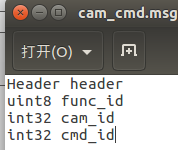

注意冒号后面的空格
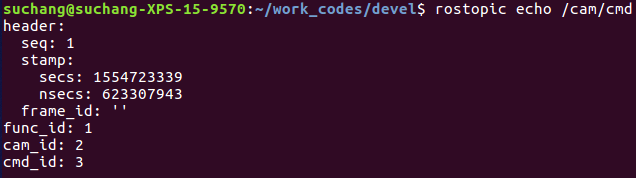
Header的定义 http://docs.ros.org/melodic/api/std_msgs/html/msg/Header.html
cmdline语法格式 http://wiki.ros.org/ROS/YAMLCommandLine
Creating a ROS msg and srv的更多相关文章
- 建立一个ROS msg and srv
msg是一个描述ROS消息字段的简单的文本文件,它们经常用来为消息产生不同语言的源代码. srv文件描述一个服务,它由请求和响应两部分组成. msg文件被存储在一个包的msg目录下,srv文件被存储在 ...
- 7、创建ROS msg和srv
一.msg和srv介绍 msg: msg文件使用简单的文本格式声明一个ROS message的各个域. 仅须要创建一个msg文件,就能够使用它来生成不同语言的message定义代码. srv:srv文 ...
- ROS学习笔记五:创建和使用ROS msg和srv
1 msg和srv简介 1.1 msg文件 msg文件就是一个简单的text文件,其中每行有一个类型和名称,可用的类型如下: int8, int16, int32, int64 (plus uint* ...
- ros msg和srv使用
在包文件中新建文件夹srv和msg,在这两个文件夹中新建test.msg,test.srv 修改apckage.xml 添加以下内容 <build_depend>:message_gene ...
- ROS学习手记 - 7 创建ROS msg & srv
至此,我们初步学习了ROS的基本工具,接下来一步步理解ROS的各个工作部件的创建和工作原理. 本文的详细文档:http://wenku.baidu.com/view/623f41b3376baf1ff ...
- ROS学习(十一)—— msg srv
一.msg 和 srv介绍 1.定义 消息(msg): msg文件就是一个描述ROS中所使用消息类型的简单文本.它们会被用来生成不同语言的源代码 服务(srv): 一个srv文件描述一项服务.它包含两 ...
- Ros中创建msg和srv遇到的问题
在创建msg和srv文件之后,使用srv和msg文件时候需要对xml文件进行修改,如下: <build_depend>message_generation</build_depend ...
- ROS中msg和srv文件的区别
1.msg和srv究竟有什么区别?? msg只是单向的发送和接受. srv包含两个部分:请求和响应. 2.msg和srv简介 msg:msg文件是描述ROS消息字段的简单文本文件.它们用于为不同语言( ...
- 创建一个ROS msg
1. msg •msg:msg文件是简单的文本文件,用于描述ROS中消息(消息的各个参数项).用于为不同的编程语言生成有关消息的源代码. •srv:描述服务的文件,由两部分组成:请求和反馈: msg文 ...
随机推荐
- linux系统做raid
raid 常用步骤 1.ctrl+R 进入raid设置界面 2.F2 相当于右键功能 3.箭头 → 是下一个选项功能 4.ctrl+n是下一页,ctrl+p是前一页 5.Esc退出.最后ctrl+al ...
- 3.jmeter接口测试---脚本录制
安装好jmeter后,就要进入主题了,进行接口测试,接口测试的脚本获取方式 ①手动填写 ②badboy录制后,导入jmeter使用 ③jmeter录制 不会安装的可以进入这里:https://www. ...
- 机器学习(六)K-means聚类、密度聚类、层次聚类、谱聚类
本文主要简述聚类算法族.聚类算法与前面文章的算法不同,它们属于非监督学习. 1.K-means聚类 记k个簇中心,为\(\mu_{1}\),\(\mu_{2}\),...,\(\mu_{k}\),每个 ...
- DOM-基本概念及使用
1.获取元素的方式总结 1.根据 id 的属性的值获取元素,返回值是一个元素对象 document.getElementById("id属性的值"); 2.根据标签名获取元素,返回 ...
- java byte 梳理
最近写编解码的代码比较多,抽一点时间梳理下java下byte的解析.在例子代码中主要涉及的知识点就两块: 1.byte代表8个bit,其中最高位是符号位: 2.当我们用String类的getBytes ...
- 分布式服务框架介绍:最成熟的开源NIO框架Netty
尽管JDK提供了丰富的NIO类库,网上也有很多NIO学习例程,但是直接使用Java NIO类库想要开发出稳定可靠的通信框架却并非易事,原因如下: 1)NIO的类库和API繁杂,使用麻烦,你需要熟练掌握 ...
- Android OpenSL ES 开发:使用 OpenSL 播放 PCM 数据
OpenSL ES 是基于NDK也就是c语言的底层开发音频的公开API,通过使用它能够做到标准化, 高性能,低响应时间的音频功能实现方法. 这次是使用OpenSL ES来做一个音乐播放器,它能够播放m ...
- [Swift]LeetCode49. 字母异位词分组 | Group Anagrams
Given an array of strings, group anagrams together. Example: Input: ["eat", "tea" ...
- Kubernetes---Pod控制器
Pod作为kubernetes的最基本单元,它的控制器有以下这些 Pod的控制器: 1, RC ( ReplicationController): 2, RS(ReplicaSet) : 3, De ...
- java中this和super关键字的使用
这几天看到类在继承时会用到this和super,这里就做了一点总结,与各位共同交流,有错误请各位指正~ this this是自身的一个对象,代表对象本身,可以理解为:指向对象本身的一个指针. this ...