
neo4j-jersey分嵌入式和服务式连接图形数据库
原文载自:http://blog.csdn.net/yidian815/article/details/12887259
嵌入式:
引入neo4j依赖
        <dependency>

            <groupId>org.neo4j</groupId>

            <artifactId>neo4j</artifactId>

            <version>1.9.4</version>

        </dependency>
创建一个neo4j.properties(数据库的配置文件)
# Default values for the low-level graph engine

#neostore.nodestore.db.mapped_memory=25M

#neostore.relationshipstore.db.mapped_memory=50M

#neostore.propertystore.db.mapped_memory=90M

#neostore.propertystore.db.strings.mapped_memory=130M

#neostore.propertystore.db.arrays.mapped_memory=130M

# Autoindexing

# Enable auto-indexing for nodes, default is false

#node_auto_indexing=true

# The node property keys to be auto-indexed, if enabled

#node_keys_indexable=name,age

# Enable auto-indexing for relationships, default is false

#relationship_auto_indexing=true

# The relationship property keys to be auto-indexed, if enabled

#relationship_keys_indexable=name,age

# Keep logical logs, needed for online backups to work

keep_logical_logs=true

# Enable online backups to be taken from this database.

online_backup_enabled=true

# Uncomment and specify these lines for running Neo4j in High Availability mode.

# ha.server_id is a unique integer for each instance of the Neo4j database in the cluster.

# (as opposed to the coordinator instance IDs)

# example: ha.server_id=1

#ha.server_id=

# ha.coordinators is a comma-separated list (without spaces) of the host:port of where to

# find one or more of the Neo4j coordinator servers.

# Avoid localhost due to IP resolution issues on some systems.

# example: ha.coordinators=localhost:2181,1.2.3.4:4321

#ha.coordinators=localhost:2181

# You can also, optionally, configure the ha.cluster_name. This is the name of the cluster this

# instance is supposed to join. Accepted characters are alphabetical, numerical, dot and dash.

# This configuration is useful if you have multiple Neo4j HA clusters managed by the same

# Coordinator cluster.

# Example: ha.cluster_name = my.neo4j.ha.cluster

#ha.cluster_name =

# IP and port for this instance to bind to to communicate data with the

# other neo4j instances in the cluster. This is broadcasted to the other

# cluster members, so different members can have different communication ports.

# Optional if the members are on different machines so the IP is different for every member.

#ha.server = localhost:6001

# The interval at which slaves will pull updates from the master. Comment out

# the option to disable periodic pulling of updates. Unit is seconds.

ha.pull_interval = 10

# The session timeout for the zookeeper client. Lower values make new master

# election happen closer to the master loosing connection but also more sensitive

# to zookeeper quorum hiccups. If experiencing master switches without reason

# consider increasing this value. Unit is seconds

#ha.zk_session_timeout = 5

# Amount of slaves the master will try to push a transaction to upon commit (default is 1).

# The master will optimistically continue and not fail the transaction even if it fails to

# reach the push factor. Setting this to 0 will increase write performance when writing

# through master but could potentially lead to branched data (or loss of transaction)

# if the master goes down.

#ha.tx_push_factor=1

# Strategy the master will use when pushing data to slaves (if the push factor is greater than 0).

# There are two options available "fixed" (default) or "round_robin". Fixed will start by

# pushing to slaves ordered by server id (highest first) improving performance since the

# slaves only have to cache up one transaction at a time.

#ha.tx_push_strategy=fixed

# Enable this to be able to upgrade a store from 1.4 -> 1.5 or 1.4 -> 1.6

#allow_store_upgrade=true

# Enable this to specify a parser other than the default one. 1.5, 1.6, 1.7 are available

#cypher_parser_version=1.6
java文件(neo4j示例文件修改而来)
package org.easypoint;

import java.io.File;

import java.io.IOException;

import org.neo4j.graphdb.Direction;

import org.neo4j.graphdb.GraphDatabaseService;

import org.neo4j.graphdb.Node;

import org.neo4j.graphdb.Relationship;

import org.neo4j.graphdb.RelationshipType;

import org.neo4j.graphdb.Transaction;

import org.neo4j.graphdb.factory.GraphDatabaseFactory;

import org.neo4j.kernel.impl.util.FileUtils;

public class Learn1

{

    private static final String DB_PATH = "target/neo4j-hello-db";

    String greeting;

    // START SNIPPET: vars

    GraphDatabaseService graphDb;

    Node firstNode;

    Node secondNode;

    Relationship relationship;

    // END SNIPPET: vars

    // START SNIPPET: createReltype

    private static enum RelTypes implements RelationshipType

    {

        KNOWS

    }

    // END SNIPPET: createReltype

    public static void main( final String[] args )

    {

        Learn1 hello = new Learn1();

        hello.createDb();

        hello.removeData();

        hello.shutDown();

    }

    void createDb()

    {

        clearDb();

        // START SNIPPET: startDb

        graphDb = new GraphDatabaseFactory()

                .newEmbeddedDatabaseBuilder( "target/database/learn1" )

                .loadPropertiesFromFile(Learn1.class.getResource("/").getPath()+"neo4j.properties" )

                .newGraphDatabase();

        registerShutdownHook( graphDb );

        // END SNIPPET: startDb

        // START SNIPPET: transaction

        Transaction tx = graphDb.beginTx();

        try

        {

            // Updating operations go here

            // END SNIPPET: transaction

            // START SNIPPET: addData

            firstNode = graphDb.createNode();

            firstNode.setProperty( "message", "Hello, " );

            secondNode = graphDb.createNode();

            secondNode.setProperty( "message", "World!" );

            relationship = firstNode.createRelationshipTo( secondNode, RelTypes.KNOWS );

            relationship.setProperty( "message", "brave Neo4j " );

            // END SNIPPET: addData

            // START SNIPPET: readData

            System.out.print( firstNode.getProperty( "message" ) );

            System.out.print( relationship.getProperty( "message" ) );

            System.out.print( secondNode.getProperty( "message" ) );

            // END SNIPPET: readData

            greeting = ( (String) firstNode.getProperty( "message" ) )

                    + ( (String) relationship.getProperty( "message" ) )

                    + ( (String) secondNode.getProperty( "message" ) );

            // START SNIPPET: transaction

            tx.success();

        }

        finally

        {

            tx.finish();

        }

        // END SNIPPET: transaction

    }

    private void clearDb()

    {

        try

        {

            FileUtils.deleteRecursively( new File( DB_PATH ) );

        }

        catch ( IOException e )

        {

            throw new RuntimeException( e );

        }

    }

    void removeData()

    {

        Transaction tx = graphDb.beginTx();

        try

        {

            // START SNIPPET: removingData

            // let's remove the data

            firstNode.getSingleRelationship( RelTypes.KNOWS, Direction.OUTGOING ).delete();

            firstNode.delete();

            secondNode.delete();

            // END SNIPPET: removingData

            tx.success();

        }

        finally

        {

            tx.finish();

        }

    }

    void shutDown()

    {

        System.out.println();

        System.out.println( "Shutting down database ..." );

        // START SNIPPET: shutdownServer

        graphDb.shutdown();

        // END SNIPPET: shutdownServer

    }

    // START SNIPPET: shutdownHook

    private static void registerShutdownHook( final GraphDatabaseService graphDb )

    {

        // Registers a shutdown hook for the Neo4j instance so that it

        // shuts down nicely when the VM exits (even if you "Ctrl-C" the

        // running application).

        Runtime.getRuntime().addShutdownHook( new Thread()

        {

            @Override

            public void run()

            {

                graphDb.shutdown();

            }

        } );

    }

    // END SNIPPET: shutdownHook

}
运行java文件,可以看到在target/database/下创建了一个learn1的数据库。
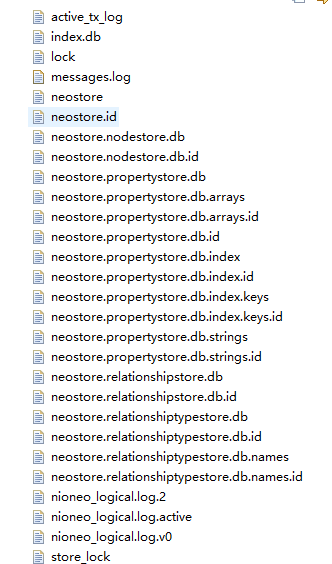
从java代码我们也可以看出,neo4j数据库主要依靠node,relationship和property来存储数据,利用relationship将各个node链接起来。
服务式:
1.简单暴力连接(使用jdbc):http://www.cnblogs.com/hwaggLee/p/5956541.html
2.使用JERSEY
添加依赖jar
<dependency>

           <groupId>com.sun.jersey</groupId>

           <artifactId>jersey-project</artifactId>

           <version>1.17</version>

       </dependency>

       <dependency>

           <groupId>com.sun.jersey</groupId>

           <artifactId>jersey-server</artifactId>

           <version>1.17</version>

       </dependency>

       <dependency>

           <groupId>com.sun.jersey</groupId>

           <artifactId>jersey-client</artifactId>

           <version>1.17</version>

       </dependency>

       <dependency>

           <groupId>com.sun.jersey</groupId>

           <artifactId>jersey-core</artifactId>

           <version>1.17</version>

       </dependency>

       <dependency>

           <groupId>com.sun.jersey</groupId>

           <artifactId>jersey-json</artifactId>

           <version>1.17</version>

       </dependency>
新建java类Learn1Rest
package org.easypoint;

import com.sun.jersey.api.client.ClientResponse;

import com.sun.jersey.api.client.WebResource;

import com.sun.jersey.api.client.Client;

import java.net.URI;

import javax.ws.rs.core.MediaType;

/**

 * 服务式neo4j连接

 */

public class Learn1Rest {

    public static void main(String args[]){

        Learn1Rest lr = new Learn1Rest();

        URI firstNode = lr.createNode();

        lr.addProperty( firstNode, "name", "Joe Strummer" );

        URI secondNode = lr.createNode();

        lr.addProperty( secondNode, "band", "The Clash" );

    }

    public URI createNode(){

       String SERVER_ROOT_URI = "http://61.xxx.xxx.xx:7474/db/data/";

       final String nodeEntryPointUri = SERVER_ROOT_URI + "node";

       WebResource resource = Client.create().resource(nodeEntryPointUri);

       ClientResponse response = resource.accept( MediaType.APPLICATION_JSON )

               .type(MediaType.APPLICATION_JSON)

               .entity("{}")

               .post(ClientResponse.class);

       final URI location = response.getLocation();

       System.out.println( String.format("POST to [%s], status code [%d], location header [%s]",

               nodeEntryPointUri, response.getStatus(), location.toString() ) );

       response.close();

       return location;

   }

    public void addProperty(URI nodeUri,String propertyName, String  propertyValue){

        String propertyUri = nodeUri.toString() + "/properties/" + propertyName;

        WebResource resource = Client.create()

                .resource( propertyUri );

        ClientResponse response = resource.accept( MediaType.APPLICATION_JSON )

                .type( MediaType.APPLICATION_JSON )

                .entity( "\"" + propertyValue + "\"" )

                .put( ClientResponse.class );

        System.out.println( String.format( "PUT to [%s], status code [%d]",

                propertyUri, response.getStatus() ) );

        response.close();

    }

}
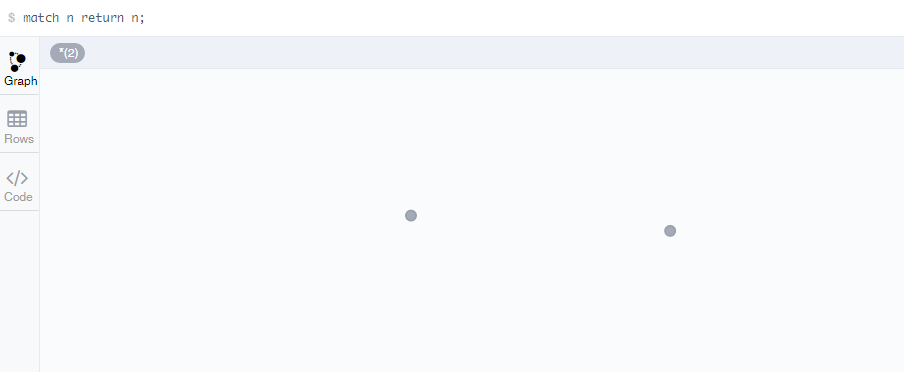
执行成功

数据库查询:
neo4j-jersey分嵌入式和服务式连接图形数据库的更多相关文章
- Android应用程序窗口(Activity)与WindowManagerService服务的连接过程分析
在前两文中,我们分析了Activity组件的窗口对象和视图对象的创建过程.Activity组件在其窗口对象和视图对象创建完成之后,就会请求与WindowManagerService建立一个连接,即请求 ...
- Android应用程序与SurfaceFlinger服务的连接过程分析
文章转载至CSDN社区罗升阳的安卓之旅,原文地址:http://blog.csdn.net/luoshengyang/article/details/7857163 前文在描述Android应用程序和 ...
- 原创:Equinox OSGi应用嵌入Jersey框架搭建REST服务
一.环境 eclipse版本:eclipse-luna 4.4 jre版本:1.8 二.Equinox OSGi应用嵌入Jersey框架搭建REST服务 1.新建插件工程HelloWebOSGI a. ...
- DLL模块例2:使用__declspec(dllexport)导出函数,extern "C"规范修饰名称,隐式连接调用dll中函数
以下内容,我看了多篇文章,整合在一起,写的一个例子,关于dll工程的创建,请参考博客里另一篇文章:http://www.cnblogs.com/pingge/articles/3153571.html ...
- CSS的三种样式:内联式,嵌入式,外部式以及他们的优先级
从CSS 样式代码插入的形式来看基本能够分为下面3种:内联式.嵌入式和外部式三种. 1:内联式css样式表就是把css代码直接写在现有的HTML标签中,如以下代码: <p style=" ...
- 打印机威胁:嵌入式Web服务有安全问题
现在大多数打印机.扫描仪,以及VoIP系统等设备都会内建嵌入式的Web服务,这主要是为了方便管理.然而不幸的是,这些设备大多会由于设置问题而处在无保护状态下.有些服务甚至可以使用默认的帐号和密码访问, ...
- ssh服务突然连接不了案例总结
ssh服务突然连接不了案例总结 一台Oracle数据库服务器(Linux版本为Oracle Linux Server release 5.7)今天中午突然出现短暂的ssh连接不上的情况,ssh连接 ...
- Equinox OSGi应用嵌入Jersey框架搭建REST服务
原文地址:https://www.cnblogs.com/kira2will/p/5040264.html 一.环境 eclipse版本:eclipse-luna 4.4 jre版本:1.8 二.Eq ...
- springcloud服务安全连接
Spring Cloud可以增加HTTP Basic认证来增加服务连接的安全性. 1.加入security启动器 在maven配置文件中加入Spring Boot的security启动器. <d ...
随机推荐
- fluent批量处理——模型参数的设置
对于常见的工程应用来说,计算的工况很多,尤其优化工作,少则几百,多则上千,面对如此之多的case文件要写,假如按照一个一个的读写的话,相信你一定会为这么机械的工作烦躁,甚至影响今后好几天的心情,那么有 ...
- Java EE必读书籍
2011-09-18 15:21 24170人阅读 评论(46) 收藏 举报 分类: JavaEE等(280) 软件工程.原理(49) 计算机历史(3) Web相关(83) Linux/Un ...
- 企业级应用架构模式N-Tier多层架构
先来看经典的3层架构,看下图: 涉及到平台可以是: Ruby on Rails, Java EE, ASP.NET, PHP, ColdFusion, Perl, Python 层 ...
- canvas学习之API整理笔记(二)
前面我整理过一篇文章canvas学习之API整理笔记(一),从这篇文章我们已经可以基本了解到常用绘图的API.简单的变换和动画.而本篇文章的主要内容包括高级动画.像素操作.性能优化等知识点,讲解每个知 ...
- 使用python处理子域名爆破工具subdomainsbrute结果txt
近期学习了一段时间python,结合自己的安全从业经验,越来越感觉到安全测试是一个体力活.如果没有良好的coding能力去自动化的话,无疑会把安全测试效率变得很低. 作为安全测试而言,第一步往往要通过 ...
- 特大喜讯,View and Data API 现在支持中文界面了
大家经常会问到,使用View and Data API怎么做界面的本地化,来显示中文,现在好消息来了,从v1.2.19起,View and Data API开始支持多国语言界面了.你需要制定版本号为v ...
- [Android]使用自定义JUnit Rules、annotations和Resources进行单元测试(翻译)
以下内容为原创,欢迎转载,转载请注明 来自天天博客:http://www.cnblogs.com/tiantianbyconan/p/5795091.html 使用自定义JUnit Rules.ann ...
- PHPmailer关于Extension missing: openssl报错的解决
最近在写一个网页的时候,需要用到PHPmailer来发送邮件,按照官网上给出的demo写出一个例子,却报错Extension missing: openssl 最后发现需要修改php.ini中的配置: ...
- JS控制键盘录入 和 window.event.keycode对照
一.只允许录入整数 1.不允许录入非数字(按下字母键就会提示并清空) function intOnly() { if (!(window.event.keyCode >= 48 &&am ...
- CentOS(5.8/6.7)linux生产环境若干优化实战
CentOS系统安装之后并不能立即投入生产环境使用,往往需要先经过我们运维人员的优化才行.在此讲解几点关于Linux系统安装后的基础优化操作.注意:本次优化都是基于CentOS(5.8/6.7). 下 ...