
Equinox OSGi应用嵌入Jersey框架搭建REST服务
原文地址:https://www.cnblogs.com/kira2will/p/5040264.html
一、环境
eclipse版本:eclipse-luna 4.4
jre版本:1.8
二、Equinox OSGi应用嵌入Jersey框架搭建REST服务
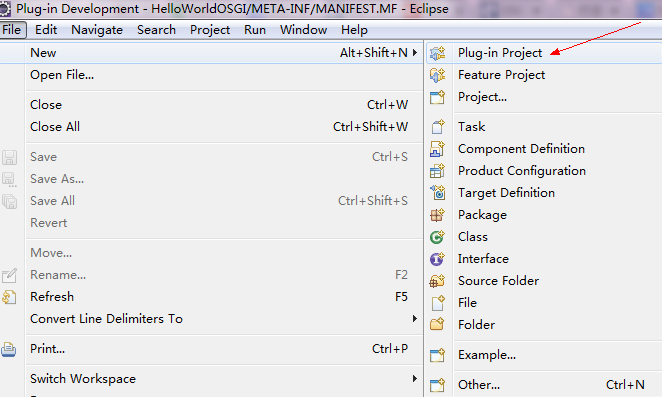
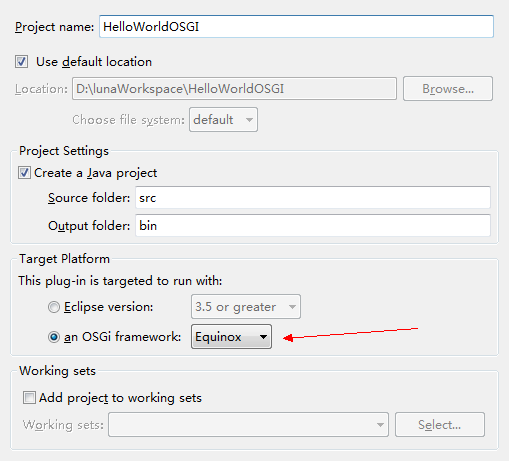
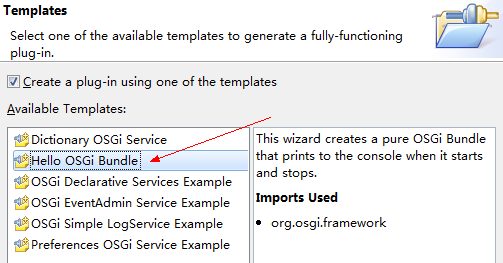
1.新建插件工程HelloWebOSGI
a.
b.
c.
d.在新建的工程中新建文件夹lib,其中放入附件中的jar包(见文末),全部添加到工程Build Path中。


2.配置运行环境
a.配置引入包、依赖插件
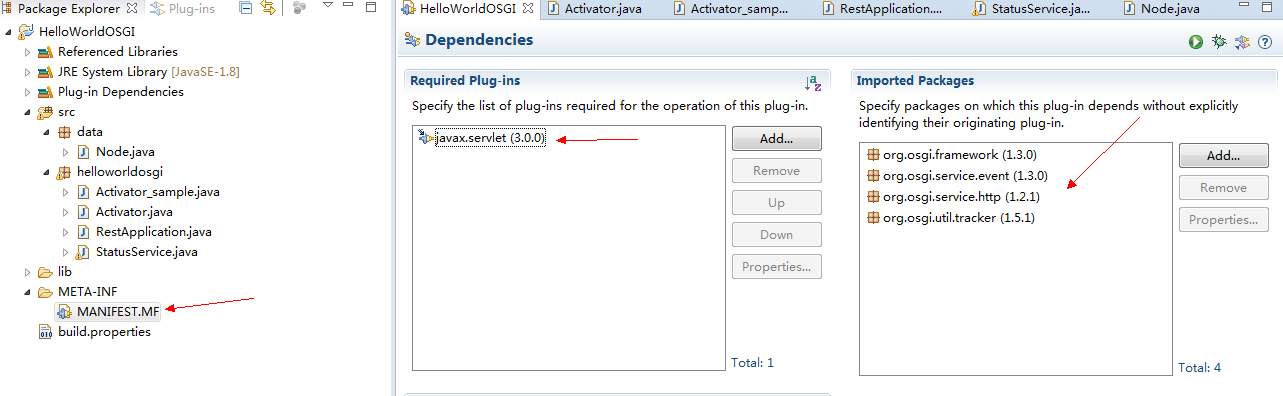
b.选择Run->Run Configuration,new一个环境
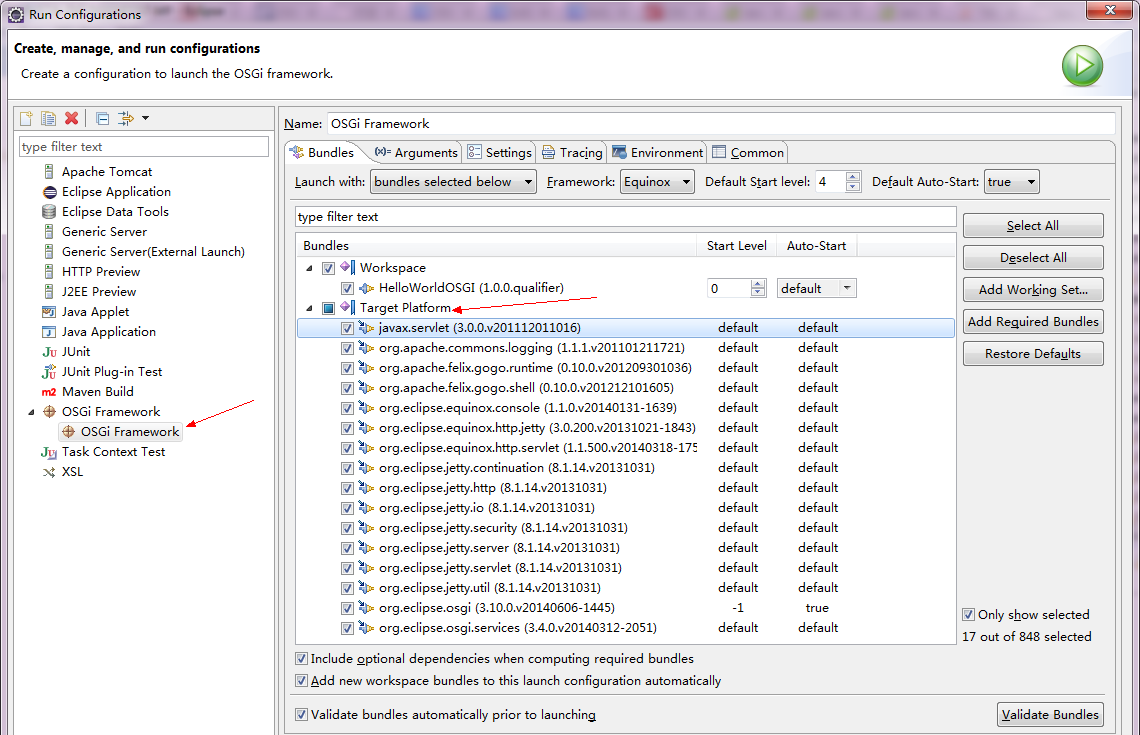
保留图中TargetPlatform中的16个Bundle。
c.在Run Configuration中设置参数
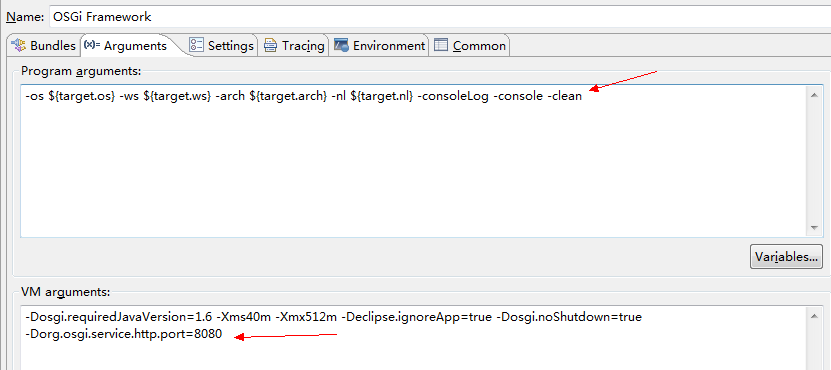
友情提示:如果有其他异常请查看提示信息,利用 http://www.aolsearch.com/ 查询提示信息(英文),如果发现http://stackoverflow.com/这个网站有相同提问,基本就知道答案近在咫尺了。
比如笔者遇到的问题:Root exception:java.lang.IllegalStateException: Workbench has not been created yet.
解决方法就是在http://stackoverflow.com/questions/13773582/workbench-has-not-been-created-yet-error-in-eclipse-plugin-programming中找到的。
d.在MANIFEST.MF(META-INF)文件中将lib文件夹中的包都引入如下图中。

3.添加代码
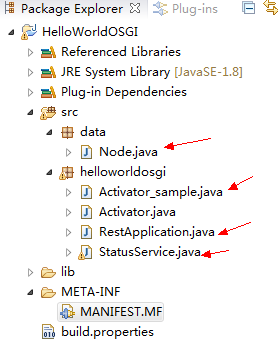
Activator_sample.java
package helloworldosgi;

import java.util.Dictionary;

import java.util.HashMap;

import java.util.Hashtable;

import java.util.logging.Logger;

import javax.servlet.ServletException;

import org.glassfish.jersey.servlet.ServletContainer;

import org.osgi.framework.BundleActivator;

import org.osgi.framework.BundleContext;

import org.osgi.framework.ServiceReference;

import org.osgi.service.event.Event;

import org.osgi.service.event.EventAdmin;

import org.osgi.service.http.HttpService;

import org.osgi.service.http.NamespaceException;

import org.osgi.util.tracker.ServiceTracker;

/*

 * BundleActivator:让你能够捕捉到bundle的start和stop事件,并对这两个事件作出自定义的反应。

 */

public class Activator_sample implements BundleActivator {

    private BundleContext bc;

    @SuppressWarnings("rawtypes")

    private ServiceTracker tracker;

    private HttpService httpService = null;

    private static final Logger logger = Logger.getLogger(Activator.class.getName());

    /**

     * URL前缀

     */

    public static final String CONTEXT_PATH = "/rest/json";

    /*

     * BundleContext:一个bundle在框架中的执行时上下文,这个上下文提供了和框架进行交互的方法。

     * @see org.osgi.framework.BundleActivator#start(org.osgi.framework.BundleContext)

     */

    @SuppressWarnings({ "unchecked", "rawtypes" })

    @Override

    public synchronized void start(BundleContext bundleContext)    throws Exception {

        this.bc = bundleContext;

        logger.info("STARTING HTTP SERVICE BUNDLE");

        this.tracker = new ServiceTracker(this.bc, HttpService.class.getName(),    null) {

            @Override

            public Object addingService(ServiceReference serviceRef) {

                httpService = (HttpService) super.addingService(serviceRef);

                registerServlets();

                return httpService;

            }

            @Override

            public void removedService(ServiceReference ref, Object service) {

                if (httpService == service) {

                    unregisterServlets();

                    httpService = null;

                }

                super.removedService(ref, service);

            }

        };

        this.tracker.open();

        logger.info("HTTP SERVICE BUNDLE STARTED");

    }

    /*

     * BundleContext:一个bundle在框架中的执行时上下文,这个上下文提供了和框架进行交互的方法。

     * @see org.osgi.framework.BundleActivator#stop(org.osgi.framework.BundleContext)

     */

    @Override

    public synchronized void stop(BundleContext bundleContext) throws Exception {

        this.tracker.close();

    }

    private void registerServlets() {

        try {

            rawRegisterServlets();

        } catch (InterruptedException | NamespaceException | ServletException ie) {

            throw new RuntimeException(ie);

        }

    }

    private void rawRegisterServlets() throws ServletException,    NamespaceException, InterruptedException {

        logger.info("JERSEY BUNDLE: REGISTERING SERVLETS");

        logger.info("JERSEY BUNDLE: HTTP SERVICE = " + httpService.toString());

        // TODO - temporary workaround

        // This is a workaround related to issue JERSEY-2093; grizzly (1.9.5)

        // needs to have the correct context

        // classloader set

        ClassLoader myClassLoader = getClass().getClassLoader();

        ClassLoader originalContextClassLoader = Thread.currentThread()

                .getContextClassLoader();

        try {

            Thread.currentThread().setContextClassLoader(myClassLoader);

            httpService.registerServlet(CONTEXT_PATH, new ServletContainer(),

                    getJerseyServletParams(), null);

            httpService.registerResources(CONTEXT_PATH + "/hello", "/webroot", null);//前面必须带“/”,后面不一定

        } finally {

            Thread.currentThread().setContextClassLoader(

                    originalContextClassLoader);

        }

        // END of workaround - after grizzly updated to the recent version, only

        // the inner call from try block will remain:

        // httpService.registerServlet("/jersey-http-service", new

        // ServletContainer(), getJerseyServletParams(), null);

        sendAdminEvent();

        logger.info("JERSEY BUNDLE: SERVLETS REGISTERED");

    }

    @SuppressWarnings("serial")

    private void sendAdminEvent() {

        @SuppressWarnings("rawtypes")

        ServiceReference eaRef = bc.getServiceReference(EventAdmin.class

                .getName());

        if (eaRef != null) {

            @SuppressWarnings("unchecked")

            EventAdmin ea = (EventAdmin) bc.getService(eaRef);

            ea.sendEvent(new Event("jersey/test/DEPLOYED",

                    new HashMap<String, String>() {

                        {

                            put("context-path", "/");

                        }

                    }));

            bc.ungetService(eaRef);

        }

    }

    private void unregisterServlets() {

        if (this.httpService != null) {

            logger.info("JERSEY BUNDLE: UNREGISTERING SERVLETS");

            httpService.unregister(CONTEXT_PATH);

            logger.info("JERSEY BUNDLE: SERVLETS UNREGISTERED");

        }

    }

    private Dictionary<String, String> getJerseyServletParams() {

        Dictionary<String, String> jerseyServletParams = new Hashtable<>();

        jerseyServletParams.put("javax.ws.rs.Application",

                RestApplication.class.getName());

        logger.info("kira2will" + RestApplication.class.getName());

        return jerseyServletParams;

    }

}
StatusService.java
package helloworldosgi;

import java.util.ArrayList;

import java.util.List;

import java.util.logging.Logger;

import javax.ws.rs.GET;

import javax.ws.rs.Path;

import javax.ws.rs.PathParam;

import javax.ws.rs.Produces;

import javax.ws.rs.core.MediaType;

import data.Node;

@Path("/status")

public class StatusService {

    private static final Logger logger = Logger.getLogger(StatusService.class.getName());

    @GET

    @Produces(MediaType.APPLICATION_JSON)

    public Node getStatus(){

        List<Node> nodes = new ArrayList<Node>();

        Node node = new Node("001", "60800","192.168.1.1","0","92","92","chizhou","50ms","hw");

        Node nothingNode = new Node("null","null","null","null","null","null","null","null","null");

        //nodes.add(node);

        nodes.add(node);

        logger.info(node.getName());

        return node;

    }

    @Path("/{id}")

    @GET

    @Produces(MediaType.APPLICATION_JSON)

    public Node getID(@PathParam("id") int id){

        List<Node> nodes = new ArrayList<Node>();

        nodes.add(new Node("null","null","null","null","null","null","null","null","null"));

        nodes.add(new Node("001", "60600","192.168.1.1","0","92","92","tonglin","50ms","hw"));

        nodes.add(new Node("002", "60600","192.168.1.1","0","92","92","tonglin","50ms","hw"));

        nodes.add(new Node("003", "60600","192.168.1.1","0","92","92","tonglin","50ms","hw"));

        nodes.add(new Node("004", "60600","192.168.1.1","0","92","92","tonglin","50ms","hw"));

        nodes.add(new Node("005", "60600","192.168.1.1","0","92","92","tonglin","50ms","hw"));

        int defaultIndex = 0;

        if ( (id < 1) || (id > nodes.size() - 1) ){

            logger.info(nodes.get(defaultIndex).getId());

            return nodes.get(defaultIndex);

        }

        else{

            logger.info(nodes.get(id).getId());

            return nodes.get(id);

        }

    }

}
RestApplication.java
package helloworldosgi;

import java.util.HashSet;

import java.util.Set;

import javax.ws.rs.core.Application;

import com.fasterxml.jackson.jaxrs.json.JacksonJsonProvider;

public class RestApplication extends Application {

    @Override

    public Set<Class<?>> getClasses() {

        Set<Class<?>> result = new HashSet<Class<?>>();

        result.add(JacksonJsonProvider.class);

        result.add(StatusService.class);

        return result;

    }

}
Node.java
package data;

import javax.xml.bind.annotation.XmlRootElement;

@XmlRootElement

public class Node {

    private String id;

    private String name;

    private String admin_ip;

    private String admin_status;

    private String longitude;

    private String latitude;

    private String location;

    private String latency;

    private String vendor_name;

    public Node(String id,

                String name,

                String admin_ip,

                String admin_status,

                String longitude,

                String latitude,

                String location,

                String latency,

                String vendor_name

                ){

        this.id = id;

        this.name = name;

        this.admin_ip = admin_ip;

        this.admin_status = admin_status;

        this.longitude = longitude;

        this.latitude = latitude;

        this.location = location;

        this.latency = latency;

        this.vendor_name = vendor_name;

    }

    public String getId() {

        return id;

    }

    public void setId(String id) {

        this.id = id;

    }

    public String getName() {

        return name;

    }

    public void setName(String name) {

        this.name = name;

    }

    public String getAdmin_ip() {

        return admin_ip;

    }

    public void setAdmin_ip(String admin_ip) {

        this.admin_ip = admin_ip;

    }

    public String getAdmin_status() {

        return admin_status;

    }

    public void setAdmin_status(String admin_status) {

        this.admin_status = admin_status;

    }

    public String getLongitude() {

        return longitude;

    }

    public void setLongitude(String longitude) {

        this.longitude = longitude;

    }

    public String getLatitude() {

        return latitude;

    }

    public void setLatitude(String latitude) {

        this.latitude = latitude;

    }

    public String getLocation() {

        return location;

    }

    public void setLocation(String location) {

        this.location = location;

    }

    public String getLatency() {

        return latency;

    }

    public void setLatency(String latency) {

        this.latency = latency;

    }

    public String getVendor_name() {

        return vendor_name;

    }

    public void setVendor_name(String vendor_name) {

        this.vendor_name = vendor_name;

    }

}
4.浏览器中输入 http://localhost:8080/rest/json/status 即可访问public Node getStatus() 返回值。
或者输入 http://localhost:8080/rest/json/status/2 即可访问public Node getID(@PathParam("id") int id)返回值。
关于@Path @Get @PathParam 参考 http://www.docin.com/p-317614298.html 第七页。
http://download.csdn.net/detail/kira_will/9729055
原文地址:https://www.cnblogs.com/kira2will/p/5040264.html
Equinox OSGi应用嵌入Jersey框架搭建REST服务的更多相关文章
- 原创:Equinox OSGi应用嵌入Jersey框架搭建REST服务
一.环境 eclipse版本:eclipse-luna 4.4 jre版本:1.8 二.Equinox OSGi应用嵌入Jersey框架搭建REST服务 1.新建插件工程HelloWebOSGI a. ...
- go服务端----使用dotweb框架搭建简易服务
使用dotweb框架搭建简易服务 go语言web框架挺多的,所谓琳琅满目,里面也有很多优秀的,比如echo.beego等,但体验下来,总是觉得哪里有点小疙瘩,后来才明白过来,echo太简单,很多日常使 ...
- 使用Yii2的Web框架搭建微服务框架
方法 使用自己的Yii2镜像作为基础 使用Yii2的Web框架搭建,为了节省搭建Yii2框架的时间,直接使用现有的Yii2项目,删除了业务相关的逻辑类,将这个代码库作为搭建微服务框架的基础,本身已经积 ...
- Flask框架搭建REST-API服务
一.目的 为了能够将测试工具部署成RESTful-API服务,这样就能通过接口的方式提供统一测试工具服务,使用人员就不用构建application而产生的各种环境问题.使用问题. 适合人群:Pytho ...
- django框架搭建web服务
一.工具 环境:windows 7 python 2.7.7 下载地址:https://www.python.org/downloads/release/python-2713/ ps:这 ...
- [Visual Studio] SOA服务框架搭建
1.服务框架搭建 2.服务模板创建 3.Nuget引用 4.客户端调用 任务点: 1.分析SOA 2.修改SOA架构名称以及关键字 3.使用Nuget添加引用 4.选择服务模板进行创建 5.尝试调用 ...
- 一步一步使用ABP框架搭建正式项目系列教程之本地化详解
返回总目录<一步一步使用ABP框架搭建正式项目系列教程> 本篇目录 扯扯本地化 ABP中的本地化 小结 扯扯本地化 本节来说说本地化,也有叫国际化.全球化的,不管怎么个叫法,反正道理都是一 ...
- Jersey 2 + Maven + Tomcat + IntelliJ IDEA 搭建RESTful服务
本文参考以下内容: [1] Starting out with Jersey & Apache Tomcat using IntelliJ [2] [Jersey]IntelliJ IDEA ...
- struts2+hibernate+spring注解版框架搭建以及简单测试(方便脑补)
为了之后学习的日子里加深对框架的理解和使用,这里将搭建步奏简单写一下,目的主要是方便以后自己回来脑补: 1:File--->New--->Other--->Maven--->M ...
随机推荐
- 第18章 启动 - Identity Server 4 中文文档(v1.0.0)
IdentityServer是中间件和服务的组合.所有配置都在您的启动类中完成. 18.1 配置服务 您可以通过调用以下方法将IdentityServer服务添加到DI系统: public void ...
- 【默认加入持久化机制,防止消息丢失,v0.0.3】对RabbitMQ.Client进行一下小小的包装,绝对实用方便
RabbitMQ是一个老牌的非微软的消息队列组件,一般来说应该能满足中小型公司对消息队列生产的需求,平时我们在.NET开发环境下运用它是可能会需要RabbitMQ.Client的SDK库,此库是官网提 ...
- Spring boot集成spring session实现session共享
最近使用spring boot开发一个系统,nginx做负载均衡分发请求到多个tomcat,此时访问页面会把请求分发到不同的服务器,session是存在服务器端,如果首次访问被分发到A服务器,那么se ...
- 【转】Android必备知识点- Android文件(File)操作
Android 使用与其他平台上基于磁盘的文件系统类似的文件系统. 本文讲述如何使用 Android 文件系统通过 File API 读取和写入文件. File 对象适合按照从开始到结束的顺序不跳过地 ...
- 2013年第四届蓝桥杯javaB组 试题 答案 解析
1.世纪末的星期 曾有邪教称1999年12月31日是世界末日.当然该谣言已经不攻自破. 还有人称今后的某个世纪末的12月31日,如果是星期一则会.... 有趣的是,任何一个世纪末的年份的12月31日都 ...
- H5页面的高度宽度100%
解决方案1: 设置如下:html,body{ min-height:100vh; background-color:#fff; }这样高度首先不会写死,而且满足最小高度是满屏 解决方案2: 可以用vh ...
- java程序员学C#
因为工作需要,我要学习C#,其实我觉得不错,我喜欢了解更多的语言,因为这对我今后的发展很有帮助,毕竟技多不压身,下面是我今天学习后总结C#的基本语法: 我曾经学过C,而且又是java程序员,所以对我来 ...
- Android Studio撤销与SVN的关联
为何会记录这一个问题,主要是在做项目的过程中出现了一个奇怪的现象,就是直接在文件目录下使用svn上传文件的话,可以看到该目录是与SVN相关联的,可是到了用Android Studio上传代码的时候却发 ...
- Android 性能优化:使用 Lint 优化代码、去除多余资源
前言 在保证代码没有功能问题,完成业务开发之余,有追求的程序员还要追求代码的规范.可维护性. 今天,以“成为优秀的程序员”为目标的拭心将和大家一起精益求精,学习使用 Lint 优化我们的代码. 什么是 ...
- 网上都没有提到的教程:python捕获异常后,怎么输出错误文件和行号
1.假设输出不存在的变量 a try: print(a) except NameError as e: print('发生错误的文件:', e.__traceback__.tb_frame.f_glo ...