
Spring mvc,jQuery和JSON数据交互
一、实验环境的搭建
1、Spring mvc jar。
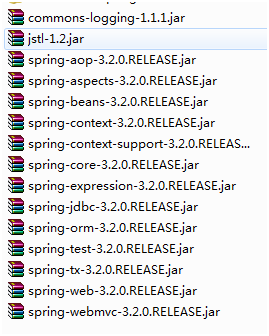
导入spring mvc运行所需jar包。导入如下(有多余)
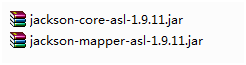
2、json的支持jar
3、加入jQuery。
选用jquery-3.0.0.min.js,放在WebRoot/JS文件夹

导入jQuery到jsp页面如下

4、web.xml
<?xml version="1.0" encoding="UTF-8"?>
<web-app xmlns:xsi="http://www.w3.org/2001/XMLSchema-instance" xmlns="http://java.sun.com/xml/ns/javaee" xsi:schemaLocation="http://java.sun.com/xml/ns/javaee http://java.sun.com/xml/ns/javaee/web-app_3_0.xsd" id="WebApp_ID" version="3.0">
<display-name>springmvcjson</display-name>
<servlet>
<servlet-name>springmvc</servlet-name>
<servlet-class>org.springframework.web.servlet.DispatcherServlet</servlet-class>
<init-param>
<param-name>contextConfigLocation</param-name>
<param-value>classpath:springmvc.xml</param-value>
</init-param>
<load-on-startup>1</load-on-startup>
</servlet>
<servlet-mapping>
<servlet-name>springmvc</servlet-name>
<url-pattern>*.action</url-pattern>
</servlet-mapping>
<welcome-file-list>
<welcome-file>index.html</welcome-file>
<welcome-file>index.htm</welcome-file>
<welcome-file>index.jsp</welcome-file>
<welcome-file>default.html</welcome-file>
<welcome-file>default.htm</welcome-file>
<welcome-file>default.jsp</welcome-file>
</welcome-file-list>
</web-app>
5、springmvc.xml
classpath下
<beans xmlns="http://www.springframework.org/schema/beans"
xmlns:xsi="http://www.w3.org/2001/XMLSchema-instance" xmlns:mvc="http://www.springframework.org/schema/mvc"
xmlns:context="http://www.springframework.org/schema/context"
xmlns:aop="http://www.springframework.org/schema/aop" xmlns:tx="http://www.springframework.org/schema/tx"
xsi:schemaLocation="http://www.springframework.org/schema/beans
http://www.springframework.org/schema/beans/spring-beans-3.2.xsd
http://www.springframework.org/schema/mvc
http://www.springframework.org/schema/mvc/spring-mvc-3.2.xsd
http://www.springframework.org/schema/context
http://www.springframework.org/schema/context/spring-context-3.2.xsd
http://www.springframework.org/schema/aop
http://www.springframework.org/schema/aop/spring-aop-3.2.xsd
http://www.springframework.org/schema/tx
http://www.springframework.org/schema/tx/spring-tx-3.2.xsd ">
<!-- <bean name="/test01.action" class="com.xzw.json.controller.JsonTest"></bean> -->
<!-- View -->
<bean class="org.springframework.web.servlet.view.InternalResourceViewResolver"></bean>
<!-- 注解映射和适配器 -->
<mvc:annotation-driven ></mvc:annotation-driven>
<!-- 组件扫描 -->
<context:component-scan base-package="com.xzw.json.controller"></context:component-scan>
<!-- 使用@Autowired、@Required等注解
如不必设置<bean class="org.springframework.beans.factory.annotation.AutowiredAnnotationBeanPostProcessor "/>和
<bean class="org.springframework.beans.factory.annotation.RequiredAnnotationBeanPostProcessor"/>等等
-->
<context:annotation-config />
</beans>
二、实验例子编写
1、请求和返回都是JSON
a).程序发起
index.jsp的一个按钮

b).js函数
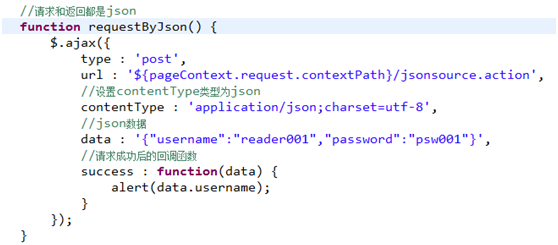
function requestByJson() {
$.ajax({
type : 'post',
url : '${pageContext.request.contextPath}/jsonsource.action',
//设置contentType类型为json
contentType : 'application/json;charset=utf-8',
//json数据
data : '{"username":"reader001","password":"psw001"}',
//请求成功后的回调函数
success : function(data) {
alert(data.username);
}
});
}
c).Controller/Mapping
@RequestMapping("/jsonsource")
//@RequestBody 将json对象转成java对象
//@ResponseBody 表示返回的是json对象
public @ResponseBody User jsonSource(@RequestBody User user){
return user;
}
d).测试结果
查看浏览器的开发者工具信息
request

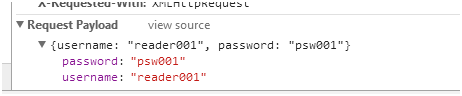
response

PS:User类有3个属性,id,username,password。
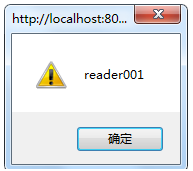
回调函数使用alert(data.username);
2、请求是key/value值,返回JSON
a).程序发起

b).js函数
//请求是key-value的值,返回的是json
function resquestByKV() {
$.ajax({
type : 'post',
url : '${pageContext.request.contextPath}/kvsource.action',
data : 'username=kvuser&password=kvpsw',
success : function(data) {
alert(data.username);
}
});
}
c).Controller/Mapping

参数没有@RequestBody。
d).测试结果
参考1。
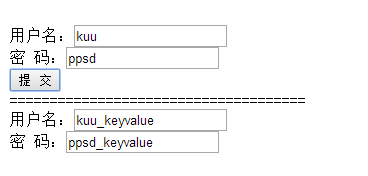
三、提交表单数据,返回json结果。
1、实验准备和预测
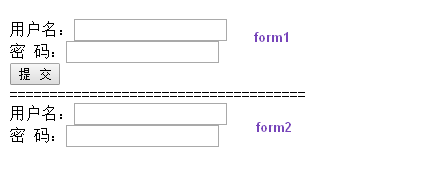
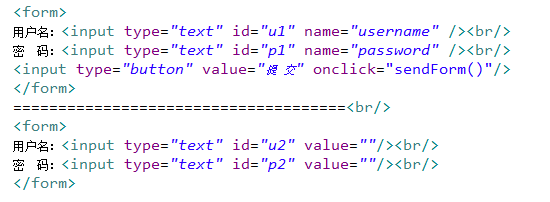
设计两个form,将form1的数据提交后,做一定的处理后返回到form2。处理结果依据controller。
2、将数据作为json发出
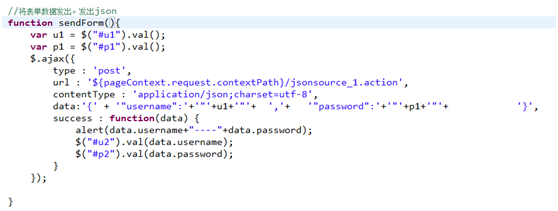
a).JS函数
b).Controller
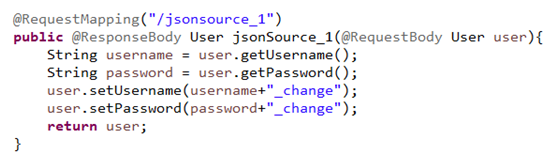
c).结果
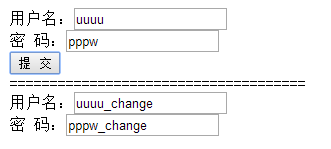
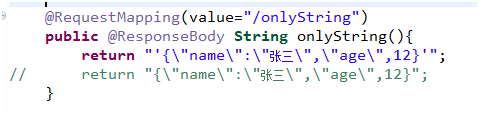
实验过程,发现如果要传递json数据(java程序传出),由于json的字符串要在双引号中,要达到双引号的效果,引号较混乱。
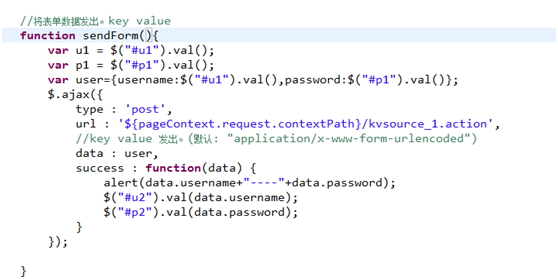
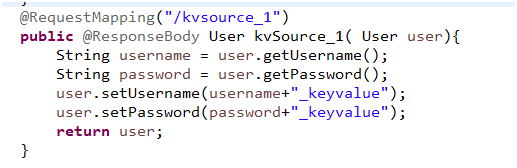
3、将数据作为key/value的形式发出。
a).JS函数
b).Controller
c).结果
四、Spring mvc和ajax中文乱码问题
1、返回的java对象
如果是java对象作为json对象返回的话,不需要设置过滤器,spring的配置文件也没有设置字符编码,中文正常返回。估计是json的支持包或spring有编码的设置。
2、返回字符串
例子请求的是这个方法
a).设置filter字符编码
spring的字符过滤器org.springframework.web.filter.CharacterEncodingFilter
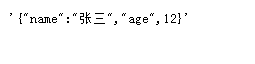
无效,是乱码。显示如下

b).解决方法一、@ResponseBody
加上produces。如produces="application/json; charset=utf-8"。

设置后没有乱码
c).解决方法二、mvc:annotation-driven
这个方法是针对所有。
在mvc:annotation-driven加上下面的StringHttpMessageConverter
主要是text/html;charset=UTF-8就可以,其他都不可以。避免乱码。
<mvc:annotation-driven>
<mvc:message-converters register-defaults="true">
<bean class="org.springframework.http.converter.StringHttpMessageConverter">
<property name="supportedMediaTypes">
<list>
<!--application/json和text/plain无法解决返回字符串的乱码 -->
<!-- <value>application/json;charset=UTF-8</value>
<value>text/plain;charset=UTF-8</value>
-->
<value>text/html;charset=UTF-8</value>
</list>
</property>
</bean>
</mvc:message-converters>
</mvc:annotation-driven>
发现:再去掉注解中的参数produces="application/json; charset=utf-8",然后测试。supportedMediaTypes加入text/html;charset=UTF-8能解决乱码。且java对象的json返回也没有出现乱码问题。
Spring mvc,jQuery和JSON数据交互的更多相关文章
- 1.4(Spring MVC学习笔记)JSON数据交互与RESTful支持
一.JSON数据交互 1.1JSON简介 JSON(JavaScript Object Notation)是一种数据交换格式. 1.2JSON对象结构 {}代表一个对象,{}中写入数据信息,通常为ke ...
- Spring MVC 前后端 Json 方式交互和处理
众所周知,在mvc中,数据是在各个层次之间进行流转是一个不争的事实. 而这种流转,也就会面临一些困境,这些困境,是由于数据在不同世界中的表现形式不同而造成的. 数据在页面上是一个扁平的,不带数据类 ...
- Spring MVC如何进行JSON数据的传输与接受
本篇文章写给刚接触SpingMVC的同道中人,虽然笔者本身水平也不高,但聊胜于无吧,希望可以给某些人带来帮助 笔者同时再次说明,运行本例时,需注意一些配置文件和网页脚本的路径,因为笔者的文件路径与读者 ...
- Spring MVC中返回JSON数据的几种方式
我们都知道Spring MVC 的Controller方法中默认可以返回ModeAndView 和String 类型,返回的这两种类型数据是被DispatcherServlet拿来给到视图解析器进行继 ...
- spring MVC之返回JSON数据(Spring3.0 MVC)
方式一:使用ModelAndView的contentType是"application/json" 方式二:返回String的 contentType是&qu ...
- Spring MVC中传递json数据时显示415错误解决方法
在ajax中设置 ContentType为'application/json;charset=utf-8' 传递的data类型必须是json字符串类型:{“key”:"value" ...
- Spring MVC之JSON数据交互和RESTful的支持
1.JSON概述 1.1 什么是JSON JSON(JavaScript Object Notation,JS对象标记)是一种轻量级的数据交换格式.它是基于JavaScript的一个子集,使用了C.C ...
- Spring mvc 前后台通过json交互【转】
原文转自:https://www.cnblogs.com/zhaojiankai/p/8184596.html 本节内容: @RequestBody @ResponseBody 请求json,响应js ...
- json数据交互
springmvc 的json数据交互 - 哎幽的成长 - CSDN博客--和老师讲课相同http://blog.csdn.net/u012373815/article/details/4720818 ...
随机推荐
- 电影TS、TC、BD版和HD版
HD的意思是指HDTV,HDTV指网上下载的高清影片,它的画面品质会比BD稍差,主要表现为亮度不足,色彩不自然等.BD是指蓝光(Blu-ray)或称蓝光盘(Blu-ray Disc,缩写为BD),目前 ...
- Haskell语言学习笔记(63)Dicidable
Dicidable class Divisible f => Decidable f where lose :: (a -> Void) -> f a choose :: (a -& ...
- SQL查询效率where语句条件
有索引的列优先,都有索引的看查询出来的数据量,少的优先 in ,not in,<>,is null,is not null 等由于不会走索引,尽量不要使用. WHERE子句后面的条件顺序对 ...
- inner outer
left join 是left outer join的简写,left join默认是outer属性的. Inner JoinInner Join 逻辑运算符返回满足第一个(顶端)输入与第二个(底端)输 ...
- C函数指针的用法
1.最简单的用法: #include <cstdio> int (*p)(int);//定义一个函数指针变量p(下面的f其实是一个常量函数指针) int f(int x) { printf ...
- Python学习day5作业
目录 Python学习day5作业 ATM和购物商城 1. 程序说明 2. 基本流程图 3. 程序测试帐号 4. 程序结构: 5. 程序测试 title: Python学习day5作业 tags: p ...
- Spring整合Struts2框架的第二种方式(Action由Spring框架来创建)(推荐大家来使用的)
1. spring整合struts的基本操作见我的博文:https://www.cnblogs.com/wyhluckdog/p/10140588.html,这里面将spring与struts2框架整 ...
- mvcpager 表单提交时无法获取pageindex的值
1.将分布页包含到form中 2.在分布页中新增一个表单hidden元素,name为pageIndex(与控制器中的pageindex保持一尺),将后台获取到的pageindex值通过viewbag初 ...
- DB2数据库常用命令数据库学习
DB2数据库常用命令数据库学习你可以用 get snapshot for locks on XXX 看是那个表锁了,再从相关的操作去查原因吧 db2pd -d 库名 -locks和db2pd -d 库 ...
- svn一次性add/delete所有文件
Linux命令行下,svn add 一次性批量上传 命令行下操作svn没有使用界面形式的TortoiseSVN直观,但是不管怎样,命令行下操作svn还是有它的有点,如果你碰到一次需要svn add许多 ...