
VUE2.0 饿了吗视频学习笔记(二):新版本添加路由和显示Header
webpack.dev.conf.js中添加两段代码
'use strict'

const utils = require('./utils')

const webpack = require('webpack')

const config = require('../config')

const merge = require('webpack-merge')

const path = require('path')

const baseWebpackConfig = require('./webpack.base.conf')

const CopyWebpackPlugin = require('copy-webpack-plugin')

const HtmlWebpackPlugin = require('html-webpack-plugin')

const FriendlyErrorsPlugin = require('friendly-errors-webpack-plugin')

const portfinder = require('portfinder')

//首先

const express = require('express')

const app = express()

var appData = require('../data.json')

var seller = appData.seller

var goods = appData.goods

var ratings = appData.ratings

var apiRoutes = express.Router()

app.use('/api', apiRoutes)

const HOST = process.env.HOST

const PORT = process.env.PORT && Number(process.env.PORT)

const devWebpackConfig = merge(baseWebpackConfig, {

  module: {

    rules: utils.styleLoaders({ sourceMap: config.dev.cssSourceMap, usePostCSS: true })

  },

  // cheap-module-eval-source-map is faster for development

  devtool: config.dev.devtool,

  // these devServer options should be customized in /config/index.js

  devServer: {

    clientLogLevel: 'warning',

    historyApiFallback: {

      rewrites: [

        { from: /.*/, to: path.posix.join(config.dev.assetsPublicPath, 'index.html') },

      ],

    },

    hot: true,

    contentBase: false, // since we use CopyWebpackPlugin.

    compress: true,

    host: HOST || config.dev.host,

    port: PORT || config.dev.port,

    open: config.dev.autoOpenBrowser,

    overlay: config.dev.errorOverlay

      ? { warnings: false, errors: true }

      : false,

    publicPath: config.dev.assetsPublicPath,

    proxy: config.dev.proxyTable,

    quiet: true, // necessary for FriendlyErrorsPlugin

    watchOptions: {

      poll: config.dev.poll,

    },

    before(app) {

      app.get('/api/seller', (req, res) => {

        res.json({

          // 这里是你的json内容

          errno: 0,

          data: seller

        })

      }),

        app.get('/api/goods', (req, res) => {

          res.json({

            // 这里是你的json内容

            errno: 0,

            data: goods

          })

        }),

        app.get('/api/ratings', (req, res) => {

          res.json({

            // 这里是你的json内容

            errno: 0,

            data: ratings

          })

        })

    }

  },

  plugins: [

    new webpack.DefinePlugin({

      'process.env': require('../config/dev.env')

    }),

    new webpack.HotModuleReplacementPlugin(),

    new webpack.NamedModulesPlugin(), // HMR shows correct file names in console on update.

    new webpack.NoEmitOnErrorsPlugin(),

    // https://github.com/ampedandwired/html-webpack-plugin

    new HtmlWebpackPlugin({

      filename: 'index.html',

      template: 'index.html',

      inject: true

    }),

    // copy custom static assets

    new CopyWebpackPlugin([

      {

        from: path.resolve(__dirname, '../static'),

        to: config.dev.assetsSubDirectory,

        ignore: ['.*']

      }

    ])

  ]

})

module.exports = new Promise((resolve, reject) => {

  portfinder.basePort = process.env.PORT || config.dev.port

  portfinder.getPort((err, port) => {

    if (err) {

      reject(err)

    } else {

      // publish the new Port, necessary for e2e tests

      process.env.PORT = port

      // add port to devServer config

      devWebpackConfig.devServer.port = port

      // Add FriendlyErrorsPlugin

      devWebpackConfig.plugins.push(new FriendlyErrorsPlugin({

        compilationSuccessInfo: {

          messages: [`Your application is running here: http://${devWebpackConfig.devServer.host}:${port}`],

        },

        onErrors: config.dev.notifyOnErrors

        ? utils.createNotifierCallback()

        : undefined

      }))

      resolve(devWebpackConfig)

    }

  })

})
添加Header.vue
<template>

    <div class="header">

      我是header

    </div>

</template>

<script>

export default {

  name: 'header.vue'

}

</script>

<style scoped>

</style>
App.vue
<template>

  <div id="app">

    <v-header></v-header>

    <div class="tab">

      I am tab

    </div>

    <img src="./assets/logo.png">

    <router-view/>

  </div>

</template>

<script>

import VHeader from './components/header/header.vue'

export default {

  components: {

    VHeader

  }

}

</script>

<style>

#app {

  font-family: 'Avenir', Helvetica, Arial, sans-serif;

  -webkit-font-smoothing: antialiased;

  -moz-osx-font-smoothing: grayscale;

  text-align: center;

  color: #2c3e50;

  margin-top: 60px;

}

</style>
VHeader是系统推荐的写法。
运行结果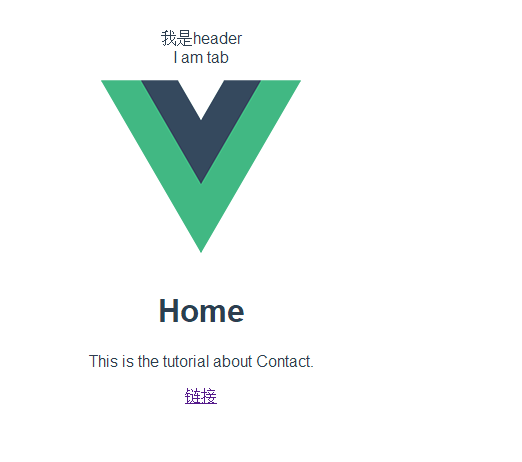
VUE2.0 饿了吗视频学习笔记(二):新版本添加路由和显示Header的更多相关文章
- VUE2.0 饿了吗视频学习笔记(四):颜色、跳转、设置、vue-resource
https://gitee.com/1981633/vue_study.git 源码下载地址,随笔记动态更新中 1.设置选中项颜色 <template> <div id=" ...
- VUE2.0 饿了吗视频学习笔记(七-终):compute,循环,flex,display:table
一.star组件使用到了computed属性 computed相当于属性的一个实时计算,当对象的某个值改变的时候,会进行实时计算. computed: { starType() { return 's ...
- VUE2.0 饿了吗视频学习笔记(六):定位问题、文字显示、模糊背景图片、点击事件
一.定位问题按照视频写代码时,发现元素“5个“”定位不对,如下图 正常位置为 还以为是哪里写错了,仔细研究了下,需要在父div上加relative. position:relative/absolut ...
- VUE2.0 饿了吗视频学习笔记(一):VUE示例data.json
https://gitee.com/1981633/vue_study.git 源码下载地址,随笔记动态更新中有的同学找不到data.json,以下是data.json内容 { "selle ...
- VUE2.0 饿了吗视频学习笔记(五):父子对象传递、显示图片
一.父子组件之间对象传递 1.app.Vue中的v-header 中加入 v-bind:seller="seller" template> <div id=" ...
- VUE2.0 饿了吗视频学习笔记(三):VUE2.0取消了v-link
https://gitee.com/1981633/vue_study.git 源码下载地址,随笔记动态更新中 写法如下 <div class="tab-item"> ...
- vue2.0 饿了么项目学习总结
最近在GitHub上发现一个基于vue2.0的饿了么项目.本着互联网的分享精神,现在将我自己所理解的,所总结的经验分享给大家.本篇文字我将从学习的角度向大家分享. 在学习本项目之前我已经将vue2.0 ...
- Asp.net core 2.0.1 Razor 的使用学习笔记(五)
按说这里应该写关于Role角色类的笔记,但是我还没时间实验这块,所以等以后我搞定了再来分享.现在先写其他部分. Asp.net core 2.0.1 Razor 的使用学习笔记——建立模型 按照微软官 ...
- Asp.net core 2.0.1 Razor 的使用学习笔记(六)
Asp.net core 2.0.1 Razor 的使用学习笔记——基本页面的建立 VS这版(vs版本:15.5.6 .net版本:4.7.02558)的Razor页面自动生成就是坑爹货,它自动生成 ...
随机推荐
- Linux环境(CentOS)安装维护过程中用到的常见命令
1. yum 安装时需要选择仓库 一般的路径 /etc/repos.d/ 2. 查看安装了哪些软件的 yum list |grep docker installed 的就是已经安装的软件. 3. 卸载 ...
- pandas数据统计
1 count() 非空观测数量 2 sum() 所有值之和 3 mean() 所有值的平均值 4 median() 所有值的中位数 5 mode() 值的模值 6 std() 值的标准偏差 7 mi ...
- CAS登陆过程UML中文版
如果大家图片显示看不请,可以点击图片右键:在新窗口中打开图片,进行查看 名词解释 CASTGC:向cookie中添加该值的目的是当下次访问 认证中心 时,浏览器将Cookie中的TGC携带到服务器,服 ...
- BZOJ1036[ZJOI2008]树的统计——树链剖分+线段树
题目描述 一棵树上有n个节点,编号分别为1到n,每个节点都有一个权值w.我们将以下面的形式来要求你对这棵树完成一些操作: I. CHANGE u t : 把结点u的权值改为t II. QMAX u v ...
- BZOJ5206 JSOI2017原力(三元环计数)
首先将完全相同的边的权值累加.考虑这样一种trick:给边确定一个方向,由度数小的连向度数大的,若度数相同则由编号小的连向编号大的.这样显然会得到一个DAG.那么原图的三元环中就一定有且仅有一个点有两 ...
- Git初次使用总结,安装到上传代码,多平台[码云|github]
安装步骤 1.选择安装路径 2.选择创建图标,选择安装Git Bash和Git GUI 3.选择创建开始菜单 4.选择:use git and optional unix tools from the ...
- Zabbix3.0学习笔记
第1章 zabbix监控 1.1 为什么要监控 在需要的时刻,提前提醒我们服务器出问题了 当出问题之后,可以找到问题的根源 网站/服务器 的可用性 1.1.1 网站可用性 在软件系统的高可靠性(也 ...
- day26 多继承
class A(object): def test(self): print('from A') class B(A): def test(self): print('from B') class C ...
- day10 局部变量 全局变量 作用域前奏
规则命名以及基本介绍 name="LHF" # 顶头写的全局都可以调用的就是全局变量,命名规则要求大写全局变量 def chang_name(): # global name # ...
- vimrc 的配置
windows syntax on set nocompatible set guifont=Consolas:h17 set linespace=0 color molokai set clipbo ...