
react-native-image-picker iOS设置
效果图,因为我用的是模拟器,所以拍照功能没有效果,不过可从相册选择,下面是具体的效果图
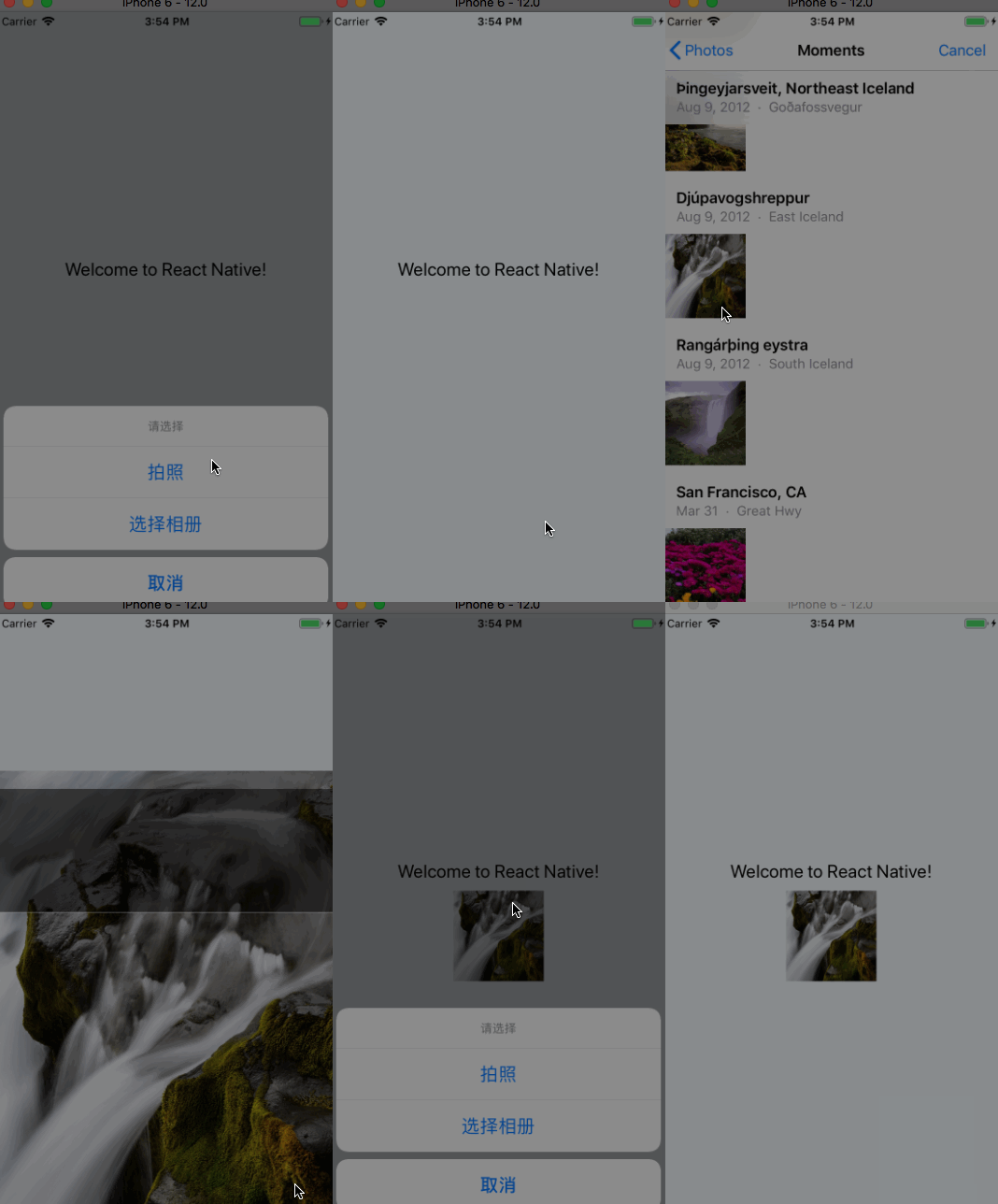
把react-native-image-picker添加到项目
yarn add react-native-image-picker
plist文件设置
<key>NSPhotoLibraryUsageDescription</key>

    <string>$(PRODUCT_NAME) would like access to your photo gallery</string>

    <key>NSCameraUsageDescription</key>

    <string>$(PRODUCT_NAME) would like to use your camera</string>

    <key>NSPhotoLibraryAddUsageDescription</key>

    <string>$(PRODUCT_NAME) would like to save photos to your photo gallery</string>

    <key>NSMicrophoneUsageDescription</key>

    <string>$(PRODUCT_NAME) would like to your microphone (for videos)</string>
xcode设置:
1.In the XCode's "Project navigator", right click on your project's Libraries folder ➜ Add Files to <...>.

2.Go to node_modules ➜ react-native-image-picker ➜ ios ➜ select RNImagePicker.xcodeproj.

Add RNImagePicker.a to Build Phases -> Link Binary With Libraries.
代码集成步骤:
/**

 * Sample React Native App

 * https://github.com/facebook/react-native

 * @flow

 */

import React, {Component} from 'react';

import {

    AppRegistry,

    StyleSheet,

    Text,

    View, TouchableOpacity,Image

} from 'react-native';

import ImagePicker from 'react-native-image-picker';

export default class MyApp extends Component {

    constructor(props){

        super(props)

        this.state={

            avatarSource:null

        }

    }

    render() {

        const photoOptions = {

            title: '请选择',

            quality: 0.8,

            cancelButtonTitle: '取消',

            takePhotoButtonTitle: '拍照',

            chooseFromLibraryButtonTitle: '选择相册',

            allowsEditing: true,

            noData: false,

            storageOptions: {

                skipBackup: true,

                path: 'images'

            }

        };

        return (

            <View style={styles.container}>

                <TouchableOpacity onPress = {()=>{

                    ImagePicker.showImagePicker(photoOptions, (response) => {

                        console.log('Response = ', response);

                        if (response.didCancel) {

                            console.log('User cancelled image picker');

                        }

                        else if (response.error) {

                            console.log('ImagePicker Error: ', response.error);

                        }

                        else if (response.customButton) {

                            console.log('User tapped custom button: ', response.customButton);

                        }

                        else {

                            let source = { uri: response.uri };

                            // You can also display the image using data:

                            // let source = { uri: 'data:image/jpeg;base64,' + response.data };

                            this.setState({

                                avatarSource: source

                            });

                        }

                    });

                }}>

                    <Text style={styles.welcome}>

                        Welcome to React Native!

                    </Text>

                </TouchableOpacity>

                <Image source={this.state.avatarSource} style={{width:100,height:100}}/>

            </View>

        );

    }

}

const styles = StyleSheet.create({

    container: {

        flex: 1,

        justifyContent: 'center',

        alignItems: 'center',

        backgroundColor: '#F5FCFF',

    },

    welcome: {

        fontSize: 20,

        textAlign: 'center',

        margin: 10,

    },

    instructions: {

        textAlign: 'center',

        color: '#333333',

        marginBottom: 5,

    },

});

AppRegistry.registerComponent('MyApp', () => MyApp);
react-native-image-picker iOS设置的更多相关文章
- 如何用 React Native 创建一个iOS APP?(三)
前两部分,<如何用 React Native 创建一个iOS APP?>,<如何用 React Native 创建一个iOS APP (二)?>中,我们分别讲了用 React ...
- 如何用 React Native 创建一个iOS APP?(二)
我们书接上文<如何用 React Native 创建一个iOS APP?>,继续来讲如何用 React Native 创建一个iOS APP.接下来,我们会涉及到很多控件. 1 AppRe ...
- 如何用 React Native 创建一个iOS APP?
诚然,React Native 结合了 Web 应用和 Native 应用的优势,可以使用 JavaScript 来开发 iOS 和 Android 原生应用.在 JavaScript 中用 Reac ...
- React Native之(支持iOS与Android)自定义单选按钮(RadioGroup,RadioButton)
React Native之(支持iOS与Android)自定义单选按钮(RadioGroup,RadioButton) 一,需求与简单介绍 在开发项目时发现RN没有给提供RadioButton和Rad ...
- 封装 React Native 原生组件(iOS / Android)
封装 React Native 原生组件(iOS / Android) 在 React Native中,有很多种丰富的组件了,例如 ScrollView.FlatList.SectionList.Bu ...
- React Native热更新(iOS)-Pushy
React Native的出现,使的开发iOS代码出现了更便捷的方式.由于RN是使用脚本语言编写的,实现了"解释执行"的方式,而这种执行方式的修改只需替换脚步即可,不需要重新发布程 ...
- React Native项目集成iOS原生模块
今天学习一下怎么在React Native项目中集成iOS原生模块,道理和在iOS原生项目中集成React Native模块类似.他们的界面跳转靠的都是iOS原生的UINavigationContro ...
- React Native环境搭建(iOS、Mac)
http://reactnative.cn/docs/0.42/getting-started.html#content 1.安装Homebrew Homebrew, Mac系统的包管理器,用于安装N ...
- React Native 组建之IOS和Android通用抽屉
/** * Sample React Native App * https://github.com/facebook/react-native * @flow *npm:https://www.np ...
- React Native区分安卓/iOS平台
import { Platform, } from 'react-native'; alert(JSON.stringify(Platform)): android手机弹出:{"OS&quo ...
随机推荐
- 仿迅雷播放器教程 -- 封装VLC (5)
虽然上个教程中10多行代码便做出了一个播放器,但如果加上快进快退等功能的话,代码都会挤在一团,阅读性很差,所以这个版本将对VLC进行封装,由于第一个教程已经进行了ffmpeg的封装,所以这里将 ...
- ASP.NET MVC 4 (十三) 基于表单的身份验证
在前面的章节中我们知道可以在MVC应用程序中使用[Authorize]特性来限制用户对某些网址(控制器/控制器方法)的访问,但这都是在对用户认证之后,而用户的认证则依然是使用ASP.NET平台的认证机 ...
- Nginx-配置https虚拟服务(访问http时自动跳转https)
https口令文件和nginx配置文件位置关系: nginx配置文件内容如下: #user nobody; worker_processes 1; #设置工作进程数 pid logs/nginx.pi ...
- 三、K3 Cloud 开发插件《K3 Cloud插件开发新手指导 + K3 Cloud插件开发代码调试》
案例需求:在销售订单上新增一个按钮,在订单明细中新增一个字段,命名[即时库存]. 点击按钮,弹出“Hello World!”,并获取订单明细物料的即时库存,填入字段[即时库存]. 开发工具:Visua ...
- Android摸索一环境搭建
用户场景:做语音保全,首先要拨打400号码,听到语音后需要先按1然后再拨打对方号码,那么问题就来了,如果我记不清楚对方号码!是不是很苦逼----我要先找到对方号码然后用笔或者其他方式把这个号码记录下来 ...
- 在最新的Power BI Desktop中使用报表主题功能
报表主题的工作原理 Power BI Desktop中,增加了万众期待的报表主题色功能(预览),如下图: 要使用这个功能,请先在官网下载并安装最新版的Power BI Desktop.安装成功后在&q ...
- url自动补全index.php
location / { index index.html index.htm index.php l.php; autoindex on; if (!-e $request_filename) { ...
- Slapper帮助Dapper实现一对多
Dapper的Query的方法提供了多个泛型重载可以帮助我们实现导航属性的查询 1对1 public class Employees4List { public int Id { get; set; ...
- eclipse搭建j2ee
Tomcat环境变量设置,分别添加3个系统变量 CATALINA_BASE E:/tomcat7 CATALINA_HOME E:/tomcat7 CATALINA_TMPDIR Etomcat7/t ...
- 今天看到的一些js的用法
以下是今天学习到的一些js语法,特整理出来. 1. (10)["toString"]() === "10" // true 2.如何优雅的取整 var a = ...