
a message box to confirm the action
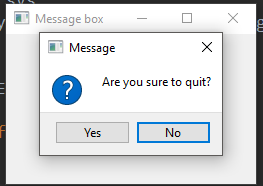
当点击窗口的X按钮时,弹出确认退出消息框,继续点击Yes,退出。否则,窗口继续处于打开状态
代码:
 """

 This program shows a confirmation

 message box when we click on the close

 button of the application window.

 """

 import sys

 from PyQt5.QtWidgets import QWidget, QMessageBox, QApplication

 class Example(QWidget):

     def __init__(self):

         super().__init__()

         self.initUI()

     def initUI(self):

         self.setGeometry(300, 300, 250, 150)

         self.setWindowTitle('Message box')

         self.show()

     def closeEvent(self, event):

         reply = QMessageBox.question(self, 'Message',

             "Are you sure to quit?", QMessageBox.Yes |

             QMessageBox.No, QMessageBox.No)

         if reply == QMessageBox.Yes:

             event.accept()

         else:

             event.ignore()

 if __name__ == '__main__':

     app = QApplication(sys.argv)

     ex = Example()

     sys.exit(app.exec_())
If we close a QWidget, the QCloseEvent is generated. To modify the widget behaviour we need to reimplement the closeEvent() event handler.
reply = QMessageBox.question(self, 'Message',

            "Are you sure to quit?", QMessageBox.Yes |

            QMessageBox.No, QMessageBox.No)

The first string appears on the titlebar. 即上图中的'Message'
The second string is the message text displayed by the dialog. 即上图中的"Are you sure to quit?"
The third argument specifies the combination of buttons appearing in the dialog. 即上图中的Yes和No组合
The last parameter is the default button. It is the button which has initially the keyboard focus.
默认选中button,如上图是No,直接enter即退出窗口
The return value is stored in the reply variable.
a message box to confirm the action的更多相关文章
- Wix: Show conditional message box
For example: Scenario: Show message box only during installation and MYPROPERTY has to be equal to & ...
- Message Box Position
<!DOCTYPE html> <html> <head> <meta charset="UTF-8"> <title> ...
- mint-ui message box 问题;
当引用 mint-ui message box 的 出现的问题,我暂时是不知道为什么: 官网是这样写的: 于是 我也这么做的:(这里用小写,具体我也不清楚,毕竟文档上写的也不是很清楚,但是只有这样写, ...
- vue 结合mint-ui Message box的使用方法
两种方式使用: 一.全局注册 1.在main.js中引入 //引入 import { MessageBox } from 'mint-ui'; //全局使用,挂载到原型上 Vue.prototyp ...
- message box
QMessageBox 弹出框上的按钮设置为中文 Qt 默认的弹出框上的按钮式英文,虽然也知道是什么意思,但终究不如中文看着顺眼. QMessageBox box(QMessageBox::War ...
- Qt学习笔记-制作一个计算器-对话框Message Box
在做计算器的前提先做一个加法器. 设计界面. 在点击计算的时候,获取前两个输入框中的数据相加后显示在第三个输入框. toInt是将字符串转换为数字.number静态函数是将数字转化为字符串. 加法器已 ...
- Model-View-ViewModel (MVVM) Explained 转摘自:http://www.wintellect.com/blogs/jlikness/model-view-viewmodel-mvvm-explained
The purpose of this post is to provide an introduction to the Model-View-ViewModel (MVVM) pattern. W ...
- github pages
http://zyip.github.io/facemaker/index echo "hello world" >>hello.htm git init git ad ...
- Yii2美化confirm
在view中, <?= Html::a('删除', ['post/delete', 'id' => $post['id']],['data-confirm'=>'确定要删除吗?']) ...
随机推荐
- P2279 消防局的设立(贪心+dp)
题目链接:传送门 题目大意: 给定一棵树(N个基地N-1条边): 用半径为2的消防局覆盖这N个基地,问最小的消防局数量. (树上距离为k的最小覆盖问题) 思路: 每次贪心地找到不被覆盖的最深的一个节点 ...
- ps教程
http://www.16xx8.com/photoshop/xinshoujiaocheng/
- rest-framework之频率控制
rest-framework之频率控制 本文目录 一 频率简介 二 自定义频率类,自定义频率规则 三 内置频率类及局部使用 四 内置频率类及全局使用 五 源码分析 回到目录 一 频率简介 为了控制用户 ...
- Linux 进程管理 笔记
https://www.ibm.com/developerworks/cn/linux/l-linux-process-management/index.htmlLinux 进程管理剖析 进程可以是短 ...
- Python 面向对象(创建类和对象,面向对象的三大特性是指:封装、继承和多态,多态性)
概念: ...
- JS push对象
var zoom = page.maps.maps._map.getZoom(), centerPoint = page.maps.maps._map.getCenter(); data = $(&q ...
- Monte Carlo tree search 学习
https://en.wikipedia.org/wiki/Monte_Carlo_tree_search 蒙特卡洛树搜索(MCTS)基础 http://mcts.ai/about/index.htm ...
- openstack--5--控制节点和计算节点安装配置nova
Nova相关介绍 目前的Nova主要由API,Compute,Conductor,Scheduler组成 Compute:用来交互并管理虚拟机的生命周期: Scheduler:从可用池中根据各种策略选 ...
- Revit api 创建族并加载到当前项目
using System; using System.Collections.Generic; using System.Linq; using System.Text; using System.T ...
- redmine和jenkins的ldap登录设置
工具: softeera LDAP browser 流程: Authentication modes » test Name * Host * Port * LDAPS Account Passwo ...