
rest-framework之频率控制
rest-framework之频率控制
本文目录
一 频率简介
为了控制用户对某个url请求的频率,比如,一分钟以内,只能访问三次
二 自定义频率类,自定义频率规则
自定义的逻辑
#(1)取出访问者ip

# (2)判断当前ip不在访问字典里,添加进去,并且直接返回True,表示第一次访问,在字典里,继续往下走

# (3)循环判断当前ip的列表,有值,并且当前时间减去列表的最后一个时间大于60s,把这种数据pop掉,这样列表中只有60s以内的访问时间,

# (4)判断,当列表小于3,说明一分钟以内访问不足三次,把当前时间插入到列表第一个位置,返回True,顺利通过

# (5)当大于等于3,说明一分钟内访问超过三次,返回False验证失败
代码实现:
class MyThrottles():

    VISIT_RECORD = {}

    def __init__(self):

        self.history=None

    def allow_request(self,request, view):

        #(1)取出访问者ip

        # print(request.META)

        ip=request.META.get('REMOTE_ADDR')

        import time

        ctime=time.time()

        # (2)判断当前ip不在访问字典里,添加进去,并且直接返回True,表示第一次访问

        if ip not in self.VISIT_RECORD:

            self.VISIT_RECORD[ip]=[ctime,]

            return True

        self.history=self.VISIT_RECORD.get(ip)

        # (3)循环判断当前ip的列表,有值,并且当前时间减去列表的最后一个时间大于60s,把这种数据pop掉,这样列表中只有60s以内的访问时间,

        while self.history and ctime-self.history[-1]>60:

            self.history.pop()

        # (4)判断,当列表小于3,说明一分钟以内访问不足三次,把当前时间插入到列表第一个位置,返回True,顺利通过

        # (5)当大于等于3,说明一分钟内访问超过三次,返回False验证失败

        if len(self.history)<3:

            self.history.insert(0,ctime)

            return True

        else:

            return False

    def wait(self):

        import time

        ctime=time.time()

        return 60-(ctime-self.history[-1])
三 内置频率类及局部使用
写一个类,继承自SimpleRateThrottle,(根据ip限制)问:要根据用户现在怎么写
from rest_framework.throttling import SimpleRateThrottle

class VisitThrottle(SimpleRateThrottle):

    scope = 'luffy'

    def get_cache_key(self, request, view):

        return self.get_ident(request)
在setting里配置:(一分钟访问三次)
REST_FRAMEWORK = {

    'DEFAULT_THROTTLE_RATES':{

        'luffy':'3/m'

    }

}
在视图类里使用
throttle_classes = [MyThrottles,]
错误信息的中文提示:
class Course(APIView):

    authentication_classes = [TokenAuth, ]

    permission_classes = [UserPermission, ]

    throttle_classes = [MyThrottles,]

    def get(self, request):

        return HttpResponse('get')

    def post(self, request):

        return HttpResponse('post')

    def throttled(self, request, wait):

        from rest_framework.exceptions import Throttled

        class MyThrottled(Throttled):

            default_detail = '傻逼啊'

            extra_detail_singular = '还有 {wait} second.'

            extra_detail_plural = '出了 {wait} seconds.'

        raise MyThrottled(wait)
内置频率限制类:
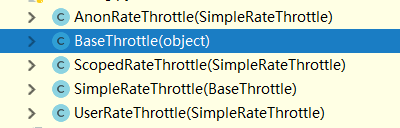
BaseThrottle是所有类的基类:方法:def get_ident(self, request)获取标识,其实就是获取ip,自定义的需要继承它
AnonRateThrottle:未登录用户ip限制,需要配合auth模块用
SimpleRateThrottle:重写此方法,可以实现频率现在,不需要咱们手写上面自定义的逻辑
UserRateThrottle:登录用户频率限制,这个得配合auth模块来用
ScopedRateThrottle:应用在局部视图上的(忽略)
四 内置频率类及全局使用
REST_FRAMEWORK = {

    'DEFAULT_THROTTLE_CLASSES':['app01.utils.VisitThrottle',],

    'DEFAULT_THROTTLE_RATES':{

        'luffy':'3/m'

    }

}
五 源码分析
    def check_throttles(self, request):

        for throttle in self.get_throttles():

            if not throttle.allow_request(request, self):

                self.throttled(request, throttle.wait())

    def throttled(self, request, wait):

        #抛异常,可以自定义异常,实现错误信息的中文显示

        raise exceptions.Throttled(wait)
class SimpleRateThrottle(BaseThrottle):

    # 咱自己写的放在了全局变量,他的在django的缓存中

    cache = default_cache

    # 获取当前时间,跟咱写的一样

    timer = time.time

    # 做了一个字符串格式化,

    cache_format = 'throttle_%(scope)s_%(ident)s'

    scope = None

    # 从配置文件中取DEFAULT_THROTTLE_RATES,所以咱配置文件中应该配置,否则报错

    THROTTLE_RATES = api_settings.DEFAULT_THROTTLE_RATES

    def __init__(self):

        if not getattr(self, 'rate', None):

            # 从配置文件中找出scope配置的名字对应的值,比如咱写的‘3/m’,他取出来

            self.rate = self.get_rate()

        #     解析'3/m',解析成 3      m

        self.num_requests, self.duration = self.parse_rate(self.rate)

    # 这个方法需要重写

    def get_cache_key(self, request, view):

        """

        Should return a unique cache-key which can be used for throttling.

        Must be overridden.

        May return `None` if the request should not be throttled.

        """

        raise NotImplementedError('.get_cache_key() must be overridden')

    def get_rate(self):

        if not getattr(self, 'scope', None):

            msg = ("You must set either `.scope` or `.rate` for '%s' throttle" %

                   self.__class__.__name__)

            raise ImproperlyConfigured(msg)

        try:

            # 获取在setting里配置的字典中的之,self.scope是 咱写的luffy

            return self.THROTTLE_RATES[self.scope]

        except KeyError:

            msg = "No default throttle rate set for '%s' scope" % self.scope

            raise ImproperlyConfigured(msg)

    # 解析 3/m这种传参

    def parse_rate(self, rate):

        """

        Given the request rate string, return a two tuple of:

        <allowed number of requests>, <period of time in seconds>

        """

        if rate is None:

            return (None, None)

        num, period = rate.split('/')

        num_requests = int(num)

        # 只取了第一位,也就是 3/mimmmmmmm也是代表一分钟

        duration = {'s': 1, 'm': 60, 'h': 3600, 'd': 86400}[period[0]]

        return (num_requests, duration)

    # 逻辑跟咱自定义的相同

    def allow_request(self, request, view):

        """

        Implement the check to see if the request should be throttled.

        On success calls `throttle_success`.

        On failure calls `throttle_failure`.

        """

        if self.rate is None:

            return True

        self.key = self.get_cache_key(request, view)

        if self.key is None:

            return True

        self.history = self.cache.get(self.key, [])

        self.now = self.timer()

        # Drop any requests from the history which have now passed the

        # throttle duration

        while self.history and self.history[-1] <= self.now - self.duration:

            self.history.pop()

        if len(self.history) >= self.num_requests:

            return self.throttle_failure()

        return self.throttle_success()

    # 成功返回true,并且插入到缓存中

    def throttle_success(self):

        """

        Inserts the current request's timestamp along with the key

        into the cache.

        """

        self.history.insert(0, self.now)

        self.cache.set(self.key, self.history, self.duration)

        return True

    # 失败返回false

    def throttle_failure(self):

        """

        Called when a request to the API has failed due to throttling.

        """

        return False

    def wait(self):

        """

        Returns the recommended next request time in seconds.

        """

        if self.history:

            remaining_duration = self.duration - (self.now - self.history[-1])

        else:

            remaining_duration = self.duration

        available_requests = self.num_requests - len(self.history) + 1

        if available_requests <= 0:

            return None

        return remaining_duration / float(available_requests)
SimpleRateThrottle源码分析
rest-framework之频率控制的更多相关文章
- Django Rest Framework源码剖析(三)-----频率控制
一.简介 承接上篇文章Django Rest Framework源码剖析(二)-----权限,当服务的接口被频繁调用,导致资源紧张怎么办呢?当然或许有很多解决办法,比如:负载均衡.提高服务器配置.通过 ...
- windows类书的学习心得
原文网址:http://www.blogjava.net/sound/archive/2008/08/21/40499.html 现在的计算机图书发展的可真快,很久没去书店,昨日去了一下,真是感叹万千 ...
- Django REST framework 内置访问频率控制
对匿名用户采用 IP 控制访问频率,对登录用户采用 用户名 控制访问频率. from rest_framework.throttling import SimpleRateThrottle class ...
- Django Rest Framework(二)
•基于Django 先创建一个django项目,在项目中创建一些表,用来测试rest framework的各种组件 models.py class UserInfo(models.Model): &q ...
- Django Rest framework 框架之认证使用和源码执行流程
用这个框架需要先安装: pip3 install djangorestframework 如果写了一个CBV的东西,继承了View. # 继承Django里面View class APIView(Vi ...
- Django之REST framework源码分析
前言: Django REST framework,是1个基于Django搭建 REST风格API的框架: 1.什么是API呢? API就是访问即可获取数据的url地址,下面是一个最简单的 Djang ...
- django rest framework restful 规范
内容回顾: . django请求生命周期 -> 执行遵循wsgi协议的模块(socket服务端) -> 中间件(路由匹配) -> 视图函数(业务处理:ORM.模板渲染) -> ...
- django的rest framework框架——认证、权限、节流控制
一.登录认证示例 模拟用户登录,获取token,当用户访问订单或用户中心时,判断用户携带正确的token,则允许查看订单和用户信息,否则抛出异常: from django.conf.urls impo ...
- Django REST Framework之频率限制
开放平台的API接口调用需要限制其频率,以节约服务器资源和避免恶意的频繁调用 使用 自定义频率限制组件:utils/thottle.py class MyThrottle(BaseThrottle): ...
- Django REST Framework概述
什么是REST REST与技术无关,代表的是一种软件架构风格,REST是Representational State Transfer的简称,中文翻译为“表征状态转移”.这里说的表征性,就是指资源,通 ...
随机推荐
- 回声TCP服务器端/客户端
一.TCP服务端 1.TCP服务端的默认函数调用顺序 socket()创建套接字 bind()分配套接字地址 listen()等待请求连接状态 accept()允许连接 read()/write()数 ...
- 六招让你的Ubuntu马上提速
Chris Hoffman Ubuntu的启动速度非常快,按了开机键之后很快就进入桌面.但我们仍然可以充分利用内存,通过多种方法让开机速度更快.某些方法真的可以提速,对于旧电脑的效果尤其明显. 选用轻 ...
- 未来Linux系统将是运维行业必备的技能之一
关于linux,这个并不是每个人都能用或者需要用的,因为平时有很多人用电脑只是为了上上网,聊聊天,打打游戏,这个是完全不需要用linux的.关于linux,是不能用正常的大家所熟知的window来认知 ...
- Java关于反射
反射的概念:JAVA反射机制是在运行状态中,对于任意一个实体类,都能够知道这个类的所有属性和方法:对于任意一个对象,都能够调用它的任意方法和属性:这种动态获取信息以及动态调用对象方法的功能称为java ...
- MySQL5.6数据库8小时内无请求自动断开连接
问题: 最近的项目中,发现Mysql数据库在8个小时内,没有请求时,会自动断开连接,这是MySQL服务器的问题.The last packet successfully received from t ...
- sqlserver指定排序字段
在sqlserver中可以指定排序的字段,需要将哪个字段值排在最前面或最后面,都是可以的.见如下代码: SELECT * FROM public_comment order by case [User ...
- 泛型算法,排序的相关操作,lower_bound、upper_bound、equal_range
body, table{font-family: 微软雅黑; font-size: 13.5pt} table{border-collapse: collapse; border: solid gra ...
- Valgrind,内存调试工具
Valgrind是一款用于内存调试.内存泄漏检测以及性能分析的软件开发工具 官网:http://valgrind.org/ 用户开发手册地址:http://valgrind.org/docs/manu ...
- 第二篇 界面开发 (Android学习笔记)
第二篇 界面开发 第5章 探索界面UI元素 ●The Android View Class ●△Widget设计步骤 需要修改三个XML,以及一个class: 1)第一个xml是布局XML文件 ...
- js call回调的this指向问题
function fn1(){ console.log(1); } function fn2(){ console.log(2); } fn1.call(fn2); //输出 1 fn1.call.c ...