
Bringing up interface eth0: Device eth0 does not seem to be presen
在公司的电脑虚拟机上安装了centos 6.5 ,然后我把他克隆下来用在家里电脑的虚拟机上,打开后查看ip,发现只有回环地址lo,没有eth0,
于是重启网络 输入 service network restart 发现 报错Bringing up interface eth0: Device eth0 does not seem to be present,delaying initialization. [FAILED]
问题原因
克隆的Linux系统在新的机器上运行,新服务器网卡物理地址已经改变。而/etc/udev/rules.d/70-persistent-net.rules这个文件确定了网卡和MAC地址的信息之间的绑定,克隆后的网卡的MAC已经发生了变化,所以导致系统认为网络设备不存在,网络不能正常启动。另外一个就是/etc/sysconfig/network-scripts/ifcfg-eth0里面MAC地址也是以前的旧信息。
关于/etc/udev/rules.d/70-persistent-net.rules这个文件,系统在启动时会自动监测变化,然后由/lib/udev/write_net_rules写入到/etc/udev/rules.d/70-persistent-net.rules中一个新的配置节,网卡的的序号依次递增(如原来为eth0,则修改第一后生成一个eth1,再次修改后生成一个eth2...),且其ATTR{address}的值为当前网卡对应的mac地址。
网上解决办法很多,我选了一种
1、查看配置文件 cat /etc/udev/rules.d/70-persistent-net.rules ,记下eth1下的addr。
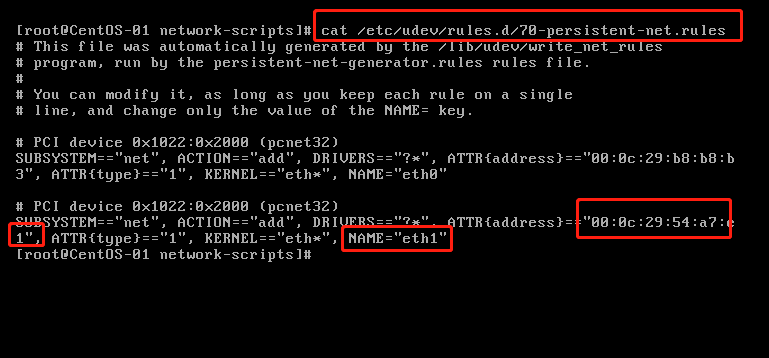
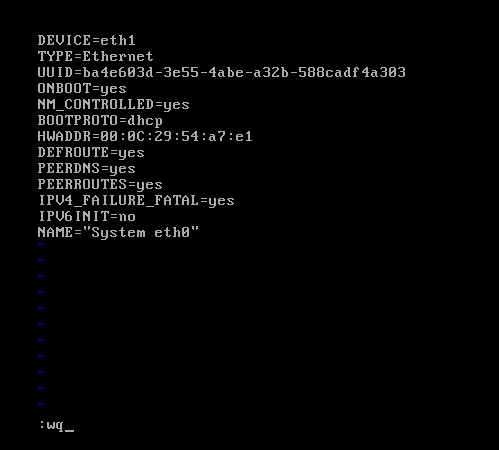
2、打开ifcfg-eth0 文件 vi /etc/sysconfig/network-scripts/ifcfg-eth0,按一下 i 键进入编辑模式,修改eth0为eth1,修改HWADDR,输入上面记下的addr地址
按:(冒号)进入底行模式,按wq 保存退出

3、重启网络 service network restart
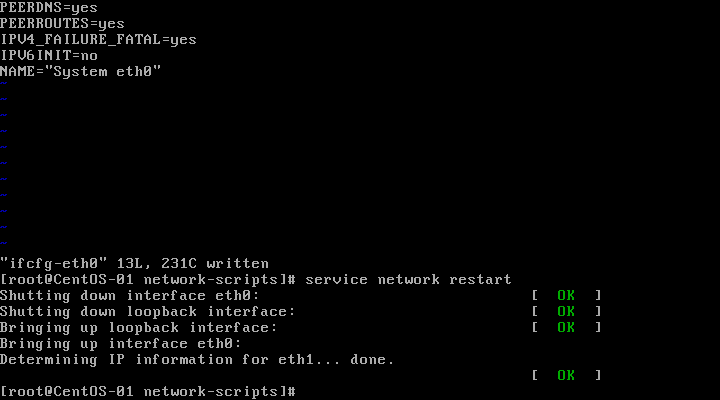
问题解决!
Bringing up interface eth0: Device eth0 does not seem to be presen的更多相关文章
- 问题:Bringing up interface eth0: Device eth0 does not seem to be present,delaying initialization. [FAILED]—— 找不到网卡。
克隆虚拟机的时候或其他情况出现以下问题(命令service network restart): Bringing up interface eth0: Device eth0 does not ...
- Bringing up interface eth0: Device eth0 does not seem to be present, delaying initialization
跑 service network restart NIC出现无法启动,他说,没有发现 Bringing up interface eth0: Device eth0 does not seem t ...
- Bringing up interface eth0: Device eth0 does not seem to be present, delaying initialization.FAILED
1.service network stop 2./etc/sysconfig/network-scripts目录下,删除想要删除的网卡配置,我要删除eth1,所以rm -rf ifcfg-eth1, ...
- 解决Bringing up interface eth0: Device eth0 does not seem to be present, delaying initialization.
一.问题描述 OS:centos 原因是拷贝虚拟机造成的. 使用vmworkstation打开虚拟机的时候,要选择copy而非move. 二.解决描述 网络上解决步骤各异,其实就一句话.只要保证vmw ...
- 虚拟机复制的linux无法联网,解决Bringing up interface eth0: Device eth0 does not seem to be present, delaying initialization.
一.问题描述 OS:centos 原因是拷贝虚拟机造成的. 使用vmworkstation打开虚拟机的时候,要选择copy而非move. 二.解决描述 网络上解决步骤各异,其实就一句话.只要保证vmw ...
- centos dhcp获取不到ip解决方法 Bringing up interface eth0: Device eth0 does not seem to be present,delaying initialization.
1.删除文件: /etc/udev/rules.d/70-persistent-net.rules 2.编辑 /etc/sysconfig/network-scripts/ifcfg-eth0 删除H ...
- VMbox复制虚拟机后网卡问题-bring up interface eth0:Device eth0 does not seem to be present
1.使用 ifconfig -a 查看mac地址 eg:HWaddr:08:00:29:B2:2B 2.vi /etc/sysconfig/network-scripts/ifcfg-eth0 将 ...
- CentOS Linux解决网卡报错Bringing up interface eth0.....
问题描述:在VMware里克隆出来的CentOS Linux,开机执行命令:ifconfig...没有看到eth0网卡.然后重启网卡又报以下错误:Bringing up interface eth0: ...
- Linux解决Device eth0 does not seem to be present
ifconfig...没有看到eth0..然后重启网卡又报下面错误. 故障现象: service network restartShutting down loopback insterface: ...
随机推荐
- Shell环境变量文件
/etc/profile 系统级的初始化环境变量文件,由登录Shell调用执行 /etc/profile.d 当/etc/profile运行时,会调用该目录下的一些脚本 /etc/bashrc 每个交 ...
- Docker基础内容之镜像
概念 镜像是一个包含程序运行必要依赖环境和代码的只读文件,它采用分层的文件系统,将每一次改变以读写层的形式增加到原来的只读文件上.镜像是容器运行的基石. 下图展示的是Docker镜像的系统结构.其中, ...
- MySQL Router单点隐患通过Keepalived实现
目录 一.介绍 二.环境准备 三.安装步骤 3.1下载软件包,解压 3.2源码安装 3.3配置keepalived 3.4修改keepalived配置文件 3.5启动keepalived 3.6查看V ...
- c++中对象的构造和销毁
对象的初始化 如下 ckasss Person { public: ]; char sex; int age; }; Person p={}; //对象初始化 构造数组对象时,需要一个没有参数的构造函 ...
- excel 2010 如何设置日期选择器
excel 中想输入很多的日期.如果每个日期都直接手动输入太过于繁琐,而且容易出错.想制作一个日期选择器,直接鼠标点选就可以了. 效果如下: 具体实现参考 http://wenku.baidu.com ...
- python学习记录(八)
0910--https://www.cnblogs.com/fnng/archive/2013/04/28/3048356.html Python异常 Python用异常对象(exception ob ...
- 2019icpc南京网络赛 A The beautiful values of the palace(离线+树状数组)
题意: (假设所有的点对应的值已经求出)给你一个1e6*1e6的矩阵,有m<=1e5个点有值,其余都为0 q<=1e5个询问,求子矩阵的权值和 思路: 根据二维差分,对于询问左下角(x1, ...
- 动态主机配置协议-DHCP
一.DHCP 概述 当局域网中有大量的PC时.如果我们逐个为每台PC去手动配置IP.那这就是一个吃力也未必讨好的办法 累死你 而DHCP 刚好可以解决这个问题.DHCP全称(动态主机配置协议).使用的 ...
- postman批量接口测试/批量导入/批量参数化简要全过程及遇到问题处理方法
简单说明下postman批量接口调用的过程及注意事项: 1.报文调试(建议先调通再批量执行,统筹安排时间) 2.参数化,例如: "address": "{{address ...
- OFDM Modulation Scheme