
python学习记录(八)
0910--https://www.cnblogs.com/fnng/archive/2013/04/28/3048356.html
Python异常
Python用异常对象(exception object)来表示异常情况。遇到错误后。会引发异常。如果异常对象未被处理或捕捉,程序就会用所谓的回溯(Traceback,一种错误信息)终止执行:
>>> 1/0

Traceback (most recent call last):

  File "<pyshell#0>", line 1, in <module>

    1/0

ZeroDivisionError: division by zero
raise语句
为了引发异常,可以使用一个类(Exception的子类)或者实例参数调用raise语句。下面的例子使用内建的Exception异常类:
>>> raise Exception('hyperdrive overload')

Traceback (most recent call last):

  File "<pyshell#2>", line 1, in <module>

    raise Exception('hyperdrive overload')

Exception: hyperdrive overload
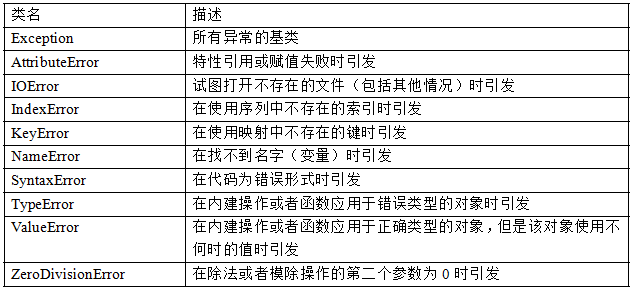
系统自带的内建异常类:
自定义异常
尽管内建的异常已经包括了大部分的情况,而且对于很多要求都已经足够了,但有些时候还是需要创建自己的异常类。
和其他类一样,只是要确保从Exception类继承,不管是直接继承还是间接继承。像下面这样:
>>> class someCustomException(Exception):pass
捕捉异常
使用try/except来实现异常的捕捉处理。
假设创建了一个让用户输入两个数,然后进行相除的程序:
try:

    x = int(input('Enter the first number:'))

    y = int(input('Enter the sencond number:'))

    z = x/y

    print(z)

except ZeroDivisionError:

    print('输入的数字不能为0!')

#输入

Enter the first number:1

Enter the sencond number:0

输入的数字不能为0!
假如,我们再调试的时候引发异常会好些,如果在与用户的进行交互的过程中又是不希望用户看到异常信息的。如何开启/关闭“屏蔽”机制?
class MuffledCalulator:

    muffled = False    #这里默认关闭屏蔽

    def calc(self,expr):

        try:

            return eval(expr)

        except ZeroDivisionError:

            if self.muffled:

                print ('Division by zero is illegal')

            else:

                raise

#运行程序:

>>> calculator = MuffledCalulator()

>>> calculator.calc('10/2')

5

>>> calculator.clac('10/0')

Traceback (most recent call last):

  File "<pyshell#30>", line 1, in <module>

    calculator.clac('10/0')

AttributeError: MuffledCalulator instance has no attribute 'clac'   #异常信息被输出了

>>> calculator.muffled = True   #现在打开屏蔽

>>> calculator.calc('10/0')

Divsion by zero is illagal
多个except子句
如果运行输入两个数,求除法程序,输入非数字的内容,还会产生另外一个异常:
try:

    x = int(input('Enter the first number:'))

    y = int(input('Enter the sencond number:'))

    z = x/y

    print(z)

except ZeroDivisionError:

    print('输入的数字不能为0!')

except ValueError:

    print('请输入数字')

#运行程序

Enter the first number: 10

Enter the second number: 'hello,word'

请输入数字!
一个块获取多个异常
try:

    x = int(input('Enter the first number:'))

    y = int(input('Enter the second number:'))

    print(x/y)

except (ZeroDivisionError,TypeError,NameError,ValueError):

    print("输入的内容有误,请输入非0数字!")

#运行程序

Enter the first number:1

Enter the second number:0

输入的内容有误,请输入非0数字!

#输入非数字

Enter the first number:a

输入的内容有误,请输入非0数字!
捕捉全部异常
就算以上处理了好几种异常,总有不小心忽略处理的情况,如果真想用一段代码捕捉所有异常,那么可在except子句中忽略所有的异常类:
try:

    x = int(input('Enter the first number:'))

    y = int(input('Enter the second number:'))

    print (x/y)

except:

    print ('Sorry,Please enter again!')

#运行程序

Enter the first number:1

Enter the second number:djfjshfjkd

Sorry,Please enter again!
加入循环,若用户输入了错误信息,允许重新输入
while True:

    try:

        x = int(input('Enter the first number:'))

        y = int(input('Enter the second number:'))

        value = x/y

        print ('x/y is',value)

        break

    except:

        print ('输入的内容无效,请重新输入!')

#执行程序

Enter the first number:a

输入的内容无效,请重新输入!

Enter the first number:

输入的内容无效,请重新输入!

Enter the first number:1

Enter the second number:0

输入的内容无效,请重新输入!

Enter the first number:1

Enter the second number:3

x/y is 0.3333333333333333
python学习记录(八)的更多相关文章
- Python学习记录day5
title: Python学习记录day5 tags: python author: Chinge Yang date: 2016-11-26 --- 1.多层装饰器 多层装饰器的原理是,装饰器装饰函 ...
- Python学习记录day6
title: Python学习记录day6 tags: python author: Chinge Yang date: 2016-12-03 --- Python学习记录day6 @(学习)[pyt ...
- python学习第八讲,python中的数据类型,列表,元祖,字典,之字典使用与介绍
目录 python学习第八讲,python中的数据类型,列表,元祖,字典,之字典使用与介绍.md 一丶字典 1.字典的定义 2.字典的使用. 3.字典的常用方法. python学习第八讲,python ...
- Python学习记录day8
目录 Python学习记录day8 1. 静态方法 2. 类方法 3. 属性方法 4. 类的特殊成员方法 4.1 __doc__表示类的描述信息 4.2 __module__ 和 __class__ ...
- Python学习记录day7
目录 Python学习记录day7 1. 面向过程 VS 面向对象 编程范式 2. 面向对象特性 3. 类的定义.构造函数和公有属性 4. 类的析构函数 5. 类的继承 6. 经典类vs新式类 7. ...
- Python学习记录:括号配对检测问题
Python学习记录:括号配对检测问题 一.问题描述 在练习Python程序题的时候,我遇到了括号配对检测问题. 问题描述:提示用户输入一行字符串,其中可能包括小括号 (),请检查小括号是否配对正确, ...
- 实验楼Python学习记录_挑战字符串操作
自我学习记录 Python3 挑战实验 -- 字符串操作 目标 在/home/shiyanlou/Code创建一个 名为 FindDigits.py 的Python 脚本,请读取一串字符串并且把其中所 ...
- 我的Python学习记录
Python日期时间处理:time模块.datetime模块 Python提供了两个标准日期时间处理模块:--time.datetime模块. 那么,这两个模块的功能有什么相同和共同之处呢? 一般来说 ...
- Python 学习记录
记录一些 学习python 的过程 -------------------------------------- 1. 初始学习 @2013年10月6日 今天开始学习python 了 遇到好多困难但是 ...
随机推荐
- 1.2 UML带来了什么(学习笔记)
需求->需求分析->设计->开发 uml 编号 uml元素 对于语言理解 1 元模型 基本词汇 2 表示法或视图 语法 3 RUP 方法(统一软件开发过程) 方法 4 控制类 定语 ...
- 用TensorFlow做图像识别(python)
一.TensorFlow简介 TensorFlow是由谷歌开发的一套机器学习的工具,使用方法很简单,只需要输入训练数据位置,设定参数和优化方法等,TensorFlow就可以将优化结果显示出来,节省了很 ...
- rabbitmq系列(一)初识rabbitmq
为什么要使用消息中间件 案例:假如我们开发了一个商品抢购网站.这个网站的目的就是在某一时间点进行抢购商品,同时要求用户注册,在注册的时候会同时给用户电话和邮箱中发送验证码,以便完成信息注册.传统做法应 ...
- python方法的重写
方法的重写: 在子类中重写定义一个父类拥有的方法, 调用时使用子类中重写定义的方法. 效果图: 代码: class Animal: def run(self): print('动物会跑~~~') de ...
- 关于在读取excel的文件时候,放在服务器上就报路径错误
就是指定这个路径:C:\Program Files (x86)\IIS Express 因为在上传到服务器的时候,服务器读取的是在服务器上的路径,所以正确的思路应该是 把上传的Excel存在服务器上, ...
- Prop验证、inheritAttrs、$attrs的用法和坑
Prop Prop验证 Vue.component('my-component', { props: { // 基础的类型检查 (`null` 和 `undefined` 会通过任何类型验证) pro ...
- 所有锁的unlock要放到try{}finally{}里,不然发生异常返回就丢了unlock了
所有锁的unlock要放到try{}finally{}里,不然发生异常返回就丢了unlock了
- python 线程条件
条件.事件.信号量本质上都是锁,不常用 """ 常用方法: obj,acquire() Obj.release() obj.wait(),创建是阻塞状态,等待obj.no ...
- CentOS7 搭建Fabric 1.0
1.环境搭建 1.1 go的按装及配置 1.1.1下载go压缩包 wget https://dl.google.com/go/go1.9.2.linux-amd64.tar.gz 1.1.2 解压 ...
- Java入门 - 语言基础 - 19.方法
原文地址:http://www.work100.net/training/java-method.html 更多教程:光束云 - 免费课程 方法 序号 文内章节 视频 1 概述 2 方法的定义 3 方 ...