
Django - Ajax初识
当需要在弹出的对话框中,做判断操作时,需要用到ajax
1、host.html
<!DOCTYPE html>
<html lang="en">
<head>
    <meta charset="UTF-8">
    <title>Title</title>
    <style>
        .shade{
            top:0;
            left:0;
            right:0;
            bottom:0;
            background:black;
            z-index: 100;
            position: fixed;
            opacity: 0.3;
            }
        .add-modle{
            position: fixed;
            height: 300px;
            width: 400px;
            top:100px;
            left: 50%;
            z-index: 101;
            background: white;
            margin-left: -200px;
        }
        .hide{
            display: none;
        }
    </style>
</head>
<body>
<h1>主机列表</h1>
<div>
    <input id="add_host" type="text" value="添加">
</div>

<table border="1">
    <thead>
    <tr>
        <th>主机ID</th>
        <th>主机名</th>
        <th>主机IP</th>
        <th>主机Port</th>
        <th>业务线</th>
    </tr>
    </thead>
    <tbody>

         {% for row in v %}
        <tr host-id="{{ row.nid }}" cap-id="{{ row.b.id }}">
            <td>{{ forloop.counter}}</td>
            <td>{{ row.hostname }}</td>
            <td>{{ row.ip }}</td>
            <td>{{ row.port }}</td>
            <td>{{ row.b.caption }}</td>
        </tr>
        {% endfor %}
    </tbody>

</table>
<table border="1">
    <thead>
    <tr>
        <th>主机名</th>
        <th>主机IP</th>
        <th>主机Port</th>
        <th>业务线</th>
    </tr>
    </thead>
    <tbody>

         {% for row in v2 %}
        <tr host-id="{{ row.nid }}" cap-id="{{ row.b.id }}">
            <td>{{ row.hostname }}</td>
            <td>{{ row.ip }}</td>
            <td>{{ row.port }}</td>
            <td>{{ row.b__caption }}</td>
        </tr>
        {% endfor %}
    </tbody>

</table>
<div class="shade hide" ></div>
<form method="post" action="/app01/host">
<div class="add-modle hide">
    <div class="group">
        <input id="host" type="text" placeholder="主机名" name="hostname">
    </div>
    <div class="group">
        <input id="ip" type="text" placeholder="IP" name="ip">
    </div>
    <div class="group">
        <input id="port" type="text" placeholder="端口" name="port">
    </div>
    <div class="group">
        <select id="select" name="b_id">
            {% for rp in b_list %}
            <option value="{{ rp.id }}">{{ rp.caption }}</option>
            {% endfor %}

        </select>
    </div>
    <div class="group">
        <input type="submit" value="提交" >
        <a id="ajax_sub" style="display: inline-block;padding: 5px;background: blue;color: white">默默提交</a>
        <input type="button" value="取消">
    </div>
</div>
</form>
<script src="/static/jquery.min.js"></script>
<script>
    $(function () {
    $("#add_host").click(function () {
        $(".shade,.add-modle").removeClass("hide")
    });
    $("#ajax_sub").click(function () {
        $.ajax({
            url:'/app01/ajax_text',
            type:"POST",
            data:{
                'hostname':$('#host').val(),
                'ip':$("#ip").val(),
                'port':$("#port").val(),
                "b_id":$("#select").val()

            },
            success:function (data) {
                if (data=="ok"){
                    location.reload()
                }
                else {
                    alert(data)
                }

            }
        })
    })

    })

</script>
</body>
</html>

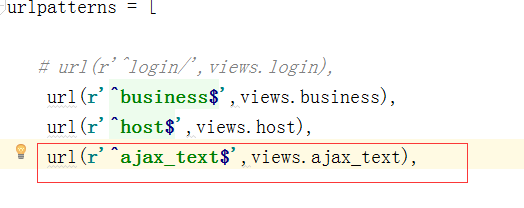
2、在urls.py中,增加url和函数对应关系
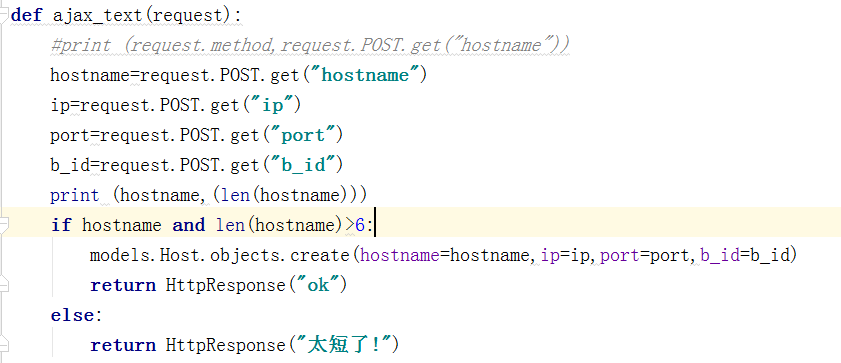
3、在views.py中,增加函数获取前端值及写入数据库
Django - Ajax初识的更多相关文章
- django ajax 及批量插入数据 分页器
``` Ajax 前端朝后端发送请求都有哪些方式 a标签href GET请求 浏览器输入url GET请求 form表单 GET/POST请求 Ajax GET/POST请求 前端朝后端发送数据的编码 ...
- Django ajax的简单使用、自定义分页器
一. ajax初识 1. 前后端传输数据编码格式contentType 使用form表单向后端提交数据时,必须将form表单的method由默认的get改为post,如果提交的数据中包含文件,还要将f ...
- Django ajax MYSQL Highcharts<1>
Another small project with django/Ajax/Mysql/Highcharts. 看下效果图 - delivery dashboard .嘿嘿 是不是还蛮好看的. 废 ...
- django ajax练习
这几天遇到了django ajax请求出错的问题,总结一下 前端js:我这里创建的是一个字典格式的数据,前端js收到字典之后也是要用字典的形式去解包后台传送过来的数据,比如我下面的写法:data['s ...
- 关于Django Ajax CSRF 认证
CSRF(Cross-site request forgery跨站请求伪造,也被称为“one click attack”或者session riding,通常缩写为CSRF或者XSRF,是一种对网站的 ...
- day059 ajax初识 登录认证练习
ajax初识 ajax有两个特点: 一个是异步,另一个是浏览器页面局部刷新(这个特点是用户感受不到的时候进行的) 示例: 页面输入两个整数,通过AJAX传输到后端计算结果并返回 在HTML文件中: & ...
- django ajax增 删 改 查
具于django ajax实现增 删 改 查功能 代码示例: 代码: urls.py from django.conf.urls import url from django.contrib impo ...
- python学习-- Django Ajax CSRF 认证
使用 jQuery 的 ajax 或者 post 之前 加入这个 js 代码:http://www.ziqiangxuetang.com/media/django/csrf.js /*======== ...
- Django之初识Ajax
1.简介 AJAX(Asynchronous Javascript And XML)翻译成中文就是“异步的Javascript和XML”.即使用Javascript语言与服务器进行异步交互,传输的数据 ...
随机推荐
- 用WebCollector爬取新浪微博数据
教程已转移:http://datahref.com/archives/28 WebCollector爬取新浪微博等完整演示样例project可加群250108697或345054141从群文件里下载. ...
- 解析cocos2d-lua项目中的Hello World
创建完cocos2d-x的lua项目后.打开项目的Resources目录,找到hello.lua.cocos2d-x的lua项目的測试样例主要就是由这个脚本文件运行的. require "A ...
- jstl自己定义函数的使用
因为本人之前并没有接触过jstl标签,说来也可笑,之前一直使用struts2标签.近期项目用到jstl,所以做些记录方便以后自己查看. jstl的强大原因之中的一个我觉得就是他的自己定义函数,我们能够 ...
- VC中CString和WPARAM之间的相互转换
在传递自己定义消息的过程中.须要转换CString 变量. 在发送消息端使用例如以下方法: SendMessage(WM_MESSAG_MINE,0,(LPARAM)strVal.AllocSysSt ...
- 【CODEFORCES】 D. CGCDSSQ
D. CGCDSSQ time limit per test 2 seconds memory limit per test 256 megabytes input standard input ou ...
- 【线程安全】—— 单例类双重检查加锁(double-checked locking)
1. 三个版本单例类的实现 版本1:经典版 public class Singleton { public static Singleton getInstance() { if (instance ...
- LCA__st算法&&树上倍增
st表 #include<cstdio> #include<algorithm> #include<cmath> using namespace std; ]; ] ...
- Flink之Stateful Operators
Implementing Stateful Functions source function的stateful看官网,要加lock Declaring Keyed State at the Runt ...
- JavaSE综合项目演练
光阴似箭日月如梭,大家学习已经有了一段时间了,转眼间,从刚开始如何配置JDK已经到了现在快学完网络编程了.学了这么多,眼看就要进入下一个阶段了,数据库编程了,那么在进入下个阶段前,我们来完成一个综合性 ...
- 从"嘿,今晚..."谈消息安全传输中的技术点
一.初级阶段:信息裸传 特点:在网络上传递明文 黑客定理一:网络上传递的数据是不安全的,属网络于黑客公共场所,能被截取 结果:传递明文无异于不穿衣服裸奔 改进方案:先加密,再在网络上传输 二.进阶阶段 ...