
SOLRJ单机-添加文档,删除,查询操作
单机solrJ不需要占用太多的服务器和资源,本机使用solr-6.3.0,也不需要配置tomcat.
一、新建一个java工程需要依赖的jar包如下:
solr-solrj-6.3.0.jar; commons-lang-2.5.jar ; log4j-1.2.17.jar; slf4j-api-1.7.7.jar; slf4j-log4j12-1.7.6.jar;httpclient-4.4.1.jar; httpcore-4.4.1.jar; httpmime-4.4.1.jar
(解析json常用的包:commons-logging-1.1.1.jar;commons-beanutils-1.7.jar;commons-collections.jar; noggit-0.5.jar; ezmorph.jar; json-lib-2.2.2-jdk15.jar;)
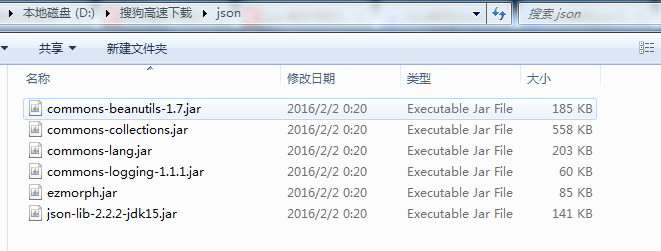
二、文档操作(增加,删除,查询)的代码如下:
1.首先创建一个对象,对象只有一些属性值,没有成员方法。
 package test;

 public class LawTest {

     // String fields[]={"guid","lawName","itemIndex","itemTitle","itemContent","categoryTitle","categoryIndex"};

      private String guid;

      private String lawName;

      private int itemIndex;

      private String itemTitle;

      private String itemContent;

      private String categoryTitle;

      private int categoryIndex;

      public LawTest(){

          this.guid="";

          this.lawName="";

          this.itemIndex=0;

          this.itemTitle="";

          this.itemContent="";

          this.categoryTitle="";

          this.categoryIndex=0;

      }

      public LawTest(String guid,String lawName,int itemIndex,String itemTitle,String itemContent,String categoryTitle,int categoryIndex){

          this.guid=guid;

          this.lawName=lawName;

          this.itemIndex=itemIndex;

          this.itemTitle=itemTitle;

          this.itemContent=itemContent;

          this.categoryTitle=categoryTitle;

          this.categoryIndex=categoryIndex;

      }

     public String getGuid() {

         return guid;

     }

     public void setGuid(String guid) {

         this.guid = guid;

     }

     public String getLawName() {

         return lawName;

     }

     public void setLawName(String lawName) {

         this.lawName = lawName;

     }

     public int getItemIndex() {

         return itemIndex;

     }

     public void setItemIndex(int itemIndex) {

         this.itemIndex = itemIndex;

     }

     public String getItemTitle() {

         return itemTitle;

     }

     public void setItemTitle(String itemTitle) {

         this.itemTitle = itemTitle;

     }

     public String getItemContent() {

         return itemContent;

     }

     public void setItemContent(String itemContent) {

         this.itemContent = itemContent;

     }

     public String getCategoryTitle() {

         return categoryTitle;

     }

     public void setCategoryTitle(String categoryTitle) {

         this.categoryTitle = categoryTitle;

     }

     public int getCategoryIndex() {

         return categoryIndex;

     }

     public void setCategoryIndex(int categoryIndex) {

         this.categoryIndex = categoryIndex;

     }

 }
2.有了对象后,开始构建我们的客户端代码:首先初始化连接
     private static String serverUrl="http://localhost:8983/solr/collectionTest";

     private static String fields[]={"guid","lawName","itemIndex","itemTitle","itemContent","categoryTitle","categoryIndex"};

     private static SolrClient solrclient = null;

     private static SolrQuery query=new SolrQuery("*:*");

     /**

      * 初始化连接

      */

     @SuppressWarnings("deprecation")

     public static void initiate(){

           solrclient = new HttpSolrClient(serverUrl);

     }
3. 然后需要将已有的入库json文本转化为对象,再根据对象添加到solr中
 /**

  * 输入文档存放地址,读取为字符串

  * 将字符串解析为json并转换为对象

  * @param DirectoryPath

  * @return

  */

     public static List<LawTest> readTxtFile(String DirectoryPath){

         List<LawTest> list = new ArrayList<LawTest>();

         try {

                 String encoding="GB2312";//UTF-8

                 String guid=null;

                 String lawName=null;

                 int itemIndex=0;

                 String itemTitle=null;

                 String itemContent=null;

                 String categoryTitle=null;

                 int categoryIndex=0;

                 File file=new File(DirectoryPath);

                 File[] tempList = file.listFiles();

                 System.out.println("该目录下对象个数:"+tempList.length);

                 for (int i = 0; i < tempList.length; i++) {

                  if (tempList[i].isFile() && tempList[i].exists()) {

                       //保存每一个文本为字符串

                       StringBuilder stringAll=new StringBuilder();

                       System.out.println("文 件:"+i+":"+tempList[i]);

                       InputStreamReader read = new InputStreamReader(

                       new FileInputStream(tempList[i]),encoding);//考虑到编码格式

                       BufferedReader bufferedReader = new BufferedReader(read);

                       String lineTxt = null;

                       while((lineTxt = bufferedReader.readLine()) != null){

                           System.out.println(lineTxt);

                           stringAll.append(lineTxt);

                       }

                       String text=stringAll.toString();

                       JSONArray arry = JSONArray.fromObject(text);

                       System.out.println("json字符串内容如下");

                       System.out.println(arry);

                       //List<Map<String, String>> rsList = new ArrayList<Map<String, String>>();

                       for (int j = 0; j < arry.size(); j++)

                       {

                           JSONObject jsonObject = arry.getJSONObject(j);

                           //Map<String, String> map = new HashMap<String, String>();

                           for (Iterator<?> iter = jsonObject.keys(); iter.hasNext();)

                           {

                               String key = (String) iter.next();

                               String value = jsonObject.get(key).toString();

                              // map.put(key, value);

                               if("guid".equals(key)){ guid=value; }

                               else if("lawName".equals(key)){ lawName=value;}

                               else if("itemIndex".equals(key)){ itemIndex=Integer.valueOf(value);}

                               else if("itemTitle".equals(key)){ itemTitle=value;}

                               else if("itemContent".equals(key)){ itemContent=value;}

                               else if("categoryIndex".equals(key)){ categoryIndex=Integer.valueOf(value);}

                               else if("categoryTitle".equals(key)){ categoryTitle=value;}

                           }

                           LawTest lawlistbean=new LawTest( guid, lawName, itemIndex, itemTitle, itemContent, categoryTitle, categoryIndex);

                           list.add(lawlistbean);

                           //rsList.add(map);

                       }

                  }

              }

         }

         catch (Exception e) {

             System.out.println("读取文件内容出错");

             e.printStackTrace();

         }

         return list;

     }
4.添加文档:
  /**

      * 添加文档

      * @param DocList

      */

     public static  void addDocs(List<LawTest> DocList) {

         try {

             for (int i = 0; i<DocList.size();i++){

                 SolrInputDocument doc1=new SolrInputDocument();

                 doc1.setField("guid", DocList.get(i).getGuid());

                 doc1.setField("lawName", DocList.get(i).getLawName());

                 doc1.setField("itemIndex", DocList.get(i).getItemIndex());

                 doc1.setField("itemTitle", DocList.get(i).getItemTitle());

                 doc1.setField("itemContent", DocList.get(i).getItemContent());

                 doc1.setField("categoryIndex", DocList.get(i).getCategoryIndex());

                 doc1.setField("categoryTitle", DocList.get(i).getItemTitle());

                 solrclient.add(doc1);

             }

         }catch (Exception e) {

                 e.printStackTrace();

             } finally {

                 try {

                     solrclient.commit();

                 } catch (Exception e) {

                     e.printStackTrace();

                 }

             }

     }
5.删除文档;
 /**

      * 根据索引删除文档

      * @param query

      */

     public void delDoc(String query){

       try {

              solrclient.deleteByQuery(query);

              solrclient.commit();

             } catch (Exception e) {

                 e.printStackTrace();

             }

     }
6.查询文档;
    /**

     * 查询文档

     * @param query

     */

    public static List<Map<String,Object>> queryDoc(SolrQuery query, String[] fields){

        if(query==null || fields==null){

            return null;

        }

        else{

            QueryResponse resp3 = null;

            query.setStart(0);

            query.setRows(10);

            query.setFields(fields);

             try {

                resp3=solrclient.query(query);

            } catch (SolrServerException | IOException e) {

                // TODO Auto-generated catch block

                e.printStackTrace();

            }

             SolrDocumentList solrList = resp3.getResults();

             List<Map<String, Object>> result = new ArrayList<Map<String, Object>>();

            for (SolrDocument doc : solrList) {

                Map<String, Object> resultMap=new HashMap<String, Object>();

                for (String field : fields){

                    resultMap.put(field,doc.get(field));

                }

                    result.add(resultMap);

            }

            return result;

        }

    }

    //查询文档入口

    public static List<Map<String,Object>> retrieveContent(Map<String, Object> args){

        //关键词

        String keywords = (String) args.remove("keyword");

        if (!(keywords == null || "".equals(keywords))) {

            query.setQuery(keywords);

        }

        //其他查询过滤条件

        for (Entry<String, Object> entry : args.entrySet()) {

            query.addFilterQuery(entry.getKey() + ":" + entry.getValue());

        }

        return queryDoc(query,fields);

    }
7.获取文档数量:
 public static long getCount(){

         long numFound = 0;

         SolrQuery q = query.getCopy();

         q.setStart(0);

         q.setRows(0);

         try {

             //没必要排序

             q.remove("sort");

             if ((query.getBool("group", false))) {

                 q.setParam("group", false);

                 q.setParam("group.ngroups", false);

                 String field = query.get("group.field");

                 q.set("json.facet", "{distinctCount:'unique(" + field + ")'}");

             }

             QueryResponse results = solrclient.query(q,METHOD.POST);

             if ((query.getBool("group", false))) {

                 Object facets = results.getResponse().get("facets");

                 if(facets != null && facets instanceof SimpleOrderedMap){

                     Object distinctCount = ((SimpleOrderedMap)facets).get("distinctCount");

                     if(distinctCount != null ){

                         numFound = (Long)distinctCount;

                     }

                 }

             } else {

                 numFound = results.getResults().getNumFound();

             }

         } catch (SolrServerException e) {

             e.printStackTrace();

         } catch (IOException e) {

             e.printStackTrace();

         }

         return numFound;

     }
8.测试主函数:
 public static void main(String [] args) throws SolrServerException, IOException{

         String path="D:\\文件\\solr入库测试文件";

         Map<String, Object> map=new HashMap<String, Object>();

         //初始化

         initiate();

         //添加文档测试

         //addDocs(readTxtFile(path));

         //查询

         map.put("keyword", "标题");

         List<Map<String, Object>> result = new ArrayList<Map<String, Object>>();

         result=retrieveContent(map);

         if(result==null || result.size()==0){

             System.out.println("data is null");

         }

         else{

             System.out.println("-----输出查询结果如下:-----\n");

             result.forEach( mp->{

                 for(String key: mp.keySet()){

                     System.out.println(key+":"+mp.get(key).toString());

                 }

             });

         }

         System.out.println("query count:"+getCount());

         System.out.println("query over!");

     }
SOLRJ单机-添加文档,删除,查询操作的更多相关文章
- Elasticsearch(5):添加文档
1 ES数据读写流程¶ ES中,每个索引都将被划分为若干分片,每个分片可以有多个副本.这些副本共同组成复制组,复制组中的分片在添加或删除文档时必须保持同步,否则,从一个副本中读取的数据将与从另一个 ...
- solr学习之添加文档
一.开篇语 其实Solr就是一个你可以通过他来查询文档的东西,他整个都是基于Document的,那么这些Document从何而来列? 当然是我们给他,而这些来源就包括了:数据库文件,XML,Json ...
- Xapian的内存索引-添加文档
本文主要记录Xapian的内存索引在添加文档过程中,做了哪些事情. 内容主要为函数执行过程中的流水线. demo代码: Xapian::WritableDatabase db = Xapian::In ...
- Xamarin.Android 入门实例(4)之实现对 SQLLite 进行添加/修改/删除/查询操作
1.Main.axml <?xml version="1.0" encoding="utf-8"?> <LinearLayout xmlns: ...
- Mongodb 级联删除查询操作
ObjRelationPojo表一条记录 public class YpObjRelationPojo implements Serializable { @Id private String id; ...
- MongoDB(8)- 文档删除操作
删除方法 db.collection.deleteOne() 删除单条文档 db.collection.deleteMany() 删除多条文档 db.collection.remove() 删除单条或 ...
- Django 1.10 中文文档------3.2.2 查询操作making queries
3.2.2 查询操作 6.15章节包含所有模型相关的API解释. 后面的内容基于如下的一个博客应用模型: from django.db import models class Blog(models. ...
- 配置允许匿名用户登录访问vsftpd服务,进行文档的上传下载、文档的新建删除等操作
centos7环境下 临时关闭防火墙 #systemctl stop firewalld 临时关闭selinux #setenforce 0 安装ftp服务 #yum install vsftpd - ...
- MongoDB入门---文档查询操作之条件查询&and查询&or查询
经过前几天的学习之路,今天终于到了重头戏了.那就是文档查询操作.话不多说哈,直接看下语法: db.collection.find(query, projection) query :可选,使用查询操作 ...
随机推荐
- rpm的gpg key
1 gpg 这是一种公钥.私钥机制. 2 rpm包的格式 rpm包由四部分构成,lead.signature.header和archive构成. 这里的签名(signature)是加密了的,也就是说, ...
- 手游服务器php架构比较
从swoole项目开始到现在,一直有人在问这个问题.今天来抽空讲一下它.为什么swoole非要使用纯C来写而不是PHP代码来实现,核心的原因有2点: 1. PHP无法直接调用操作系统API 如send ...
- HTML CSS 编码规范
返璞归真,代码规范也是一门艺术 黄金定律 永远遵循同一套编码规范 -- 可以是这里列出的,也可以是你自己总结的.如果你发现本规范中有任何错误,敬请指正.通过open an issue on GitHu ...
- docker pure-ftp 搭建ftp服务器
参考:https://hub.docker.com/r/stilliard/pure-ftpd/ docker-compose.yml: ftp: image: stilliard/pure-ftpd ...
- Java语言基础二
1.常量的概述和使用 A:什么是常量 B:Java中常量的分类 常量分类为六种:a.”字符串” b.’字符’ c.整数 d.小数 e.boolern(布尔类型) 返回值为 FALSE和TRUE ...
- 【Maven】pom.xml(2)
<project xmlns="http://maven.apache.org/POM/4.0.0" xmlns:xsi="http://www.w3.org/20 ...
- Android Platform Version与API Level的对应表
Platform Version API Level VERSION_CODE Notes Android 6.0 23 M Platform Highlights Android 5.1 22 LO ...
- UVA-10391(字符串检索)
题意: 给定一个字典,要求找出所有的复合词; 思路: 用map把词都存起来,再把词拆开看是否是出现过的单词; AC代码: #include <bits/stdc++.h> #include ...
- boost之timer
1. timer类实现 #pragma once #include <ctime> #include <limits> class timer { public: timer( ...
- Oracle中插入100万条数据
在做项目的工程中,需要数据库中存在大量的数据进行程序的验证,但是我们又没有数据,这时就需要我们自己手动建一个表,插入大量数据,进行验证. 那么插入大量数据的sql语句如下: insert into E ...