
定义Portal显示规则
Defining Portal Display Rules
Use
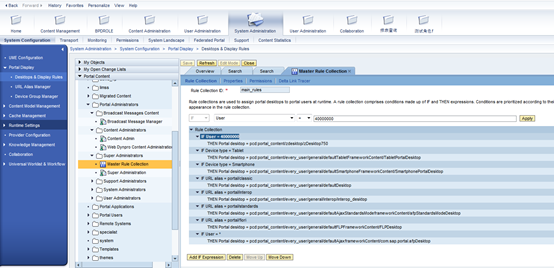
You use the Portal Display Rules editor to create and edit rule collection objects. Rule collections allow you to define how portal desktops are assigned to portal users at runtime.
A rule collection comprises a set of conditions, constructed by IF and THEN expressions. Conditions in a rule collection are prioritized according to their order of appearance in the rule collection. If a user fits more than one condition, then the first condition that is true for that user determines which portal desktop is displayed.
- An IF-THEN condition may contain unlimited nested IF expressions.
- An IF-THEN condition may contain only a single THEN expression.
- A rule collection object may contain conditions that reference other rule collection objects. For example:
IF Browser Type = Microsoft Internet Explorer
THEN Rule collection = pcd:Display_Rules/MSIE_Rules
Prerequisites
- You have access to the Portal Display Rules editor (it is assigned by default to the system administration role).
- You have at least read/write permissions for the Portal Catalog folder in which you are creating or editing a rule collection object.
- You have at least read administrator permissions on the relevant portal desktop and rule collection objects in the Portal Catalog.
Procedure
Creating a Rule Collection
- In the portal, navigate to System Administration System Configuration Portal Display Desktops & Display Rules.
- In the Portal Catalog, in the context menu of the folder in which you want to create a rule collection object, choose New Rule Collection. The Portal Display Rules editor appears.
- In the Rule Collection Name field, enter a name for the rule collection object.
- In the Rule Collection ID field, enter a unique ID for the rule collection object.
- Define the conditions of the display rules using a combination of IF and THEN expressions:
|
Action |
Description |
|
Adding a new IF-THEN condition |
A new IF-THEN condition is added to the end of the rule collection list (use the Move Up and Move Down buttons to correctly position the new condition). By default, the new expression is defined as:IF User = * THEN Portal Desktop = pcd:portal_content/every_user/general/defaultDesktop . Change the default values for each expression, as needed.
Note the following:
|
|
Adding a nested IF expression |
The parameters of the THEN expression are displayed in the editing area above the rule collection list.
A new IF expression is added to the rule collection list.
|
|
Changing priority of IF-THEN conditions |
In the rule collection list, select the root IF expression in the IF-THEN condition that you want to move, and then choose either Move Up or Move Down . This action moves the entire IF-THEN condition of the selected IF expression, including any nested IF expressions. |
|
Deleting an IF-THEN condition |
In the rule collection list, select the root IF expression in the IF-THEN condition that you want to delete, and then chooseDelete . This action deletes the entire IF-THEN condition. |
- Save your changes.
The rule collection object is created in the selected folder. You can access it later from the Portal Catalog for further editing.
Editing a Rule Collection
- In the portal, navigate to System Administration System Configuration Portal Display Desktops & Display Rules.
- In the Portal Catalog, in the context menu of the rule collection object that you want to edit choose Open Rule Collection.
The Portal Display Rules editor opens and displays the conditions of the selected rule collection object.
- Add, remove, or modify conditions as described in the table above.
- Save your changes.
定义Portal显示规则的更多相关文章
- 聊天IM的时间戳显示规则
====================================================== 以下规则是在体验微信操作后,推测出来的规则,可能存在一些不准确的表述 ========== ...
- Wireshark技巧-过滤规则和显示规则
Wireshark是一个强大的网络协议分析软件,最重要的它是免费软件. 过滤规则 只抓取符合条件的包,在Wireshark通过winpacp抓包时可以过滤掉不符合条件的包,提高我们的分析效率. 如果要 ...
- Wireshark技巧-过滤规则和显示规则【转】
转自:https://www.cnblogs.com/icez/p/3973873.html Wireshark是一个强大的网络协议分析软件,最重要的它是免费软件. 过滤规则 只抓取符合条件的包,在W ...
- 【转】Wireshark技巧-过滤规则和显示规则
原文: http://www.cnblogs.com/icez/p/3973873.html ----------------------------------------------------- ...
- (1)定义闭合图形抽象类ClosedFigure定义属性:1.形状;2.定义构造方法,给形状赋值;3.定义两个抽象方法:计算面积和计算周长;4.定义一个显示方法:显示图像形状,周长,面积;
题目显示不全,完整题目描述: (1)定义闭合图形抽象类ClosedFigure定义属性:1.形状:2.定义构造方法,给形状赋值:3.定义两个抽象方法:计算面积和计算周长:4.定义一个显示方法:显示图像 ...
- 干货:Wireshark使用技巧-显示规则
- 显示规则使用 在Wireshark界面对已经抓取的报文在界面的显示进行控制的规则,称为显示规则,显示规则只是让一部分不符合规则的报文不被显示,但未被丢弃,这些报文仍然存在在Wireshark的系统 ...
- PCL入门—点云操作 定义变量 显示点云 存储
// 定义相关变量 pcl::PointCloud<pcl::PointXYZ>::Ptr cloud_ptr (new pcl::PointCloud<pcl::PointXYZ& ...
- android 网络运营商的名字显示规则(锁定屏幕,下拉列表)
一:Background & 有关flow MTK Operator name display分为两种类型的手机: 1. Sim卡名称: 从基于引导SIM卡读取IMSI到Spn-conf.xm ...
- MVC写在Model文件夹下,登录注册等页面定义的变量规则,不会被更新实体模型删除
一下图为我的model文件夹
随机推荐
- python自动化学习笔记11-自动化测试UTP框架
前面基本的unittest及ddt已经学过了,现在我们系统把这些知识结合起来,写一个简单的UTP自动化测试框架: 我们先来建基础目录,首先新建一个项目,项目下建父目录UTP,conf目录,用来存放配置 ...
- 题解报告:hdu 1312 Red and Black(简单dfs)
Problem Description There is a rectangular room, covered with square tiles. Each tile is colored eit ...
- native2ascii命令详解
1.native2ascii简介: native2ascii是sun java sdk提供的一个工具.用来将别的文本类文件(比如*.txt,*.ini,*.properties,*.java等等 ...
- Android4.4以上Uri转换成绝对路径的工具类
一.Android4.4版本以上Uri地址封装规范: content://com.android.providers.media.documents/document/image%3A659 二.An ...
- Paxos,Raft,Zab一致性协议-Raft篇
Raft是一个一致性算法,旨在易于理解.它提供了Paxos的容错和性能.不同之处在于它被分解为相对独立的子问题,它清楚地解决了实际系统所需的所有主要部分.我们希望Raft能够为更广泛的受众提供共识,并 ...
- WordPress主题reBorn最新破解版发布
今天上班的时候,没事浏览网页! 突然之间发现了这么一个标题,顿时让我产生了兴趣. 标题:WordPress主题reBorn最新破解版发布 不知道什么原因,现在原网址打不开了,可能是作者怕骚扰吧. 其实 ...
- Apache Maven 3.0.3 (yum) 安裝 (CentOS 6.4 x64)
介紹http://maven.apache.org/ Maven是一個專案的開發,管理和綜合工具. 下載http://maven.apache.org/download.cgi 參考http://ma ...
- day02python
''' 列表 定义:在[]内,可以存放多个任意类型的值,并以逗号隔开. 一般用于存放学生的爱好,课堂的周期等等... ''' students=['钱垚','李小龙','张全蛋','赵铁柱'] pri ...
- 07C语言程序语句
C语言程序语句 判断语句 if(表达式) {语句} #include <stdio.h> int main(){ printf("请输入2个数字:"); int a,b ...
- Mybatis中collection和association的使用区别
1. 关联-association2. 集合-collection 比如同时有User.java和Card.java两个类 User.java如下: public class User{ privat ...