
Springboot使用zuul进行负载均衡
完整项目代码地址参考:https://github.com/SimonHu1993/SpringbootZuul
1.这里我们使用Eureka来作为服务的注册与发现中心,首先看看Eureka client客户端配置文件
server:

  port: 10013

  contextPath: /cardmember

  session:

    timeout: 1800

logging:

  config: classpath:log4j2-dev-spring.yml

#spring配置

spring:

  application:

    name: cardmember

  datasource:

      driver-class-name: oracle.jdbc.driver.OracleDriver

      url: jdbc:oracle:thin:@xxx:1521/xshdb

      username: xxxx

      password: xxx

      type: com.zaxxer.hikari.HikariDataSource

      hikari:

        maxLifetime: 1765000 #一个连接的生命时长(毫秒),超时而且没被使用则被释放(retired),缺省:30分钟,建议设置比数据库超时时长少30秒以上

        maximumPoolSize: 20 #连接池中允许的最大连接数。缺省值:10;推荐的公式:((core_count * 2) + effective_spindle_count)

        minimumIdle:  1 #连接池中允许的最小空闲连接数

  cache:

     type: guava

     cache-names: merchantDetail,selConfig

     guava:

         spec: maximumSize=500,expireAfterWrite=5m

  #模版引擎

  thymeleaf:

    cache: false

    prefix: classpath:/templates/

    suffix: .html

    encoding: UTF-8

#mybatis

mybatis:

  mapperLocations: classpath*:com/zhx/*/*/mapper/*Mapper.xml

  typeAliasesPackage: com.zhx.web

  configuration:

    log-impl: org.apache.ibatis.logging.stdout.StdOutImpl

eureka:

  client:

    # 开启健康检查(需要spring-boot-starter-actuator依赖)

    healthcheck:

      enabled: true

    serviceUrl:

      #defaultZone: http://127.0.0.1:9700/eureka/,http://127.0.0.1:9600/eureka/,http://127.0.0.1:9500/eureka/ 可以配置多个eureka节点

      defaultZone: http://admin:123456@127.0.0.1:9800/eureka/

  instance:

    #启用Ip注册

    preferIpAddress: true

    instance-id: ${spring.cloud.client.ipAddress}:${server.port}:${random.value}

    # 续约更新时间间隔(默认30秒)

    lease-renewal-interval-in-seconds: 180

    # 续约到期时间(默认90秒)

    lease-expiration-duration-in-seconds: 200

management:

  #关闭安全检测

  security:

    enabled: false

  port: ${server.port}

#监控监控信息设置为非敏感

endpoints:

  health:

    sensitive: false

security:

  basic:

    enabled: false

#配置属性

site:

  #测试

  errorNumber: 1
启动类中添加@EnableEurekaClient注解
@SpringBootApplication

@EnableCaching // 启用缓存

@EnableEurekaClient

public class Application extends WebMvcConfigurerAdapter {

    public static void main(String[] args) {

        SpringApplication.run(Application.class, args);

    }

    @Autowired

    private RequestInterceptor requestInterceptor;

    /**

     * 配置拦截器

     * @param registry

     */

    @Override

    public void addInterceptors(InterceptorRegistry registry) {

        registry.addInterceptor(requestInterceptor).addPathPatterns("/**");

    }

}
2.配置eureka服务端
server:

  port: 9800

spring:

  application:

    name: eureka_server

eureka:

  server:

    # 设为false,关闭自我保护

    enable-self-preservation: false

    # 清理间隔(单位毫秒,默认是60*1000)

    eviction-interval-timer-in-ms: 15000

  client:

    registerWithEureka: true

    fetchRegistry: true

    service-url:

      defaultZone: http://${security.user.name}:${security.user.password}@xxxx:8081/eureka/,http://${security.user.name}:${security.user.password}@xxx:9600/eureka/

#      defaultZone: http://localhost:8762/eureka/ 部署eureka服务的节点ip

  instance:

      #启用Ip注册

      preferIpAddress: true

      instance-id: ${spring.cloud.client.ipAddress}:${server.port}:${random.value}

      # 续约更新时间间隔(默认30秒)

      lease-renewal-interval-in-seconds: 10

      # 续约到期时间(默认90秒)

      lease-expiration-duration-in-seconds: 20

management:

  #关闭安全检测

  security:

    enabled: false

  port: ${server.port}

endpoints:

  health:

    sensitive: false

security:

  basic:

    enabled: true

  user: #eureka登录账号密码

    name: admin

    password: 123456
pom文件添加eureka-server依赖
 <!--增加eureka-server的依赖-->

        <dependency>

            <groupId>org.springframework.cloud</groupId>

            <artifactId>spring-cloud-starter-eureka-server</artifactId>

        </dependency>
eureka-server启动类
@EnableEurekaServer

@SpringBootApplication

public class EurekaServerApplication {

    public static void main(String[] args) {

        SpringApplication.run(EurekaServerApplication.class, args);

    }

}
3.zuul做负载均衡
spring:

  application:

    name: zuul_server

server:

  port: 8080

zuul:

  routes:

    #服务端负载均衡配置

    coreapiread:

      path: /coreapiread/**

      stripPrefix: false

      #服务的 application.name  不能带下划线

      serviceId: coreapiread

    coreapiwrite:

      path: /coreapiwrite/**

      stripPrefix: false

      serviceId: coreapiwrite

    didiAdmin:

      path: /didi-admin/**

      stripPrefix: false

      url: http://127.0.0.1:6028

    cardmember:

      path: /cardmember/**

      stripPrefix: false

      serviceId: cardmember

  sensitive-headers:

  add-host-header: true

  add-proxy-headers: true

#超时设置

hystrix:

  command:

    default:

      execution:

        timeout:

          enabled: true

        isolation:

          thread:

            timeoutInMilliseconds: 20000

ribbon:

  ReadTimeout: 20000

  ConnectTimeout: 20000

  MaxAutoRetries: 0

  MaxAutoRetriesNextServer: 1

eureka:

  client:

    # 开启健康检查(需要spring-boot-starter-actuator依赖)

    healthcheck:

      enabled: true

    serviceUrl:

      defaultZone: http://admin:123456@xxx:8081/eureka/,http://admin:123456@xxx:9600/eureka/

   # eureka用户名和密码

    #设置拉取服务注册信息时间,默认60s   如果要迅速获取服务注册状态,可以缩小该值

    registry-fetch-interval-seconds: 10

  instance:

    #启用Ip注册

    preferIpAddress: true

    instance-id: ${spring.cloud.client.ipAddress}:${server.port}:${random.value}

    # 续约更新时间间隔(默认30秒)

    lease-renewal-interval-in-seconds: 30

    # 续约到期时间(默认90秒)

    lease-expiration-duration-in-seconds: 90

management:

  #关闭安全检测

  security:

    enabled: false

  port: ${server.port}

security:

  basic:

    enabled: true

  user:

    name: zhx22

    password: fdg2222

#监控监控信息设置为非敏感

endpoints:

  health:

    sensitive: false
zuul启动类
@EnableEurekaClient

@EnableZuulProxy

@SpringBootApplication

public class ZuulApplication {

    public static void main(String[] args) {

        SpringApplication.run(ZuulApplication.class, args);

    }

}
pom文件
<dependency>

            <groupId>org.springframework.cloud</groupId>

            <artifactId>spring-cloud-starter-zuul</artifactId>

        </dependency>

        <dependency>

            <groupId>org.springframework.cloud</groupId>

            <artifactId>spring-cloud-starter-eureka</artifactId>

        </dependency>
eureka控制台信息
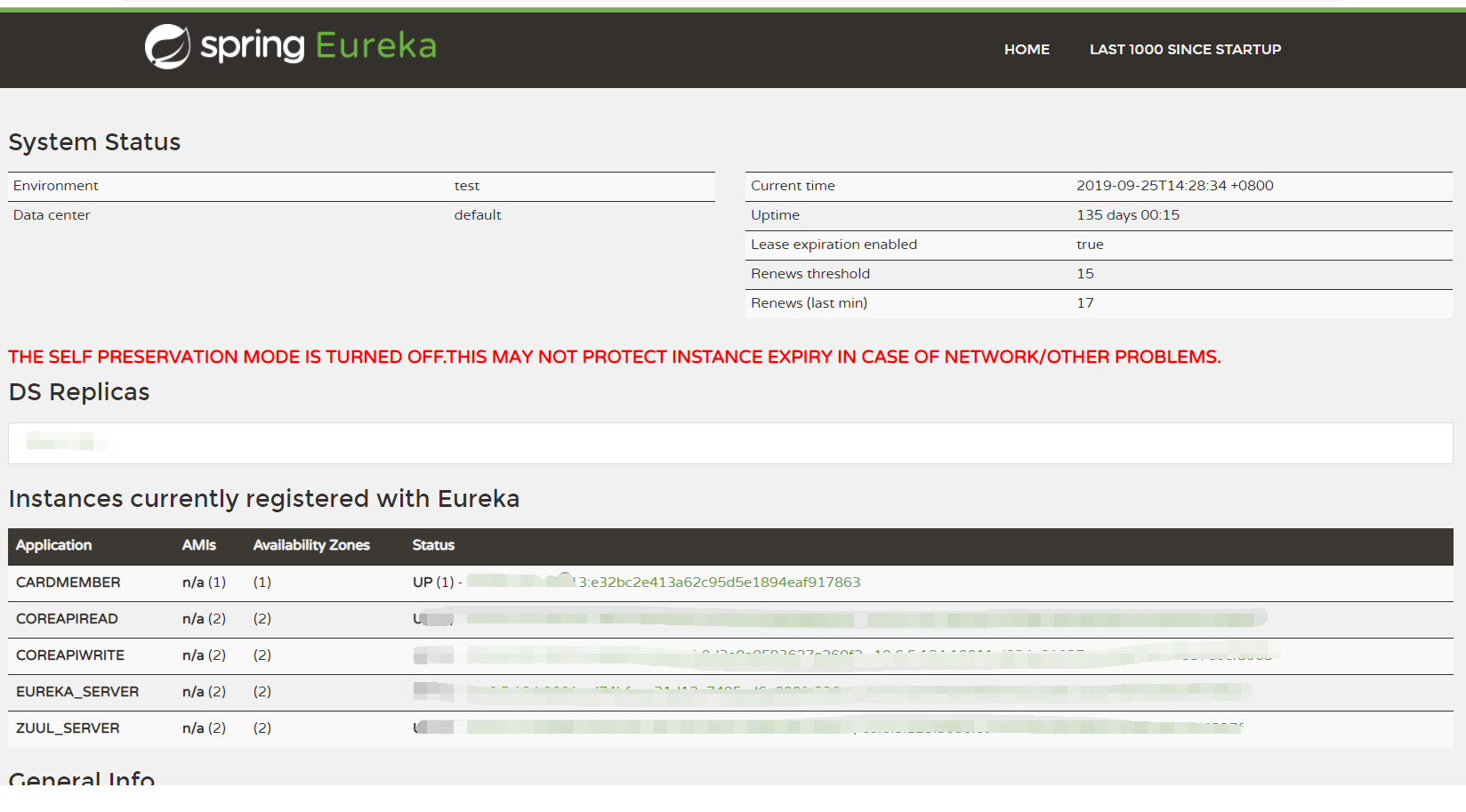
进行节点移除更新时,在eureka服务所在服务器上先移除待更新节点,在kill节点服务:
移除节点

curl -u admin:123456 -X DELETE http://127.0.0.1:8081/eureka/apps/ZUUL_SERVER/127.22.2.124:10011:cf6d9fd513f57727e57c8bc213767fc3
参数解释,curl -u eureka用户名:密码,第一个ip为eureka服务所在ip,第二个为client所在ip,最后的md5信息为eureka控制台上的节点信息;
Springboot使用zuul进行负载均衡的更多相关文章
- springCloud搭建微服务集群+Zuul服务器端负载均衡
概述 最近研究了一下springCloud的微服务集群,主要用到了SpringCloud的服务发现和服务器端负载均衡,所有的项目都是用的springboot,可以和springCloud无缝对接. 技 ...
- SpringBoot(三) - Ribbon客户端负载均衡,Zuul网关,Config配置中心
1.Ribbon客户端负载均衡 1.1 依赖 1.2 配置信息 # feign默认加载了ribbon负载均衡,默认负载均衡机制是:轮询 # 负载均衡机制是添加在消费端(客户端)的,如果改为随机,指定服 ...
- spring cloud使用zuul实现反向代理和负载均衡
首先,这篇文章参考的是http://blog.didispace.com/springcloud5/这位大牛的博客.本人是通过这篇博客来学习zuul的,现在写的博客只是个人在学习时个人的一些感受和理解 ...
- Spring Cloud负载均衡:使用zuul作服务器端负载均衡
1.目的: 本文简述Spring Cloud负载均衡之服务器负载均衡模式,使用组件为zuul. zuul作为Spring Cloud中的网关组件,负责路由转发.身份验证.请求过滤等等功能,那么我们可以 ...
- Kubernetes部署SpringCloud(二) 部署ZUUL与服务 非host, 伸缩与负载均衡
因为服务需要可缩容,所以不能使用host部署. 涉及两个应用,zuul,basic-info-api 验证,在k8s任意一个node 从zuul 访问 basic-info-api 创建一个Sprin ...
- Spring Cloud微服务Ribbon负载均衡/Zuul网关使用
客户端负载均衡,当服务节点出现问题时进行调节或是在正常情况下进行 服务调度.所谓的负载均衡,就是当服务提供的数量和调用方对服务进行 取舍的调节问题,在spring cloud中是通过Ribbon来解决 ...
- spring cloud: zuul(三): ribbon负载均衡配置
zuul的routes配置下path/url组合不支持负载均衡 下面介绍zuul的routes配置下的path/serviceId负载均衡配置 spring-boot-user微服务开启了:7901, ...
- springboot+spring session+redis+nginx实现session共享和负载均衡
环境 centos7. jdk1.8.nginx.redis.springboot 1.5.8.RELEASE session共享 添加spring session和redis依赖 <depen ...
- Spring Cloud之Zuul负载均衡
Zuul网关默认是实现负载均衡的,不需要任何配置.默认开启ribbon效果的 可以启启动两个服务端口,访问下.
随机推荐
- 串口工具kermit(ubuntu)
安装 # sudo apt-get install ckermit 配置 kermit启动时,会首先查找~/.kermrc,然后再遍历/etc/kermit/kermrc # vi /etc/kerm ...
- SAP官方发布的ABAP编程规范
最近有朋友在公众号后台给我留言,"Jerry啊,你最近写的都是一些SAP研究院里面用到的新技术,能不能写点SAP传统的开发技术比如ABAP相关的东西"? 其实Jerry在刚开始写这 ...
- 【leetcode】575. Distribute Candies
原题 Given an integer array with even length, where different numbers in this array represent differen ...
- linux三剑客grep,sed,awk
grep 官方帮助文档 Usage: grep [OPTION]... PATTERN [FILE]... Search for PATTERN in each FILE or standard in ...
- python 并发编程-- 多进程
一 multiprocessing 模块介绍 python中的多线程无法利用多核优势,如果想要充分地使用多核CPU的资源(os.cpu_count()查看),在python中大部分情况需要使用多进程 ...
- 创建守护进程步骤与setsid()
原创:http://www.cnblogs.com/mickole/p/3188321.html 一,守护进程概述 Linux Daemon(守护进程)是运行在后台的一种特殊进程.它独立于控制终端并且 ...
- sqlserver 拼接字符串分割
CREATE FUNCTION [dbo].[fnQuerySplit] ( @string VARCHAR(MAX) ,--待分割字符串 )--分割符 ) ) ) AS BEGIN DECLARE ...
- MySql忘记密码了咋办
对内 忘记密码终端修改操作: #停止mysql服务 sudo /opt/lampp/lampp stopmysql #参数启动mysqld sudo /opt/lampp/sbin/mysqld -- ...
- 基于JQ的记忆翻牌游戏
<!DOCTYPE html> <html lang="zh-CN"> <head> <meta charset="UTF-8& ...
- Java核心技术 卷一 复习笔记(丁
面向对象1.面向对象设计概述 1.1.面向对象是什么 面向对象是一种程序设计范型(简称OOP),是针对对象进行开发,简化开发过程的一种设计方式 1.2.类 类是构造对象的模板,相当于一个烘焙模板,而对 ...