
Kubernetes部署SpringCloud(二) 部署ZUUL与服务 非host, 伸缩与负载均衡
因为服务需要可缩容,所以不能使用host部署.
涉及两个应用,zuul,basic-info-api
验证,在k8s任意一个node 从zuul 访问 basic-info-api
创建一个SpringBoot应用: basic-info-api
用于检查健康状态的Controller
/**

 * User: laizhenwei

 * Date: 2018-04-12 Time: 16:10

 */

@RestController

@RequestMapping(path = "/")

public class Healthz {

    @Value("${spring.application.name}")

    private String serviceId;

    @Autowired

    private LoadBalancerClient loadBalancer;

    @GetMapping(path = "/healthz",produces = MediaType.TEXT_PLAIN_VALUE)

    public String healthz(){

        return "ok";

    }

    @GetMapping(path = "/getHost",produces = MediaType.TEXT_PLAIN_VALUE)

    public String getHost(){

        ServiceInstance instance = loadBalancer.choose(serviceId);

        return instance.getHost();

    }

}
Application.java
@EnableEurekaClient

@EnableCircuitBreaker

@SpringBootApplication

public class BasicInfoApiApplication {

    public static void main(String[] args) {

        SpringApplication.run(BasicInfoApiApplication.class, args);

    }

}
application.yaml
spring:

  application:

    name: BASIC-INFO-API

  profiles:

    active: dev
application-test.yaml
eureka:

  instance:

    appname: ${spring.application.name}

    prefer-ip-address: true

    #续约更新时间间隔

    lease-renewal-interval-in-seconds: 10

    #续约到期时间

    lease-expiration-duration-in-seconds: 30

  client:

    serviceUrl:

      defaultZone: http://192.168.91.141:8000/eureka/,http://192.168.91.142:8001/eureka/,http://192.168.91.143:8002/eureka/

logging:

  config: classpath:logback-test.xml
打包上传到私有仓库
docker build -t ms-basic-info-api .

tag ms-basic-info-api 192.168.91.137:/ms-basic-info-api

docker tag push 192.168.91.137:/ms-basic-info-api
Deployment.yaml
apiVersion: extensions/v1beta1

kind: Deployment

metadata:

  name: basic-info-api

  namespace: ms

spec:

  replicas: 1

  selector:

    matchLabels:

      app: basic-info-api

  template:

    metadata:

      labels:

        app: basic-info-api

    spec:

      terminationGracePeriodSeconds: 60

#      hostNetwork: true

      containers:

      - name: basic-info-api

        image: 192.168.91.137:5000/ms-basic-info-api

        command: ["java"]

        args: ["-jar", "/usr/local/basic-info-api.jar","--spring.profiles.active=test","--server.port=8300"]

        ports:

        - name: http

          containerPort: 8300

        livenessProbe:

          failureThreshold: 3

          httpGet:

            path: /healthz

            port: 8300

            scheme: HTTP

          initialDelaySeconds: 20

          periodSeconds: 10

          successThreshold: 1

          timeoutSeconds: 1

        readinessProbe:

          failureThreshold: 3

          httpGet:

            path: /healthz

            port: 8300

            scheme: HTTP

          initialDelaySeconds: 20

          periodSeconds: 10

          successThreshold: 1

          timeoutSeconds: 1

---

apiVersion: v1

kind: Service

metadata:

  name: basic-info-api

  namespace: ms

  labels:

    app: basic-info-api

spec:

  selector:

    app: basic-info-api

  clusterIP: 172.21.1.2

  ports:

    - name: http

      port: 8300

      protocol: TCP
master 执行
kubectl create -f basic-info-api.yaml
查看Eureka页面

创建 zuul 服务
健康检查Controller
/**

 * User: laizhenwei

 * Date: 2018-04-12 Time: 16:09

 */

@RestController

@RequestMapping(path = "/")

public class Healthz {

    @GetMapping(path = "/healthz",produces = MediaType.TEXT_PLAIN_VALUE)

    public String healthz(){

        return "ok";

    }

}
Application.java
@EnableZuulProxy

@EnableEurekaClient

@EnableCircuitBreaker

@SpringBootApplication

public class ZuulApplication {

    public static void main(String[] args) {

        SpringApplication.run(ZuulApplication.class, args);

    }

}
application.yaml
spring:

  application:

    name: API-GATEWAY

  profiles:

    active: dev
application-test.yaml
eureka:

  instance:

    appname: ${spring.application.name}

    prefer-ip-address: true

    #续约更新时间间隔

    lease-renewal-interval-in-seconds: 10

    #续约到期时间

    lease-expiration-duration-in-seconds: 30

  client:

    serviceUrl:

      defaultZone: http://192.168.91.141:8000/eureka/,http://192.168.91.142:8001/eureka/,http://192.168.91.143:8002/eureka/

logging:

  config: classpath:logback-test.xml
打包镜像,上传到私有仓库
docker build -t ms-zuul .

docker tag ms-zuul 192.168.91.137:/ms-zuul

docker push 192.168.91.137:/ms-zuul
Deployment.yaml
apiVersion: extensions/v1beta1

kind: Deployment

metadata:

  name: zuul

  namespace: ms

spec:

  replicas: 1

  selector:

    matchLabels:

      app: zuul

  template:

    metadata:

      labels:

        app: zuul

    spec:

      terminationGracePeriodSeconds: 60

      containers:

      - name: zuul

        image: 192.168.91.137:5000/ms-zuul

        command: ["java"]

        args: ["-jar", "/usr/local/zuul.jar","--spring.profiles.active=test","--server.port=8200"]

        ports:

        - name: http

          containerPort: 8200

        livenessProbe:

          failureThreshold: 3

          httpGet:

            path: /healthz

            port: 8200

            scheme: HTTP

          initialDelaySeconds: 20

          periodSeconds: 10

          successThreshold: 1

          timeoutSeconds: 1

        readinessProbe:

          failureThreshold: 3

          httpGet:

            path: /healthz

            port: 8200

            scheme: HTTP

          initialDelaySeconds: 20

          periodSeconds: 10

          successThreshold: 1

          timeoutSeconds: 1

---

apiVersion: v1

kind: Service

metadata:

  name: zuul

  namespace: ms

  labels:

    app: zuul

spec:

  selector:

    app: zuul

  ports:

    - name: http

      port: 8200

      protocol: TCP
master 执行
kubectl create -f zuul.yaml
查看Eureka

进入k8s任意一个节点 根据zuul访问basic-info-api
curl http://172.20.20.4:8200/basic-info-api/healthz

测试伸缩 与 负载均衡
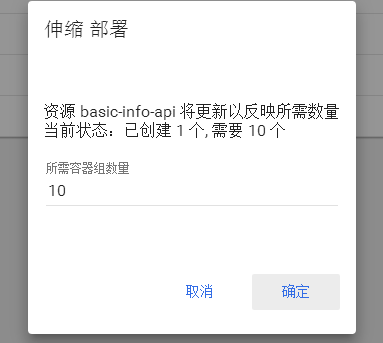

因刚才重启了一个节点,zuul地址改变了
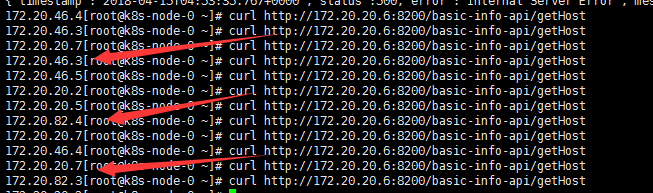
curl http://172.20.20.6:8200/basic-info-api/getHost
测试负载均衡
Kubernetes部署SpringCloud(二) 部署ZUUL与服务 非host, 伸缩与负载均衡的更多相关文章
- SpringCloud初体验:三、Feign 服务间调用(FeignClient)、负载均衡(Ribbon)、容错/降级处理(Hystrix)
FeignOpenFeign Feign是一种声明式.模板化的HTTP客户端. 看了解释过后,可以理解为他是一种 客户端 配置实现的策略,它实现 服务间调用(FeignClient).负载均衡(Rib ...
- 微服务Kong(十)——负载均衡参考
KONG为请求多个后端服务提供了多种负载均衡方案:一种是简单的基于DNS,另一种是更加动态的环形均衡器,他在不需要DNS服务器的情况下也允许服务注册. 一.基于DNS的负载均衡 当使用基于DNS的负载 ...
- 三十一、【WCF路由中间件】WCFHosting服务主机的路由器与负载均衡和实现思路
回<[开源]EFW框架系列文章索引> EFW框架源代码下载V1.3:http://pan.baidu.com/s/1c0dADO0 EFW框架实例源代码下载:http://pan.baid ...
- SpringCloud升级之路2020.0.x版-32. 改进负载均衡算法
本系列代码地址:https://github.com/JoJoTec/spring-cloud-parent 在前面一节,我们梳理了实现 Feign 断路器以及线程隔离的思路,这一节,我们先不看如何源 ...
- 基于Dubbo框架构建分布式服务(集群容错&负载均衡)
Dubbo是Alibaba开源的分布式服务框架,我们可以非常容易地通过Dubbo来构建分布式服务,并根据自己实际业务应用场景来选择合适的集群容错模式,这个对于很多应用都是迫切希望的,只需要通过简单的配 ...
- HAProxy(二):HAProxy的ACL规则实现智能负载均衡详解与示例
一.HAProxy的ACL的功能 ACL(Access Control List)访问控制列表,HAProxy中的ACL的匹配条件和控制条件有许多种,功能很强大,可以通过源地址.源端口.目标地址.目标 ...
- 微服务通信之feign集成负载均衡
前言 书接上文,feign接口是如何注册到容器想必已然清楚,现在我们着重关心一个问题,feign调用服务的时候是如何抉择的?上一篇主要是从读源码的角度入手,后续将会逐步从软件构架方面进行剖析. 一.R ...
- springboot10-springcloud-eureka 服务注册与发现,负载均衡客户端(ribbon,feign)调用
创建5个项目: 1.服务注册中心 2.服务提供者1 3.服务提供者2(与服务提供者1的代码实现一样,这是是为了模拟负载均衡) 4.ribbon客户端项目 5.feign客户端项目 如图: 一.注册中心 ...
- Spring Cloud微服务开发笔记5——Ribbon负载均衡策略规则定制
上一篇文章单独介绍了Ribbon框架的使用,及其如何实现客户端对服务访问的负载均衡,但只是单独从Ribbon框架实现,没有涉及spring cloud.本文着力介绍Ribbon的负载均衡机制,下一篇文 ...
随机推荐
- Linux下阅读MHT文件
Linux下阅读MHT文件 2016年02月04日 15:11:32 dj0379 阅读数:1769 mht是一种WEB电子邮件档案,用IE选择保存网页类型时可以看到有这一项,其最大优点是所保存的 ...
- Chart-template
ylbtech-Chart: 1.返回顶部 1-1. 2.返回顶部 3.返回顶部 4.返回顶部 5.返回顶部 6.返回顶部 7.返回顶部 8.返回顶部 9.返回顶部 ...
- 几种php加速器比较
一.PHP加速器介绍 PHP加速器是一个为了提高PHP执行效率,从而缓存起PHP的操作码,这样PHP后面执行就不用解析转换了,可以直接调用PHP操作码,这样速度上就提高了不少. Apache中使用mo ...
- [Canvas]Bombman v1.00
爆破小人Canvas版,请点此下载,并用浏览器打开试玩. 图例: 源码: <!DOCTYPE html> <html lang="utf-8"> <m ...
- 调用 setState 之后发生了什么?
(1)代码中调用 setState 函数之后,React 会将传入的参数对象与组件当前的状态合并,然后触发所谓的调和过程(Reconciliation).(2)经过调和过程,React 会以相对高效的 ...
- (原)pycharm中debugger时console如何打开
转载请注明出处; https://www.cnblogs.com/darkknightzh/p/9913439.html 使用pycharm在debugger时,旁边的console一不小心给关了.要 ...
- Authentication 方案优化探索(JWT, Session, Refresh Token, etc.)
转载自:http://www.jianshu.com/p/5ac8a0e1e5a8
- 赋值文件夹名称为日期的doc命令
copy D:\111.txt d:\%date:~0,4%年%date:~5,2%月%date:~8,2%日.*
- Error loading page Domain: WebKitErrorDomain Error Code: 101
使用 WebView 组件,loading的过程中出现这个错误. 解决方案: webVIew 里面加 renderError={ (e) => { if (e === 'WebKitErrorD ...
- Socket网络编程--聊天程序(4)
上一小节讲到可以实现多客户端与服务器进行通讯,对于每一个客户端的连接请求,服务器都要分配一个进程进行处理.对于多用户连接时,服务器会受不了的,而且还很消耗资源.据说有个select函数可以用,好像还很 ...