
TensorFlow实战第四课(tensorboard数据可视化)
tensorboard可视化工具
tensorboard是tensorflow的可视化工具,通过这个工具我们可以很清楚的看到整个神经网络的结构及框架。
通过之前展示的代码,我们进行修改从而展示其神经网络结构。
一、搭建图纸
首先对input进行修改,将xs,ys进行新的名称指定x_in y_in
这里指定的名称,之后会在可视化图层中inputs中显示出来
xs= tf.placeholder(tf.float32, [None, 1],name='x_in')
ys= tf.placeholder(tf.loat32, [None, 1],name='y_in')
使用with.tf.name_scope('inputs')可以将xs ys包含进来,形成一个大的图层,图层的名字就是
with.tf.name_scope()方法中的参数
with tf.name_scope('inputs'):

    # define placeholder for inputs to network

    xs = tf.placeholder(tf.float32, [None, 1])

    ys = tf.placeholder(tf.float32, [None, 1])
接下来编辑layer
编辑前的代码片段:
def add_layer(inputs, in_size, out_size, activation_function=None):

    # add one more layer and return the output of this layer

    Weights = tf.Variable(tf.random_normal([in_size, out_size]))

    biases = tf.Variable(tf.zeros([1, out_size]) + 0.1)

    Wx_plus_b = tf.add(tf.matmul(inputs, Weights), biases)

    if activation_function is None:

        outputs = Wx_plus_b

    else:

        outputs = activation_function(Wx_plus_b, )

    return outputs
编辑后
def add_layer(inputs, in_size, out_size, activation_function=None):

    # add one more layer and return the output of this layer

    with tf.name_scope('layer'):

        Weights= tf.Variable(tf.random_normal([in_size, out_size]))

        # and so on...
定义完大的框架layer后,通知需要定义里面小的部件weights biases activationfunction
定义方法有两种,一是用tf.name_scope(),二是在Weights中指定名称W
    def add_layer(inputs, in_size, out_size, activation_function=None):

    #define layer name

    with tf.name_scope('layer'):

        #define weights name

        with tf.name_scope('weights'):

            Weights= tf.Variable(tf.random_normal([in_size, out_size]),name='W')

        #and so on......
接着定义biases,方法同上
def add_layer(inputs, in_size, out_size, activation_function=None):

    #define layer name

    with tf.name_scope('layer'):

        #define weights name

        with tf.name_scope('weights')

            Weights= tf.Variable(tf.random_normal([in_size, out_size]),name='W')

        # define biase

        with tf.name_scope('Wx_plus_b'):

            Wx_plus_b = tf.add(tf.matmul(inputs, Weights), biases)

        # and so on....
最后编辑loss 将with.tf.name_scope( )添加在loss上方 并起名为loss
这句话就是绘制了loss
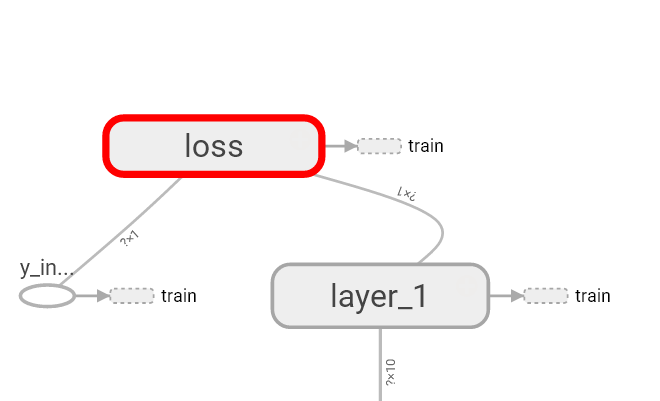
最后再对train_step进行编辑
with tf.name_scope('train'):

    train_step = tf.train.GradientDescentOptimizer(0.1).minimize(loss)
我们还需要运用tf.summary.FileWriter( )将上面绘画的图保存到一个目录中,方便用浏览器浏览。
这个方法中的第二个参数需要使用sess.graph。因此我们把这句话放在获取session后面。
这里的graph是将前面定义的框架信息收集起来,然后放在logs/目录下面。
sess = tf.Session() # get session

# tf.train.SummaryWriter soon be deprecated, use following

writer = tf.summary.FileWriter("logs/", sess.graph)
最后在终端中使用命令获取网址即可查看
tensorboard --logdir logs
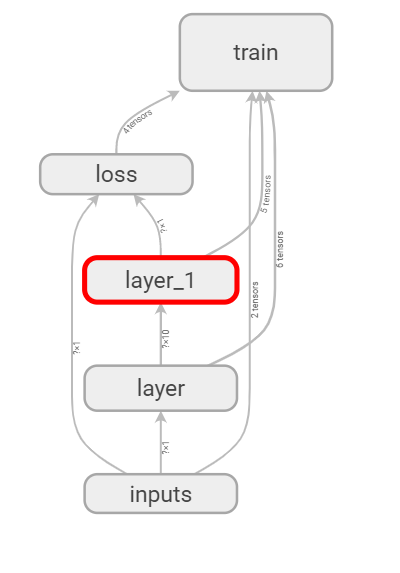
完整代码:
#如何可视化神经网络

#tensorboard

import tensorflow as tf

def add_layer(inputs, in_size, out_size, activation_function=None):

    # add one more layer and return the output of this layer

    with tf.name_scope('layer'):

        with tf.name_scope('weights'):

            Weights = tf.Variable(tf.random_normal([in_size, out_size]), name='W')

        with tf.name_scope('biases'):

            biases = tf.Variable(tf.zeros([1, out_size]) + 0.1, name='b')

        with tf.name_scope('Wx_plus_b'):

            Wx_plus_b = tf.add(tf.matmul(inputs, Weights), biases)

        if activation_function is None:

            outputs = Wx_plus_b

        else:

            outputs = activation_function(Wx_plus_b)

        return outputs

# define placeholder for inputs to network

with tf.name_scope('inputs'):

    xs = tf.placeholder(tf.float32, [None, 1], name='x_input')

    ys = tf.placeholder(tf.float32, [None, 1], name='y_input')

# add hidden layer

l1 = add_layer(xs, 1, 10, activation_function=tf.nn.relu)

# add output layer

prediction = add_layer(l1, 10, 1, activation_function=None)

# the error between prediciton and real data

with tf.name_scope('loss'):

    loss = tf.reduce_mean(tf.reduce_sum(tf.square(ys - prediction), reduction_indices=[1]))

with tf.name_scope('train'):

    train_step = tf.train.GradientDescentOptimizer(0.1).minimize(loss)

sess = tf.Session()

writer = tf.summary.FileWriter("logs/", sess.graph)

init = tf.global_variables_initializer()

sess.run(init)
-------------------------------------------------------------------
tensorflow可视化训练过程的图标是如何制作的?
首先要添加一些模拟数据。nump可以帮助我们添加一些模拟数据。
利用np.linespace()产生随机的数字 同时为了模拟更加真实 我们会添加一些噪声 这些噪声是通过np.random.normal()随机产生的。
 x_data= np.linspace(-1, 1, 300, dtype=np.float32)[:,np.newaxis]

 noise=  np.random.normal(0, 0.05, x_data.shape).astype(np.float32)

 y_data= np.square(x_data) -0.5+ noise
在layer中为weights biases设置变化图表
首先我们在add_layer()方法中添加一个参数n_layer 来标识层数 并且用变量layer_name代表其每层的名称
def add_layer(

    inputs ,

    in_size,

    out_size,

    n_layer,

    activation_function=None):

    ## add one more layer and return the output of this layer

    layer_name='layer%s'%n_layer  ## 定义一个新的变量

    ## and so on ……
接下来 我们层中的Weights设置变化图 tensorflow中提供了tf.histogram_summary( )方法,用来绘制图片,第一个参数是图表的名称,第二个参数是图标要记录的变量。
def add_layer(inputs ,

            in_size,

            out_size,n_layer,

            activation_function=None):

    ## add one more layer and return the output of this layer

    layer_name='layer%s'%n_layer

    with tf.name_scope('layer'):

         with tf.name_scope('weights'):

              Weights= tf.Variable(tf.random_normal([in_size, out_size]),name='W')

              tf.summary.histogram(layer_name + '/weights', Weights)

    ##and so no ……
同样的方法我们对biases进行绘制图标:
with tf.name_scope('biases'):

    biases = tf.Variable(tf.zeros([1,out_size])+0.1, name='b')

    tf.summary.histogram(layer_name + '/biases', biases)
至于activation_function( ) 可以不用绘制,我们对output 使用同样的方法
最后通过修改 addlayer()方法如下所示
def add_layer(inputs, in_size, out_size, n_layer, activation_function=None):

    # add one more layer and return the output of this layer

    #对神经层进行命名

    layer_name = 'layer%s' % n_layer

    with tf.name_scope(layer_name):

        with tf.name_scope('weights'):

            Weights = tf.Variable(tf.random_normal([in_size, out_size]), name='W')

            tf.summary.histogram(layer_name + '/weights', Weights)

        with tf.name_scope('biases'):

            biases = tf.Variable(tf.zeros([1, out_size]) + 0.1, name='b')

            tf.summary.histogram(layer_name + '/biases', biases)

        with tf.name_scope('Wx_plus_b'):

            Wx_plus_b = tf.add(tf.matmul(inputs, Weights), biases)

        if activation_function is None:

            outputs = Wx_plus_b

        else:

            outputs = activation_function(Wx_plus_b, )

        tf.summary.histogram(layer_name + '/outputs', outputs)

    return outputs
设置loss的变化图
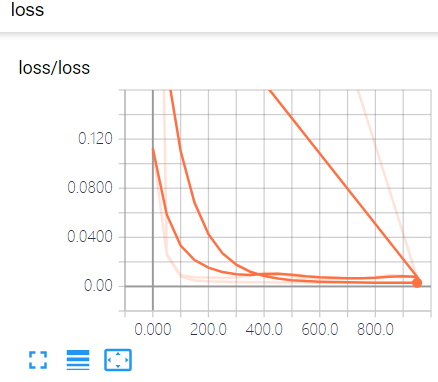
loss是tensorb的event下面的 这是由于我们使用的是tf.scalar_summary()方法。
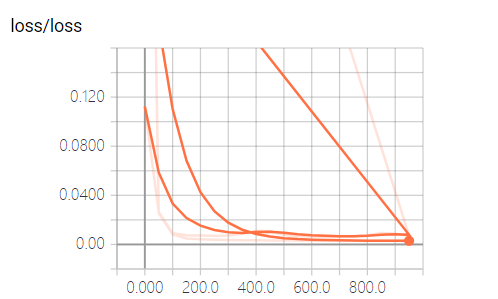
当你的loss函数图像呈现的是下降的趋势 说明学习是有效的
将所有训练图合并
接下来进行合并打包,tf.merge_all_summaries()方法会对我们所有的summaries合并到一起
sess = tf.Session()

#合并

merged = tf.summary.merge_all()

writer = tf.summary.FileWriter("logs/", sess.graph)

init = tf.global_variables_initializer()
训练数据
忽略不想写
完整代码如下:(运行代码后需要在终端中执行tensorboard --logdir logs)
import tensorflow as tf

import numpy as np

def add_layer(inputs, in_size, out_size, n_layer, activation_function=None):

    # add one more layer and return the output of this layer

    #对神经层进行命名

    layer_name = 'layer%s' % n_layer

    with tf.name_scope(layer_name):

        with tf.name_scope('weights'):

            Weights = tf.Variable(tf.random_normal([in_size, out_size]), name='W')

            tf.summary.histogram(layer_name + '/weights', Weights)

        with tf.name_scope('biases'):

            biases = tf.Variable(tf.zeros([1, out_size]) + 0.1, name='b')

            tf.summary.histogram(layer_name + '/biases', biases)

        with tf.name_scope('Wx_plus_b'):

            Wx_plus_b = tf.add(tf.matmul(inputs, Weights), biases)

        if activation_function is None:

            outputs = Wx_plus_b

        else:

            outputs = activation_function(Wx_plus_b, )

        tf.summary.histogram(layer_name + '/outputs', outputs)

    return outputs

# Make up some real data

x_data = np.linspace(-1, 1, 300)[:, np.newaxis]

noise = np.random.normal(0, 0.05, x_data.shape)

y_data = np.square(x_data) - 0.5 + noise

# define placeholder for inputs to network

with tf.name_scope('inputs'):

    xs = tf.placeholder(tf.float32, [None, 1], name='x_input')

    ys = tf.placeholder(tf.float32, [None, 1], name='y_input')

# add hidden layer

l1 = add_layer(xs, 1, 10, n_layer=1, activation_function=tf.nn.relu)

# add output layer

prediction = add_layer(l1, 10, 1, n_layer=2, activation_function=None)

# the error between prediciton and real data

with tf.name_scope('loss'):

    loss = tf.reduce_mean(tf.reduce_sum(tf.square(ys - prediction),

                                        reduction_indices=[1]))

    tf.summary.scalar('loss', loss)

with tf.name_scope('train'):

    train_step = tf.train.GradientDescentOptimizer(0.1).minimize(loss)

sess = tf.Session()

#合并

merged = tf.summary.merge_all()

writer = tf.summary.FileWriter("logs/", sess.graph)

init = tf.global_variables_initializer()

sess.run(init)

for i in range(1000):

    sess.run(train_step, feed_dict={xs: x_data, ys: y_data})

    if i % 50 == 0:

        result = sess.run(merged,feed_dict={xs: x_data, ys: y_data})

        #i 就是记录的步数

        writer.add_summary(result, i)
tensorboard查看效果 使用命令tensorboard --logdir logs
TensorFlow实战第四课(tensorboard数据可视化)的更多相关文章
- Tensorflow搭建神经网络及使用Tensorboard进行可视化
创建神经网络模型 1.构建神经网络结构,并进行模型训练 import tensorflow as tfimport numpy as npimport matplotlib.pyplot as plt ...
- TensorFlow实战第三课(可视化、加速神经网络训练)
matplotlib可视化 构件图形 用散点图描述真实数据之间的关系(plt.ion()用于连续显示) # plot the real data fig = plt.figure() ax = fig ...
- TensorFlow实战第七课(dropout解决overfitting)
Dropout 解决 overfitting overfitting也被称为过度学习,过度拟合.他是机器学习中常见的问题. 图中的黑色曲线是正常模型,绿色曲线就是overfitting模型.尽管绿色曲 ...
- TensorFlow实战第八课(卷积神经网络CNN)
首先我们来简单的了解一下什么是卷积神经网路(Convolutional Neural Network) 卷积神经网络是近些年逐步兴起的一种人工神经网络结构, 因为利用卷积神经网络在图像和语音识别方面能 ...
- 吴裕雄 数据挖掘与分析案例实战(5)——python数据可视化
# 饼图的绘制# 导入第三方模块import matplotlibimport matplotlib.pyplot as plt plt.rcParams['font.sans-serif']=['S ...
- CNN中tensorboard数据可视化
1.CNN_my_test.py import tensorflow as tf from tensorflow.examples.tutorials.mnist import input_data ...
- Tensorflow实战第十一课(RNN Regression 回归例子 )
本节我们会使用RNN来进行回归训练(Regression),会继续使用自己创建的sin曲线预测一条cos曲线. 首先我们需要先确定RNN的各种参数: import tensorflow as tf i ...
- Tensorflow实战第十课(RNN MNIST分类)
设置RNN的参数 我们本节采用RNN来进行分类的训练(classifiction).会继续使用手写数据集MNIST. 让RNN从每张图片的第一行像素读到最后一行,然后进行分类判断.接下来我们导入MNI ...
- TensorFlow实战第六课(过拟合)
本节讲的是机器学习中出现的过拟合(overfitting)现象,以及解决过拟合的一些方法. 机器学习模型的自负又表现在哪些方面呢. 这里是一些数据. 如果要你画一条线来描述这些数据, 大多数人都会这么 ...
随机推荐
- Java进阶知识03 Hibernate的基础配置详解
1.Hibernate的原理/流程步骤 1.通过Configuration().configure(); 读取并解析hibernate.cfg.xml配置文件,并创建一个configuration对象 ...
- hdu 5831 Rikka with Parenthesis II 括号匹配+交换
Rikka with Parenthesis II Time Limit: 2000/1000 MS (Java/Others) Memory Limit: 65536/65536 K (Jav ...
- Python基础之注释
有时候我们写的东西不一定都是给用户看的,或者不希望解释器执行,那么我们可以选择注释掉代码. 被注释的内容是不会执行的,可以方便在以后能读懂代码. 注释分为两种,一种是单行注释,一种是多行注释. 单行注 ...
- cin.clear()与cin.sync()的使用
cin.clear()与cin.sync()使用是有先后顺序的. 他们的作用: cin.clear(); //将流中的所有状态都重设为有效值 cin.sync();//清空流 在输入错误的情况下,如果 ...
- Nginx事件管理之ngx_event_core_module模块
1. 概述 ngx_event_core_module 模块是一个事件类型的模块,它在所有事件模块中的顺序是第一位.它主要完成以下两点任务: 创建连接池(包括读/写事件): 决定究竟使用哪些事件驱动机 ...
- tp5 模型中 关联查询(省去了foreach写法)
1.控制器中 $list = Userlawsbook::where($where)->with('lawsbook')->paginate(7); // 此处查出来为数组对象 dump ...
- weblogic性能调优
1.设置java参数: a) 编辑Weblogic Server启动脚本文件: /user_projects/domains/Domain_jgbs/bin/startWebLogic.sh /use ...
- 2.ibatis执行流程解析
以下仅为个人理解,如有问题,欢迎指正
- Android SDK更新后Eclipse无法正常工作问题
一,问题描述 更新完Android SDK后,如果你的ADT版本低于其设定的最新版本,你更新完后立马会报错 这个时候你的项目出现各种红线,反正看着让人很不爽 二,原因 每次你更新完SDK后,Andro ...
- vue问题六:表单验证
表单验证规则 查看文档:https://blog.csdn.net/weixin_42018790/article/details/80762149 1). el-form增加 :rules=&quo ...