
更改jupyter notebook的单元格宽度和主题颜色(theme)
一、单元格宽度
这个命令:
jt -t gruvboxl -f roboto -fs 12 -cellw 100% -T -N
它将宽度设置为100%
二、主题颜色
在用jupyter notebook时,想到一个问题,能不能更改jupyter notebook的主题颜色,总是看着白色的默认主题,有些乏味,也不够酷炫。博主找到了让jupyter notebook变得酷炫的方法。
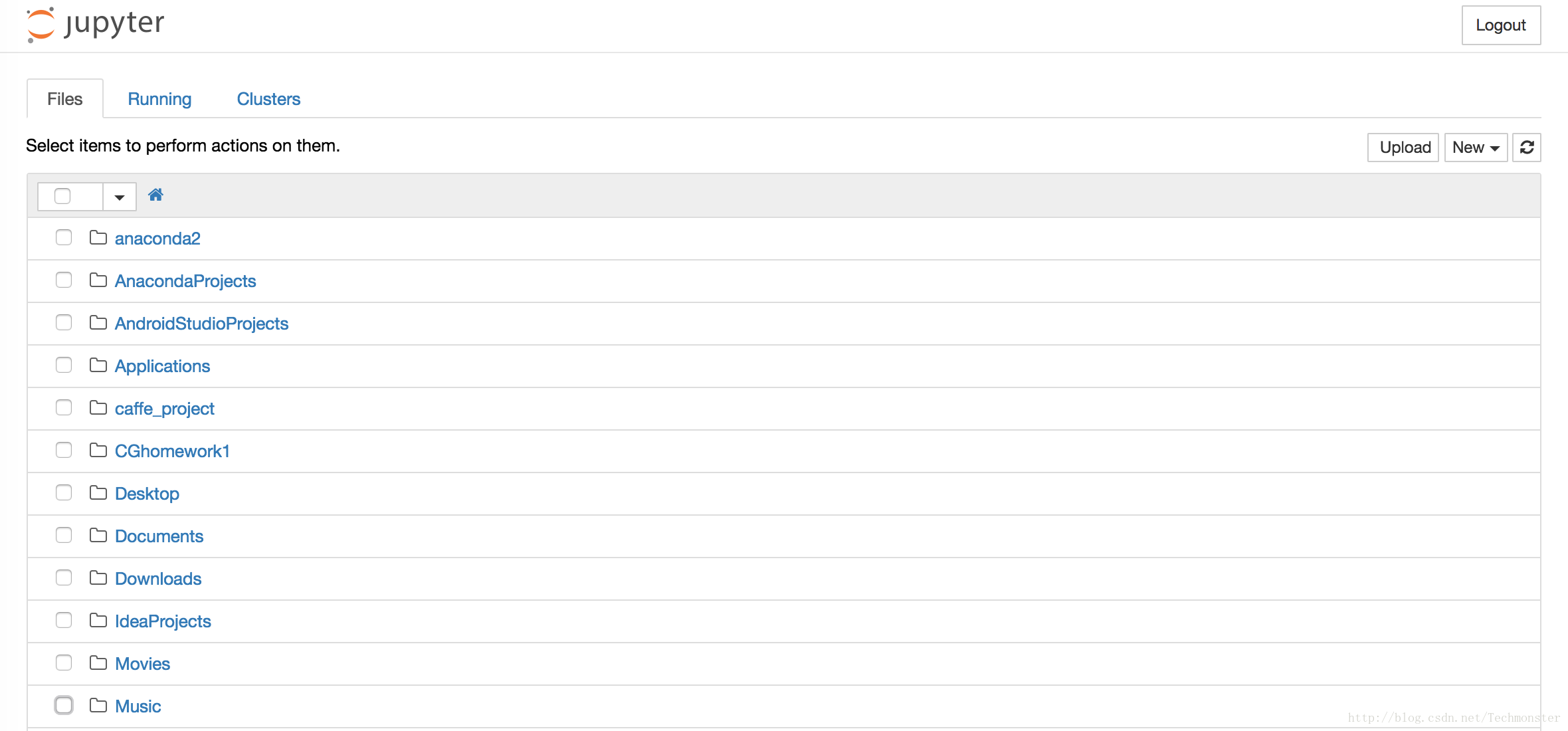
默认的样式:
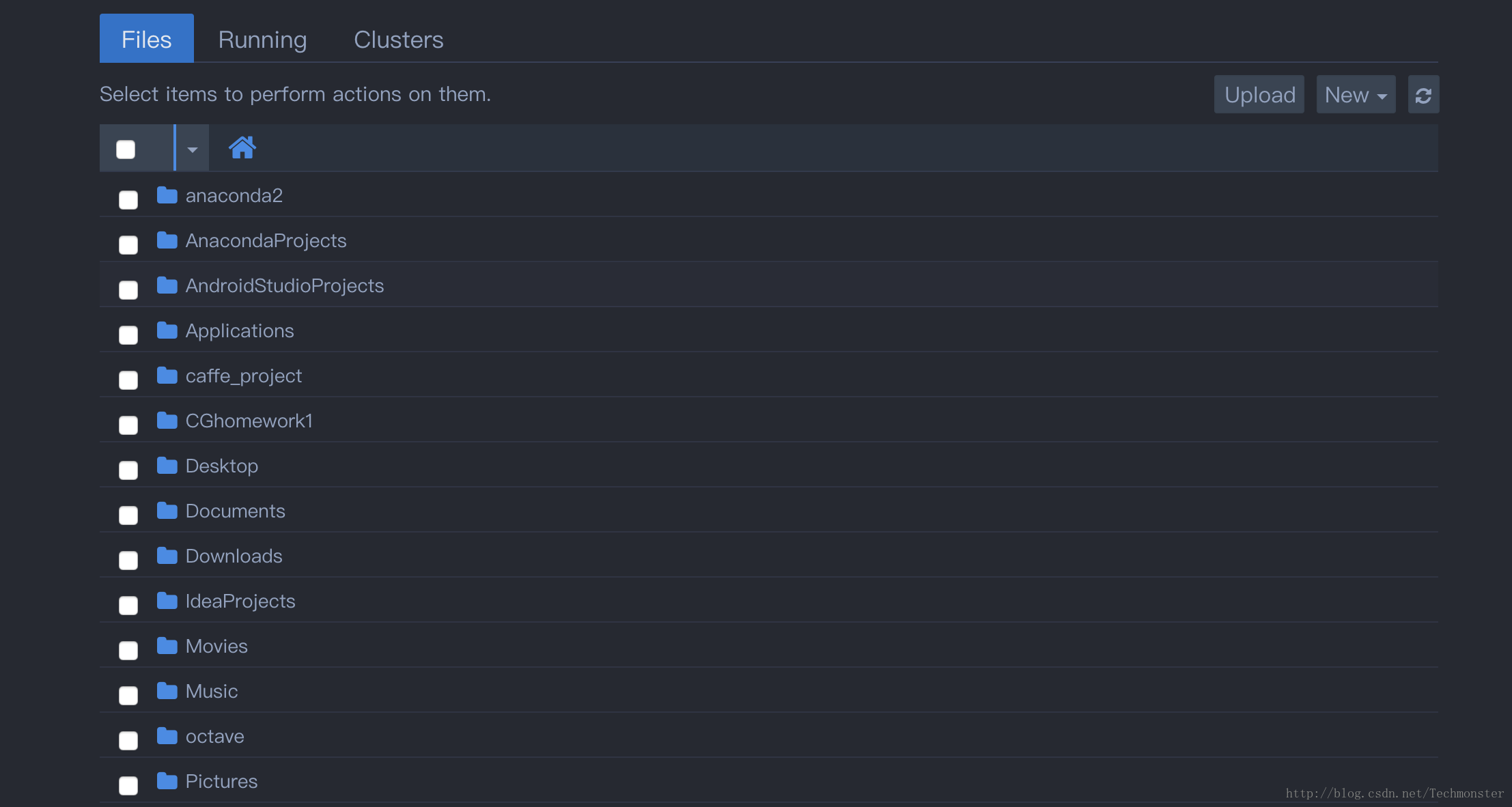
使用之后:
除此之外,在pycharm中的jupyter
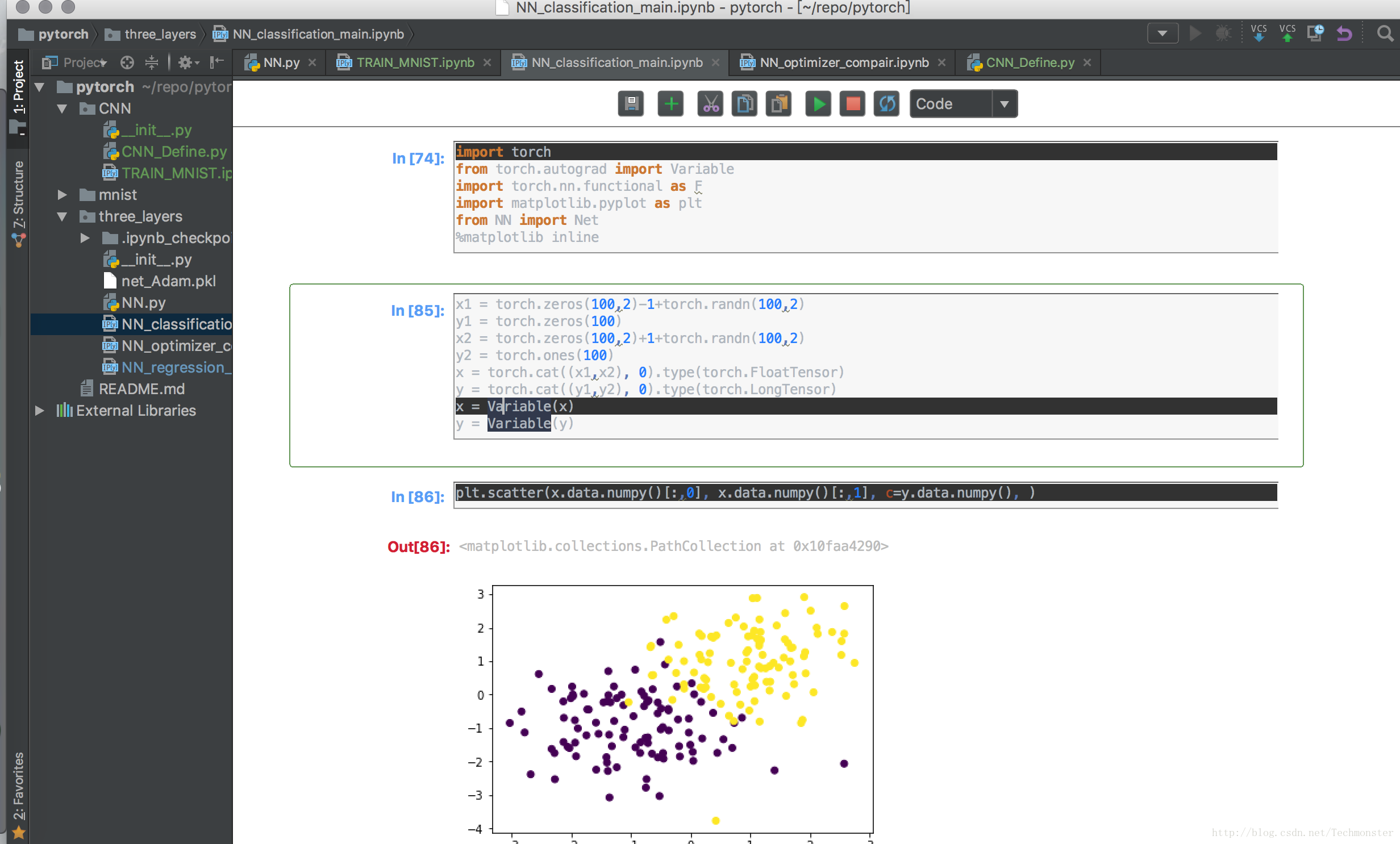
notebook,颜色上也有一些问题。我不知道是特例还是普遍现象,在pycharm中,jupyter
notebook的背景颜色很多时候不能根据IDE的主题来一起更改,很多时候会出现下图所示情况。也可以通过这种方法来解决。
使用的是jupyter-themes,下面介绍用法:
首先在控制台下用pip 安装jupyter-themes
pip install --upgrade jupyterthemes- 1
- 1
然后可以查看所有可用的主题:
usename$ jt -l

Available Themes:

   chesterish

   grade3

   monokai

   oceans16

   onedork

   solarizedd

   solarizedl
三、作者github的方法介绍
Links
Requirements
- Python 2.7, 3.4, 3.5, 3.6
- Jupyter (Anaconda recommended)
- matplotlib
Install with pip
# install jupyterthemes

pip install jupyterthemes

# upgrade to latest version

pip install --upgrade jupyterthemes
Known issues
- refreshing / removing / resetting: depending on your system, browser, etc., you may need to empty your browser cache after installing a new theme (
-t) or attempting to restore the default (-r) in order for those changes to take effect. (see discussion here). At the very least you'll need to refresh your browser window (usuallycmd+rorctrl+r). - install issue: if you get an error saying
jtis not recognized, try this fix. - slow render when scrolling: fix available here
- for best results: use notebook>=5.0 (
pip install --upgrade notebook)
Command Line Usage
jt  [-h] [-l] [-t THEME] [-f MONOFONT] [-fs MONOSIZE] [-nf NBFONT]

    [-nfs NBFONTSIZE] [-tf TCFONT] [-tfs TCFONTSIZE] [-dfs DFFONTSIZE]

    [-m MARGINS] [-cursw CURSORWIDTH] [-cursc CURSORCOLOR] [-vim]

    [-cellw CELLWIDTH] [-lineh LINEHEIGHT] [-altp] [-altmd] [-altout]

    [-P] [-T] [-N] [-r] [-dfonts]
Description of Command Line options
| cl options | arg | default |
|---|---|---|
| Usage help | -h | -- |
| List Themes | -l | -- |
| Theme Name to Install | -t | -- |
| Code Font | -f | -- |
| Code Font-Size | -fs | 11 |
| Notebook Font | -nf | -- |
| Notebook Font Size | -nfs | 13 |
| Text/MD Cell Font | -tf | -- |
| Text/MD Cell Fontsize | -tfs | 13 |
| Pandas DF Fontsize | -dfs | 9 |
| Output Area Fontsize | -ofs | 8.5 |
| Mathjax Fontsize (%) | -mathfs | 100 |
| Intro Page Margins | -m | auto |
| Cell Width | -cellw | 980 |
| Line Height | -lineh | 170 |
| Cursor Width | -cursw | 2 |
| Cursor Color | -cursc | -- |
| Alt Prompt Layout | -altp | -- |
| Alt Markdown BG Color | -altmd | -- |
| Alt Output BG Color | -altout | -- |
| Style Vim NBExt* | -vim | -- |
| Toolbar Visible | -T | -- |
| Name & Logo Visible | -N | -- |
| Kernel Logo Visible | -kl | -- |
| Reset Default Theme | -r | -- |
| Force Default Fonts | -dfonts | -- |
Command Line Examples
# list available themes

# onedork | grade3 | oceans16 | chesterish | monokai | solarizedl | solarizedd

jt -l

# select theme...

jt -t chesterish

# restore default theme

# NOTE: Need to delete browser cache after running jt -r

# If this doesn't work, try starting a new notebook session.

jt -r

# toggle toolbar ON and notebook name ON

jt -t grade3 -T -N

# toggle kernel logo.  kernel logo is in same container as name

# toggled with -N.  That means that making the kernel logo visible is

# pointless without also making the name visible

jt -t grade3 -N -kl

# set code font to 'Roboto Mono' 12pt

# (see monospace font table below)

jt -t onedork -f roboto -fs 12

# set code font to Fira Mono, 11.5pt

# 3digit font-sizes get converted into float (115-->11.5)

# 2digit font-sizes > 25 get converted into float (85-->8.5)

jt -t solarizedd -f fira -fs 115

# set font/font-size of markdown (text cells) and notebook (interface)

# see sans-serif & serif font tables below

jt -t oceans16 -tf merriserif -tfs 10 -nf ptsans -nfs 13

# adjust cell width (% screen width) and line height

jt -t chesterish -cellw 90% -lineh 170

# or set the cell width in pixels by leaving off the '%' sign

jt -t solarizedl -cellw 860

# fix the container-margins on the intro page (defaults to 'auto')

jt -t monokai -m 200

# adjust cursor width (in px) and make cursor red

# options: b (blue), o (orange), r (red), p (purple), g (green), x (font color)

jt -t oceans16 -cursc r -cursw 5

# choose alternate prompt layout (narrower/no numbers)

jt -t grade3 -altp

# my two go-to styles

# dark

jt -t onedork -fs 95 -altp -tfs 11 -nfs 115 -cellw 88% -T

# light

jt -t grade3 -fs 95 -altp -tfs 11 -nfs 115 -cellw 88% -T
Set Plotting Style (from within notebook)
jtplot.style() makes changes to matplotlib's rcParams dictionary so that figure aesthetics match those of a chosen jupyterthemes style. In addition to setting the color scheme, jtplot.style() allows you to control various figure properties (spines, grid, font scale, etc.) as well as the plotting "context" (borrowed from seaborn).
Note, these commands do not need to be re-run every time you generate a new plot, just once at the beginning of your notebook or whenever style changes are desired after that.
Pro-tip: Include the following two lines in ~/.ipython/profile_default/startup/startup.ipy file to set plotting style automatically whenever you start a notebook:
# import jtplot submodule from jupyterthemes

from jupyterthemes import jtplot

# currently installed theme will be used to

# set plot style if no arguments provided

jtplot.style()
jtplot.style() Examples
# import jtplot module in notebook

from jupyterthemes import jtplot

# choose which theme to inherit plotting style from

# onedork | grade3 | oceans16 | chesterish | monokai | solarizedl | solarizedd

jtplot.style(theme='onedork')

# set "context" (paper, notebook, talk, poster)

# scale font-size of ticklabels, legend, etc.

# remove spines from x and y axes and make grid dashed

jtplot.style(context='talk', fscale=1.4, spines=False, gridlines='--')

# turn on X- and Y-axis tick marks (default=False)

# turn off the axis grid lines (default=True)

# and set the default figure size

jtplot.style(ticks=True, grid=False, figsize=(6, 4.5))

# reset default matplotlib rcParams

jtplot.reset()
Monospace Fonts (code cells)
| -f arg | Monospace Font |
|---|---|
| anka | Anka/Coder |
| anonymous | Anonymous Pro |
| aurulent | Aurulent Sans Mono |
| bitstream | Bitstream Vera Sans Mono |
| bpmono | BPmono |
| code | Code New Roman |
| consolamono | Consolamono |
| cousine | Cousine |
| dejavu | DejaVu Sans Mono |
| droidmono | Droid Sans Mono |
| fira | Fira Mono |
| firacode | Fira Code |
| generic | Generic Mono |
| hack | Hack |
| hasklig | Hasklig |
| inconsolata | Inconsolata-g |
| inputmono | Input Mono |
| iosevka | Iosevka |
| liberation | Liberation Mono |
| meslo | Meslo |
| office | Office Code Pro |
| oxygen | Oxygen Mono |
| roboto | Roboto Mono |
| saxmono | saxMono |
| source | Source Code Pro |
| sourcemed | Source Code Pro Medium |
| ptmono | PT Mono |
| ubuntu | Ubuntu Mono |
Sans-Serif Fonts
| -nf/-tf arg | Sans-Serif Font |
|---|---|
| opensans | Open Sans |
| droidsans | Droid Sans |
| exosans | Exo_2 |
| latosans | Lato |
| ptsans | PT Sans |
| robotosans | Roboto |
| sourcesans | Source Sans Pro |
Serif Fonts
| -nf/-tf arg | Serif Font |
|---|---|
| loraserif | Lora |
| ptserif | PT Serif |
| georgiaserif | Georgia |
| cardoserif | Cardo |
| crimsonserif | Crimson Text |
| ebserif | EB Garamond |
| merriserif | Merriweather |
| neutonserif | Neuton |
| goudyserif | Sorts Mill Goudy |
更改jupyter notebook的单元格宽度和主题颜色(theme)的更多相关文章
- firefox ie chrome 设置单元格宽度 td width 有bug,不能正常工作。以下方式可以解决
1. firefox ie chrome 设置单元格宽度 td width 有bug,不能正常工作. 如果是上面一行 和下面一行是分别属于两个table,但是他们的列需要对齐,也就是说分开画的,然后设 ...
- 关于html表格单元格宽度的计算规则
* { margin: 0; padding: 0 } body { background: #fafafa } ul,li { list-style: none } h1 { margin: 20p ...
- Easyui datagrid 设置内容超过单元格宽度时自动换行显示
datagrid 设置内容超过单元格宽度时自动换行显示 by:授客 QQ:1033553122 测试环境 jquery-easyui-1.5.3 问题描述 单元格内容超过单元格宽度不会自动化换行.如下 ...
- colgroup中col定义表格单元格宽度
colgroup中可以使用col来定义表格单元格宽度,可以使用像素(数字),百分比,我们来具体看看有什么不同. 先看一个最基本的:用像素(数字)表示,因为table有个宽度,这里表示占比 <ht ...
- CSS开发技巧(二):表格合并边框后的单元格宽度计算
前言: 分离边框模型和合并边框模型是表格的两种模型,它通过以下属性确定: border-collapse:separate(默认值) | collapse | inherit 当采用分离边框模型时,表 ...
- 读取Excel文件中的单元格的内容和颜色
怎样读取Excel文件中的单元格的内容和颜色 先创建一个Excel文件,在A1和A2中随意输入内容,设置A1的字体颜色为红色,A2的背景为黄色.需要 using Excel = Microsoft.O ...
- mac下更改Jupyter notebook工作目录
Jupyter notebook运行之后,默认的工作目录在mac下是个人文件夹,在windows下貌似也是如此.显然不太合理,需要修改它. 具体办法是: 进入终端命令行模式,输入下面的代码: jupy ...
- 【python】windows更改jupyter notebook(ipython)的默认打开工作路径
写在前面:本博客为本人原创,严禁任何形式的转载!本博客只允许放在博客园(.cnblogs.com),如果您在其他网站看到这篇博文,请通过下面这个唯一的合法链接转到原文! 本博客全网唯一合法URL:ht ...
- windows更改Jupyter Notebook工作的目录
1.将打开的Jupyter Notebook程序关闭,然后找到桌面快捷方式,右键=>属性,然后把目标后面输入框最后的“%USERPROFILE%”这个参数去掉后,确定.否则之后做的其它修改无法生 ...
随机推荐
- 关于lib和dll
关于lib和dll 声明:引用请注明出处http://blog.csdn.net/lg1259156776/ 说明:这里说的就是静态链接库LIB和动态链接库DL,有些时候经常弄混淆这两个东西,这里基于 ...
- 谈谈NPM和Webpack的关系
为什么有NPM: 当包引入数量很多时管理就成为了一个问题,这个就是npm为开发者行了方便之处,npm已经为你做好了依赖和版本的控制,也就是说使用npm可以让你从繁杂的依赖安装和版本冲突中解脱出来,进而 ...
- Homebrew介绍和使用
一.Homebrew是什么 Homebrew是一款Mac OS平台下的软件包管理工具,拥有安装.卸载.更新.查看.搜索等很多实用的功能.简单的一条指令,就可以实现包管理,而不用你关心各种依赖和文件路径 ...
- Shiro认证、角色、权限
Apache Shiro 是 Java 的一个安全框架.Shiro 可以帮助我们完成:认证.授权.加密.会话管理.与 Web 集成.缓存等. Shiro的内置Realm:IniRealm和JdbcRe ...
- 如何保持人际关系zz
作者:Faaany链接:https://www.zhihu.com/question/35590289/answer/63675007来源:知乎著作权归作者所有.商业转载请联系作者获得授权,非商业转载 ...
- springboot集成elk 三:springboot + Elasticsearch Rest-Client
注: 该集成方式,对Elasticsearch无版本限制,但是需要自行封装请求,解析结果等. <dependency> <groupId>org.elasticsearch. ...
- Office常用快捷键大全,包含 Word、Excel、PowerPoint
功能 快捷键 查找文字.格式和特殊项 Ctrl+G 使字符变为粗体 Ctrl+B 为字符添加下划线 Ctrl+U 删除段落格式 Ctrl+Q 复制所选文本或对象 Ctrl+C 剪切所选文本或对象 Ct ...
- 整合thymeleaf
1.导入thymeleaf依赖 2.controller类 (1)模板 导入命名空间,xmlns:th="http://www.thymeleaf.org" (2)ModelAnd ...
- 在一个form表单中实现多个submit不同的action
在button中用JS的事件绑定onclick实现,如下: <!-- employees是表单的name属性值--> <script type="text/javascri ...
- uboot-的start.S详细注解及分析
原文地址:uboot-的start.S详细注解及分析 作者:zhouyg11 大多数bootloader都分为stage1和stage2两部分,u-boot也不例外.依赖于CPU体系结构的代码(如设备 ...