
python_tkinter弹出对话框1
tkinter提供了三个模块,可以创建弹出对话窗口:(使用必须单独导入模块)
1.messagebox 消息对话框
示例:askokcancel
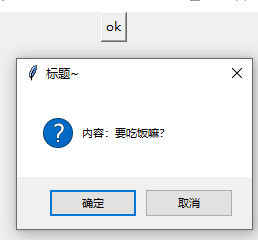
import tkinter

# 导入消息对话框子模块

import tkinter.messagebox

# 创建主窗口

root = tkinter.Tk()

# 设置窗口大小

root.minsize(300,300)

# 声明函数

def okqqq():

    # 弹出对话框

    result = tkinter.messagebox.askokcancel(title = '标题~',message='内容:要吃饭嘛?')
  # 返回值为True或者False

    print(result)

# 添加按钮

btn1 = tkinter.Button(root,text = 'ok',command = okqqq)

btn1.pack()

# 加入消息循环

root.mainloop()
示例:askquestion
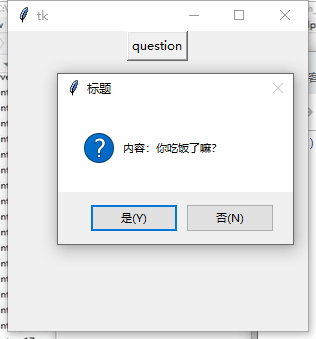
import tkinter

# 导入消息对话框子模块

import tkinter.messagebox

# 创建主窗口

root = tkinter.Tk()

# 设置窗口大小

root.minsize(300,300)

# 声明函数

def question():

    # 弹出对话框

    result = tkinter.messagebox.askquestion(title = '标题',message='内容:你吃饭了嘛?')

    # 返回值为:yes/no

    print(result)

# 添加按钮

btn1 = tkinter.Button(root,text = 'question',command = question)

btn1.pack()

# 加入消息循环

root.mainloop()
示例:askretrycancel (重试)

import tkinter

# 导入消息对话框子模块

import tkinter.messagebox

# 创建主窗口

root = tkinter.Tk()

# 设置窗口大小

root.minsize(300,300)
# 声明函数

def retry():

    # 弹出对话框

    result = tkinter.messagebox.askretrycancel(title = '标题',message='内容:女生拒绝了你!?')

    # 返回值为:True或者False

    print(result)

# 添加按钮

btn1 = tkinter.Button(root,text = 'retry',command = retry)

btn1.pack()
# 加入消息循环

root.mainloop()
示例:askyesno
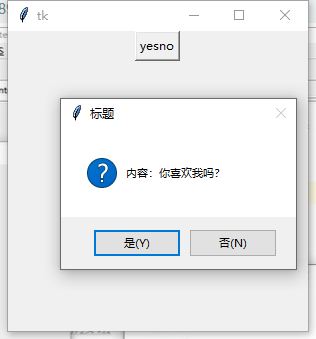
# 声明函数

def yesno():

    # 弹出对话框

    result = tkinter.messagebox.askyesno(title = '标题',message='内容:你喜欢我吗?')

    # 返回值为:True或者False

    print(result)

# 添加按钮

btn1 = tkinter.Button(root,text = 'yesno',command = yesno)

btn1.pack()
示例:showerror (出错)
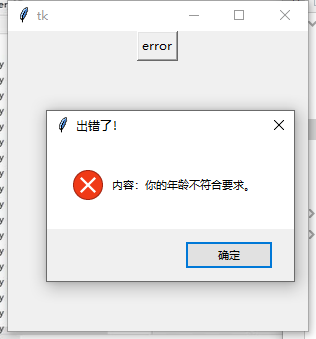
# 声明函数

def error():

    # 弹出对话框

    result = tkinter.messagebox.showerror(title = '出错了!',message='内容:你的年龄不符合要求。')

    # 返回值为:ok

    print(result)

# 添加按钮

btn1 = tkinter.Button(root,text = 'error',command = error)

btn1.pack()
示例:showwarning(警告)
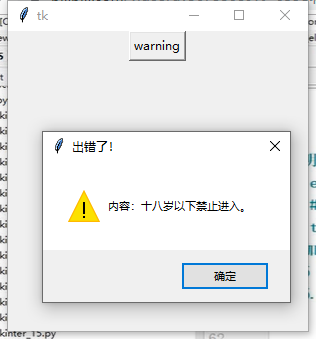
# 声明函数

def warning():

    # 弹出对话框

    result = tkinter.messagebox.showwarning(title = '出错了!',message='内容:十八岁以下禁止进入。')

    # 返回值为:ok

    print(result)

# 添加按钮

btn1 = tkinter.Button(root,text = 'warning',command = warning)

btn1.pack()
示例:showinto (信息提示)

# 声明函数

def info():

    # 弹出对话框

    result = tkinter.messagebox.showinfo(title = '信息提示!',message='内容:您的女朋友收到一只不明来历的口红!')

    # 返回值为:ok

    print(result)

# 添加按钮

btn1 = tkinter.Button(root,text = 'info',command = info)

btn1.pack()
2.simpledialog 简单信息对话框
示例:asksting(获取字符串)
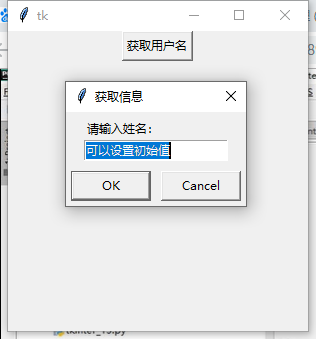
import tkinter

# 导入子模块

import tkinter.simpledialog

# 创建主窗口

root = tkinter.Tk()

# 设置窗口大小

root.minsize(300,300)

# 创建函数

def askname():

    # 获取字符串(标题,提示,初始值)

    result = tkinter.simpledialog.askstring(title = '获取信息',prompt='请输入姓名:',initialvalue = '可以设置初始值')

    # 打印内容

    print(result)

# 添加按钮

btn = tkinter.Button(root,text = '获取用户名',command = askname)

btn.pack()

# 加入消息循环

root.mainloop()
示例:askinteger(获取整型)

import tkinter

# 导入消息对话框子模块

import tkinter.simpledialog

# 创建主窗口

root = tkinter.Tk()

# 设置窗口大小

root.minsize(300,300)

# 创建函数

def askage():

    # 获取整型(标题,提示,初始值)

    result = tkinter.simpledialog.askinteger(title = '获取信息',prompt='请输入年龄:',initialvalue = '')

    # 打印内容

    print(result)

# 添加按钮

btn = tkinter.Button(root,text = '获取年龄',command = askage)

btn.pack()

# 加入消息循环

root.mainloop()
示例:askfloat(获取浮点型)

import tkinter

# 导入消息对话框子模块

import tkinter.simpledialog

# 创建主窗口

root = tkinter.Tk()

# 设置窗口大小

root.minsize(300,300)

# 创建函数

def askheight():

    # 获取浮点型数据(标题,提示,初始值)

    result = tkinter.simpledialog.askfloat(title = '获取信息',prompt='请输入身高(单位:米):',initialvalue = '18.0')

    # 打印内容

    print(result)

# 添加按钮

btn = tkinter.Button(root,text = '获取身高',command = askheight)

btn.pack()

# 加入消息循环

root.mainloop()
python_tkinter弹出对话框1的更多相关文章
- python_tkinter弹出对话框2
1.fledialog对话框 示例:askopenfilename(选择单个文件,获取文件路径) import tkinter # 导入消息对话框子模块 import tkinter.filedial ...
- 10.JAVA之GUI编程弹出对话框Dialog
在上节基础上添加对话框显示错误信息. 代码如下: /*弹出对话框显示错误信息,对话框一般不单独出现,一般依赖于窗体.*/ /*练习-列出指定目录内容*/ import java.awt.Button; ...
- 【Telerik】弹出对话框RadWindow,确认删除信息
要做一个删除功能,但是删除前正常都要弹出对话框确认一下是否删除信息,防止误删信息.
- Response.Write("<script>alert('弹出对话框!')</script>") 后跟Response.Redirect("page.aspx");不能弹出对话框,直接跳转页面了 如何解?
Response.Write和Response.Redirect一起用的时候就会这样,write脚本和redirect脚本不能同时使用,这样不会执行脚本,最好使用ClientScript 改进方法: ...
- selenium移动div里面的滚动条,操作弹出对话框
还是使用js来移动 首先要定位到这个元素 倾向于使用js来定位元素,输入下面的脚本,按下回车键,即可在调试页面看到对应的div块$("div.table-responsive") ...
- java selenium (十一) 操作弹出对话框
Web 开发人员通常需要利用JavaScript弹出对话框来给用户一些信息提示, 包括以下几种类型 阅读目录 对话框类型 1. 警告框: 用于提示用户相关信息的验证结果, 错误或警告等 2. 提示框 ...
- ABAP 弹出对话框
一组有用的用户交互窗口函数 显示多条消息 SAP系统用的是这个函数:C14Z_MESSAGES_SHOW_AS_POPUP POPUP_TO_CONFIRM_LOSS_OF_DATA 显示有YES/N ...
- AlertDialog.Builder弹出对话框
在Android中,弹出对话框使用AlertDialog.Builder方法. new AlertDialog.Builder(MainActivity.this).setTitle("本机 ...
- Android 手机卫士--弹出对话框
在<Android 手机卫士--解析json与消息机制发送不同类型消息>一文中,消息机制发送不同类型的信息还没有完全实现,在出现异常的时候,应该弹出吐司提示异常,代码如下: private ...
随机推荐
- HTTP网页请求状态码
我们平时在打开一些网页的时候,会遇到打不开的情况,页面提示404错误,这个404就是http状态码.如果我们可以正常打开网页,这时也会有http状态码的,这个状态码就是200,只不过这时我们是无法通过 ...
- Acquire and Release Fences
转载自: http://preshing.com/20130922/acquire-and-release-fences/ Acquire and release fences, in my op ...
- Windows Terminal Preview v0.7 Release
Windows Terminal Preview v0.7 Release The following key bindings are included by default within this ...
- 第二坑:Linux发布项目
在这里踩过两个坑: 1.第一个是上传文件的时候,不知道是什么原因,上传失败了,然后发布新版本的时候,依然用的上个版本的包,导致工作出现重大失误. 谨记:上传文件的时候,检查一下上传文件和本地文件的时间 ...
- Board Game CodeForces - 605D (BFS)
大意: 给定$n$张卡$(a_i,b_i,c_i,d_i)$, 初始坐标$(0,0)$. 假设当前在$(x,y)$, 若$x\ge a_i,y\ge b_i$, 则可以使用第$i$张卡, 使用后达到坐 ...
- raise ImproperlyConfigured('mysqlclient 1.3.13 or newer is required; you have %s.' % Database.__version__)
转自:http://www.cnblogs.com/xiaobinglife/articles/10716605.html 一.Django数据同步过程中遇到的问题: 1.raise Improper ...
- C# 第一次做项目。一些经验总结。
这是我的第一篇博客,写得不好望大家多多包涵. 初学C#2个多月,拿着老师给的项目,试着做了做,发现自己在编程方面有很多陋习与编程知识方面的不足. 首先是没有遵守某一个设计模式,这导致我想到哪里就做到了 ...
- solr 配置中文分析器/定义业务域/配置DataImport功能(测试用)
一.配置中文分析器 使用IKAnalyzer 配置方法: 1)把IK的jar包添加到solr工程中/WEB-INF/lib目录下 2)把IK的配置文件扩展词典, ...
- php 环境搭建问题
项目过程中需要用到 PHP环境 https://www.cnblogs.com/cyrfr/p/6483529.html APACHE无法启动:THE REQUEST OPERATION HAS FA ...
- nexus 匿名用户的问题。
为了做到安全和不浪费我们自己的服务器资源,要绝对拒绝匿名用户进行访问: 1,不允许匿名用户访问 2,禁用匿名的账号 以下是这2点的设置图. ============================== ...