
在UPW中使用VLC解码媒体
VLC支持的格式很全,学会如何使用后,完全可以自己给自己写一个简单的万能播放器了。
源码来自github:https://github.com/kakone/VLC.MediaElement.git(想详细了解就clone自己研究下,这里只简单了解下)
安装NuGet包 libVLCX
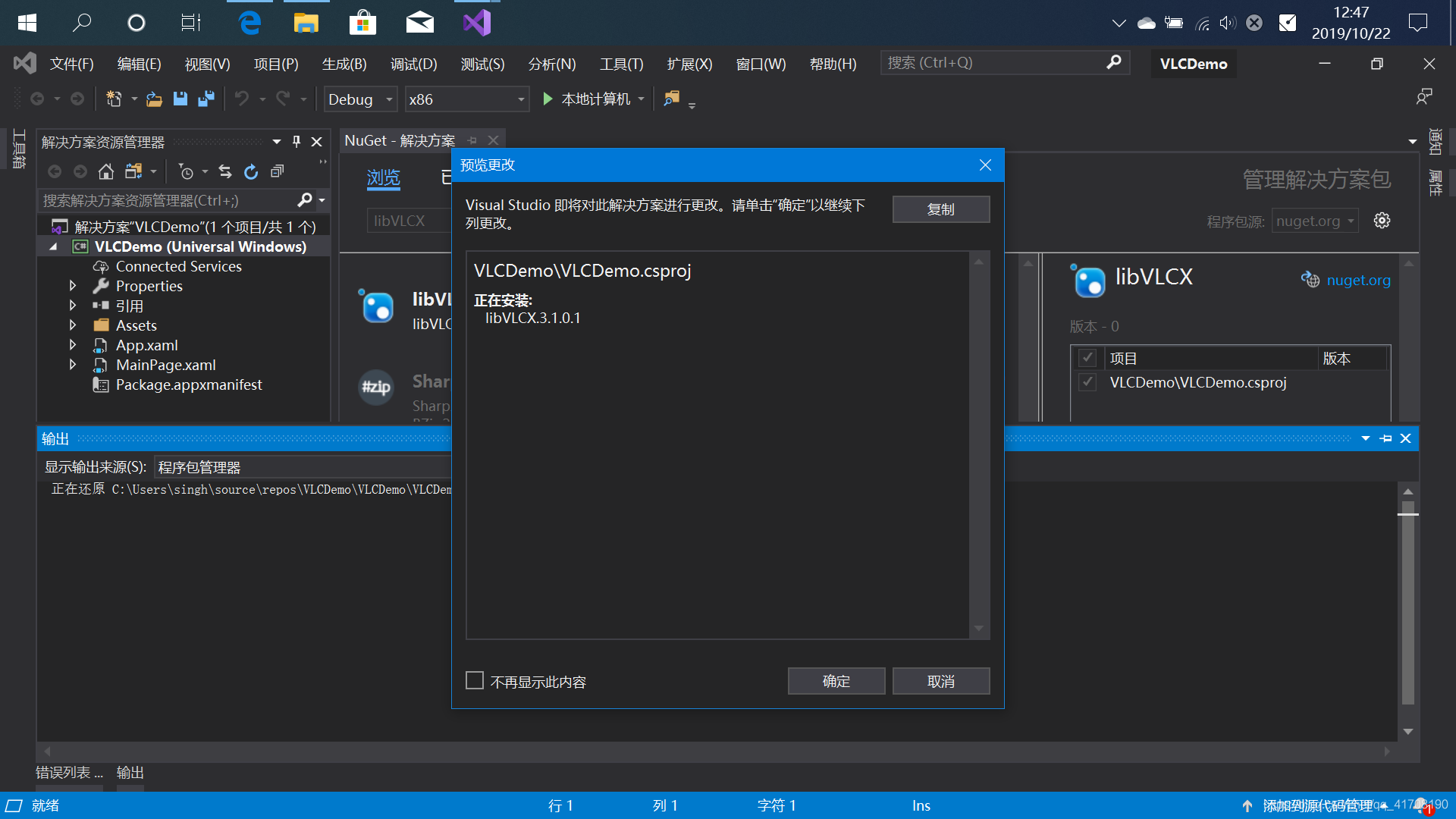
安装NuGet包 VLC.MediaElement,并在XAML里添加引用 xmlns:vlc="using:VLC"

后台代码,选取文件并打开,选取格式为"*",表示包含所有格式后缀
先定义字符串常量
private const string FILE_TOKEN = "{1BBC4B94-BE33-4D79-A0CB-E5C6CDB9D107}";

        private const string SUBTITLE_FILE_TOKEN = "{16BA03D6-BCA8-403E-B1E8-166B0020B4A7}";
private async void OpenFileAsync()
{
var file = await PickSingleFileAsync("*", FILE_TOKEN);
if (file != null)
{
media_element.MediaSource = VLC.MediaSource.CreateFromUri($"winrt://{FILE_TOKEN}");
}
}
private async Task<StorageFile> PickSingleFileAsync(string fileTypeFilter, string token)
{
var fileOpenPicker = new FileOpenPicker()
{
SuggestedStartLocation = PickerLocationId.VideosLibrary
};
fileOpenPicker.FileTypeFilter.Add(fileTypeFilter);
var file = await fileOpenPicker.PickSingleFileAsync();
if (file != null)
{
StorageApplicationPermissions.FutureAccessList.AddOrReplace(token, file);
}
return file;
}添加外部字幕文件,格式为(.srt)
private async void OpenSubtitleFileAsync()
{
var source = media_element.MediaSource;
if (source == null)
{
return;
}
var file = await PickSingleFileAsync(".srt", SUBTITLE_FILE_TOKEN);
if (file != null)
{
media_element.MediaSource.ExternalTimedTextSources.Add(TimedTextSource.CreateFromUri($"winrt://{SUBTITLE_FILE_TOKEN}"));
}
}完整代码
<Page
x:Class="VLCDemo.MainPage"
xmlns="http://schemas.microsoft.com/winfx/2006/xaml/presentation"
xmlns:x="http://schemas.microsoft.com/winfx/2006/xaml"
xmlns:local="using:VLCDemo"
xmlns:d="http://schemas.microsoft.com/expression/blend/2008"
xmlns:mc="http://schemas.openxmlformats.org/markup-compatibility/2006"
mc:Ignorable="d"
xmlns:vlc="using:VLC"
Background="{ThemeResource ApplicationPageBackgroundThemeBrush}">
<Grid>
<Grid.RowDefinitions>
<RowDefinition Height="Auto"/>
<RowDefinition/>
</Grid.RowDefinitions>
<vlc:MediaElement x:Name="media_element" Grid.Row="1" AreTransportControlsEnabled="True" HardwareAcceleration="True">
</vlc:MediaElement>
<Button x:Name="openFile_bt" Content="OpenFile" Style="{ThemeResource ButtonRevealStyle}" HorizontalAlignment="Left" CornerRadius="10" BorderThickness="1" Tapped="openFile_bt_Tapped"/>
<Button x:Name="addSubTitle_bt" Content="AddSubTitle" Style="{ThemeResource ButtonRevealStyle}" HorizontalAlignment="Left" Margin="100,0,0,0" CornerRadius="10" BorderThickness="1" Tapped="addSubTitle_bt_Tapped"/>
</Grid>
</Page>
using System;
using System.Collections.Generic;
using System.IO;
using System.Linq;
using System.Runtime.InteropServices.WindowsRuntime;
using System.Threading.Tasks;
using VLC;
using Windows.Foundation;
using Windows.Foundation.Collections;
using Windows.Storage;
using Windows.Storage.AccessCache;
using Windows.Storage.Pickers;
using Windows.UI.Xaml;
using Windows.UI.Xaml.Controls;
using Windows.UI.Xaml.Controls.Primitives;
using Windows.UI.Xaml.Data;
using Windows.UI.Xaml.Input;
using Windows.UI.Xaml.Media;
using Windows.UI.Xaml.Navigation;
// https://go.microsoft.com/fwlink/?LinkId=402352&clcid=0x804 上介绍了“空白页”项模板
namespace VLCDemo
{
/// <summary>
/// 可用于自身或导航至 Frame 内部的空白页。
/// </summary>
public sealed partial class MainPage : Page
{
private const string FILE_TOKEN = "{1BBC4B94-BE33-4D79-A0CB-E5C6CDB9D107}";
private const string SUBTITLE_FILE_TOKEN = "{16BA03D6-BCA8-403E-B1E8-166B0020B4A7}";
public MainPage()
{
this.InitializeComponent();
}
private void openFile_bt_Tapped(object sender, TappedRoutedEventArgs e)
{
OpenFileAsync();
}
private async void OpenFileAsync()

        {

            var file = await PickSingleFileAsync("*", FILE_TOKEN);

            if (file != null)

            {

                media_element.MediaSource = VLC.MediaSource.CreateFromUri($"winrt://{FILE_TOKEN}");

            }

        }

        private async Task<StorageFile> PickSingleFileAsync(string fileTypeFilter, string token)

        {

            var fileOpenPicker = new FileOpenPicker()

            {

                SuggestedStartLocation = PickerLocationId.VideosLibrary

            };

            fileOpenPicker.FileTypeFilter.Add(fileTypeFilter);

            var file = await fileOpenPicker.PickSingleFileAsync();

            if (file != null)

            {

                StorageApplicationPermissions.FutureAccessList.AddOrReplace(token, file);

            }

            return file;

        }
private void addSubTitle_bt_Tapped(object sender, TappedRoutedEventArgs e)
{
OpenSubtitleFileAsync();
}
private async void OpenSubtitleFileAsync()

        {

            var source = media_element.MediaSource;

            if (source == null)

            {

                return;

            }

            var file = await PickSingleFileAsync(".srt", SUBTITLE_FILE_TOKEN);

            if (file != null)

            {

                media_element.MediaSource.ExternalTimedTextSources.Add(TimedTextSource.CreateFromUri($"winrt://{SUBTITLE_FILE_TOKEN}"));

            }

        }
}
}
demo地址:https://github.com/singhwong/uwp-vlc-demo.git
在UPW中使用VLC解码媒体的更多相关文章
- web网页中使用vlc插件播放相机rtsp流视频
可参考: 使用vlc播放器做rtsp服务器 使用vlc播放器播放rtsp视频 使用vlc进行二次开发做自己的播放器 vlc功能还是很强大的,有很多的现成的二次开发接口,不需配置太多即可轻松做客户端播放 ...
- JavaScript中URL的解码和编码
这些URI方法encodeURI.encodeURIComponent().decodeURI().decodeURIComponent()代替了BOM的escape()和unescape()方法. ...
- Android中解决图像解码导致的OOM问题
Android中解决图像解码导致的OOM问题 原文链接:http://blog.csdn.net/zjl5211314/article/details/7042017
- Java 字符编码(二)Java 中的编解码
Java 字符编码(二)Java 中的编解码 java.nio.charset 包中提供了一套处理字符编码的工具类,主要有 Charset.CharsetDecoder.CharsetEncoder. ...
- Java 字符编码(三)Reader 中的编解码
Java 字符编码(三)Reader 中的编解码 我们知道 BufferedReader 可以将字节流转化为字符流,那它是如何编解码的呢? try (BufferedReader reader = n ...
- python3中的编解码
#一个知识点是:python3中有两种字符串数据类型:str类型和 bytes类型:sty类型存储unicode数据,bytes类型存储bytes数据 #当我们在word上编辑文件的时候,数据保存之前 ...
- Javascript中Base64编码解码的使用实例
Javascript为我们提供了一个简单的方法来实现字符串的Base64编码和解码,分别是window.btoa()函数和window.atob()函数. 1 var encodedStr = win ...
- python3中编码与解码的问题
python3中编码与解码的问题 ASCII .Unicode.UTF-8 ASCII 我们知道,在计算机内部,所有的信息最终都表示为一个二进制的字符串.每一个二进制位(bit)有0和1两种状态,因此 ...
- JS高级面试题思路(装箱和拆箱、栈和堆、js中sort()方法、.js中Date对象中的getMounth() 需要注意的、开发中编码和解码使用场景有哪些)
1.装箱和拆箱: 装箱:把基本数据类型转化为对应的引用数据类型的操作: var num = 123 // num var objNum = new Num(123) // object console ...
随机推荐
- 【基础算法-树状数组】入门-C++
目录 基本定义 如何理解树状数组 主要操作 @ 基本定义 树状数组(Binary Indexed Tree(B.I.T), Fenwick Tree)是一个查询和修改复杂度都为log(n)的数据结构. ...
- sql server 函数学习
sql server 创建函数 资料 https://docs.microsoft.com/zh-cn/sql/relational-databases/user-defined-functions/ ...
- 024_统计/var/log 有多少个文件,并显示这些文件名
#!/bin/bash#使用 ls 递归显示所有,再判断是否为文件,如果是文件则计数器加 1cd /var/logsum=0for i in `ls -r *`do if [ -f $i ]; ...
- 富文本编辑器word
tinymce是很优秀的一款富文本编辑器,可以去官网下载.https://www.tiny.cloud 这里分享的是它官网的一个收费插件powerpaste的旧版本源码,但也不影响功能使用. http ...
- [Luogu] 均分数据
题面:https://www.luogu.org/problemnew/show/P2503 题解:https://www.zybuluo.com/wsndy-xx/note/1141736
- seq2seq聊天模型(一)
原创文章,转载请注明出处 最近完成了sqe2seq聊天模型,磕磕碰碰的遇到不少问题,最终总算是做出来了,并符合自己的预期结果. 本文目的 利用流程图,从理论方面,回顾,总结seq2seq模型, seq ...
- Ubuntu18.04安装和配置Django,并实现简单示例
一.前言(系统,django介绍,window.mac.linux简单区别) Django是python开发过程最重要的web框架.因为在看的Django教学视频是在mac下安装的,我自己用的是Lin ...
- hive安装运行hive报错通解
参考博文:https://blog.csdn.net/lsxy117/article/details/47703155 大部分问题还是hadoop的配置文件的问题: 修改配置文件hadoop/conf ...
- 一个XP SP3调用0地址蓝屏BUG
0x00 蓝屏的堆栈 在XP SP3上跑POC之后,一段时间之后会出现蓝屏,蓝屏的堆栈如下,可以看出是ACKData里面CALL了一个0指针导致的蓝屏 0x01 蓝屏原因 1 ETW(Event Tr ...
- 如何卸载oracle11g
方法/步骤 .关闭oracle所有的服务.可以在windows的服务管理器中关闭: 打开注册表:regedit 打开路径:HKEY_LOCAL_MACHINE\SYSTEM\CurrentCo ...