
24、自动装配-@Profile环境搭建
24、自动装配-@Profile环境搭建
- Spring为我们提供的可以根据当前环境,动态的激活和切换一系列组件的功能。
- 开发环境、测试环境、正式环境 数据源切换
24.1 添加 数据源和jdbc驱动 pom 依赖
<!-- https://mvnrepository.com/artifact/com.mchange/c3p0 -->

<dependency>

    <groupId>com.mchange</groupId>

    <artifactId>c3p0</artifactId>

    <version>0.9.5.2</version>

</dependency>

<!-- https://mvnrepository.com/artifact/mysql/mysql-connector-java -->

<dependency>

    <groupId>mysql</groupId>

    <artifactId>mysql-connector-java</artifactId>

    <version>8.0.13</version>

</dependency>
24.2 添加MainConfigOfProfile
package com.hw.springannotation.config;

import com.mchange.v2.c3p0.ComboPooledDataSource;

import org.springframework.aop.target.CommonsPool2TargetSource;

import org.springframework.beans.factory.annotation.Value;

import org.springframework.context.EmbeddedValueResolverAware;

import org.springframework.context.annotation.Bean;

import org.springframework.context.annotation.PropertySource;

import org.springframework.stereotype.Component;

import org.springframework.util.StringValueResolver;

import javax.annotation.Resource;

import javax.sql.DataSource;

import java.beans.PropertyVetoException;

/**

 * @Description Profile

 * @Author hw

 * @Date 2018/11/29 19:25

 * @Version 1.0

 */

@Component

@PropertySource(value = {"classpath:/datasource.properties"})

public class MainConfigOfProfile implements EmbeddedValueResolverAware {

    @Value("${db.username}")

    private String username;

    private String driveClassName;

    private StringValueResolver resolver;

    public void setEmbeddedValueResolver(StringValueResolver resolver) {

        this.resolver = resolver;

        this.driveClassName = this.resolver.resolveStringValue("${db.driveClassName}");

    }

    @Bean

    public DataSource dataSourceTest(@Value("${db.password}") String password) throws PropertyVetoException {

        ComboPooledDataSource dataSource = new ComboPooledDataSource();

        dataSource.setUser(username);

        dataSource.setPassword(password);

        dataSource.setJdbcUrl("jdbc:mysql://localhost:3306/test");

        dataSource.setDriverClass(driveClassName);

        return dataSource;

    }

    @Bean

    public DataSource dataSourceDev(@Value("${db.password}") String password) throws PropertyVetoException {

        ComboPooledDataSource dataSource = new ComboPooledDataSource();

        dataSource.setUser(username);

        dataSource.setPassword(password);

        dataSource.setJdbcUrl("jdbc:mysql://localhost:3306/mysql");

        dataSource.setDriverClass(driveClassName);

        return dataSource;

    }

    @Bean

    public DataSource dataSourceProd(@Value("${db.password}") String password) throws PropertyVetoException {

        ComboPooledDataSource dataSource = new ComboPooledDataSource();

        dataSource.setUser(username);

        dataSource.setPassword(password);

        dataSource.setJdbcUrl("jdbc:mysql://localhost:3306/qm_dmp");

        dataSource.setDriverClass(driveClassName);

        return dataSource;

    }

}
24.3 添加配置文件datasource.properties
db.username=root

db.password=root

db.driveClassName=com.mysql.jdbc.Driver
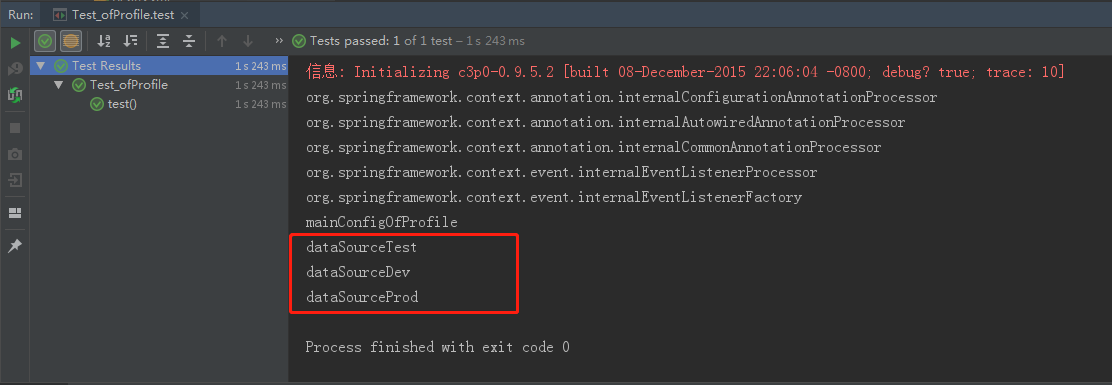
24.4 测试用例Test_ofProfile
package com.hw.springannotation.test;

import com.hw.springannotation.config.MainConfigOfProfile;

import org.junit.jupiter.api.Test;

import org.springframework.context.annotation.AnnotationConfigApplicationContext;

/**

 * @Description TODO

 * @Author hw

 * @Date 2018/11/29 20:14

 * @Version 1.0

 */

public class Test_ofProfile {

    @Test

    public void test() {

        AnnotationConfigApplicationContext applicationContext = new AnnotationConfigApplicationContext(MainConfigOfProfile.class);

        String[] definitionNames = applicationContext.getBeanDefinitionNames();

        for (String name : definitionNames) {

            System.out.println(name);

        }

    }

}
24、自动装配-@Profile环境搭建的更多相关文章
- 25、自动装配-@Profile根据环境注册bean
25.自动装配-@Profile根据环境注册bean 指定组件在哪个环境的情况下才能被注册到容器中 加了环境标识的,只有这个环境被激活才能注册到组件中 默认是default环境 写在类上,整个配置类的 ...
- Spring注解开发系列Ⅴ --- 自动装配&Profile
自动装配: spring利用依赖注入和DI完成对IOC容器中各个组件的依赖关系赋值.自动装配的优点有: 自动装配可以大大地减少属性和构造器参数的指派. 自动装配也可以在解析对象时更新配置. 自动装配的 ...
- Hadoop2.2.0 自动切换HA环境搭建
自动切换的HA,比手动切换HA集群多了一个zookeeper集群 机器分配: zookeeper:hadoop4,hadoop5,hadoop6 namenode:hadoop4,hadoop5 da ...
- Linux下环境搭建(四)——jenkins+gitlab+jmeter实践
经过前三篇博文的介绍,jenkins+gitlab+jmeter接口自动化的框架就搭建成功了,详细可见 Linux下环境搭建(一)——java.tomcat配置 Linux下环境搭建(二)——jenk ...
- Jenkins环境搭建(7)-集成钉钉消息推送
在去年的时候,搭建了一套Jenkins环境,基本功能已实现,可以通过如下地址查阅. Jenkins环境搭建(1)-下载与安装 Jenkins环境搭建(2)-搭建jmeter+ant+jenkins自动 ...
- 【Spring】Spring中的Bean - 5、Bean的装配方式(XML、注解(Annotation)、自动装配)
Bean的装配方式 简单记录-Java EE企业级应用开发教程(Spring+Spring MVC+MyBatis)-Spring中的Bean 文章目录 Bean的装配方式 基于XML的装配 基于注解 ...
- bean的自动装配,使用注解开发,使用java的方式配置Spring
bean的自动装配 自动装配是Spring满足bean依赖一种方式! Spring会在上下文中自动寻找,并自动给bean装配属性! 在Spring中有三种装配的方式 在xml中显示的配置 在java中 ...
- 记录使用gogs,drone搭建自动部署测试环境
使用gogs,drone,docker搭建自动部署测试环境 Gogs是一个使用go语言开发的自助git服务,支持所有平台 Docker是使用go开发的开源容器引擎 Drone是一个基于容器技术的持续集 ...
- 使用jenkins自动部署java工程到jboss-eap6.3 -- 1.环境搭建
使用jenkins自动部署java工程到jboss-eap6.3 -- 1.环境搭建 目录 使用jenkins自动部署java工程到jboss-eap6.3 -- 1.环境搭建 使用jenkins自动 ...
随机推荐
- 人机交互技术 Week 2_History of HCI
Recap: Interaction Design Interaction Design Designing interactive products to support people in the ...
- PHP常量:define()和const的区别
常量,就是一个用于存储“不会(也不允许)变化的数据”的标识符.比如圆周率,在一定的应用场景中,就是一个固定的值(人为规定为某个值).常量默认大小写敏感.通常常量标识符总是大写的. (1)define( ...
- spring cloud微服务实践三
上篇文章里我们实现了spring cloud中的服务提供者和使用者.接下来我们就来看看spring cloud中微服务的其他组件. 注:这一个系列的开发环境版本为 java1.8, spring bo ...
- c++学习---迭代器
迭代器类型: begin和end的返回值的类型由对象是否为常量所决定 无论对象是都为常量,cbegin和cend都将都到一个const_iterator
- Linux下PHP7.2扩展
前言 由于公司某项目需要连接oracle数据库,该项目使用的开发语言为PHP,故需要对PHP进行扩展 环境说明 服务器:Centos7 PHP:7.2, 源码安装;安装路径:/usr/local/xx ...
- 剑指offer(3)——二维数组中的查找
题目: 在一个二维数组中,每一行都按照从左到右递增的顺序排序,每一列都按照从上到下递增的顺序排序.请完成一个函数,输入这样的一个二维数组和一个整数,判断数组中是否含有该整数 思路: 首先选取数组中右上 ...
- Linux学习之如何让普通用户获得ROOT权限
https://blog.csdn.net/qq_41940950/article/details/81044594
- 怎样修改原型对象prototype
修改原型对象的方法分为两种情况, 一种是对原型对象的属性方法做增删改, 一种改变原型对象的指向. 第一种: 对原型对象的属性/方法做增删改 function Person(name){ this.na ...
- Spring Boot 多个域名指向同一IP
一.需求:直接通过域名访问首页(同一应用下,多个首页,包括PC端.手机端首页) 方法:采用多个域名绑定同一IP下同一应用,不同域名对应不同产品(PC.手机端)的方法,在后台通过拦截器判断 reques ...
- 私服nexus的权限问题,带admin和带view的区别
admin和view的区别只找到了这个解释: https://blog.csdn.net/tian_111222333/article/details/100159983 最终得出答案,我只需要给他们 ...