
25、自动装配-@Profile根据环境注册bean
25、自动装配-@Profile根据环境注册bean
- 指定组件在哪个环境的情况下才能被注册到容器中
- 加了环境标识的,只有这个环境被激活才能注册到组件中
- 默认是default环境
- 写在类上,整个配置类的激活的时候才能生效
- 没有标注环境标识的bean,在任何环境下都是加载的
package org.springframework.context.annotation;

import java.lang.annotation.Documented;

import java.lang.annotation.ElementType;

import java.lang.annotation.Retention;

import java.lang.annotation.RetentionPolicy;

import java.lang.annotation.Target;

import org.springframework.core.env.AbstractEnvironment;

import org.springframework.core.env.ConfigurableEnvironment;

import org.springframework.core.env.Profiles;

@Target({ElementType.TYPE, ElementType.METHOD})

@Retention(RetentionPolicy.RUNTIME)

@Documented

@Conditional(ProfileCondition.class)

public @interface Profile {

	/**

	 * 指定组件在哪个环境的情况下才能被注册到容器中

	 * The set of profiles for which the annotated component should be registered.

	 */

	String[] value();

}
25.1 实现
package com.hw.springannotation.config;

import com.mchange.v2.c3p0.ComboPooledDataSource;

import org.springframework.beans.factory.annotation.Value;

import org.springframework.context.EmbeddedValueResolverAware;

import org.springframework.context.annotation.Bean;

import org.springframework.context.annotation.Profile;

import org.springframework.context.annotation.PropertySource;

import org.springframework.stereotype.Component;

import org.springframework.util.StringValueResolver;

import javax.sql.DataSource;

import java.beans.PropertyVetoException;

/**

 * @Description Profile

 * @Author hw

 * @Date 2018/11/29 19:25

 * @Version 1.0

 */

@Component

@PropertySource(value = {"classpath:/datasource.properties"})

public class MainConfigOfProfile implements EmbeddedValueResolverAware {

    @Value("${db.username}")

    private String username;

    private String driveClassName;

    private StringValueResolver resolver;

    public void setEmbeddedValueResolver(StringValueResolver resolver) {

        this.resolver = resolver;

        this.driveClassName = this.resolver.resolveStringValue("${db.driveClassName}");

    }

    @Profile("default")

    @Bean

    public DataSource dataSourceTest(@Value("${db.password}") String password) throws PropertyVetoException {

        ComboPooledDataSource dataSource = new ComboPooledDataSource();

        dataSource.setUser(username);

        dataSource.setPassword(password);

        dataSource.setJdbcUrl("jdbc:mysql://localhost:3306/test");

        dataSource.setDriverClass(driveClassName);

        return dataSource;

    }

    @Profile("dev")

    @Bean

    public DataSource dataSourceDev(@Value("${db.password}") String password) throws PropertyVetoException {

        ComboPooledDataSource dataSource = new ComboPooledDataSource();

        dataSource.setUser(username);

        dataSource.setPassword(password);

        dataSource.setJdbcUrl("jdbc:mysql://localhost:3306/mysql");

        dataSource.setDriverClass(driveClassName);

        return dataSource;

    }

    @Profile("prod")

    @Bean

    public DataSource dataSourceProd(@Value("${db.password}") String password) throws PropertyVetoException {

        ComboPooledDataSource dataSource = new ComboPooledDataSource();

        dataSource.setUser(username);

        dataSource.setPassword(password);

        dataSource.setJdbcUrl("jdbc:mysql://localhost:3306/qm_dmp");

        dataSource.setDriverClass(driveClassName);

        return dataSource;

    }

}
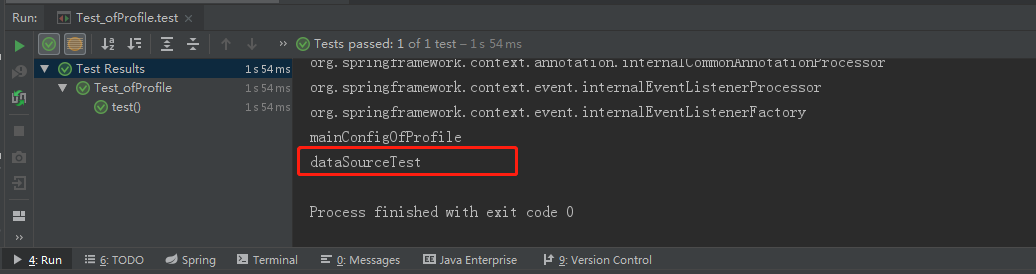
运行:
25.2 切换环境-使用命令行动态参数
- 在运行时指定
-Dspring.profiles.active=prod
25.3 切换环境-使用代码的方式
- 之前使用的是有参构造器,配置加载完,容器就刷新了,所以使用无参构造器
public AnnotationConfigApplicationContext(Class<?>... annotatedClasses) {

		this();

		register(annotatedClasses);

		refresh();

	}
步骤
- 构造IOC容器
- 设置需要激活的环境
- 注入配置类
- 启动刷新容器
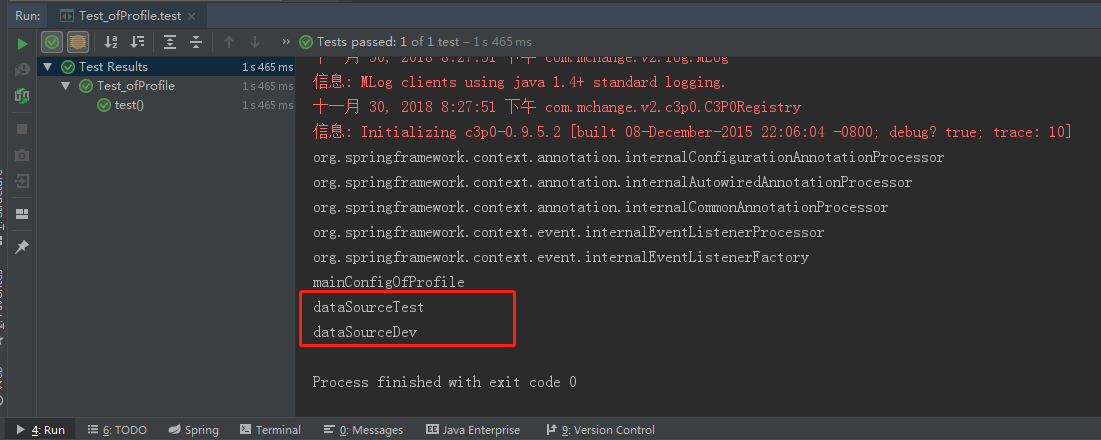
@Test

public void test() {

    // 1. 构造IOC容器

    AnnotationConfigApplicationContext applicationContext = new AnnotationConfigApplicationContext();

    // 2. 设置需要激活的环境(可以同时激活多个)

    applicationContext.getEnvironment().setActiveProfiles("test", "dev");

    // 3. 注入配置类

    applicationContext.register(MainConfigOfProfile.class);

    // 4. 启动刷新容器

    applicationContext.refresh();

    String[] definitionNames = applicationContext.getBeanDefinitionNames();

    for (String name : definitionNames) {

        System.out.println(name);

    }

}
25、自动装配-@Profile根据环境注册bean的更多相关文章
- 24、自动装配-@Profile环境搭建
24.自动装配-@Profile环境搭建 Spring为我们提供的可以根据当前环境,动态的激活和切换一系列组件的功能. 开发环境.测试环境.正式环境 数据源切换 24.1 添加 数据源和jdbc驱动 ...
- Spring注解开发系列Ⅴ --- 自动装配&Profile
自动装配: spring利用依赖注入和DI完成对IOC容器中各个组件的依赖关系赋值.自动装配的优点有: 自动装配可以大大地减少属性和构造器参数的指派. 自动装配也可以在解析对象时更新配置. 自动装配的 ...
- SpringBoot自动装配原理之Configuration以及@Bean注解的使用
Configuration以及Bean注解的使用 该知识点在Spring中应该学过,没有学过或者遗忘的的朋友需要预习或温习前置知识点.SpringBoot其实就是Spring的进一步简化,所以前置知识 ...
- Spring学习03(Bean的自动装配)
6.Bean的自动装配 6.1 自动装配说明 自动装配是使用spring满足bean依赖的一种方法 spring会在应用上下文中为某个bean寻找其依赖的bean. Spring中bean的三种装配机 ...
- spring实战二之Bean的自动装配(非注解方式)
Bean的自动装配 自动装配(autowiring)有助于减少甚至消除配置<property>元素和<constructor-arg>元素,让Spring自动识别如何装配Bea ...
- Spring(九):Spring配置Bean(二)自动装配的模式、Bean之间的关系
XML配置里的Bean自动装配 Spring IOC容器可以自动装配Bean,需要做的仅仅是在<bean>的autowire属性里指定自动装配的模式,模式包含:byType,byName, ...
- spring bean autowire自动装配
转自:http://blog.csdn.net/xiao_jun_0820/article/details/7233139 autowire="byName"会自动装配属性与Bea ...
- Spring学习笔记--自动装配Bean属性
Spring提供了四种类型的自动装配策略: byName – 把与Bean的属性具有相同名字(或者ID)的其他Bean自动装配到Bean的对应属性中. byType – 把与Bean的属性具有相同类型 ...
- SpringXML方式配置bean的自动装配autowire
Spring的自动装配,也就是定义bean的时候让spring自动帮你匹配到所需的bean,而不需要我们自己指定了. 例如: User实体类里面有一个属性role 1 2 3 4 5 6 7 publ ...
随机推荐
- navicat-use
https://blog.csdn.net/weixin_44496987/article/details/87186071
- PO,VO,DAO,BO,POJO之间的区别与解释
VO value object:值对象 通常用于业务层之间的数据传递,由new创建,由GC回收. PO persistant object:持久层对象 对应数据库中表的字段. VO和PO,都是属性加上 ...
- logback日志输出至数据库
我们知道将数据库输出到不同的地方需要使用不同的appender表示,那下面了解一下输出到数据库的DBAppender. 1.DBAppender 由于DBAppender会把记录写到数据库中,因此我们 ...
- Python开发【第三章】:编码转换
一.字符编码与转码 1.bytes和str 之前有学过关于bytes和str之间的转换,详细资料->bytes和str(第四字符串) 2.为什么要进行编码和转码 由于每个国家电脑的字符编码格式不 ...
- Thread 如何安全结束一个线程 MD
Markdown版本笔记 我的GitHub首页 我的博客 我的微信 我的邮箱 MyAndroidBlogs baiqiantao baiqiantao bqt20094 baiqiantao@sina ...
- (二十九)JSP之国际化
导入 <%@ taglib url="http://java.sun.com/jsp/jstl/fmt" prefix="fmt" %> 创建三个语 ...
- js对象 c#对象转换
前台页面 js 创建对象 let t = {}; 数组对象 let c = []; c.push({}) ;// 添加对象 以string格式 传递 JSON JSON.stringify(c); c ...
- ASP.NET WEB应用程序(.network4.5)MVC Razor视图引擎2 视图模板页
https://www.cnblogs.com/xlhblogs/archive/2013/06/09/3129449.html MVC Razor模板引擎 @RenderBody.@RenderPa ...
- phpstorm+xdebug+mvc
前一段时间自己琢磨出来,今天又给忘了,还去t00ls发帖.... 写到这里备忘 拿这个yxcms举例子 版本: yxcms1.2.1 源码:http://pan.baidu.com/s/1pJM1CP ...
- flutter packages get 慢 解决方案
国内使用 flutter packages get 命令,一直是 This is taking an unexpectedly long time 状态 科.学.上.网.无.效. windows解决 ...