
Windows phone 8 二维码生成与扫描
1. 二维码的生成
二维码生成用到了一个第三方的插件(zxing.wp8.0)
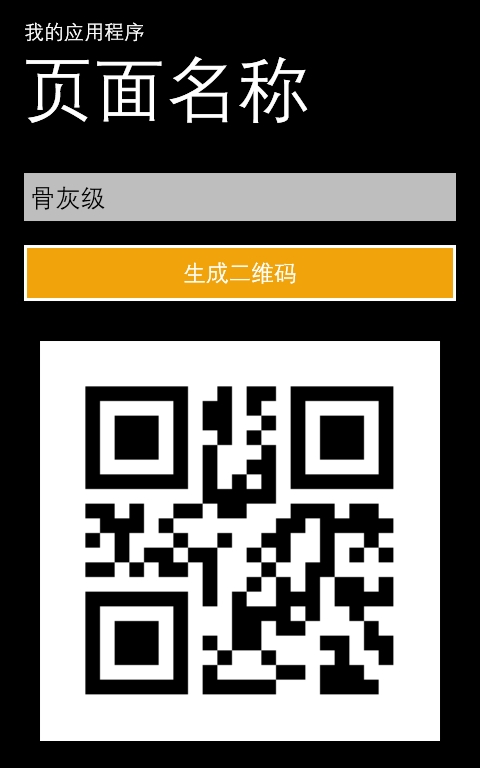
根据指定的信息,生成对应的二维码。
代码很简单:
bool falg=tbk.Text==""?false:true;
if (falg==false)
{
MessageBox.Show("message lose, can't produce!");
return;
}
EncodingOptions options;//包含一些编码、大小等的设置
BarcodeWriter write = null;//用来生成二维码,对应的BarcodeReader用来解码
options = new QrCodeEncodingOptions
{
DisableECI = true,
CharacterSet = "UTF-8",
Width = 300,
Height = 300,
Margin = 3
};
write = new BarcodeWriter();
write.Format = BarcodeFormat.QR_CODE;
write.Options = options;
WriteableBitmap bitmap = write.Write(tbk.Text.Trim());
imgCode.Source = bitmap;
下面看下二维码的扫描(同样用的一个第三方的插件 Silverlight_ZXing_Core)
直接上代码
protected override void OnNavigatedTo(System.Windows.Navigation.NavigationEventArgs e)
{
_reader = new QRCodeReader();
_photoCamera = new PhotoCamera();
_photoCamera.Initialized += new EventHandler<CameraOperationCompletedEventArgs>(cam_Initialized); _videoBrush.SetSource(_photoCamera);
BarCodeRectInitial();
base.OnNavigatedTo(e);
}
//释放资源
protected override void OnNavigatingFrom(System.Windows.Navigation.NavigatingCancelEventArgs e)
{
if (_photoCamera != null)
{
_timer.Stop();
_photoCamera.CancelFocus();
_photoCamera.Dispose();
}
base.OnNavigatingFrom(e);
}
//初始化
void cam_Initialized(object sender, CameraOperationCompletedEventArgs e)
{
int width = Convert.ToInt32(_photoCamera.PreviewResolution.Width);
int height = Convert.ToInt32(_photoCamera.PreviewResolution.Height);
_luminance = new PhotoCameraLuminanceSource(width, height);
Dispatcher.BeginInvoke(() =>
{
_previewTransform.Rotation = _photoCamera.Orientation;
_timer.Start();
});
_photoCamera.FlashMode = FlashMode.Auto;
_photoCamera.Focus();
}
public void SetStillPicture()
{
int width = Convert.ToInt32(_photoCamera.PreviewResolution.Width);
int height = Convert.ToInt32(_photoCamera.PreviewResolution.Height);
int[] PreviewBuffer = new int[width * height];
_photoCamera.GetPreviewBufferArgb32(PreviewBuffer);
WriteableBitmap wb = new WriteableBitmap(width, height);
PreviewBuffer.CopyTo(wb.Pixels, 0);
MemoryStream ms = new MemoryStream();
wb.SaveJpeg(ms, wb.PixelWidth, wb.PixelHeight, 0, 80);
ms.Seek(0, SeekOrigin.Begin);
BitmapImage bi = new BitmapImage();
bi.SetSource(ms);
ImageBrush still = new ImageBrush();
still.ImageSource = bi;
frame.Fill = still;
still.RelativeTransform = new CompositeTransform() { CenterX = 0.5, CenterY = 0.5, Rotation = _photoCamera.Orientation };
}
private void ScanPreviewBuffer()
{
try
{
_photoCamera.GetPreviewBufferY(_luminance.PreviewBufferY);
var binarizer = new HybridBinarizer(_luminance);
var binBitmap = new BinaryBitmap(binarizer);
Result result = _reader.decode(binBitmap);
if (result != null)
{
_timer.Stop();
SetStillPicture();
BarCodeRectSuccess();
Dispatcher.BeginInvoke(() =>
{
//读取成功,结果存放在result.Text
NavigationService.Navigate(new Uri("/ScanResult.xaml?result=" + result.Text, UriKind.Relative));
});
}
else
{
_photoCamera.Focus();
}
}
catch
{ }
}
Windows phone 8 二维码生成与扫描的更多相关文章
- Android开发——Android中的二维码生成与扫描
0. 前言 今天这篇文章主要描述二维码的生成与扫描,使用目前流行的Zxing,为什么要讲二维码,因为二维码太普遍了,随便一个Android APP都会有二维码扫描.本篇旨在帮助有需求的同学快速完成二维 ...
- wex5 实战 二维码生成,扫描,蓝牙打印
给人设计了一个小模块,要求是,把一个单号生成二维码,实现扫描查询单号具体信息,并能通过蓝牙把二维码打印出来.功能实现并不复杂,今天一口气把它搞定.来看效果. 一 效果演示: 二.二维码生成 1 在 ...
- 转【微信小程序 四】二维码生成/扫描二维码
原文:https://blog.csdn.net/xbw12138/article/details/75213274 前端 二维码生成 二维码要求:每分钟刷新一次,模拟了个鸡肋,添加了个按分钟显示的时 ...
- iOS 之 二维码生成与扫描(LBXScan)
参考:https://github.com/MxABC/LBXScan 步骤如下: 1. 下载 通过参考网址进行下载. 2. 导入 导入整个LBXScan文件夹 3. 配置 在pch中加入 #impo ...
- IOS原生方法实现二维码生成与扫描
转自:http://www.jianshu.com/p/d6663245d3fa 二维码的生成有好多第三方库,如Z-Xing.但是为了控制安装包的大小,或者并不需要其他的一些额外的功能,用系统的方法即 ...
- 二维码生成与windows系统IP查询功能
一个木函是一款强大的手机软件,里面囊括了很多小功能,每一个都基本可以堪称小程序.那么,这些小功能具体是怎么实现的呢?让我们来一起来探讨二维码生成.IP查询这两个功能吧! 一.二维码生成 首先,我们来看 ...
- Winform窗体实现简单的二维码生成和保存
二维码的生成需要用到二维码生成的类库,ThoughtWorks.QRCode.dll 步骤: 第一步:下载二维码生成类库,ThoughtWorks.QRCode.dll 第二步:新建winform项目 ...
- C#二维码生成与解码(二)
本文内容在<C#二维码生成与解码>的基础上增加了纠错级别和Logo图标加入,增加了二维码的功能.关于透明度在这里没有单独显现,因为在颜色里面就已经包含,颜色值由8位8进制构成,最前面的两位 ...
- Python 实现二维码生成和识别
今天突然想给自己自己做个头像,然后还是二维码的形式,这样只要扫一扫就可以访问我的主页.然后就开始自己的苦逼之路... 其实实现二维码java,c#,C++等都可以实现:由于自己正在学python,所以 ...
随机推荐
- SpringBoot2.0 Actuator 监控参数说明
主要内容更 监控参数说明 Maven坐标 <dependency> <groupId>org.springframework.boot</groupId> < ...
- Unknown system variable 'query_cache_size'
java连接mysql 报错 java.sql.SQLException: Unknown system variable 'query_cache_size'at com.mysql.cj.jdbc ...
- ubuntu mysql 的安装、配置、简单使用,navicat 连接
MySQL 的安装 1. 先更新 apt 安装中心: apt update 里面会有默认最新的mysql 的包. 2.安装msyql : sudo apt-get install mysql-serv ...
- mongodb MongoDB C#/.NET driver version
The first column lists the driver version(s). C#/.NET Driver Version MongoDB 2.6 MongoDB 3.0 MongoDB ...
- ubuntu 安装百度云客户端
下载地址:http://pan.baidu.com/download 如果没有安装alien,安装 luo@luo-ThinkPad-W540:~$sudo apt-get install alien ...
- 21 Flutter仿京东商城项目 商品详情 请求接口渲染数据 商品属性数据渲染
加群452892873 下载对应21可文件,运行方法,建好项目,直接替换lib目录,在往pubspec.yaml添加上一下扩展. cupertino_icons: ^0.1.2 flutter ...
- Java NIO学习笔记八 DatagramChannel
Java NIO DatagramChannel Java NIO DatagramChannel是可以发送和接收UDP数据包的通道.由于UDP是一种无连接网络协议,因此您不能默认读取和写入Datag ...
- ORA-03114: not connected to ORACLE
PlSql Developer出现这个问题的时候,只要重新连接一些数据库就行了!
- laravel中的管道设计模式
转自 http://laravelacademy.org/post/3088.html
- Visual Studio Code 调试 SpringBoot
Build Anything with Spring Boot:Spring Boot is the starting point for building all Spring-based appl ...