
C#二维码生成与解码(二)
本文内容在《C#二维码生成与解码》的基础上增加了纠错级别和Logo图标加入,增加了二维码的功能。关于透明度在这里没有单独显现,因为在颜色里面就已经包含,颜色值由8位8进制构成,最前面的两位就是控制透明度的,后面的6位分为对应红绿蓝的值。
【窗体效果图】
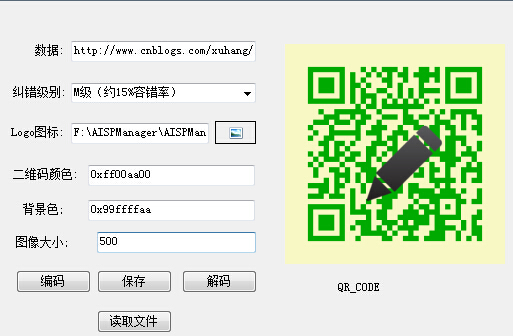
【程序源代码】
using System;

using System.Collections.Generic;

using System.ComponentModel;

using System.Data;

using System.Drawing;

using System.Linq;

using System.Text;

using System.Windows.Forms;

using ZXing;

using ZXing.QrCode.Internal;

using System.IO;

namespace ErWeiMa

{

    public partial class Form1 : Form

    {

        public Form1()

        {

            InitializeComponent();

            cbocorrection.SelectedIndex = ;

        }

        /// <summary>获取标志图像路径</summary>

        private void btnLogo_Click(object sender, EventArgs e)

        {

            var dlg = new OpenFileDialog()

            {

                Filter = "图片文件|*.png;*.bmp;*.dib;*.jpg;*.jpeg;*.jpe;*.jfif;*.tif;*.tiff|所有文件|*.*",

                Multiselect = false

            };

            if (dlg.ShowDialog() ==DialogResult.OK)

                this.txtLogoFile.Text = dlg.FileName;

        }

        /// <summary>生成二维码图片</summary>

        private void btnGen_Click(object sender, EventArgs e)

        {

            if (String.IsNullOrEmpty(this.txtMessage.Text))

            {

                MessageBox.Show("编码用的内容字符串不能为空。", "操作错误",MessageBoxButtons.OK,MessageBoxIcon.Error);

                return;

            }

            this.imgQrcode.Image = null;

            try

            {

                // 纠错级别

                var errCorrLvl = ErrorCorrectionLevel.M;

                var corrRatio = 0.15;

                switch (this.cbocorrection.SelectedIndex)

                {

                    case : errCorrLvl = ErrorCorrectionLevel.L; corrRatio = 0.07; break;

                    case : errCorrLvl = ErrorCorrectionLevel.M; corrRatio = 0.15; break;

                    case : errCorrLvl = ErrorCorrectionLevel.Q; corrRatio = 0.25; break;

                    case : errCorrLvl = ErrorCorrectionLevel.H; corrRatio = 0.30; break;

                }

                int Qsize = Int32.Parse(textBox1.Text);

                if(Qsize==)

                    Qsize=(int)this.imgQrcode.Width;

                // 生成 QR Code 位图

                var hints = new Dictionary<EncodeHintType, object>();

                hints.Add(EncodeHintType.CHARACTER_SET, "UTF-8");

                hints.Add(EncodeHintType.ERROR_CORRECTION, errCorrLvl);

                var matrix = new MultiFormatWriter().encode(this.txtMessage.Text, BarcodeFormat.QR_CODE,Qsize ,Qsize, hints);

                var bitmap = new Bitmap(matrix.Width, matrix.Height, System.Drawing.Imaging.PixelFormat.Format32bppArgb);

                var deepColor = ColorTranslator.FromHtml("0xff000000");

                var lightColor = ColorTranslator.FromHtml("0xffffffff");

                if (!String.IsNullOrWhiteSpace(this.txtDeepColor.Text))

                    deepColor = ColorTranslator.FromHtml("0x" + this.txtDeepColor.Text.TrimStart('#'));

                if (!String.IsNullOrWhiteSpace(this.txtLightColor.Text))

                    lightColor = ColorTranslator.FromHtml("0x" + this.txtLightColor.Text.TrimStart('#'));

                for (int x = ; x < matrix.Width; x++)

                    for (int y = ; y < matrix.Height; y++)

                        bitmap.SetPixel(x, y, matrix[x, y] ? deepColor : lightColor);

                // 添加标志

                if (!String.IsNullOrWhiteSpace(this.txtLogoFile.Text))

                {

                    if (File.Exists(this.txtLogoFile.Text))

                    {

                        var logo = new Bitmap(this.txtLogoFile.Text);

                        var ratio = (double)(logo.Width * logo.Height) / (double)(bitmap.Width * bitmap.Height);

                        if (ratio > corrRatio * 0.6)    // 标志图片大小最大只能占到最大容错面积的60%以保证图片高可读性

                        {

                            MessageBox.Show(String.Format("在当前指定的纠错级别下,标志图片大小最大只能占到二维码图片面积的 {0:P1}。", corrRatio * 0.6), "操作错误",MessageBoxButtons.OK,MessageBoxIcon.Error);

                            return;

                        }

                        CreateQRCodeBitmapWithPortrait(bitmap, logo);

                    }

                    else

                    {

                        var dlgResult = MessageBox.Show("指定的标志图片文件不存在!\r\n是否忽略标志图片继续生成?", "警告",MessageBoxButtons.YesNo,MessageBoxIcon.Warning);

                        if (dlgResult == DialogResult.OK) return;

                    }

                }

                this.imgQrcode.Image = bitmap;

            }

            catch (Exception ex)

            {

                MessageBox.Show(String.Format("生成二维码图片时出错。\r\n错误类型:{0}\r\n错误信息:{1}", ex.GetType(), ex.Message), "错误", MessageBoxButtons.OK, MessageBoxIcon.Error);

            }

        }

        /// <summary>在二维码位图上绘制标志。</summary>

        private void CreateQRCodeBitmapWithPortrait(Bitmap qrCode, Bitmap logo)

        {

            Graphics g = Graphics.FromImage(qrCode);

            int qsize = Int32.Parse(textBox1.Text);

            // 设置头像要显示的位置,即居中显示

            int rectX = (qsize- logo.Width) / ;

            int rectY = (qsize - logo.Height) / ;

            g.DrawImage(logo, rectX, rectY);

            g.Dispose();

        }

        /// <summary>保存二维码图片 </summary>

        private void btnSave_Click(object sender, EventArgs e)

        {

            Image img = imgQrcode.Image;

            if (img != null)

            {

                SaveFileDialog sFD = new SaveFileDialog();

                sFD.Filter = "*.png|*.png";

                if (sFD.ShowDialog() == DialogResult.OK)

                {

                    Bitmap bmap = new Bitmap(img, img.Width, img.Height);

                    bmap.Save(sFD.FileName);

                    MessageBox.Show("保存成功!");

                }

            }

            else

            {

                MessageBox.Show("您还没有生成二维码!");

            }

        }

        private void btnRead_Click(object sender, EventArgs e)

        {

            var dlg = new OpenFileDialog()

            {

                Filter = "图片文件|*.png;*.bmp;*.dib;*.jpg;*.jpeg;*.jpe;*.jfif;*.tif;*.tiff|所有文件|*.*",

                Multiselect = false

            };

            if (dlg.ShowDialog() ==DialogResult.OK)

            {

                // 采用先将图片文件内容读入字节数组然后再通过该数组创建图像实例是为了读取图片后图片文件不再会被文件访问锁锁定

                byte[] bytes = null;

                using (var stream = File.Open(dlg.FileName, FileMode.Open))

                using (BinaryReader reader = new BinaryReader(stream))

                {

                    var fileInfo = new FileInfo(dlg.FileName);

                    bytes = reader.ReadBytes(unchecked((int)fileInfo.Length));

                    reader.Close();

                }

                try

                {

                    MemoryStream ms = new MemoryStream(bytes);

                    imgQrcode.Image = new Bitmap(ms);

                }

                catch (Exception ex)

                {

                    this.imgQrcode = null;

                    MessageBox.Show(String.Format("读取图片信息时出错,可能图片是不认识的图像格式。\r\n错误类型:{0}\r\n错误信息:{1}", ex.GetType(), ex.Message), "错误", MessageBoxButtons.OK, MessageBoxIcon.Error);

                }

            }

        }

        private void btnAnalysis_Click(object sender, EventArgs e)

        {

            var image = imgQrcode.Image;

            if (image == null)

            {

                MessageBox.Show("二维码图片空白,还没读取二维码图片。", "操作错误", MessageBoxButtons.OK, MessageBoxIcon.Stop);

                return;

            }

            this.txtMessage.Text = String.Empty;

            this.lblQ.Text = "(空)";

            Bitmap bitmap;

            bitmap = new Bitmap(image);

            try

            {

                LuminanceSource source = new BitmapLuminanceSource(bitmap);

                /*

                 * 在二值化方面,GlobalHistogramBinarizer 提供了比较基础的二值化方法,而 HybridBinarizer 则算是高级的算法,建议要机器性能比较好才使用。

                 * HybridBinarizer 在识别对比度比较低的图片就是比 GlobalHistogramBinarizer 要差;

                 * HybridBinarizer 在光照均匀的情况下,效果比 GlobalHistogramBinarizer 优。

                 */

                // var binarizer = new ZXing.Common.HybridBinarizer(luminance);

                var binarizer = new ZXing.Common.GlobalHistogramBinarizer(source);

                var binBitmap = new BinaryBitmap(binarizer);

                var hints = new Dictionary<DecodeHintType, object>();

                hints.Add(DecodeHintType.CHARACTER_SET, "UTF-8");

                var result = new MultiFormatReader().decode(binBitmap, hints);

                if (result == null)

                {

                    MessageBox.Show("无法正确解析图片。", "错误", MessageBoxButtons.OK, MessageBoxIcon.Exclamation);

                    return;

                }

                this.txtMessage.Text = result.Text;

                this.lblQ.Text = result.BarcodeFormat.ToString();

            }

            catch (Exception ex)

            {

                MessageBox.Show(String.Format("解析图片时出错。\r\n错误类型:{0}\r\n错误信息:{1}", ex.GetType(), ex.Message), "错误", MessageBoxButtons.OK, MessageBoxIcon.Error);

            }

        }

    }

}
【引用dll文件】
http://pan.baidu.com/s/1ntNr79v
【关注我的博客】
C#二维码生成与解码(二)的更多相关文章
- Java二维码生成与解码
基于google zxing 的Java二维码生成与解码 一.添加Maven依赖(解码时需要上传二维码图片,所以需要依赖文件上传包) <!-- google二维码工具 --> &l ...
- HTML-DEV-ToolLink(常用的在线字符串编解码、代码压缩、美化、JSON格式化、正则表达式、时间转换工具、二维码生成与解码等工具,支持在线搜索和Chrome插件。)
HTML-DEV-ToolLink:https://github.com/easonjim/HTML-DEV-ToolLink 常用的在线字符串编解码.代码压缩.美化.JSON格式化.正则表达式.时间 ...
- jquery二维码生成插件_二维码生成器
jquery二维码生成插件_二维码生成器 下载地址:jquery生成二维码.rar
- C#实现二维码生成与解码
前几天公司内部分享了一个关于二维码的例子,觉得挺好玩的,但没有提供完整的源码.有时候看到一个好玩的东西,总想自己Demo一个,于是抽空就自己研究了一下. 一.二维码的原理 工欲善其事,必先利其器.要生 ...
- Java二维码生成与解码工具Zxing使用
Zxing是Google研发的一款非常好用的开放源代码的二维码生成工具,目前源码托管在github上,源码地址: https://github.com/zxing/zxing 可以看到Zxing库有很 ...
- 转【微信小程序 四】二维码生成/扫描二维码
原文:https://blog.csdn.net/xbw12138/article/details/75213274 前端 二维码生成 二维码要求:每分钟刷新一次,模拟了个鸡肋,添加了个按分钟显示的时 ...
- C#二维码生成与解码
[窗体效果图] [程序源代码] using System; using System.Collections.Generic; using System.ComponentModel; using S ...
- 主攻ASP.NET.4.5 MVC4.0之重生:二维码生成和谷歌二维码
使用ThoughtWorks.QRCode.Codec 效果图 using ThoughtWorks.QRCode.Codec; 非原创代码 public void code(string id) { ...
- simple go web application & 二维码生成 & 打包部署
go语言简易web应用 & 二维码生成及解码 & 打包部署 转载请注明出处: https://www.cnblogs.com/funnyzpc/p/10801476.html 前言(闲 ...
随机推荐
- poj3928 Ping pong 树状数组
http://poj.org/problem?id=3928 Ping pong Time Limit: 1000MS Memory Limit: 65536K Total Submissions ...
- [LeetCode217]Contains Duplicate
题目:Given an array of integers, find if the array contains any duplicates. Your function should retur ...
- JSON小结
在 JSON 中,“Object” 是什么呢? json.org 有很好的解释: 1 .An object is an unordered set of name/value pairs. 2.An ...
- 在用TabbarController中出现navigationController 嵌套报错
假设出现: nested push animation can result in corrupted navigation bar Finishing up a navigation transit ...
- 大约SQL现场“这包括”与“包括在”字符串的写法
1.字段查找表值"这包括"方法一字符串的所有记录 如果表中有一name场,查询name这包括"乔 - 史密斯"所有记录.能够写sql: Stirng st ...
- 【Java 之 JVM】Java内存结构概述
watermark/2/text/aHR0cDovL2Jsb2cuY3Nkbi5uZXQvYWl3dXpoaWxpbmc=/font/5a6L5L2T/fontsize/400/fill/I0JBQk ...
- Unity 二战中加飞机
一个简短的引论: 谢意: 本申请中使用<Unity3D\2D移动游戏开发>提供资源.著作权属于作者.感谢作者.基于原始时本申请的二次开发. 要素: 1.增加2s cd的机身旋转,旋转时保持 ...
- openstack临时存储后端
声明: 本博客欢迎转发.但请保留原作者信息! 博客地址:http://blog.csdn.net/halcyonbaby 内容系本人学习.研究和总结,如有雷同,实属荣幸! 眼下openstack提供了 ...
- MySQL多实例配置(两)
MySQL操作和维护一个集中的数据库的.它可以由一个单一的执行MySQL在数据库服务器,部署多MySQL示例.这个功能是由mysqld_multi实现.mysqld_multimysqld的服务进程. ...
- 有意练习--Rails RESTful(一)
书要反复提及<哪里有天才>在说,大多数所谓的天才是通过反复刻意练习获得. 当你的练习时间达到10000几个小时后,.你将成为该领域的专家. 近期在学习rails怎样实现RESTful We ...