
【iOS】iOS设置某个界面强制横屏,进入就横屏
最近有一个项目,例如:A界面跳转到B界面,A界面是竖屏的,B界面进入就要横屏。
花了半天的时间在网上搜索解决方案,有些论坛的大牛也就贴两行代码,具体实现也没有,对我们这种菜鸟造成一万点真实伤害。为了避免后人在浪费时间,在这里我整理一下,并且上传Demo到GitHub。在iOS7 8 9 上运行都OK.
在这里我整理了3种解决方案。
方案一:
使用 presentViewController
1.首先设置项目 支持的屏幕方向
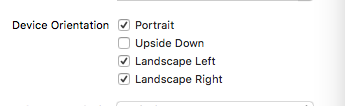
2.写一个子类CusNavigationController 继承 UINavigationController,在CusNavigationController中重写方法:shouldAutorotate 和 supportedInterfaceOrientations
@implementation CusNavViewController

- (void)viewDidLoad {

    [super viewDidLoad];

    // Do any additional setup after loading the view.

}

- (void)didReceiveMemoryWarning {

    [super didReceiveMemoryWarning];

    // Dispose of any resources that can be recreated.

}

//支持旋转

-(BOOL)shouldAutorotate{

    return [self.topViewController shouldAutorotate];

}

//支持的方向

- (UIInterfaceOrientationMask)supportedInterfaceOrientations {

    return [self.topViewController supportedInterfaceOrientations];

}

@end
在AppDelegate中设置RootViewController
- (BOOL)application:(UIApplication *)application didFinishLaunchingWithOptions:(NSDictionary *)launchOptions {

    // Override point for customization after application launch.

    self.window = [[UIWindow alloc]initWithFrame:[[UIScreen mainScreen]bounds]];

    [self.window makeKeyAndVisible];

    ViewController *vc  =[[ViewController alloc]init];

    CusNavViewController *nav = [[CusNavViewController alloc]initWithRootViewController:vc];

    [self.window setRootViewController:nav];

    return YES;

}
3.最重要的来咯,界面A中,重写旋转方法 和 支持的方向
//支持旋转

-(BOOL)shouldAutorotate{

    return YES;

}

//支持的方向 因为界面A我们只需要支持竖屏

- (UIInterfaceOrientationMask)supportedInterfaceOrientations {

    return UIInterfaceOrientationMaskPortrait;

}
4.界面A跳转界面B的方法:
-(void)pushaction{

    ViewControllertwo *vc = [[ViewControllertwo alloc]init];

    //使用 presentViewController 跳转

    [self presentViewController:vc animated:YES completion:nil];

}
5.界面B重写 旋转方法 和 支持的方向
//支持旋转

-(BOOL)shouldAutorotate{

    return YES;

}

//

//支持的方向

- (UIInterfaceOrientationMask)supportedInterfaceOrientations {

    return UIInterfaceOrientationMaskLandscapeLeft;

}

//一开始的方向  很重要

-(UIInterfaceOrientation)preferredInterfaceOrientationForPresentation{

    return UIInterfaceOrientationLandscapeLeft;

}
方案二:
使用方案一presentViewController确实很不错,但是毕竟也有些不方便,如果想用在界面使用Nav push到别的界面就不太好实现了,所以,我又找了半天,又找到了解决方案。
1.设置项目支持的旋转方向:

2.创建子类CusNavViewController 继承UINavigationController
3.界面A设置支持的方向 和 是否可以旋转
//是否可以旋转

- (BOOL)shouldAutorotate

{

    return false;

}

//支持的方向

-(UIInterfaceOrientationMask)supportedInterfaceOrientations

{

    return UIInterfaceOrientationMaskPortrait;

}
4.push进去的界面B 设置 方向 和 旋转
//支持的方向

-(UIInterfaceOrientationMask)supportedInterfaceOrientations

{

    return UIInterfaceOrientationMaskLandscapeLeft;

}

//是否可以旋转

-(BOOL)shouldAutorotate

{

    return YES;

}
5.界面B设置物理设备方向:
//setOrientation 在3.0以后变为私有方法了,不能直接去调用此方法,否则后果就是被打回。

在网上搜了很多很久,都是这种调用私有方法的:

//强制横屏,会被打回。

if ([[UIDevice currentDevice] respondsToSelector:@selector(setOrientation:)]) {

[[UIDevice currentDevice] performSelector:@selector(setOrientation:)

withObject:(id)UIInterfaceOrientationLandscapeRight];

}

不能直接调用,但是可以间接的去调用,下面的方法就是利用 KVO机制去间接调用,多次验证不会被打回,放心!

- (void)viewWillAppear:(BOOL)animated{

    [super viewWillAppear:animated];

    NSNumber *orientationUnknown = [NSNumber numberWithInt:UIInterfaceOrientationUnknown];

    [[UIDevice currentDevice] setValue:orientationUnknown forKey:@"orientation"];

    NSNumber *orientationTarget = [NSNumber numberWithInt:UIInterfaceOrientationLandscapeLeft];

    [[UIDevice currentDevice] setValue:orientationTarget forKey:@"orientation"];

}

- (void)viewWillDisappear:(BOOL)animated {

    [super viewWillAppear:animated];

    NSNumber *orientationUnknown = [NSNumber numberWithInt:UIInterfaceOrientationUnknown];

    [[UIDevice currentDevice] setValue:orientationUnknown forKey:@"orientation"];

    NSNumber *orientationTarget = [NSNumber numberWithInt:UIInterfaceOrientationPortrait];

    [[UIDevice currentDevice] setValue:orientationTarget forKey:@"orientation"];

}
备注:使用这种方法可以不设置 2 3 4步 我没设置也成功了
这里不是直接使用苹果的私有变量,而是利用kvo的方法 间接的调用此方法,可以上架,不会被打回。
至于这里为什么要 多写这两行代码:
NSNumber *orientationUnknown = [NSNumber numberWithInt:UIInterfaceOrientationUnknown];
[[UIDevice currentDevice] setValue:orientationUnknown forKey:@"orientation"];
方法三:
iOS中可以直接调用某个对象的消息方式有两种
1.performSelector:withObject;
2.NSInvocation
//使用这里的代码也是oK的。 这里利用 NSInvocation 调用 对象的消息

- (void) viewWillAppear:(BOOL)animated

{

    [super viewWillAppear:animated];

    if([[UIDevice currentDevice]respondsToSelector:@selector(setOrientation:)]) {

        SEL selector = NSSelectorFromString(@"setOrientation:");

        NSInvocation *invocation = [NSInvocation invocationWithMethodSignature:[UIDevice instanceMethodSignatureForSelector:selector]];

        [invocation setSelector:selector];

        [invocation setTarget:[UIDevice currentDevice]];

        int val = UIInterfaceOrientationLandscapeLeft;//横屏

        [invocation setArgument:&val atIndex:2];

        [invocation invoke];

    }

}
第一个参数需要接收一个指针,也就是传递值的时候需要传递地址
第二个参数:需要给指定方法的第几个参数传值
注意:设置参数的索引时不能从0开始,因为0已经被self(target)占用,1已经被_cmd(selector)占用在NSInvocation的官方文档中已经说明
(_cmd在Objective-C的方法中表示当前方法的selector,正如同self表示当前方法调用的对象实例。)
[invocationsetArgument:&valatIndex:2];
调用NSInvocation对象的invoke方法*只要调用invocation的invoke方法,就代表需要执行NSInvocation对象中制定对象的指定方法,并且传递指定的参数
[invocationinvoke];
关于NSInvocation的博客
【iOS】iOS设置某个界面强制横屏,进入就横屏的更多相关文章
- iOS设置某个界面强制横屏,进入就横屏
最近有一个项目,例如:A界面跳转到B界面,A界面是竖屏的,B界面进入就要横屏. 花了半天的时间在网上搜索解决方案,有些论坛的大牛也就贴两行代码,具体实现也没有,对我们这种菜鸟造成一万点真实伤害.为了避 ...
- Xamarin iOS教程之编辑界面编写代码
Xamarin iOS教程之编辑界面编写代码 Xamarin iOS的Interface Builder Interface Builder被称为编辑界面.它是一个虚拟的图形化设计工具,用来为iOS应 ...
- iOS Swift WisdomHUD 提示界面框架
iOS Swift WisdomHUD 提示界面框架 Framework Use profile(应用简介) 一:WisdomHUD简介 今天给大家介绍一款iOS的界面显示器:WisdomHUD,W ...
- 李洪强iOS之集成极光推送二iOS 证书 设置指南
李洪强iOS之集成极光推送二iOS 证书 设置指南 创建应用程序ID 登陆 iOS Dev Center 选择进入iOS Provisioning Portal. 在 iOS Provisioning ...
- iOS 跳转系统设置界面
iOS 跳转系统设置界面 [[UIApplication sharedApplication] openURL:[NSURL URLWithString:@"prefs:root=Pri ...
- iOS 怎么设置 UITabBarController 的第n个item为第一响应者?
iOS 怎么设置 UITabBarController 的第n个item为第一响应者? UITabBarController 里面有个属性:selectedIndex @property(nonato ...
- iOS开发小技巧--iOS中设置applicationIconBadgeNumber遇到的问题
iOS中设置applicationIconBadgeNumber 在iOS7中直接设置applicationIconBadgeNumber没有问题,但是在iOS8之后设置applicationIcon ...
- 【转】iOS中设置导航栏标题的字体颜色和大小
原文网址:http://www.360doc.com/content/15/0417/11/20919452_463847404.shtml iOS中设置导航栏标题的字体颜色和大小,有需要的朋友可以参 ...
- iOS中设置导航栏标题的字体颜色和大小
iOS中设置导航栏标题的字体颜色和大小,有需要的朋友可以参考下. 在平时开发项目的时候,难免会遇到修改导航栏字体大小和颜色的需求,一般使用自定义视图的方法,其实还存在一种方法. 方法一:(自定义视图的 ...
- 安卓端调用h5界面js方法和ios端调用h5界面js方法
备注:本人为h5开发人员,不懂安卓和ios,这是开发小伙伴对接联调的主代码. 1.iOS端调用h5界面js方法: 2.安卓端调用h5界面js方法: @Override protect ...
随机推荐
- 前端自定义cli
Windows PowerShell 版权所有 (C) Microsoft Corporation.保留所有权利. 尝试新的跨平台 PowerShell https://aka.ms/pscore6 ...
- 知道主机名称 如何知道ip地址
举例 ping -4 raspberrypi 就可以知道 ip 地址了.
- DeepCompare文件深度对比软件操作使用方法详细介绍
DeepCompare文件深度对比软件下载地址 可以通过以下网址下载软件,官网下载速度较慢,推荐通过CSDN或百度网盘下载. CSDN下载链接:https://download.csdn.net/do ...
- Django+Celery 进阶:Celery可视化监控与排错
一.Celery 命令行工具 Celery 命令行工具可用去查看Celery的运行状态.打开一个终端窗口,进入项目目录(与manage.py同级),运行以下命令 列出集群中在线的Celery Work ...
- ADC常见误差参数来源与软件优化措施
0 ADC性能指标 精度表示 DNL:Differential Non-Linearity--微分非线性度 INL: Integral Non-Linearity--积分非线性度 LSB(Least ...
- SciTech-BigDataAIML-Statistical Model-Bayes Inference-数据/事实 ∩ 假设: 政治经济、社会和科学分析
SciTech-BigDataAIML-Statistical Model Bayes Inference-数据/事实 ∩ 假设 \(\large \begin{array}{rl} \\ P(H|D ...
- English-英语发音舌位唇形图
英语发音舌位唇形图 图0 梯形图 图1 图2 图3
- SciTech-BigDataAIML-Methodology方法论-Whole+Part整体和局部-$\large Supervised\ Statistical\ Model$统计模型和大量训练数据+Transformer核心原理+ MI移动互联+IoT万物互联-Economics经济-Politics政策
词汇 MI(Mobile Internet): 移动互联网 IoT(Internet of Things): 万物互联网 WE(Word Embedding): 词嵌入 PE(Positional E ...
- POLIR-Organization-WHO-Exercise: Dance + Physical Activity + 7 benefits of regular physical activity
Dance + 身体使用 汇编 特别注意: 心神: 轻松.专注.聚精会神. 大脑: 珍惜爱护"脑力",不可"过度用脑"."德智体美劳"全面发 ...
- spring-ai 学习系列(8)-上下文记忆-多轮对话
继续spring-ai学习之旅,大模型本身是无状态的,也就是每次请求对它来说,都是全新的,无记忆!比如:我们以ollama本地加载qwen3:0.6b模型为例,依次问它以下三个问题: 有1个变量A,它 ...