
iOS设置某个界面强制横屏,进入就横屏
最近有一个项目,例如:A界面跳转到B界面,A界面是竖屏的,B界面进入就要横屏。
花了半天的时间在网上搜索解决方案,有些论坛的大牛也就贴两行代码,具体实现也没有,对我们这种菜鸟造成一万点真实伤害。为了避免后人在浪费时间,在这里我整理一下,并且上传Demo到GitHub。在iOS7 8 9 上运行都OK.
在这里我整理了3种解决方案。
原文地址:http://www.cnblogs.com/niit-soft-518/p/5611298.html
方案一:
使用 presentViewController
1.首先设置项目 支持的屏幕方向
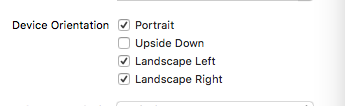
2.写一个子类CusNavigationController 继承 UINavigationController,在CusNavigationController中重写方法:shouldAutorotate 和 supportedInterfaceOrientations
 @implementation CusNavViewController

 - (void)viewDidLoad {

     [super viewDidLoad];

     // Do any additional setup after loading the view.

 }

 - (void)didReceiveMemoryWarning {

     [super didReceiveMemoryWarning];

     // Dispose of any resources that can be recreated.

 }

 //支持旋转

 -(BOOL)shouldAutorotate{

     return [self.topViewController shouldAutorotate];

 }

 //支持的方向

 - (UIInterfaceOrientationMask)supportedInterfaceOrientations {

     return [self.topViewController supportedInterfaceOrientations];

 }

 @end
在AppDelegate中设置RootViewController
 - (BOOL)application:(UIApplication *)application didFinishLaunchingWithOptions:(NSDictionary *)launchOptions {

     // Override point for customization after application launch.

     self.window = [[UIWindow alloc]initWithFrame:[[UIScreen mainScreen]bounds]];

     [self.window makeKeyAndVisible];

     ViewController *vc  =[[ViewController alloc]init];

     CusNavViewController *nav = [[CusNavViewController alloc]initWithRootViewController:vc];

     [self.window setRootViewController:nav];

     return YES;

 }
3.最重要的来咯,界面A中,重写旋转方法 和 支持的方向
 //支持旋转

 -(BOOL)shouldAutorotate{

     return YES;

 }

 //支持的方向 因为界面A我们只需要支持竖屏

 - (UIInterfaceOrientationMask)supportedInterfaceOrientations {

     return UIInterfaceOrientationMaskPortrait;

 }
4.界面A跳转界面B的方法:
 -(void)pushaction{

     ViewControllertwo *vc = [[ViewControllertwo alloc]init];

     //使用 presentViewController 跳转

     [self presentViewController:vc animated:YES completion:nil];

 }
5.界面B重写 旋转方法 和 支持的方向
 //支持旋转

 -(BOOL)shouldAutorotate{

     return YES;

 }

 //

 //支持的方向

 - (UIInterfaceOrientationMask)supportedInterfaceOrientations {

     return UIInterfaceOrientationMaskLandscapeLeft;

 }

 //一开始的方向  很重要

 -(UIInterfaceOrientation)preferredInterfaceOrientationForPresentation{

     return UIInterfaceOrientationLandscapeLeft;

 }
GitHub Demo地址:https://github.com/zhuxinleibandou/-Demo
原文地址:http://www.cnblogs.com/niit-soft-518/p/5611298.html
方案二:
使用方案一presentViewController确实很不错,但是毕竟也有些不方便,如果想用在界面使用Nav push到别的界面就不太好实现了,所以,我又找了半天,又找到了解决方案。
1.设置项目支持的旋转方向:

2.创建子类CusNavViewController 继承UINavigationController
3.界面A设置支持的方向 和 是否可以旋转
 //是否可以旋转

 - (BOOL)shouldAutorotate

 {

     return false;

 }

 //支持的方向

 -(UIInterfaceOrientationMask)supportedInterfaceOrientations

 {

     return UIInterfaceOrientationMaskPortrait;

 }
4.push进去的界面B 设置 方向 和 旋转
 //支持的方向

 -(UIInterfaceOrientationMask)supportedInterfaceOrientations

 {

     return UIInterfaceOrientationMaskLandscapeLeft;

 }

 //是否可以旋转

 -(BOOL)shouldAutorotate

 {

     return YES;

 }
5.界面B设置物理设备方向:
//setOrientation 在3.0以后变为私有方法了,不能直接去调用此方法,否则后果就是被打回。
在网上搜了很多很久,都是这种调用私有方法的:
//强制横屏,会被打回。
if ([[UIDevice currentDevice] respondsToSelector:@selector(setOrientation:)]) {
[[UIDevice currentDevice] performSelector:@selector(setOrientation:)
withObject:(id)UIInterfaceOrientationLandscapeRight];
}
不能直接调用,但是可以间接的去调用,下面的方法就是利用 KVO机制去间接调用,多次验证不会被打回,放心!
-(void)viewWillAppear:(BOOL)animated{

    NSNumber *orientationUnknown = [NSNumber numberWithInt:UIInterfaceOrientationUnknown];

    [[UIDevice currentDevice] setValue:orientationUnknown forKey:@"orientation"];

    NSNumber *orientationTarget = [NSNumber numberWithInt:UIInterfaceOrientationLandscapeLeft];

    [[UIDevice currentDevice] setValue:orientationTarget forKey:@"orientation"];

}
这里不是直接使用苹果的私有变量,而是利用kvo的方法 间接的调用此方法,可以上架,不会被打回。
至于这里为什么要 多写这两行代码:
NSNumber *orientationUnknown = [NSNumber numberWithInt:UIInterfaceOrientationUnknown];
[[UIDevice currentDevice] setValue:orientationUnknown forKey:@"orientation"];
请参考博客:http://www.jianshu.com/p/6c45fa2bb970
方法三:
*iOS中可以直接调用某个对象的消息方式有两种
*1.performSelector:withObject;
*2.NSInvocation
 //使用这里的代码也是oK的。 这里利用 NSInvocation 调用 对象的消息

 - (void) viewWillAppear:(BOOL)animated

 {

     [super viewWillAppear:animated];

     if([[UIDevice currentDevice]respondsToSelector:@selector(setOrientation:)]) {

         SEL selector = NSSelectorFromString(@"setOrientation:");

         NSInvocation *invocation = [NSInvocation invocationWithMethodSignature:[UIDevice instanceMethodSignatureForSelector:selector]];

         [invocation setSelector:selector];

         [invocation setTarget:[UIDevice currentDevice]];

         int val = UIInterfaceOrientationLandscapeLeft;//横屏

         [invocation setArgument:&val atIndex:];

         [invocation invoke];

     }

 }
第一个参数需要接收一个指针,也就是传递值的时候需要传递地址
第二个参数:需要给指定方法的第几个参数传值
注意:设置参数的索引时不能从0开始,因为0已经被self(target)占用,1已经被_cmd(selector)占用在NSInvocation的官方文档中已经说明
(_cmd在Objective-C的方法中表示当前方法的selector,正如同self表示当前方法调用的对象实例。)
[invocationsetArgument:&valatIndex:2];
调用NSInvocation对象的invoke方法*只要调用invocation的invoke方法,就代表需要执行NSInvocation对象中制定对象的指定方法,并且传递指定的参数
[invocationinvoke];
关于NSInvocation的博客
http://blog.csdn.net/onlyou930/article/details/7449102
http://www.jianshu.com/p/da96980648b6
http://my.oschina.net/u/2340880/blog/398552?fromerr=sAJ1ndvB
原文地址:http://www.cnblogs.com/niit-soft-518/p/5611298.html
iOS设置某个界面强制横屏,进入就横屏的更多相关文章
- iOS设置状态栏样式
iOS设置状态栏样式可以使用两种方式. 方式一: 直接在需要改变默认状态栏样式的控制器中实现一个方法(其他任何事情都不用做): // 返回状态栏的样式 - (UIStatusBarStyle)pref ...
- iOS 简单引导界面
代码地址如下:http://www.demodashi.com/demo/11607.html 前言 现在很多APP在用户第一次用的时候,由于用户可能并不知道其中一些功能点的时候,这个时候就需要我们来 ...
- Unity iOS混合开发界面切换思路
Unity iOS混合开发界面切换思路 最近有很多博友QQ 私信 或则 留言联系我,请教iOS和Unity界面之前相互切换的问题,源代码就不私下发你们了,界面跳转功能的代码我直接贴到下面好了,顺带说i ...
- iOS设置app应用程序文件共享
1.iOSapp应用程序文件共享 当我们用itnues连接到设备时,在应用程序栏目下面,文件共享下,点击 对应的程序,即可以在程序右边栏目里面看到应用程序共享的数据, 此时,我们可以通过右下角的 添加 ...
- IOS 设置定时器
IOS 设置定时器 自动滚动视图 定时发送坐标信息 即时显示 时钟 NSTimer *timer; - (void)start {//1second 调用一次 timer = [NSTimer sc ...
- iOS 设置代理过程
iOS设置代理的过程 (以模拟 button 作用为例) 1.写协议 新建一个名为 MyButton 的文件,继承于 UIView,在该文件里 声明协议 myDelegate 2.写协议方法 为声明的 ...
- 【新手--android日记】实现IOS风格电话界面
[前言--新手日记] 开始学习android开发,通过做一个通讯录练习,打算实现各种自己想实现的功能. 新手作品,技术含量很浅.主要是记录自己的学习过程. 纯学习之用,求评论,求建议,求教导. [正题 ...
- iOS 专题 之 界面开发 之 控件
iOS 之 UIViewController iOS 之 Navagation Button iOS 之 UIButton iOS 之 UITextField iOS 之 UIStackView iO ...
- iOS设置拍照retake和use按钮为中文简体
iOS设置拍照retake和use按钮为中文简体,设置有两种方式一个是代码直接控制,第二就是xcode配置本机国际化为“china”(简体中文). 本文重点要说的是第二种,这样配置有两个好处,一是操作 ...
随机推荐
- SQL注入常用语句
整形参数判断 1.直接加' 2.and 1=1 3. and 1=2 如果1.3运行异常 2正常就存在注入 字符型判断 1.直接加' 2.and '1'='1' 3. ...
- 使用java写入excel文件
要操作excle文件,首先要下载jxl.jar文件,我用的版本是2.6.下载地址:http://www.andykhan.com/jexcelapi/download.html. Java Excel ...
- 【LeetCode】101 - Symmetric Tree
Given a binary tree, check whether it is a mirror of itself (ie, symmetric around its center). For e ...
- 【LeetCode】237 & 203 - Delete Node in a Linked List & Remove Linked List Elements
237 - Delete Node in a Linked List Write a function to delete a node (except the tail) in a singly l ...
- 转】MyEclipse使用总结——MyEclipse去除网上复制下来的来代码带有的行号
原博文出自于: http://www.cnblogs.com/xdp-gacl/p/3544208.html 感谢! 一.正则表达式去除代码行号 作为开发人员,我们经常从网上复制一些代码,有些时候复制 ...
- 【125】固定IP的电脑配置无线路由
标题所提到的情况即为有些电脑是用静态IP上网的,与普通的宽带连接稍微有些不同,例如我的电脑的静态IP设置是这样的: 只有按照上面的设置才可以正常上网,因此在配置无线路由器的时候也要用到上面的内容,废话 ...
- Jsp页面设计易忘点
文本标签: <b>文本加粗 <i>斜体 <u>下划线 <sub>作为下标 <sup>作为上标 样式: italic;斜体 text-deco ...
- RedHat/CentOS6.4---永久关闭iptables
今天无意中发现一个现象,当我关闭iptables并且停止iptables服务,但是总会有一些出奇的事情发生,当我再次启动系统,查看iptables状态,iptables又自动开启,很是无奈啊!在Red ...
- css之clear属性
clear属性用来设置元素左右两边是否可以存在浮动元素. 它的值包括:left,right,both,none.其中none代表左右两边可以出现浮动元素.
- LOTUS 迁移到Exchange 2010 POC 之在Exchange 2007 安装Lotus Admin!
双击Setup安装: