
Python 修改ha配置文件
任务要求:
1、用户输入字符串

    {"backend": "test.oldboy.org","record":{"server": "100.1.7.9","weight": 20,"maxconn": 30}}

2、在对应的backend下,添加一条新记录

    backend不存在时,创建

3、删除一条记录

    backend没有值时,删除

4、查询一个backend记录
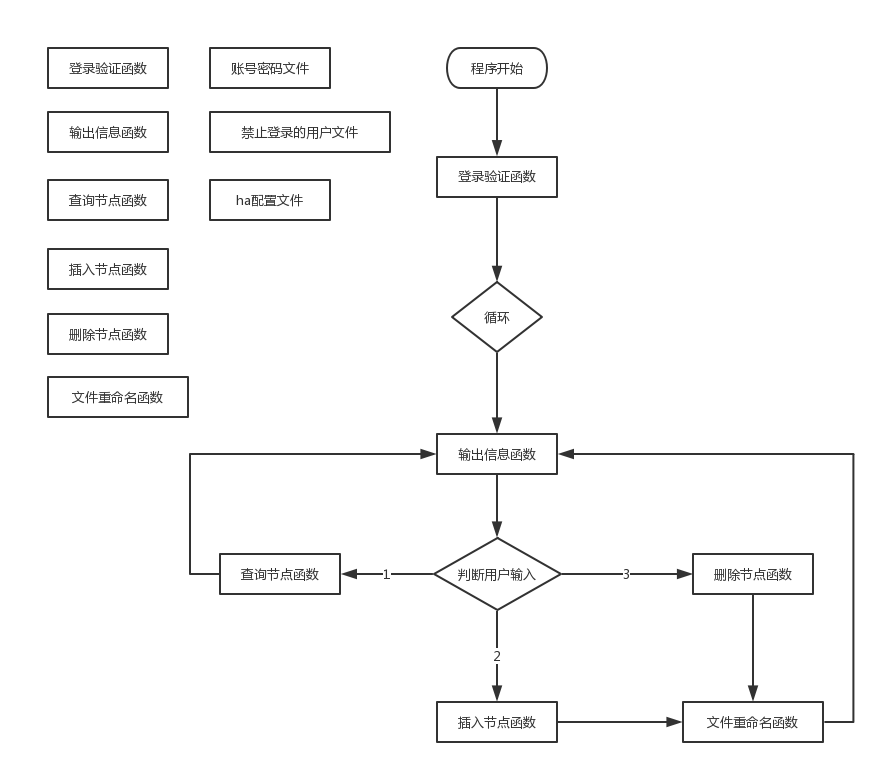
流程图:
代码:
1、主文件
#!/usr/bin/env python

# -*- coding: utf-8 -*-

# @Time    : 2017/10/12 16:26

# @Author  : evescn

# @Site    : edit haproxy.cfg file

# @File    : hp_new.py

# @Software: PyCharm

import json

import os

import sys

def login(func):

    def loginning(*args,**kwargs):

        # 验证用户帐号和密码函数

        # global name

        lock = "lock.txt"

        loginfile = "password.txt"

        login_info = 0

        i = 0

        while i < 3 and login_info == 0:

            name = input("Please input your name: ")

            with open(lock, "r") as f:

                for line in f:

                    # if name in line:

                    if name == line.strip():

                        sys.exit('\033[32:1m用户 %s 已经被锁定\033[0m' % name)

            password = input("Please input password: ")

            with open(loginfile, "r") as f:

                for line in f:

                    user_file, pass_file = line.split()

                    if user_file == name and pass_file == password:

                        # print("Bingo!")

                        login_info = 1

                        continue

                else:

                    if login_info != 1:

                        print("You name or password is error!")

                        i += 1

        else:

            if i == 3 and login_info == 0:

                f = open(lock, "a")

                f.write(name + "\n")

                f.close()

                print('\033[32:1m用户 %s 已经被锁定\033[0m' % name)

        return func(*args, **kwargs)

    return loginning

def fetch(backend):

    backend_title = 'backend %s' % backend

    record_list = []

    with open('ha') as obj:

        flag = False

        for line in obj:

            line = line.strip()

            if line == backend_title:

                flag = True

                continue

            if flag and line.startswith('backend'):

                flag = False

                break

            if flag and line:

                record_list.append(line)

    return record_list

def add(dict_info):

    backend = dict_info.get('backend')

    record_list = fetch(backend)

    # print(record_list)

    sign = 1

    backend_title = "backend %s" % backend

    current_record = "server %s %s weight %d maxconn %d" % (dict_info['record']['server'], dict_info['record']['server'], dict_info['record']['weight'], dict_info['record']['maxconn'])

    if not record_list:

        record_list.append(backend_title)

        record_list.append(current_record)

        with open('ha') as read_file, open('ha.new', 'w') as write_file:

            flag = False

            for line in read_file:

                write_file.write(line)

            for i in record_list:

                if i.startswith('backend'):

                    write_file.write(i + '\n')

                else:

                    write_file.write("%s%s\n" % (8 * " ", i))

    else:

        record_list.insert(0, backend_title)

        # print(record_list)

        if current_record not in record_list:

            record_list.append(current_record)

            with open('ha') as read_file, open('ha.new', 'w') as write_file:

                flag = False

                has_write = False

                for line in read_file:

                    line_strip = line.strip()

                    if line_strip == backend_title:

                        flag = True

                        continue

                    if flag and line_strip.startswith('backend'):

                        flag = False

                    if not flag:

                        write_file.write(line)

                    else:

                        if not has_write:

                            for i in record_list:

                                if i.startswith('backend'):

                                    write_file.write(i + '\n')

                                else:

                                    write_file.write("%s%s\n" % (8 * " ", i))

                        has_write = True

        else:

            sign = 0

            print("该IP记录已存在,请重新确认信息")

    if sign == 1:

        move_filename()

def remove(dict_info):

    backend = dict_info.get('backend')

    record_list = fetch(backend)

    backend_title = "backend %s" % backend

    current_record = "server %s %s weight %d maxconn %d" % (dict_info['record']['server'], dict_info['record']['server'], dict_info['record']['weight'], dict_info['record']['maxconn'])

    if not record_list:

        print("该backend记录不在配置文件中,请检测后重新输入!")

        return

    else:

        if current_record not in record_list:

            print("该主机配置记录不正确,请检测后重新输入!")

            return

        else:

            del record_list[record_list.index(current_record)]

            if len(record_list) > 0:

                record_list.insert(0, backend_title)

        with open('ha') as read_file, open('ha.new', 'w') as write_file:

            flag = False

            has_write = False

            for line in read_file:

                line_strip = line.strip()

                if line_strip == backend_title:

                    flag = True

                    continue

                if flag and line_strip.startswith('backend'):

                    flag = False

                if not flag:

                    write_file.write(line)

                else:

                    if not has_write:

                        for i in record_list:

                            if i.startswith('backend'):

                                write_file.write(i + '\n')

                            else:

                                write_file.write("%s%s\n" % (8 * " ", i))

                    has_write = True

    move_filename()

def move_filename():

    for file in os.listdir('.'):

        if file == "ha.bak":

            os.remove(file)

    os.rename('ha', 'ha.bak')

    os.rename('ha.new', 'ha')

    print("操作成功")

def show():

    # 显示信息函数

    print("*****************************")

    print("1、获取ha记录")

    print("2、增加ha记录")

    print("3、删除ha记录")

    print("4、退出系统")

    print("*****************************")

    return

@login

def main():

    while True:

        # 输出显示信息

        show()

        num = input('请输入序号:')

        if num == '1':

            data = input('请输入内容:')

            ret = fetch(data)

            for i in ret:

                print(i)

        elif num == '4':

            sys.exit("欢迎再次使用haproxy修改系统")

        else:

            data = input('请输入内容:')

            dict_data = json.loads(data)

            if num == '2':

                add(dict_data)

            elif num == '3':

                remove(dict_data)

            else:

                print("你输入的操作系列号有误!请重新输入。")

if __name__ == '__main__':

    main()
2、用户帐号密码文件
# password.txt

evescn gmkk

gmkk 12321
3、ha配置文件
# ha配置文件

global

        log 127.0.0.1 local2

        daemon

        maxconn 256

        log 127.0.0.1 local2 info

defaults

        log global

        mode http

        timeout connect 5000ms

        timeout client 50000ms

        timeout server 50000ms

        option  dontlognull

listen stats :8888

        stats enable

        stats uri       /admin

        stats auth      admin:1234

frontend oldboy.org

        bind 0.0.0.0:80

        option httplog

        option httpclose

        option  forwardfor

        log global

        acl www hdr_reg(host) -i www.oldboy.org

        use_backend www.oldboy.org if www

backend www.oldboy.org

        server 100.1.7.119 100.1.7.119 weight 20 maxconn 30

        server 100.1.7.9 100.1.7.9 weight 20 maxconn 3000

        server 100.1.7.19 100.1.7.19 weight 20 maxconn 30

        server 100.1.7.12 100.1.7.12 weight 20 maxconn 30

backend buy.oldboy.org

        server 100.1.7.90 100.1.7.90 weight 20 maxconn 3000
运行结果:
1、查询记录
Please input your name: evescn

Please input password: gmkk

*****************************

1、获取ha记录

2、增加ha记录

3、删除ha记录

4、退出系统

*****************************

请输入序号:1

请输入内容:www.oldboy.org

server 100.1.7.119 100.1.7.119 weight 20 maxconn 30

server 100.1.7.9 100.1.7.9 weight 20 maxconn 3000

server 100.1.7.19 100.1.7.19 weight 20 maxconn 30

server 100.1.7.12 100.1.7.12 weight 20 maxconn 30

*****************************
2、增加记录
*****************************

1、获取ha记录

2、增加ha记录

3、删除ha记录

4、退出系统

*****************************

请输入序号:2

请输入内容:{"backend": "test.oldboy.org","record":{"server": "100.1.7.9","weight": 20,"maxconn": 30}}

操作成功

*****************************

# ha配置文件

.......

backend buy.oldboy.org

        server 100.1.7.90 100.1.7.90 weight 20 maxconn 3000

backend test.oldboy.org

        server 100.1.7.9 100.1.7.9 weight 20 maxconn 30
3、删除记录
*****************************

1、获取ha记录

2、增加ha记录

3、删除ha记录

4、退出系统

*****************************

请输入序号:3

请输入内容:{"backend": "buy.oldboy.org","record":{"server": "100.1.7.90","weight": 20,"maxconn": 3000}}

操作成功

*****************************

# ha配置文件

......

backend www.oldboy.org

        server 100.1.7.119 100.1.7.119 weight 20 maxconn 30

        server 100.1.7.9 100.1.7.9 weight 20 maxconn 3000

        server 100.1.7.19 100.1.7.19 weight 20 maxconn 30

        server 100.1.7.12 100.1.7.12 weight 20 maxconn 30

backend test.oldboy.org

        server 100.1.7.9 100.1.7.9 weight 20 maxconn 30
Python 修改ha配置文件的更多相关文章
- 用python修改haproxy配置文件
需求: 当用户输入域名的时候,显示出来下面的记录 当用户需要输入添加纪录的时候,添加到你需要的那个域名下面 global log 127.0.0.1 local2 daemon maxconn 256 ...
- s12-day03-work01 python修改haproxy配置文件(初级版本)
#!/usr/local/env python3 ''' Author:@南非波波 Blog:http://www.cnblogs.com/songqingbo/ E-mail:qingbo.song ...
- Python 读取写入配置文件 —— ConfigParser
Python 读取写入配置文件 —— ConfigParser Python 读取写入配置文件很方便,可使用内置的 configparser 模块:可查看源码,如博主本机地址: “C:/python2 ...
- Python读取ini配置文件(接口自动测试必备)
前言 大家应该接触过.ini格式的配置文件.配置文件就是把一些配置相关信息提取出去来进行单独管理,如果以后有变动只需改配置文件,无需修改代码. 特别是后续做自动化的测试,代码和数据分享,进行管理.比如 ...
- asp.net中为什么修改了配置文件后我们不需要重启IIS
本文转载:http://blog.itpub.net/12639172/viewspace-659819/ 大家知道,asp.net中,如果我们修改了配置文件只要把它保存之后,就会立刻反应到程序中, ...
- 翻译文章“AST 模块:用 Python 修改 Python 代码”---!!注意ironpathyon未实现此功能
https://github.com/upsuper/blog/commit/0214fdd084c4adf2de2ed9912d644fb59ce13a1c +Title: [翻译] AST 模块: ...
- Spark添加/更改集群节点需要修改的配置文件
笔记:在配置好了spark后,如果需要添加/删除一个结点需要修改如下配置文件 cd $HADOOP/etc/hadoop 进入hadoop配置文件夹下 修改 slaves,将对应的节点添加/删除 修改 ...
- [Python]ConfigParser解析配置文件
近期发现非常多接口配置都硬编码在souce file中了,于是就看了下python怎么解析配置文件,重构下这一块. 这个应该是早就要作的... 配置文件: [mysqld] user = mysql ...
- sublime text3修改默认配置文件是失败的解决方法
如果你修改sublime text3的默认配置文件Preferences.sublime-settings失败,现实的错误信息如下图: 其实根据提示信息就好找问题出在哪里了:权限 要想成功的修改默认配 ...
随机推荐
- gst-rtsp-server编译测试
最近在做dm368的开发,打算在368上移植个gst-rtsp-server.先在电脑上折腾了一天,终于是可以运行了. 我的虚拟机上早先已经安装了gstreamer-0.10(gstreamer版本太 ...
- [POI2009]Slw
题目 神题!!只有\(POI\)出得出来的神题!! 只能说好像懂了,不想听蒟蒻废话就右转\(dalao\)的博客 目前网上除官方外仅三篇题解,由于推论无法直观得出且有点复杂,难免不好理解,手玩数据最重 ...
- JavaWeb Session
1. Session概述 1.1. 什么是Session Session一般译为会话,是解决Http协议的无状态问题的方案,可以将一次会话中的数据存储在服务器端的内存中,保证在下一次的会话中可以使用. ...
- Python 列表List的定义及操作
# 列表概念:有序的可变的元素集合 # 定义 # 直接定义 nums = [1,2,3,4,5] # 通过range函数构造,python2 和python3 版本之间的差异: # python3 用 ...
- maven 简介 —— maven权威指南学习笔记(一)
maven是什么?有什么用? Maven是一个项目管理工具,它包含了 一个项目对象模型 (Project Object Model), 一组标准集合, 一个项目生命周期(ProjectLifecycl ...
- java创建多线程的三种方式
/***************************继承Thread类创建多线程************************/ public class FirstThread extends ...
- cos用在什么场景
随着应用的不断发展,应用过的图片,文件会不断增加, 存储量的提升带来的是IO用量的提升和带宽占用增加 大部分文件属于低频文件,但是占用较大 硬盘的变更需要重启机器 这个循环会造成支出不断增加 为了节省 ...
- 微信小程序申请。很蛋疼的流程。
微信小程序申请. 营业执照,食品许可证,身份证正面,身份证反面. 1.先要申请服务号. 需要一个QQ邮箱,申请服务号. 填写各种信息,营业执照信息. 法人信息. 管理员用自己人的.方便开发操作. 申请 ...
- dr01_SetColor
1. TGraphicUnit.SetColor 2. 3.
- Keystone Federation Identity
转自 http://wsfdl.com/openstack/2016/01/14/Keystone-Federation-Identity.html Keystone federation ident ...